Build an Automated Task Reminder Workflow with n8n — Never Miss a Client Reply Again

Build a lightweight n8n workflow with AI assistance to push incomplete task reminders every 15 minutes.
This article walks through a lightweight personal productivity setup built around n8n: an automated workflow that checks your to-do list every 15 minutes and pushes incomplete tasks as notifications, paired with calendar-based meeting reminders. The standout feature is AI-assisted node configuration, which compresses setup from hours to minutes. It's ideal for client-facing professionals, multitasking knowledge workers, and n8n beginners — though readers should note that task data source and notification channel integrations will need to be handled independently.
Why You Need an Automated Reminder Workflow
Distraction and forgetfulness are productivity killers in daily work. Once your focus is broken, it's easy to lose track of what you were doing — or worse, forget to reply to a client. Instead of relying on memory alone, why not hand off the job of "watching your tasks" to an automation tool?
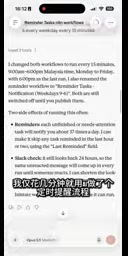
One creator shared a remarkably lightweight solution: using AI assistance to build a scheduled reminder workflow in n8n in just a few minutes. The core idea is straightforward — have the system proactively notify you of unfinished tasks at regular intervals, shifting from passive memory to active push notifications.

The Core Logic: A Reminder Every 15 Minutes
The backbone of this setup is simple. The workflow is triggered on a schedule, checking your to-do list every 15 minutes and pushing any incomplete tasks as notifications to the user. This high-frequency but lightweight reminder mechanism directly addresses the pain points of distraction and forgetfulness.

The 15-minute interval is a design choice worth borrowing. It's frequent enough to keep you on track without causing notification fatigue like a per-minute alert would, yet short enough that no task gets truly forgotten. For people who need to reply to clients frequently or juggle multiple workstreams, this cadence keeps the risk of missed replies to a minimum.
AI Lowers the Barrier to Automation
One notable point the author emphasizes is that this workflow was built "in just a few minutes with AI." This reflects a broader trend: with AI helping generate node configurations and logic, work that previously required familiarity with n8n's syntax and node connections can now be completed rapidly. For people unfamiliar with automation tools, this dramatically reduces the learning curve.
n8n is an open-source workflow automation tool with a visual node editor. Users build automated workflows by dragging and connecting different "nodes," where each node represents an action (such as triggering a timer, reading data, or sending a notification). It supports self-hosted deployment, meaning data doesn't pass through third-party servers — a key advantage in privacy-sensitive scenarios. Compared to SaaS automation platforms like Zapier or Make, n8n has a steeper learning curve, requiring users to understand node configuration syntax and data-passing logic. This is precisely why "AI-assisted configuration generation" is so valuable here — users can describe their needs in plain language, have AI generate node parameters or JavaScript expressions, and skip the manual documentation lookup entirely, compressing what might take hours of trial-and-error into minutes of validation and adjustment.
Integrating Calendar Tools for Meeting Reminders
Beyond task reminders, the author also incorporated meeting agendas into this system. By setting up meeting reminders in a calendar tool, notifications for upcoming meetings arrive on time — no more repeatedly flipping through your calendar to check what's next.

Combining "task reminders" with "meeting reminders" creates a simple personal productivity dashboard: incomplete tasks are pushed every 15 minutes at the task level, while upcoming meeting alerts handle the calendar side. Together, they cover the two most error-prone scenarios in everyday work.
The Value of Centralized Task Management
The author mentions being able to manage tasks directly within the tool, which means the reminder system and the task source are connected. Compared to scattering tasks across sticky notes, memory, or multiple fragmented apps, centralized management makes reminders more accurate and progress easier to track.
"Connecting reminders to the task source" typically means, at a technical level, that n8n reads to-do data directly from a task management tool (such as Notion, Todoist, or Airtable) via API or database — rather than maintaining a separate, manually updated reminder list. The key advantage of this integration is a single source of truth: wherever a task is created and marked complete, the reminder system reads the latest status from that same place. This eliminates common issues like "task is done but reminders keep firing" or "a new task was added but the reminder system wasn't synced." When implementing this, you'll need to check whether your chosen task tool offers an API that n8n can call, and how to use filter conditions to pull only items that are "incomplete and assigned to you" — which is exactly what the author refers to as "the task data source integration that users will need to complete themselves."
Who Is This Workflow For?
This kind of lightweight automated reminder workflow is especially well-suited for three groups:
- Client-facing roles: Sales, customer service, and business development professionals who need to reply promptly and can't afford to miss communications.
- Multitaskers: Knowledge workers handling multiple projects simultaneously who are prone to interruptions.
- Automation beginners: Users who want to explore n8n but don't know where to start — this simple workflow makes an excellent first project.
Summary
The value of this example isn't in technical complexity — it's in solving a real, high-frequency pain point at minimal cost. n8n provides flexible automation capabilities, AI brings the setup time down to just minutes, and combining that with a calendar tool's meeting reminders produces a personal productivity system that actually runs. For anyone who finds themselves constantly scattered and worried about missing client replies, this is a workflow worth replicating.
One caveat: the original walkthrough leans heavily toward demonstrating the concept, and specific node configuration details aren't covered in depth. To deploy this in practice, you'll need to handle the task data source connection and notification channel integration yourself.
Related articles

Gaussian Process Bandit Optimization: Exploration Strategies and Inference Regret Guarantees
Cumulative regret guarantees in Bayesian optimization fail to reflect final recommendation quality. This article examines a new study that provides inference regret guarantees for Gaussian process bandit optimization through exploration query strategies and fill distance analysis, validated on hyperparameter optimization and control tasks.

The Most Detailed Codex Guide on Bilibili: From Installation to Real-World Practice
The most detailed Codex guide on Bilibili: from app store installation to daily work mode configuration, with a real coffee shop project demonstrating file organization, data extraction, dashboard creation, and other practical tasks. Learn to use Plan Mode and desktop pets to leverage Codex efficiently.

Appearance Compensation in Volume Rendering: Why RGB Accuracy Cannot Guarantee Density Correctness
Volume rendering research reveals that volumetric data perfectly reproducing external RGB views may still contain density errors: appearance compensation can double central density and keep external rays unchanged even when L2 error exceeds 14.52%. Density recovery depends on appearance capacity, spatial resolution, and measurement design.