Build Your Own Always-On Open-Source AI Agents with Pi and Telegram — An OpenAI Dots Alternative

Self-host OpenAI Dots-style always-on AI agents using Pi framework and a Telegram message gateway.
This article presents a fully open-source, privacy-first multi-agent setup to replace closed-source always-on services like OpenAI Dots. Each AI agent is a folder with an agents.md persona, mounted Skills, and its own workspace — backed by any model via OpenRouter. A lightweight pi-gateway process routes Telegram messages using a source+agent+session triplet, with state stored in local SQLite. The result: two parallel specialized agents (personal assistant Bunny with Google Workspace access, and research assistant Andre with Firecrawl) — all models, data, and runtime under your full control.
OpenAI's Dots represent a new paradigm for AI — always-on agents each focused on their own vertical domain. You can have one Dot act as a research assistant and another as a personal secretary with access to your email and calendar. They run continuously in the background and proactively message you when something important comes up.
The catch is that these services depend on closed-source models and hosted platforms. One YouTube creator has put forward a fully open-source alternative: using models you control, running on your own always-on machine, to replicate a functionally equivalent multi-agent system. This article walks through the complete implementation, with Pi terminal framework and Telegram as the messaging frontend as the core tools.
The Agent Philosophy: One Directory, One Agent
The design philosophy behind this setup is refreshingly lightweight. On the author's VPS, all agents live under a single agents directory, and each agent is essentially just its own folder.
Each folder contains three key elements:
agents.mdfile: Defines the agent's context and persona. For example, the personal assistant'sagents.mdmight say "You are a personal assistant who helps the user manage their work via Google Workspace CLI," giving it the ability to read and write Gmail, organize inboxes, and create calendar events.- Skills: Tools are attached to each agent using
npx skills add. The author gave the research assistant Firecrawl's scraping, parsing, and search skills, and gave the personal assistant Google Workspace skills for calendar, Drive, and email. Skills can be installed scoped to a specific project, so each agent has its own dedicated toolset. - Independent workspace: Each directory serves as that agent's own "computer" where it can read and write files and conduct research without interfering with other agents.
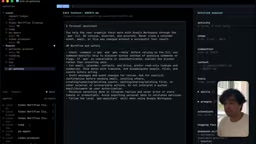
The author's demo features two agents: research assistant Andre (powered by the Kimi K3 model) and personal assistant Bunny (powered by the Space Bunny stealth model). The former handles web research; the latter is connected to his Gmail and calendar, able to read emails, send emails, and schedule events. You can add as many agents as you like, each with its own dedicated tools, its own prompt, and driven by any model using your own API keys.
Pi terminal framework (Project Pi) is an AI agent runtime built around the "directory as workspace" design principle. It works by gluing together traditional CLI toolchains with LLM calls: each time you start a session in a directory, the framework reads that directory's agents.md as the system prompt and loads any installed Skills as callable tool sets (tool calls). The Skills installation mechanism essentially wraps the calling logic of external APIs into function schemas that the model can recognize, allowing it to trigger real network requests or local commands via structured outputs. Firecrawl is a web scraping and content cleaning service optimized for LLM pipelines — it converts arbitrary web pages into clean Markdown for the model to read, preventing HTML noise from interfering with reasoning quality.
The Message Gateway: Making Agents Always Reachable
Relying on SSH to connect to Pi is obviously not enough — you can't sit at a terminal all the time. What truly makes tools like Hermes and OpenCLO stand out isn't just their wide integrations, but the fact that they let you talk directly from any platform you already use: Telegram, WhatsApp, email, Slack, and so on — just like reaching a real contact.
The core component that makes this possible is a message gateway — a background process running on your always-on machine. Whether that's a VPS, a home desktop, or a local DGX Spark, as long as it stays powered on, this process continuously listens for messages from all integrated platforms.
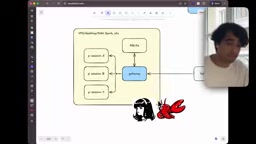
The gateway's routing logic is straightforward: when a message arrives from Telegram, the gateway generates a three-part ID made up of the message source (e.g., Telegram), the agent name (e.g., PA agent), and the corresponding Pi session ID. This message is then stored in a local SQLite database (also running on the always-on machine).
If no matching session exists in SQLite, the gateway creates a new one; if a session already exists, it routes the message to the Pi session in that specific directory. Since Pi works directory-by-directory, once the message lands in that directory, it naturally picks up all the skills, tools, and context we defined earlier. Sending /new in Telegram starts a fresh session — the gateway sees it isn't in the database and creates a new entry. The mechanism is simple but highly effective.
The message gateway design pattern is familiar in distributed systems — it's essentially an "event-driven asynchronous message broker." It decouples the message source (Telegram, WhatsApp, etc.) from the actual execution layer (Pi sessions), allowing both sides to evolve independently. SQLite here serves as a lightweight persistent state machine — compared to Redis or PostgreSQL, SQLite requires no separate service process; a single file stores the entire session mapping table, making maintenance costs extremely low for personal deployments. It's worth noting that this source + agent name + session ID triplet routing scheme is architecturally very similar to webhook routing in commercial CPaaS platforms like Twilio — the key difference is that this approach keeps compute and data sovereignty on the user's own machine.
Getting Started: From BotFather to a Running Instance
The author emphasizes that you don't need to write the gateway from scratch — he open-sourced a minimal pi-gateway tool that reached its current state in roughly 34 commits. It's extremely lightweight. The deployment process looks roughly like this:
Install and Initialize
After installing with uv tool install pi-gateway, navigate to your target agent directory (e.g., the PA assistant) and run pi-gateway init to initialize.
Create a Telegram Bot
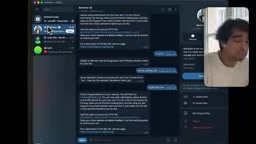
In Telegram, find the official BotFather, send the command to create a new bot, give it a name (e.g., bunny), and set a unique username ending in bot. BotFather will return a token — copy and paste it into the gateway configuration.
Security and Binding
To prevent anyone from accessing your agent, make sure to configure a whitelist of User IDs. Use userinfobot to find your own Telegram ID and add it, ensuring only you can chat with the bot. Then specify the working directory the bot should bind to (which determines which context it loads), the model to use (e.g., Space Bunny via OpenRouter), and the reasoning level.
Launch and Manage
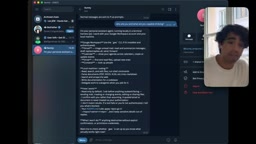
Use pi-gateway start -i bunny to start a specific instance, pi-gateway status to check running status, and pi-gateway instances to list all running bots. Back in Telegram, tap the bot's Start button — and a personal assistant running on the Pi framework with full Google Workspace access is live.
Following the same process, the author also created research assistant Andre, bound to the researcher directory and the Kimi K3 model. Two agents with distinct personalities and specializations are now running in parallel, ready to be summoned from your phone at any time.
Where to Take It Next
The demo gateway currently only supports Telegram, but the author leaves the rest as "homework," encouraging developers to keep extending the open-source repo:
- Scheduled automation: Have an agent automatically check and summarize emails every morning, categorize them, and make it easy to quickly archive them.
- More tools: Attach additional capabilities to Pi agents via MCP or custom tools.
- More platforms: Following the approach of open-source projects like OpenCLO and Hermes, integrate WhatsApp, email, Slack, and other messaging entry points yourself.
The real value of this setup is control and privacy: the model, data, and runtime are entirely in your own hands. SQLite stores sessions locally, you bring your own keys, and you choose any model. For anyone who values privacy or wants to run local models, it offers a viable path away from closed-source hosted services.
MCP (Model Context Protocol) is an open protocol proposed by Anthropic in late 2024, designed to standardize how LLMs connect to external tools and data sources. Its design goal is similar to what USB did for hardware peripherals: developers implement an MCP Server once per the protocol, and any model or framework that supports an MCP Client can call it directly — no per-model adaptation required. Compared to the proprietary tool-calling formats used by various frameworks, MCP's standardization means tool ecosystems can be reused across different agent frameworks. That's why the author recommends extending Pi agent capabilities via MCP — there are already a large number of ready-made MCP Servers covering common scenarios like filesystems, databases, GitHub, Notion, and more, which can be mounted directly without any custom development.
Related articles

Amphibious Transforming Drone: Beyond 100x Power Savings, What Are the Real Needs?
Is the amphibious transforming drone just a gimmick? Starting from the 100x power difference of the M4 Morphobot, explore real application scenarios and thesis topic ideas, analyzing boundary conditions where pure drones and pure ground robots both fail.

Warhound Raises $200 Million: Genetically Engineered "War Dogs" Paired with Anduril Gear
Warhound raises $200M, backed by Ben Lamm and Palmer Luckey, to genetically engineer dogs for military and law enforcement use and equip them with Anduril gear. This article analyzes its technology direction, funding logic, and ethical controversy.

Claude API Comes to Google Cloud: IAM Integration and SDK Access Guide
Anthropic hosts the full Claude API on Google Cloud with IAM-controlled permissions and unified billing. This guide covers the Vertex AI and Anthropic-hosted entry points, IAM role configuration, and SDK access.