Building a Customer Churn Early Warning System with n8n: Silence Is More Dangerous Than Cancellation

Use n8n to aggregate four customer behavior signals and trigger churn alerts before silent disengagement becomes permanent.
B2B customer churn rarely looks like a cancellation — it's a gradual process of declining order frequency, shrinking spend, and fading communication. This article walks through an n8n-based churn early warning system that builds a dynamic customer health profile across four dimensions: orders, spend, engagement gaps, and support tickets. Its most insightful design choice is surfacing unresolved tickets (e.g., 8 days open) alongside order data, helping teams identify the true cause of churn — often a neglected service complaint rather than budget or competition. The system shifts the team from quarterly post-mortem reviews to real-time proactive intervention, while recognizing that automation is only the trigger — retaining customers still depends on the timely, genuine human conversation that follows.
Customers Don't Cancel — They Just Go Quiet
In B2B businesses, the most dangerous kind of churn rarely comes with a clear signal. Customers don't send an email saying "I'm leaving." They quietly reduce order volumes, stretch out purchasing intervals, and one day simply vanish. This "silent churn" is far harder to detect than an explicit cancellation — and far harder to reverse.
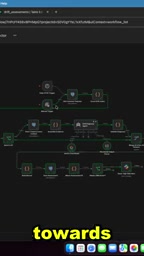
A YouTube creator focused on automation shared a customer churn early warning system built on n8n. The core idea is straightforward: capture subtle behavioral shifts in the data before a customer fully disengages, and automatically alert your customer relationship team to step in.
What the System Actually Monitors
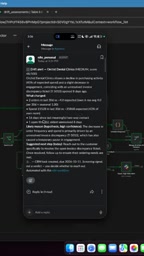
This automation isn't a simple "ordered / didn't order" binary check. It builds a customer health profile across multiple dimensions. From the example notification, you can see several key signals:
Declining Order Frequency
The example customer averaged 4 orders every 30 days historically, but placed only 2 in the most recent 30-day period. A drop in order frequency is the most intuitive warning indicator — it signals that the customer's reliance on you is weakening, and they may be evaluating competitors or cutting budgets.
Shrinking Spend
Beyond frequency, the system also tracks spending. The customer's expenditure over the last 30 days dropped 43% compared to their own historical average. Notice that the benchmark here is the customer's own baseline, not an industry average. This personalized comparison more accurately reflects anomalies at the individual customer level.
Lengthening Engagement Gaps
The notification shows it's been 16 days since the last "meaningful interaction." A decline in communication frequency is often a precursor to emotional disengagement — by the time contact stops entirely, the relationship has usually already broken down.
This type of composite scoring model has a common name in the customer success field: Customer Health Score. The core logic is that no single metric can reliably predict churn, so multiple behavioral signals need to be weighted and aggregated into a trackable score or status label. Platforms like Gainsight and Totango have this mechanism built in, but for smaller teams, building a lightweight version with n8n is far more cost-effective and flexible. Key design decisions for a health score include: which signal dimensions to track, how to weight each one, and where to set the alert threshold — these parameters directly determine false positive and false negative rates, and need to be calibrated iteratively against historical churn data.
The Overlooked Support Ticket: A Critical Piece
The most valuable design choice in this system is incorporating customer service status into the churn prediction model.
A Ticket That's Been Open for 8 Days
The example customer has an unresolved support ticket — and the oldest one has been sitting open for 8 days. The creator is blunt about this number: it's "pretty bad." By most enterprise service level agreements (SLAs), making a customer wait 8 days for a resolution is "complete chaos."
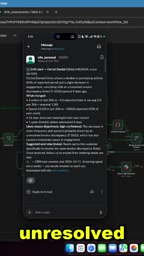
This is something sales teams often miss: when a customer reduces their orders, the cause may have nothing to do with budget or competitors. It might simply be an unresolved bad service experience. Placing ticket data and order data on the same alert card helps teams identify the real root cause of churn.
Service Level Agreement (SLA) is a formal commitment by a company specifying how quickly it will respond to or resolve customer issues. In B2B contexts, SLAs are typically tiered by ticket priority: critical issues might require a 1-hour response and 24-hour resolution, while standard issues might allow 1 business day to respond and 3 days to resolve. The deeper logic behind including ticket status in churn alerts comes from the strong correlation between service experience and renewal intent: research shows customers with unresolved complaints churn at several times the rate of satisfied customers. This is why surfacing service tickets alongside order data on the same alert card matters so much — it lets the customer relationship team know "this person might be frustrated" before they even pick up the phone, so they can adjust their approach accordingly.
The Core Value of Automation: Proactive, Not Reactive
In traditional workflows, customer relationship teams often don't realize a key account has gone silent until a quarterly review — by which point the cost of recovery is extremely high.
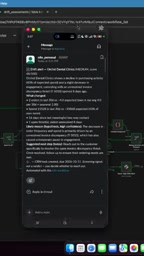
The significance of this n8n automation is that it transforms "after-the-fact damage control" into "proactive intervention." The system automatically aggregates order, spend, engagement, and ticket data across four dimensions. When a customer trips a threshold, it pushes a notification directly to the customer relationship team so they can reach out immediately, resolve issues, and preserve a healthy working relationship.
For teams using low-code automation platforms like n8n, the barrier to building this workflow is low. At its core, it connects multiple data sources (CRM, order system, ticketing system) through nodes, defines comparison rules and trigger conditions, and routes alerts to a notification channel. The creator also mentions in the video that commenting "customer" will get you the full workflow.
n8n is an open-source, low-code workflow automation tool that supports self-hosted deployment. It's similar in positioning to Zapier or Make (formerly Integromat), but more developer-friendly — users can connect APIs visually through nodes, or write JavaScript directly within nodes to handle complex logic. The "node" concept is analogous to steps in a flowchart: one node pulls data from a CRM, another performs calculations and comparisons, and another triggers a Slack message or email notification. For the churn alert scenario described here, a typical workflow structure looks like: scheduled trigger → parallel queries for order/engagement/ticket data → comparison against historical baseline → conditional check against threshold → format notification content → push to designated channel. The entire flow requires no traditional backend code.
A Few Closing Thoughts
This example is compact, but it captures a key insight from the customer success field: churn is gradual, and the signals are scattered. No single metric is enough to make a reliable judgment, but combining order frequency, spend, engagement, and service tickets gives you a reasonably robust early warning system.
One important caveat: the thresholds used in the example (like a 43% drop or an 8-day backlog) are demonstration values. In real-world deployment, you'll need to calibrate these against your own business characteristics and customer segments to avoid excessive false alerts or missed signals. Automation is just the tool. What actually retains customers is the timely, genuine conversation that happens after the alert fires.
Related articles

WorkBuddy Full Tutorial: Build an AI Office Automation Agent from Scratch
A complete WorkBuddy tutorial: installation, three working modes, multimodal picture book video practice, expert team agent building, and workflow configuration for low-cost AI office automation.

WorkBuddy Agent Complete Guide: From Beginner to Automation in 7 Days
Based on Bilibili's 256-episode WorkBuddy masterclass, this systematically breaks down Tencent's AI office workbench core capabilities: Agent principles, Skill encapsulation, cross-platform connectors, scheduled automation, knowledge bases, and zero-code development, with learning path recommendations.

8 AI Accounts, 7 Failed: An Honest Review of Using AI to Get Work Done
Only 1 of 8 AI-run Bilibili accounts succeeded. We break down the real difference between "performing AI" and "using AI to get work done."