Building a Medical Report Automation Workflow with n8n and Google Gemini

Automate medical report generation from patient invoice emails using n8n and Google Gemini.
This article introduces an automation workflow for hospitals and private clinics: starting with a Gmail trigger, n8n activates when a patient invoice email arrives, calls a Google Gemini AI Agent to extract key fields from unstructured email text, and generates structured medical reports. Data is then written to Google Sheets, files are archived to Google Drive, and a report receipt is sent automatically via Gmail — forming a complete extract→process→archive→notify loop. This low-code AI pattern significantly reduces manual data entry and report writing, though the author notes that medical data is highly sensitive and compliance, encryption, and access controls must be addressed before production deployment.
The Pain Points of Manual Medical Data Processing
For physicians running private practices and hospital administrators, manually organizing patient information, generating medical records, and archiving documents is a tedious, error-prone part of daily operations. Patient names, physician details, diagnoses, contact numbers, and visit dates are often scattered across various emails and invoices — manual data entry is time-consuming and difficult to keep consistent.
The workflow demonstrated in this tutorial is designed precisely for this scenario: by combining the automation platform n8n with Google Gemini, the system automatically extracts key information from patient invoice emails, uses AI to generate structured medical reports, and archives all data into Google Sheets.
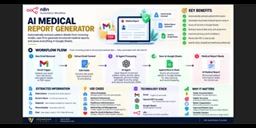
How the Workflow Operates
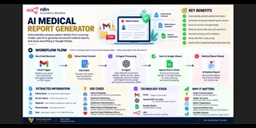
The overall automation pipeline is straightforward, composed of several nodes connected in sequence.
From Email Trigger to Data Extraction
The workflow starts with a Google trigger (Gmail/email trigger). When a new invoice email arrives, the workflow is automatically activated — no manual intervention required. The email content is then passed to an AI Agent for processing, which serves as the brain of the entire pipeline.
AI Agent for Structured Parsing
Google Gemini handles both information extraction and report generation. It identifies key fields from unstructured email text — including patient name, physician name, diagnosis, phone number, and date — and organizes them into a structured medical report. Compared to traditional regex matching or template-based parsing, large language models excel at handling real-world email content that varies widely in format and phrasing.
In n8n, the AI Agent is a special node type that goes beyond a single LLM query — it can autonomously decide which tools to call and in what order to complete multi-step tasks. In this workflow, the Agent's core capability is structured output: by defining a JSON Schema in the system prompt, Gemini is instructed to return extracted results in a strictly defined field format rather than as free text. This allows the downstream Google Sheets write node to directly read field values without any additional parsing. Compared to a standard "prompt call," the Agent mode also provides error retry and tool orchestration capabilities — when a step returns an incorrectly formatted response, it can automatically self-correct, improving the overall robustness of the pipeline.
Data Writing and File Archiving
Once parsing is complete, new records are appended to Google Sheets, building a continuously growing, always-accessible patient data table. Physicians can simply open this spreadsheet at any time to look up all historical activity records.
File Storage and Email Receipt Closing the Loop
Generated reports don't just live in the spreadsheet. The workflow uploads and stores PDF documents or related files to Google Drive via an HTTP node, enabling cloud-based archiving.
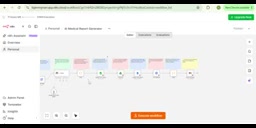
As the final step, all organized details are compiled and automatically sent as an email via Gmail. This means both physicians and patients receive a complete report receipt, and can reference it for future queries — completing the full loop of extract → process → archive → notify.
The Real-World Value of This Automation
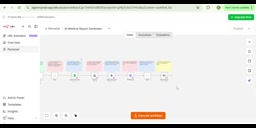
As described by the author, this solution is primarily aimed at hospitals and private clinics. Its value lies in compressing what were previously several separate manual steps — data entry, report writing, file archiving, and email notification — into a single automatically running pipeline, significantly reducing labor and time costs.
On the technical side, n8n, as an open-source workflow automation tool, provides visual node orchestration that lowers the barrier to building such pipelines. Gemini fills in the natural language understanding and generation capability. Together, they form a low-code AI application pattern that can be readily adapted to document processing in other industries.
It's worth noting that medical data involves highly sensitive personal information. When actually deploying this type of workflow, careful consideration must be given to data compliance, encrypted storage, and access control — ensuring adherence to applicable medical data protection regulations in your region. The original tutorial focuses primarily on feature demonstration, with limited discussion of privacy and security; these are critical areas that need to be addressed before any production deployment.
n8n is a node-based open-source workflow automation platform that supports self-hosted deployment — a particularly important feature for medical use cases, as data never needs to pass through third-party SaaS servers, helping satisfy the local processing requirements of data protection regulations such as HIPAA (Health Insurance Portability and Accountability Act) or GDPR. Compared to closed-source alternatives like Zapier and Make, n8n's node logic and data flow are fully transparent and auditable; operations teams can trace the input and output logs of every step. Its visual "canvas-style" interface allows non-developer users to drag and connect nodes, though some programming mindset is still needed when dealing with complex logic like conditional branching or iterative loops. The community edition is free and continuously updated, while the enterprise edition offers more granular permission management and audit logs — well suited for healthcare organizations with compliance requirements.
Related articles

Gaussian Process Bandit Optimization: Exploration Strategies and Inference Regret Guarantees
Cumulative regret guarantees in Bayesian optimization fail to reflect final recommendation quality. This article examines a new study that provides inference regret guarantees for Gaussian process bandit optimization through exploration query strategies and fill distance analysis, validated on hyperparameter optimization and control tasks.

The Most Detailed Codex Guide on Bilibili: From Installation to Real-World Practice
The most detailed Codex guide on Bilibili: from app store installation to daily work mode configuration, with a real coffee shop project demonstrating file organization, data extraction, dashboard creation, and other practical tasks. Learn to use Plan Mode and desktop pets to leverage Codex efficiently.

Appearance Compensation in Volume Rendering: Why RGB Accuracy Cannot Guarantee Density Correctness
Volume rendering research reveals that volumetric data perfectly reproducing external RGB views may still contain density errors: appearance compensation can double central density and keep external rays unchanged even when L2 error exceeds 14.52%. Density recovery depends on appearance capacity, spatial resolution, and measurement design.