Building a Morse Code Trainer from Scratch with AI: A Real-World Vibe Coding Experience

A non-developer used Vibe Coding to build a Morse code trainer entirely with AI, revealing the real limits of AI-assisted programming.
A creator learning to code used AI-assisted Vibe Coding to build a Morse code trainer — describing requirements in natural language while AI handled the full UI and interaction logic. The tool features three zones, AI-generated layouts, and an unprompted dual beginner/standard timing mode. A single-character guidance mode with a "correct input to proceed" loop was added before launch. The author concludes that AI now goes beyond code generation into UI design and feature suggestion, while the true barriers remain non-technical — filing, certification, and distribution.
It Started with a $4 Gadget
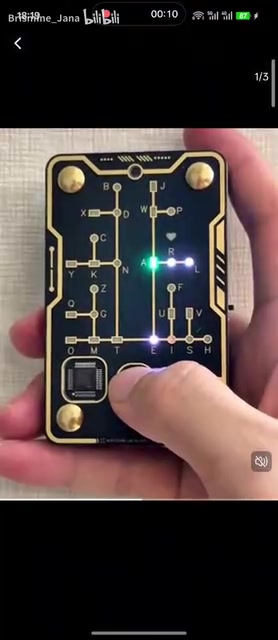
While scrolling through videos, I came across an interesting little tool — a Morse code trainer selling on Taobao for about 30 RMB. For someone learning to code, spending that much on such a simple gadget felt a bit wasteful. Since I'd already been experimenting with "Vibe Coding" (intuition-driven, AI-assisted programming), I figured I'd just build one myself with AI.
The value of this case isn't in the complexity of the tool itself — it's in what it reveals about the real capabilities and limits of AI-assisted development today: a non-professional developer, armed with nothing but ideas, can get AI to deliver a fully working product, from UI layout to interaction logic.
"Vibe Coding" is a programming approach coined and popularized by OpenAI co-founder Andrej Karpathy in early 2025. The core idea: developers don't need to write or deeply understand code line by line. Instead, they describe what they want in natural language, AI generates complete, runnable code, and the human validates the output and steers the direction. The word "vibe" captures the essence — it feels more like experiencing software come to life than precisely controlling every technical detail. This approach is especially accessible to creators without a formal CS background, dramatically lowering the barrier from idea to product. That said, it places a higher demand on clarity of description: vague input tends to produce equally vague output.
The UI: Entirely Drawn by AI
The trainer's interface is divided into three distinct zones: a key input area at the bottom, an input indicator and mode toggle in the middle, and a translation display at the top.
The key point here: the entire UI was designed and rendered by AI. The author only provided the conceptual direction — no manual pixel-level adjustments were made. This is what sets Vibe Coding apart from traditional development: the human defines the requirements and experience logic, while AI translates abstract descriptions into a working interface and codebase.
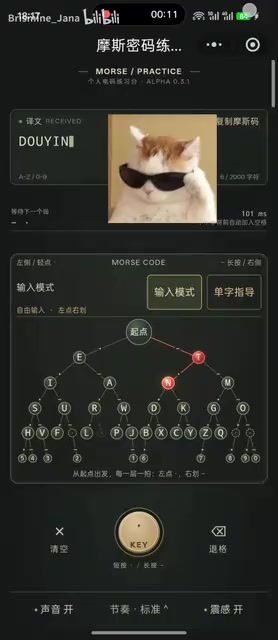
Looking at the final product, AI didn't just handle the basic layout — it proactively filled in experience-level details. This suggests that today's large language models, when given clearly scoped interactive applications, can shoulder a significant portion of the "product design" work, rather than acting purely as a code generator.
Input Timing Adjustment: A Thoughtful Feature AI Added on Its Own
At the bottom center of the interface, AI independently designed an input timing adjustment feature. This is worth calling out specifically — it wasn't something the author explicitly requested. AI added it based on its own understanding of the Morse code input context.
Specifically:
- Beginner mode: The input time window is set to its longest, giving users new to Morse code plenty of time to operate comfortably.
- Standard mode: Follows official Morse code timing requirements strictly — short press for dot, long press for dash, with tight time windows.

This graduated design — from "beginner-friendly" to "strictly standard" — shows that AI is now capable of factoring in different users' learning curves when interpreting requirements. For a practice tool, timing tolerance is precisely what determines usability.
Morse Code is a communication system that encodes letters and numbers using combinations of dots (·) and dashes (—), invented by Samuel Morse in the 19th century for telegraph transmission. In practice, dots and dashes are distinguished by key press duration, and pauses between characters and words each follow specific timing rules. In the international standard, a dot equals 1 unit, a dash equals 3 units, the gap between characters is 3 units, and the gap between words is 7 units. This is precisely why the "time window" tolerance directly determines a trainer's usability: too short, and beginners can't react in time; too long, and they never develop a realistic sending rhythm. AI's unprompted addition of dual beginner/standard modes hits exactly at the core tension of this learning scenario.
Single-Character Guidance Mode: The Final Piece Before Launch
In the last version before public release, the author added a "single-character guidance mode." This is the most carefully considered piece of interaction logic in the entire tool.
Once activated, the indicator proactively displays the correct Morse input pattern for a given character, and the mode only exits once the user inputs it correctly — returning to normal input mode. This "must-get-it-right to proceed" mechanism is essentially an instant-feedback learning loop.
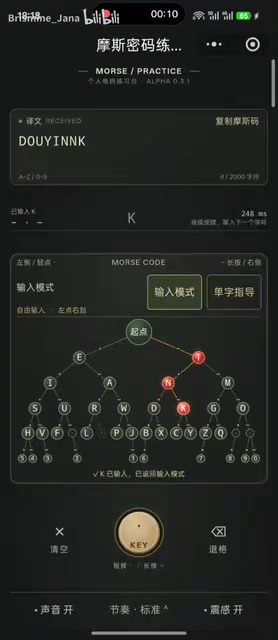
Another subtle detail: while in single-character guidance mode, the system doesn't automatically insert spaces, allowing users to input complete characters continuously within the mode. This kind of precise handling of input boundaries is exactly what beginner developers tend to overlook and where bugs most commonly creep in — yet with AI assistance, this logic was implemented relatively smoothly.
On Publishing and Real-World Impressions
The author mentioned that the tool has completed its filing (备案), but they're not planning to pay for Mini Program certification — so it can't be found through a direct platform search. Interested users can only access it via QR code. This reflects the practical trade-offs individual developers face when publishing lightweight tools: it works and it's usable, but the commercialization hurdles — certification, review, distribution — are often the real cost.
Overall, this kind of small interactive application isn't particularly demanding for today's large models. As the title jokes, generating a trainer like this barely made the model's "GPU fans spin." It's less about raw compute and more about the clarity of requirements and attention to interaction details.
What This Case Actually Shows
Setting the tool itself aside, this experiment offers a few takeaways for non-professional developers:
- AI can do more than write code — it can handle UI layout, fill in experience details, and even proactively suggest features.
- The human's value lies in defining clear ideas and requirements, especially judgment calls around experience design — like input timing tolerance and error-correction loops.
- The real barriers are often outside the code itself — things like filing, certification, and distribution channels are the genuinely non-trivial parts.
For anyone looking to use AI to quickly validate a small idea, a real-world case like "I built a $4 gadget myself" is far more convincing than any abstract rundown of AI capabilities.
Related articles

Random Pruning of the DPO Computation Graph: 1.4x Training Speedup and Lower Peak Memory
DPO training too slow and memory-hungry? This paper proposes a random pruning framework for the DPO computation graph, sampling independently across position, sequence, and branch dimensions; branch pruning achieves a 1.426x step-time speedup and cuts training time by about 30%, with in-depth attribution of memory and time gains.

Why Does JEPA Underperform MLM in Longitudinal EHR Representation Learning?
New study compares JEPA and MLM for longitudinal EHR representation learning on MIMIC-IV: three JEPA variants train stably without collapse but underperform MLM; target size, not heterogeneity, drives prediction error.

Transfer Learning + Visible Light Communication: A New Approach to Energy-Efficient Indoor Positioning
A study proposes a transfer learning-based visible light communication indoor positioning method, achieving 47% accuracy improvement on the BOSCH factory dataset, 67.5% model efficiency under high noise, and introducing the ME composite metric for energy-efficient positioning in energy-constrained industrial IoT scenarios.