Building a WorkBuddy Workspace from Scratch: MCP Protocol, Tool Calling, and Asset Library Management in Practice
Breaking down WorkBuddy's configuration logic and hands-on workflow, from workspace and permission models to skill connectors and automation.
Based on Bilibili creator Pan Ge's hands-on WorkBuddy tutorial video, this article systematically outlines the complete path for building this AI workbench from scratch. It first explains that a "workspace" is essentially a local folder that determines the boundaries of material retrieval and output storage; then analyzes how key configurations below the input box—default vs. full access permissions, O2 auto model selection vs. specified models—affect task execution; next introduces the extension ecosystem formed by experts, skills, and connectors, as well as the three modules for remote collaboration and scheduling: assistant, projects, and automation. Finally, it runs through the entire chain using a poetry learning card as an example, verifying the synergistic effect of each configuration item and distilling the design philosophy of "turning AI from a chat box into a configurable execution environment."
Building a WorkBuddy Workspace from Scratch: MCP Protocol, Tool Calling, and Asset Library Management in Practice
WorkBuddy is an AI workbench tool whose core value lies in integrating model capabilities, tool calling, and file management into a configurable workspace. Bilibili creator Pan Ge's hands-on tutorial video demonstrates the entire process from understanding the interface to getting a task to run end-to-end. This article, based on that video's content and accompanied by interface screenshots, breaks down WorkBuddy's key configuration items and automation logic to help readers understand how to make AI truly "get to work."
1. Workspace: Centralized Management of Task Materials
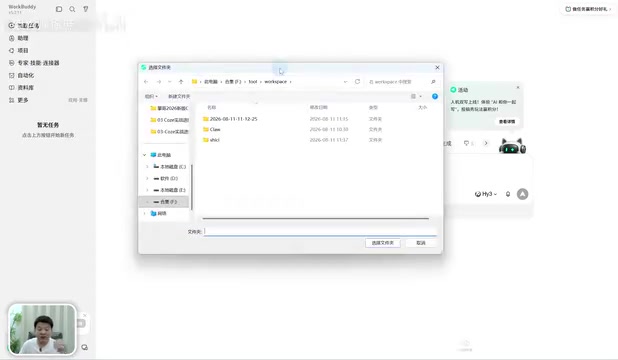
The first concept to understand in the WorkBuddy interface is the "workspace." It is essentially a local folder—when you create a new workspace, the system asks you to name it, and subsequently all material retrieval and output files generated by that task will preferentially land in this directory.
Pan Ge gives two typical scenarios in the video: when writing a weekly report, put your daily work files into a "Weekly Report" folder, and on Friday you only need one sentence for WorkBuddy to automatically retrieve the tasks completed this week from that directory and generate the report; when organizing invoices, drop all invoices into a dedicated folder, and again one sentence completes the sorting. This is exactly the point of a workspace—keeping materials organized and giving AI clear retrieval boundaries.
The workspace storage location is determined by the path in system settings. The video demonstrates two ways to open one: create a new workspace, or directly open an existing local folder (such as an "Invoices" folder) and choose to switch to it. For any task that involves processing multiple files, creating a workspace first and then executing is the recommended habit.
2. Permissions, Models, and Task Dispatch
Below the input box for creating a new task, WorkBuddy provides several key configuration items that directly determine the boundaries and effectiveness of task execution.
Default Permissions vs. Full Access Permissions
In default permission mode, when sensitive operations such as modifying or deleting files are involved, WorkBuddy will first ask the user for confirmation before executing; full access permissions reduce the confirmation steps and give the AI greater operational freedom. The poetry learning card task demonstrated in the video chose default permissions, so when generating illustrations required consuming credits, the system proactively popped up a confirmation prompt—confirming that the sensitive operation interception mechanism actually works.
Model Selection: O2 Auto vs. Specified Model
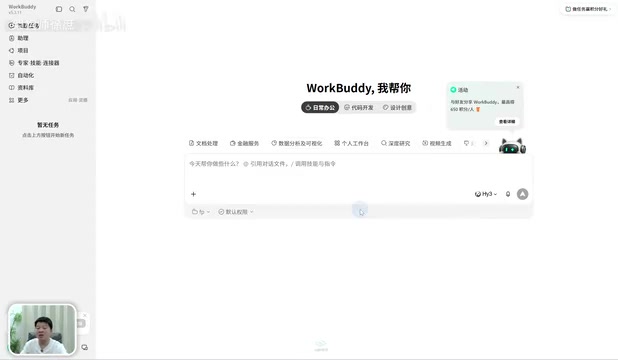
The model option defaults to "O2," which means automatically selecting a model from the model list to complete the current task. If the user has a clear preference, they can also specify a particular model, for example choosing the free Hunyuan 3 in the video for a "free-riding" test. Pan Ge uses a vivid analogy: O2 is like letting WorkBuddy automatically find someone to do the work, while specifying a model is naming a particular person to do it. Later lessons will also cover custom model configuration, leaving room for expansion for users with better model resources.
Credits are a virtual billing unit in WorkBuddy used to measure the consumption of paid resources, typically tied to higher-cost operations such as calling specific models or generating images. In the video, generating illustrations prompts a consumption of about five to ten credits, indicating that image generation tasks carry real compute costs, and the platform transparently presents these costs to users through credits. Free models (such as Hunyuan 3) generally consume no or few credits, which is why Pan Ge chose the "free-riding" test. For users, the credit mechanism means that cost control is part of task configuration: choosing default permissions ensures confirmation before each consumption, avoiding triggering large paid calls due to a vague instruction; and a clear task description can reduce the extra overhead caused by the model's repeated trial and error.
3. Experts, Skills, and Connectors: WorkBuddy's Extension Ecosystem
The video calls "Experts," "Skills," and "Connectors" a major feature of WorkBuddy—these three form the infrastructure for tool calling and capability extension.
Experts are essentially roles with preset personas and domain capabilities, including built-in options such as Workbench Builder, Senior Development Engineer, Super Partner, and Industry Scenario Researcher, and can be filtered by industry category. After the user summons an expert, that expert participates in the task in a specific role identity.
Skills are encapsulated functional modules. The video demonstrates installing "Douyin Trending Search" and "QQ Music Assistant" from the skill marketplace; after installation, they can be invoked via the plus sign when creating a new task. This means users don't need to write skill logic themselves—they can directly reuse capabilities encapsulated by others.
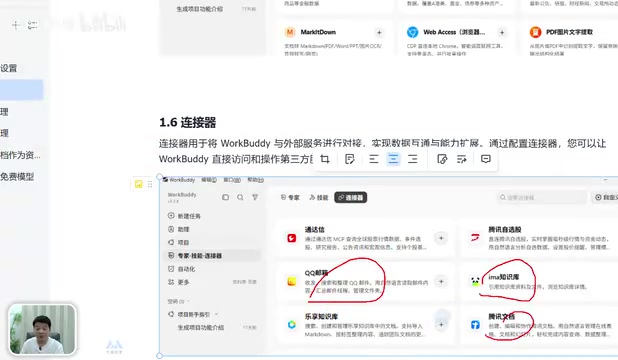
Connectors handle integration with third-party software, for example connecting to QQ Mail for automatic email sending, or connecting to Tencent Docs as a knowledge base data source. The existence of connectors extends WorkBuddy's capability boundary from local files to external services.
MCP (Model Context Protocol) is the key background for understanding the extension mechanisms of AI workbenches like WorkBuddy. MCP is a standardized protocol proposed and open-sourced by Anthropic at the end of 2024, aiming to establish a unified communication specification between AI models and external data sources and tools—analogous to a "USB-C port for the AI application world." Before MCP, every time an external service (such as email, databases, cloud documents) was integrated, developers had to write dedicated adapter code for it, resulting in high integration costs and poor reusability. MCP abstracts these integrations into a standard "server-client" model: external services expose capabilities (resource reading, tool calling, prompt templates) in the form of MCP Servers, and AI applications act as MCP Clients sending requests in a unified format. WorkBuddy's "Connectors" and "Skills" are conceptually the implementation of this approach—bringing third-party software and encapsulated functional modules into the model's callable scope through standardized interfaces, so that AI's capability boundary can be assembled on demand rather than hard-coded.
Tool Calling / Function Calling is the underlying mechanism that supports the operation of "Skills" and "Connectors." Its workflow is roughly: developers declare a set of available tools to the model with structured descriptions (name, purpose, parameter schema); after understanding the user's task, the model autonomously determines whether it needs to call a tool and outputs a call request in a structured format; the host program executes the tool and returns the result to the model, which then continues reasoning or generates the final answer based on it. The difference from ordinary conversation is that the model no longer just "says" but can "do"—retrieving files, sending emails, and searching trending lists all fall into this category. The permission confirmation step in WorkBuddy is precisely a gate inserted between "the model requests a call" and "the program actually executes," which is why operations involving file deletion or credit consumption are intercepted and queried. Understanding this makes it clear why workspace and permission settings directly affect whether a task can run smoothly.
4. Assistant, Projects, and Automation: Remote and Collaborative Capabilities
In addition to standalone tasks, WorkBuddy also provides three modules for different scenarios.
Assistant provides remote control capability: through instant messaging software such as WeChat, QQ, and Feishu, users can send messages on their phones, and the desktop WorkBuddy automatically executes the task and sends the result back to the phone. The video uses the scenario of "handling an urgent task while in the bathroom" to illustrate its practical value.
Projects are oriented toward team collaboration, supporting multiple people working together on a larger-scale project, corresponding to the project team working model in enterprise environments.
Automation handles scheduled tasks. The video gives an example: automatically searching for real-time AI news and pushing it every morning—just write the task once, and the automation module will repeatedly execute it at the set time.
5. Hands-On Run-Through: The Complete Chain of a Poetry Learning Card
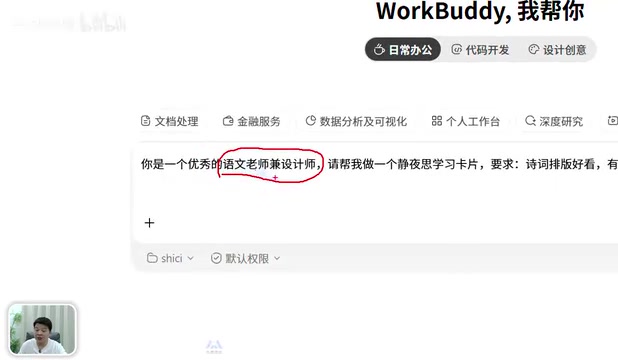
The video ends with a complete case that verifies the synergistic effect of the above configurations. The task description is "You are an excellent Chinese language teacher and designer; help me make a poetry learning card," the workspace is switched to the "Poetry" folder, the model is Hunyuan 3, and permissions use default permissions.
During execution, WorkBuddy first performs requirements analysis, then in the illustration generation step pops up a credit consumption confirmation (about five to ten credits); after confirmation, it generates a Chinese ink-wash-style illustration. After the task is completed, the output files all land in the poetry directory of the workspace, and can also be centrally managed and previewed in "Asset Library—Local Outputs." Pan Ge comments in the video that the final result is "very good," believing it demonstrates WorkBuddy's actual capabilities.
Interestingly, the video also admits that the prompt was written rather vaguely—descriptions like "nice poetry layout" are not precise. Pan Ge's advice is that the clearer the prompt, the better the result. This applies to any user of an AI workbench: the configuration of tool calling and asset management can be standardized, but the quality of task descriptions still depends on the user.
6. Insights from the Configuration Logic
From this hands-on session, we can extract WorkBuddy's design philosophy: use workspaces to constrain file boundaries, use permissions to control operational risk, use model selection to balance cost and effectiveness, use experts/skills/connectors to extend capabilities, and use automation and assistant to extend the dimensions of time and space. The core of this combination is to turn AI from a "chat box" into a "configurable execution environment."
For users who want to get started, it is recommended to follow the path in the video: first create a workspace, then choose permissions and model, then invoke skills or connectors as needed, and finally use automation to solidify repetitive tasks. The configuration at each step directly affects the usability of the final output.
Related articles
DeepSeek Mobile Quotas, Gemini 4 Tops Math Benchmark, and Alibaba Open-Sources Coding Tool
DeepSeek mobile quotas go live, Gemini 4 tops the Mafurina math benchmark at 85.4% but at high cost, Alibaba and Tencent open-source coding tools on the same day, and tokenizer research breaks new ground.

Vibe Coding Without Installation: A Hands-On Look at the Web-Based DeepSeek Harness
Bilibili creator Da Fei Yu unveils a web-based DeepSeek Harness: no Node.js or NVM install needed—just a browser for Vibe Coding, plugins intact, iPad and HarmonyOS friendly, and GitHub users can build Android apps in-browser.

Gemini 4 Leads Model Upgrade Wave, Agent Delivery Becomes the New Battleground
Google launches Genius Carbon and Gemini 4 Hydrogen, Anthropic updates Fable and Misos 5.2, Qwen previews Qwen4-Max. From model division of labor to Swarm collaboration, POPI and ARUI protocols, Agent delivery capability becomes the new competitive focus.