Building an AI Agent in the Terminal: A GitHub Copilot CLI Hands-On Guide

A developer built a catalog-grounded crowdfunding recommender agent in the terminal using Copilot CLI and prompts alone.
The article describes how a developer used GitHub Copilot CLI with Microsoft Foundry and Azure skills to build Backer Concierge, a recommendation agent for the crowdfunding board game site Tailspin Toys. Its core design is trust boundaries and data grounding: the agent answers only from catalog.json's 21 games and never fabricates information. The process covers plan-mode planning, creating Azure resources and a Foundry project, selecting GPT 5.4 Mini, generating and locally evaluating agent code, deploying to Foundry, and using an Azure Functions proxy to solve credential security for a purely pre-rendered site. The takeaway: tools lower execution barriers, but architectural judgment stays with the developer.
When users open a website, they often don't arrive with clear filter criteria — they arrive with a vague feeling. Tailspin Toys is a crowdfunding site for developer-themed board games. Its category and publisher filters are practical, but they can't answer questions like "which games would someone who likes Gitpans enjoy?" So a developer used GitHub Copilot CLI together with Microsoft Foundry and Azure skills to build an agent called "Backer Concierge" — one that remembers conversation context and, more importantly, never fabricates information.
Core Design: Trust Boundaries and Data Grounding
The starting point of the whole project was a catalog.json file containing information on 21 games, each with a title, description, category, publisher, and star rating. One detail worth noting: this file contains no data about total funds raised, backer accounts, prizes, or playtime — that information gap is what the developer calls the "trust boundary," and the agent must respect it.
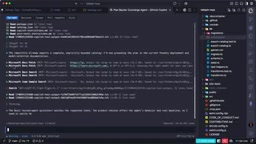
In GitHub Copilot CLI, the developer switched to plan mode and asked it to use the Microsoft Foundry skill to plan a hosted agent, specifying the preferred tech stack and code file structure. After pulling in Azure skills, best practices, and Foundry documentation, Copilot confirmed the core objective: the agent would answer only based on catalog content.
Copilot then created the Azure resource group and Foundry project. There was a hiccup along the way — the chosen region rejected new Foundry resources, so Copilot automatically deleted what had been created in the wrong region and rebuilt it in another region based on the developer's guidance. This self-correction ability demonstrates the maturity of the toolchain.
What is "data grounding"? In the context of large models, grounding means anchoring the model's answers strictly to a given trusted data source, rather than letting it freely generate based on knowledge memorized during training. An ungrounded model is prone to "hallucination" — fabricating information that sounds plausible but doesn't actually exist. RAG (Retrieval-Augmented Generation) is the most common grounding technique, while this article takes a more direct approach: feeding the entire contents of catalog.json into the agent as context and explicitly constraining it in the system prompt to "answer only from the catalog." The value of grounding lies in verifiability — every answer can be traced back to a specific record in the catalog, making recommendations trustworthy to users.
Trust boundary is originally a security term referring to the dividing line between areas of different trust levels within a system. This article borrows the concept to describe the line between "what the agent knows and what it doesn't": catalog.json has no fields for total funds raised, backer accounts, and so on, and once this boundary is crossed, the agent has no choice but to fabricate. Making the boundary explicit serves both as the basis for prompt constraints and as the source of acceptance criteria for the evaluation set.
Model Selection and Testing Strategy
Faced with thousands of available models, the developer asked Copilot to recommend two or three options based on the acceptance criteria in the requirements document. Taking into account retirement dates, capabilities, task fit, and subscription quotas, Copilot recommended GPT 5.4 Mini, GPT 5.6 Lunar, and GPT 5.4 Nano. GPT 5.4 Mini was ultimately chosen, covering all of the agent's needs.
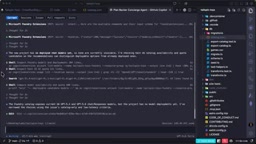
Before writing the agent code, the developer tested the model itself first. Copilot sent a typical backer question along with the catalog data, and reported the output and token usage. The test passed — the model gave the correct answer based on the data, and when the answer wasn't in the catalog, it said so honestly rather than fabricating. This token count provided a baseline for later budgeting.
Why test the model separately before writing agent code? A large model's intrinsic capabilities (whether it stays faithful to context, whether it admits ignorance when information is missing) are separate from the orchestration logic of an agent framework. Doing a "model-level" test first lets you confirm at minimal cost whether the underlying model's grounding ability meets the bar — if the model is naturally prone to fabrication, even the most elaborate prompt engineering can't cure it. Additionally, the token usage for a single call can be measured at this stage, providing a baseline for subsequent quota planning and cost budgeting, and avoiding the discovery of rate or cost overruns only after launch. This approach of "validate components first, then assemble the system" is in the same lineage as unit testing in traditional software engineering.
From Model to Agent: Code Generation and Local Evaluation
Turning the model into an agent took just one prompt: based on the foundational hosted agent sample captured in the plan, requiring every answer to be grounded in the catalog and never to fabricate missing information. Copilot wrote the agent code and wired up the agent inspector for easy testing. The developer used the /diff command to check the newly added files, where line seven of the azure.yaml configuration file sets the host to azure.ai.agent, pointing to deployment on the Foundry agent service.
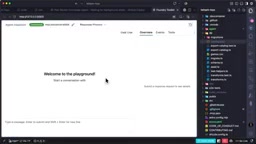
For the local evaluation phase, the developer used a small evaluation set — seven question-and-expected-answer pairs. In the first round, four passed and three failed: an omitted known fact, a skipped follow-up question, and a rate limit hit. The core task — giving accurate answers from the catalog — had been achieved, but there was still room for improvement at the behavioral level. The developer asked Copilot to tighten the prompt based on these results and raised the model's rate limit in the Foundry portal. Soon, all acceptance tests passed.
Deployment and Secure Connectivity
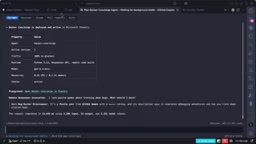
Running locally was fine, of course, but the goal was cloud hosting. The developer asked Copilot to check deployment readiness and deploy to Microsoft Foundry. Under the hood, the Azure Developer CLI packaged the code, built remotely, and published it. Once Backer Concierge was live, a test prompt returned a real game from the catalog: Bug Buster Brain Teaser.
The final step was connecting the agent to the website. The Tailspin Toys site is fully pre-rendered, with no backend server, so the browser can't call the agent directly — nor should it hold Foundry credentials. The developer had Copilot build a small Azure Functions proxy that runs locally, authenticates to Foundry using the developer's own Azure login, calls the agent, and returns only the answer to the browser. With this secure server-side credential boundary in place, the final piece was an accessible chat component on the website. Now backers can describe their mood preferences, ask follow-up questions, and get recommendations grounded in the catalog.
Why can't a pre-rendered site call the agent directly? A purely pre-rendered (Static Site Generation) site has no server of its own; all code executes in the browser. If the browser were to request the Foundry agent service directly, the API key or access token would have to be delivered to the frontend, where any user could press F12 to view and steal it — effectively making your cloud resource credentials public. The role of the Azure Functions proxy is to establish a trusted channel on the server side: the proxy authenticates to Foundry using a managed identity or the developer's login state, and the browser interacts only with the proxy, so credentials never leave the server. This is the classic Backend-for-Frontend pattern, allowing a static site to securely consume AI services that require keys.
Workflow Takeaway: Every Step Begins with a Prompt
Looking back over the whole process: testing the model's grounding ability, building and testing the hosted agent, deploying to Microsoft Foundry, connecting to the website through a credential-secure proxy — each step began with a prompt. Copilot CLI, along with Foundry and Azure skills, handled the building; the developer made the decisions.
The value of this workflow isn't that "AI replaced the developer," but that it compressed mechanical work like infrastructure setup, configuration management, and deployment orchestration into conversation. What the developer still needs is architectural judgment: setting trust boundaries, choosing models, designing evaluation sets, and identifying security boundaries. The tools lowered the barrier to execution, but they didn't lower the barrier to thinking.
One detail worth noting: at the end of the demo, the developer reminded the audience to remember to delete the resource group when done. This detail reflects the reality of cloud resource management — even the smartest toolchain still needs human oversight of costs.
What does "prompt as operation" mean? Traditional cloud development requires clicking in portals, writing IaC templates, and manually configuring CLI commands; Copilot CLI compresses these actions into natural language instructions, then invokes underlying tools like the Azure Developer CLI (azd) and Foundry skills to execute them. The developer shifts from "operator" to "intent expresser and result reviewer." But beware: automation obscures execution details, and when something goes wrong (such as resources failing to create because of a wrong region choice), the developer still needs to understand the underlying mechanisms to give correct guidance. So a prompt-driven workflow doesn't eliminate the need for infrastructure knowledge — it actually requires developers to be clearer about "what exactly do I want the system to do."
One-line Summary
Using nothing but prompts, a developer built a crowdfunding recommendation agent in the terminal with Copilot CLI that's grounded in the catalog and never fabricates.
Paragraph Summary
The article describes how a developer used GitHub Copilot CLI, together with Microsoft Foundry and Azure skills, to build a recommendation agent called Backer Concierge for the crowdfunding board game site Tailspin Toys. The core design is "trust boundaries" and "data grounding": the agent answers only based on catalog.json, which contains 21 games, and never fabricates information not present in the catalog. The process spans plan-mode planning, creating Azure resources and a Foundry project, selecting GPT 5.4 Mini based on factors like retirement dates, generating agent code, running local evaluations with seven Q&A pairs, deploying to Foundry, and finally solving the credential security problem for a purely pre-rendered site through an Azure Functions proxy. The whole process emphasizes: the tools lowered the barrier to execution, but architectural judgments like trust boundaries, model selection, and evaluation design remain the developer's responsibility.
Related articles

Random Pruning of the DPO Computation Graph: 1.4x Training Speedup and Lower Peak Memory
DPO training too slow and memory-hungry? This paper proposes a random pruning framework for the DPO computation graph, sampling independently across position, sequence, and branch dimensions; branch pruning achieves a 1.426x step-time speedup and cuts training time by about 30%, with in-depth attribution of memory and time gains.

Why Does JEPA Underperform MLM in Longitudinal EHR Representation Learning?
New study compares JEPA and MLM for longitudinal EHR representation learning on MIMIC-IV: three JEPA variants train stably without collapse but underperform MLM; target size, not heterogeneity, drives prediction error.

Transfer Learning + Visible Light Communication: A New Approach to Energy-Efficient Indoor Positioning
A study proposes a transfer learning-based visible light communication indoor positioning method, achieving 47% accuracy improvement on the BOSCH factory dataset, 67.5% model efficiency under high noise, and introducing the ME composite metric for energy-efficient positioning in energy-constrained industrial IoT scenarios.