Building an AI Agent with Claude Code from Scratch: From Workspace to Cloud Autonomy

A non-programmer builds a self-evolving content Agent with Claude Code in four levels, from workspace to unattended cloud operation.
The article explains how a non-programmer creator built an AI Agent using only the Claude desktop app—no code, no terminal—that turns long videos and newsletters into animated carousel posts. The author breaks the method into four progressive levels: workspace setup with brand context, an Agent created via a ready-made prompt, Skills to standardize workflows, Memory for self-improvement, and finally cloud deployment with GitHub, Notion, and scheduled tasks for autonomous operation. The core insight: Agents differ from chatbots by judgment, built from five components—brain, context, task, rules, tools—a framework applicable to any domain.
Most people still think of Claude Code as a "developer tool," but one non-programmer creator's real-world experience proves otherwise: he used Claude Code to build an AI Agent that automatically turns long videos and newsletters into animated carousel posts—without writing a single line of code or opening a terminal. Everything was done in the graphical interface of the Claude desktop app. This methodology is broken into four progressive levels, offering a replicable path for anyone wanting to move from "chatbot" to "true agent."
Why an Agent and a Chatbot Are Two Different Things
The core distinction lies in judgment. A chatbot answers questions; an Agent takes on tasks: you give it a goal, and it decides what to do first, which tools to use, and whether the result meets the bar.
For this kind of judgment to work, every Agent needs five components: Brain (the AI model that does the thinking), Context (how much it knows about your brand and business), Task (the goal it's pursuing), Rules (how to do things and what never to do), and Tools (the means it's allowed to use). These five components run through the entire build process, and each subsequent level strengthens one of them.
The case the author demonstrates is a content creation Agent—turning videos and newsletters into Instagram carousel posts, using assets including a brand logo, personal photos, and several real historical posts as references.
What Is an AI Agent
An AI Agent is a system that can perceive its environment, make autonomous decisions, and take actions to achieve a goal. Unlike traditional chatbots that respond passively, an Agent is goal-oriented: after receiving a task, it breaks down the steps itself, selects tools, executes actions, and evaluates results—adjusting strategy and retrying when necessary. Most current mainstream Agents are built on large language models (LLMs), with the model acting as the "brain" responsible for reasoning, external tools (such as file read/write, web search, API calls) extending its action capabilities, and a memory mechanism allowing it to retain experience across sessions. Vendors like Anthropic and OpenAI have all released accompanying Agent development frameworks, enabling non-programmers to configure a dedicated Agent through natural language.
Level 0: Set Up the Workspace First—The Step Most Easily Skipped
Just as a new colleague needs a desk set up before starting, an Agent needs an "office." The so-called workspace is, in reality, just a folder—the author named it business os, used to store all the files the Agent works and lives with.
After opening the Code tab in the Claude desktop app and selecting this folder, there are a few key settings: for permission mode, it's recommended to start with auto, letting the Agent work continuously without frequent interruptions, while blacklisting risky operations; for model selection, the author used Opus 5.5, reasoning that it "follows detailed instructions precisely and has good design taste"—for a content Agent, this is exactly what's needed.
Next comes "onboarding": have Claude read the brand's website and generate two files—one is the onboarding guide (claude.md) that is read first in every conversation, and the other is a brand context file covering business, audience, tone, and visual style. During generation, Claude will proactively ask about font choices and reference post preferences—a good time to supplement context.
The verification method is straightforward: open a new session and ask the Agent to plan next week's content. It will automatically read the brand context and historical posts, producing a content plan tailored to the business. Put the same request in an empty folder, and the output quality immediately differs drastically—the only difference is the workspace.
According to the demonstration by this Bilibili creator, the reason this "set up the environment before teaching skills" order matters is that it determines whether the AI produces generic, press-release-style content or content carrying your brand's DNA.

Level 1: "Interview" Your First Agent with a Single Prompt
You don't need to write configuration yourself to build an Agent. The author used a ready-made "Agent Designer" prompt: paste it in, describe the work, and it will interview you in turn, then automatically design the Agent file.
The content creation Agent's responsibility was defined as "turning long content into carousel posts." After generation, a corresponding Agent file appears in the folder, listing the five components mentioned earlier. The author specifically emphasizes: this file may look very technical to non-technical users, but you can absolutely skip reading it—what matters is knowing how to use it: type @ in the input box to select the Agent, hand it the assets and constraints (e.g., "no more than 10 slides"), and it will read the input files, make its own judgments, and produce a first draft.
The first result is usually imperfect: images don't display, font sizes are wrong, layout is basic. This isn't failure—it's the norm: an Agent's first version is almost never the final version, and iteration is part of the workflow.
Level 2: Use Skills to Turn "Luck Every Time" into "Reliable Every Time"
Although the first-version Agent has the right style, the hooks and layouts of each run rely on improvisation, lacking consistency. The solution is Agent Skill—think of it as a set of work manuals handed to the Agent.
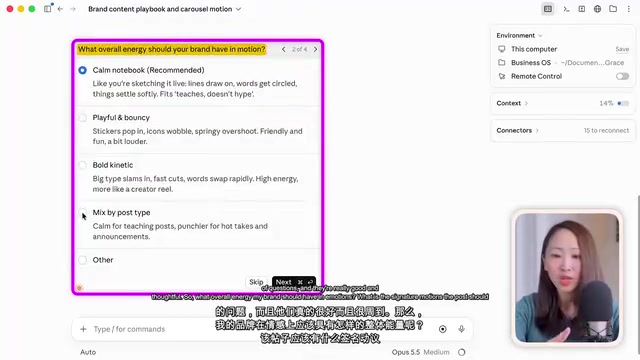
The content playbook skill the author created also layers on a motion skill, turning static carousels into animations. The most efficient way to create it is to have Claude interview itself in turn: what emotional tone should the brand have? What is the signature motion? The author also added a line "think hard," which he reports significantly improved the quality of the questions.
The result is quite直观: the same carousel is animated page by page—the face on the cover, hand-drawn loop diagrams and roadmaps, and a glass jar running through from start to finish as a moving element—with each page exported as a separate video file, ready to upload as an animated post. The author's assessment: "I really want to use this for the next Instagram issue."
After creating a skill, you also need to explicitly assign it to the Agent and update claude.md so that it automatically invokes this playbook when asked to make social posts or carousels—these two steps are key to ensuring reliability.
Level 3: Give It Memory So the Agent Gets Smarter the More You Use It
Switch to another newsletter and run it again—the Agent will pick up the work itself, execute according to the playbook, and the output is still on point. But details still deviate: a brown color that isn't part of the brand appears, and the inner page backgrounds lack variation.
The problem is that Agents have no memory by default—every session is "day one." So the author added a third required file—memory—alongside the onboarding guide and playbook. When creating it, he specifically emphasized one rule: only save feedback that has universal value for future content, not one-off edits.
Then he gave feedback in bullet-point form, and the Agent not only fixed the current carousel but also wrote the lessons into the memory file. Testing again with a brand-new newsletter, background diversity was in place and the brand color errors disappeared—you can clearly see it drawing on previously accumulated lessons. The same mechanism also let the author further clean up the yellow robot icon and the black outline on the cover face.
At this point, a truly usable self-improving Agent is established: the more you use it and the more feedback you give, the stronger its judgment becomes.
Agent Memory Mechanism
Large language models are inherently stateless—they don't retain conversation content after each session ends, which means an Agent defaults to "day one" every time. The Memory mechanism solves this by persisting key information in external files: the Agent writes valuable feedback, preferences, and lessons into the memory file during operation, and reads them first on the next startup. Memory is usually divided into short-term (current session context) and long-term (cross-session storage). Well-designed memory requires filtering rules—only retaining feedback with universal value for future tasks, avoiding沉淀 one-off edits into permanent rules, otherwise memory will bloat and create conflicts.
Level 4: Move It to the Cloud and Let It Run on Its Own
The Agents in the first three levels all live on a laptop—close the lid and they're disconnected. Level 4 is about putting it in the cloud and adding two tools: Notion (as a content inbox) and GitHub (syncing the business os folder into a private repository, free account is fine).
Once the workflow is connected, it works like this: during the day you drop materials into the Notion inbox; on your phone, through the Claude mobile app, you have the Agent check pending items and turn them into carousel drafts—even with the screen locked, background tasks keep running; when done, the Agent writes the Notion link back, marks the task complete, and the author only needs to review and approve.
The final step is scheduled tasks. The author set up a nightly task to check the inbox for new entries, generate carousel drafts, and even ask the Agent to proactively suggest improvements to the playbook based on past feedback—forming a closed loop of self-evolution. After specifying the cloud repository in settings, the task runs automatically at the scheduled time. When you open it in the morning, the drafts are already waiting for review.

What Are Scheduled Tasks and Cloud Agents
A scheduled task (Cron Job) is a mechanism that automatically triggers execution at preset time intervals. In Agent scenarios, it lets the agent run at a specified moment without manual wake-up—for example, checking the inbox and generating drafts every night. Deploying an Agent to the cloud means it no longer depends on the running state of a local computer—after closing the laptop or locking the phone screen, the task continues executing on the server. Cloud deployment usually requires a code repository (such as GitHub) as the hub for file syncing and version management, and a third-party service (such as Notion) as the input/output interface. This combination upgrades the Agent from "an assistant on call" to "an unattended digital employee"—the highest level of autonomy.
Transferability of This Approach
The author's action checklist is: set up the workspace → build the Agent (clarify task, tools, rules) → configure Skills to lock in the process → add Memory for continuous evolution → go to the cloud for unattended operation. You don't have to do it all at once; advancing level by level is enough.
It's worth emphasizing that this framework is not tied to content creation. The five-component structure—brain, context, task, rules, tools—plus the two layers of enhancement, skill and memory, applies to Agents in any domain: customer service, research, operations, and more. The real barrier isn't technical—it's whether you're willing, like mentoring a newcomer, to patiently pass on your business knowledge, work standards, and feedback to the Agent.
Background Notes
What Is Agent Skill
A Skill can be understood as an encapsulated "capability package" or "work manual," usually existing as a structured document (such as a Markdown instruction set) that describes the standard process, style conventions, output format, and considerations for a certain type of task. Once an Agent is assigned a Skill, it automatically loads these instructions when performing related tasks, reducing the uncertainty caused by improvisation. The difference between a Skill and a prompt is: a prompt is a one-time conversation input, while a Skill is a reusable, version-manageable persistent configuration. Multiple Skills can also be combined and layered—for example, a content creation Skill layered with a motion Skill gives the Agent both content generation and animation capabilities.
One-line Summary
A non-programmer builds a self-evolving content Agent in the Claude Code GUI, in four levels from workspace to unattended cloud operation.
Paragraph Summary
The article describes how a non-programmer creator built an AI Agent—without writing code or opening a terminal, using only the Claude desktop app—that automatically turns long videos and newsletters into animated carousel posts. The author breaks the methodology into four progressive levels: Level 0 sets up a workspace containing brand context and an onboarding guide; Level 1 "interviews" a first Agent using a ready-made prompt; Level 2 uses Skills to turn unstable improvisation into a reproducible standard process; Level 3 adds Memory so the Agent accumulates universal feedback and gets smarter with use; Level 4 moves the Agent to the cloud with GitHub, Notion, and scheduled tasks, so it runs autonomously even after the computer is closed. The core argument is that the essential difference between an Agent and a Chatbot is judgment, and judgment is supported by five components: brain, context, task, rules, and tools—a framework transferable to any domain beyond content.
Related articles

AI Comic Drama with WorkBuddy from Scratch: A Step-by-Step Skill Pack Installation Guide
Learn how to create AI comic dramas with WorkBuddy from scratch. This guide covers installation, Skill pack import and invocation, plus a script generation demo with manual revision tips to get you through the first step from script to storyboard.

WorkBuddy Agent Runs the Entire GEO Database Mining Pipeline with a Single Prompt
WorkBuddy agent automates GEO database mining: from data search and curation to batch correction, differential analysis, co-expression networks, feature gene screening, and immune infiltration—a single prompt generates a complete bioinformatics report, greatly lowering the barrier to bioinformatics analysis.

PC Memory Wasted? Hacker News Debates Centralized Data Centers
Hacker News users argue that personal computer memory is wasted and should be centralized in data centers, sparking debate on centralized vs. distributed computing resource allocation. This article analyzes the logic behind the claim, the costs of centralization, and new tensions in memory resource allocation in the AI era.