Building an AI Customer Support Assistant with n8n: No-Code Workflow Automation
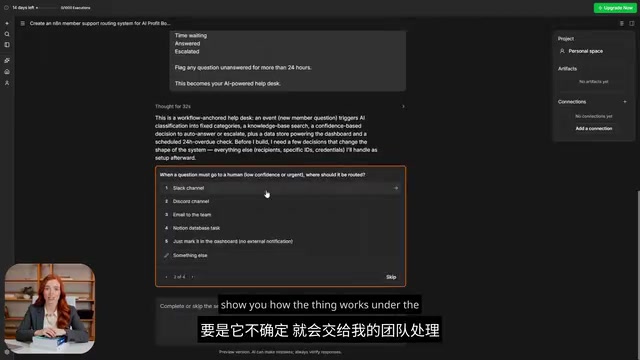
Build a no-code AI customer support assistant using n8n's visual workflow automation platform.
This guide walks through building an AI customer support assistant with n8n, an open-source workflow automation tool. Using visual node-based programming, RAG for knowledge retrieval, and AI Agents powered by LLMs like Claude or GPT, you can automate repetitive questions, route complex issues to humans, and integrate 400+ tools — all without writing code.
Why You Need an AI Support Assistant
If you're running a community, team, or indie project, chances are you've hit this wall: answering the same questions over and over, every single day. When new members join, they inevitably ask "Where do I start?" "How do I get access?" "What's the next step?" — the same words from different people, and you have to manually respond each and every time.
This repetitive labor doesn't just eat up your time — it leads to missed questions and eventually burns the whole team out. Now, with a workflow automation tool called n8n, you can build an AI support assistant that handles member questions autonomously — no large team required, no more copy-pasting.
This article is based on a hands-on walkthrough, breaking down how to build a functional AI customer support help desk from scratch with n8n, along with a deep dive into how it all works under the hood.
What Exactly Is n8n
n8n is an open-source workflow automation tool. It lets your apps "talk" to each other and automatically handles repetitive tasks, saving you from clicking buttons all day long.
The Technical Background of Workflow Automation
Workflow Automation is a technical paradigm that uses software systems to automatically execute repetitive business processes. Traditionally, organizations relied on expensive iPaaS (Integration Platform as a Service) solutions like Zapier and Integromat to connect systems. These platforms typically adopt Low-Code or No-Code design philosophies, enabling non-technical users to build automated workflows.
The core value of workflow automation lies in reducing manual intervention, lowering error rates, and improving response speed. Before the AI era, these tools were mainly used for data transfer and simple conditional logic. But with the maturation of Large Language Models (LLMs), workflow platforms have begun integrating AI capabilities, evolving from "data movers" to "intelligent decision-makers."
Think of it as a giant canvas: you drag small blocks called "Nodes" onto a blank workspace, then connect them with lines. Each block handles just one small step — fetching emails, reading forms, querying AI, sending messages. Arrange these blocks in order, and you've built a workflow that runs automatically.
Two Core Advantages
First: the visual builder. You don't need to face intimidating walls of code. If you can read a flowchart, you can build automations by dragging boxes and drawing connections. This is the key reason n8n has evolved from a "developer-only tool" into an "AI orchestration platform anyone can use."
The Cognitive Model of Node-Based Programming
n8n's node-based programming is a visual programming paradigm rooted in Dataflow Programming. Each node represents an independent operational unit, and the connections between nodes represent data flow and dependencies.
This design lowers the programming barrier: users don't need to understand variables, loops, functions, or other traditional programming concepts — they only need to grasp the linear logic of "input → process → output." Similar paradigms are used in Unreal Engine's Blueprint system, Blender's shader editor, and other professional tools.
However, node-based programming has its limitations: when workflows become complex (exceeding 50 nodes), readability drops dramatically; debugging requires checking data node by node; and version control isn't as convenient as pure code. Therefore, n8n is best suited for small-to-medium automation tasks. For enterprise-level complex processes, traditional programming may still be needed.
Second: powerful integration capabilities. Out of the box, n8n connects to over 400 tools, including Gmail, Google Sheets, Slack, Notion, OpenAI, Anthropic Claude, and more. If a tool isn't on the list, you can hook it up through a simple web request. Basically, whatever apps you use daily, n8n can probably integrate with them.
It's worth noting that n8n supports both a cloud-hosted version for quick onboarding and free self-hosting on your own server — meaning your data stays in your own hands, never touched by third parties.
The Strategic Significance of Open Source vs. Closed Source
n8n's open-source model (based on the Fair-code license) is extremely rare in the automation tool space. Unlike closed-source SaaS platforms like Zapier, open source means complete code transparency, self-hosting capability, and community-driven development.
This strategy brings three major advantages: First, data sovereignty — organizations can deploy on private clouds or local servers, ensuring sensitive data never leaves their infrastructure. Second, cost control — the self-hosted version is free, with only server costs to bear. Third, extensibility — developers can modify source code, add custom nodes, and even contribute back to the community.
For organizations that need to comply with GDPR, HIPAA, or similar regulations, or for budget-constrained startup teams, this open-source + commercial cloud dual model provides rare flexibility.
One Prompt, One Functional Help Desk
The most impressive part is the build process itself. After opening n8n, you simply type a prompt describing the customer support help desk you want, and n8n auto-generates the entire workflow.
Here's how the generated assistant works: when a member asks a question, the AI reads it, categorizes it appropriately, searches the knowledge base for an answer, and replies directly to the member.
RAG: Retrieval-Augmented Generation
The "searching the knowledge base for answers" step actually uses RAG (Retrieval-Augmented Generation) technology. This is currently the mainstream approach for solving the LLM "hallucination" problem.
The RAG workflow: First, knowledge documents are chunked into small segments and converted into vector embeddings, stored in a vector database (such as Pinecone or Qdrant). When a user asks a question, the query is also converted into a vector, and the most relevant document fragments are retrieved via semantic similarity search. Finally, the retrieved results are injected as context for the LLM to generate an answer.
The advantages of this architecture: knowledge can be updated in real-time without retraining the model; answer sources can be traced to ensure reliability; it works well with proprietary domain knowledge (like internal company documents). Through the combination of vector store nodes and AI Agents, n8n enables non-technical users to build RAG systems — something that required a professional ML engineer just a year ago.
If the AI isn't confident, it escalates the question to a human team. And every single question enters a Dashboard and stays there until it's resolved, ensuring nothing falls through the cracks.
The value of this logic: simple questions are handled instantly by AI, and you only get notified when genuine human intervention is needed. Members get help faster, and you save a massive amount of time.
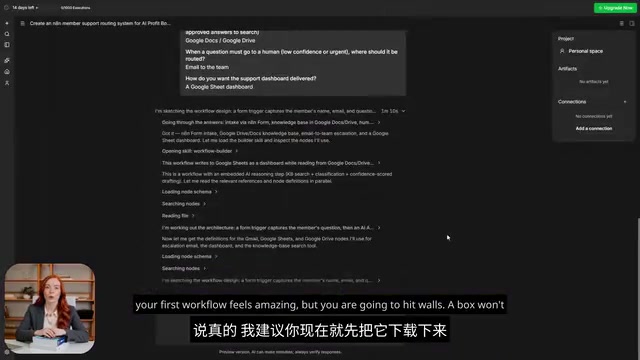
How Workflows Work Under the Hood
Once you understand the underlying mechanics, you can build almost anything. Every workflow starts with a Trigger:
- Someone submits new content
- A new email hits your inbox
- A fixed time each day (say, 8 AM)
The Event-Driven Architecture of Triggers
Workflow Triggers embody the design philosophy of Event-Driven Architecture (EDA). In this pattern, the system doesn't run continuously waiting for instructions — instead, it stays in a "dormant" state and only wakes up to execute when a specific event occurs.
n8n supports three types of triggers: Webhook triggers (activated by external systems via HTTP requests), polling triggers (periodically checking data sources for changes), and scheduled triggers (executing based on Cron expressions). Each type suits different scenarios: Webhooks offer the highest real-time responsiveness but require external system support; polling is simple but introduces latency; scheduled tasks are ideal for batch processing.
The advantage of event-driven architecture is resource efficiency — workflows only consume compute resources when needed. This is the technical foundation that allows n8n's cloud version to bill by "execution count" rather than "runtime duration." For self-hosted users, well-designed triggers can significantly reduce server load.
After the Trigger fires, nodes execute one after another, with data flowing from one block to the next, and can be inspected or modified along the way. You can also add simple logic checks, like "If the question seems urgent, route it to a human; if it's simple, let AI handle it."
The best part — it's all visual. You can clearly see where data is flowing, and if something breaks, you can pinpoint the issue in seconds.
AI Agent: An AI That Actually Takes Action
The most distinctive part of n8n is the AI Agent. It's not just a chatbot that talks to you — it's an AI that can actually take action.
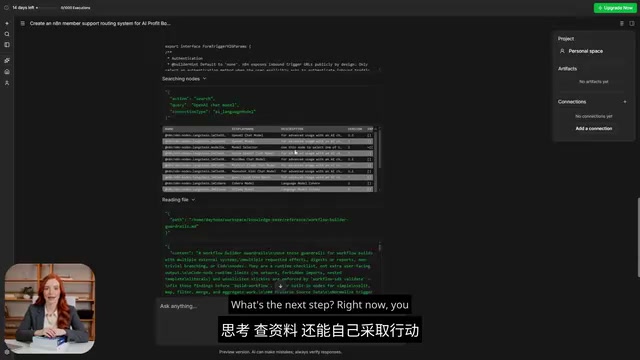
In n8n, there's a module called the AI Agent Node, composed of four parts:
- Brain (Model): An AI model like Claude or GPT
- Instructions: Tell it what to do and how to do it
- Memory: Remember what happened before, instead of starting from a blank slate every time
- Tools: Capabilities it can invoke, like searching documents or sending emails
Technical Architecture of AI Agents
AI Agents represent the cutting edge of AI applications, embodying a paradigm shift from "passive response" to "proactive execution." Traditional chatbots can only answer questions, while Agents can plan tasks, invoke tools, and execute operations.
n8n's AI Agent is based on the ReAct framework (Reasoning + Acting): the AI first analyzes the problem (Reasoning), then decides which tool to invoke (Acting), continues reasoning based on the tool's returned results, forming a think-act-observe loop. This architecture enables AI to handle multi-step tasks, such as "find recent customer complaints and send a summary email."
Among the four core components, the Model determines the intelligence ceiling, Instructions define behavioral boundaries, Memory provides contextual continuity, and Tools expand action capabilities. This modular design allows flexible combinations: you can use Claude as the reasoning engine, a vector database for memory storage, and HTTP nodes to interface with any API. This is precisely why Agents are superior to traditional rule engines — they can handle situations beyond predefined rules.
Combine these four parts, and you get an AI that can read questions, think, research, and take action autonomously. This is the core engine behind the support assistant.
How to Get Started: Start Small
Here's some very practical advice: Don't try to wire up your entire customer support system on day one.
After signing up for n8n's cloud version (or installing it for free yourself), you have two ways to build:
- Use the template library: Grab a ready-made template and tweak it to your needs
- Natural language description: Simply describe what you want in plain language and let the builder draft it for you
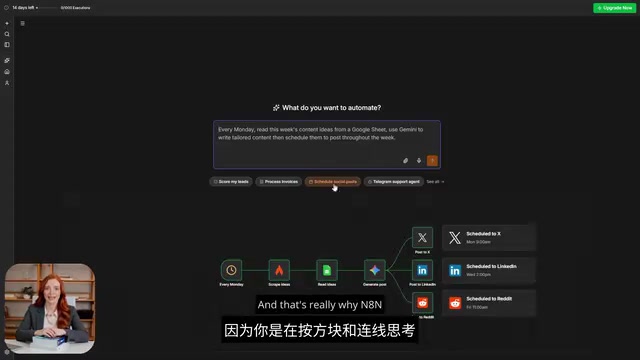
Start with one small feature, watch how it runs, then gradually add the next module. This way, the learning process won't overwhelm you. n8n does have a slight learning curve — your first workflow will feel a bit "weird" because you're thinking in "boxes and connections" instead of clicking around as usual. But once you build your first working automation, the sense of accomplishment is incredibly rewarding.
Who Should Use n8n
Honestly, anyone drowning in repetitive tasks is a good fit:
- Community managers: Answering the same questions over and over
- Lean teams: Need to focus energy on what matters most
- Solo creators: Shouldering all the work alone
If you've ever thought "Can a bot do this part for me?" — n8n is very likely the answer. And the Support Agent is just the starting point. Once you're comfortable, you can automate onboarding, content follow-ups, and virtually any other process.
With new AI connectors being added nearly every month, plus the data sovereignty that comes with self-hosting, this combination of "capability + control + AI" is extremely compelling for anyone running a community or project.
Conclusion
n8n is putting automation capabilities that once belonged exclusively to developers into the hands of everyday people. Its value isn't in "looking cool" — it's in truly freeing you from repetitive labor. Instead of mechanically answering the same questions every day, spend one afternoon building an AI assistant that works for you 24/7.
Actually use AI, instead of just watching videos about it — building your first workflow is where the real learning begins.
Related articles

Firebase AI Logic + Gemini Nano 4: A Practical Guide to Android AI Development
How Firebase AI Logic and Gemini Nano 4 help Android developers ship generative AI: App Check and prompt templates ensure security, hybrid routing cuts latency and cost, Spend Caps control budgets, and AI monitoring provides observability.

Microsoft AI Agent Breakthroughs: More Efficient, Better at Code and Weather Forecasting
Microsoft Research Focus Issue 97: ForkPilot cuts agent inference costs, Cabra reveals coding agents' code-understanding gap, Teletune learns workflows from logs, PBC improves extended forecasts, BioEMU-2 opens preview.

Prime Intellect Releases Prime Mega MoE: Trainable Fused MoE Kernel with 3.11x Forward Speedup
Prime Intellect releases Prime Mega MoE, adding backpropagation to DeepSeek's fused Mega MoE kernel for trainability. Up to 3.11x forward speedup and 34% faster Qwen3 MoE training steps in prime-rl.