Building an AI Personalized Cold Email System with Laravel + Vue.js: Episode 6 Progress Update

AI cold email system goes live with Google mail integration, reply parsing, and Sentry error tracking.
This article documents a milestone update for an AI-powered personalized cold email system built with Laravel, Vue.js, and Inertia.js. The project has been deployed to production for public testing. Key engineering work includes: integrating the Google Gmail API for real-world email send/receive capability, introducing the `email reply parser` library to extract clean reply content while filtering out quoted text and signatures, and integrating Sentry for production error tracking and observability. Together, these improvements mark the critical engineering steps in taking a cold email product from local development to a usable production environment.
Project Update: System Now Live for Testing
The AI-Powered Personalized Cold Email System has reached a significant milestone — the project has been deployed and is now running under a subdomain of q.global.net, entering the public testing phase.
For a full-stack application built on the Laravel, Vue.js, and Inertia.js stack, moving from local development to a live environment is a critical step. The author acknowledges that the project is still in testing and that the live version may have various issues, openly inviting users to report any bugs they encounter for continuous iteration. This transparent development approach — especially for a tutorial series — gives viewers a real look at how "going live is just the beginning" in real-world software engineering.
Email Sending & Receiving: Google Integration Complete
The behind-the-scenes work this episode focused on building out the email send/receive pipeline. The author fixed several issues related to sending and receiving emails, and completed the connection setup with Google, enabling the system to send and receive emails through Google services.
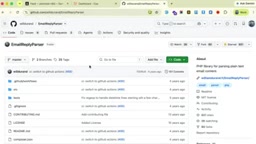
For a cold email system, a stable and reliable email pipeline is the lifeblood of the entire product. Whether emails are sent correctly and whether replies are accurately received and identified directly determines whether the downstream AI personalization logic has data to work with. Completing the Google integration means the system is no longer relying on simple SMTP test configurations — it's moving toward supporting real mailbox scenarios.
In a Laravel application, there are typically two paths for integrating Google mail services: configuring Gmail SMTP for sending, or using the Google Gmail API (OAuth 2.0) for full send/receive capability. The former only supports sending, while the latter allows reading the inbox, listening for new emails, managing labels, and more — making it far better suited for cold email scenarios that require reply tracking. Integrating the Gmail API requires creating an OAuth app in the Google Cloud Console, requesting the relevant permission scopes (such as gmail.send and gmail.readonly), and handling Access Token storage and refresh logic. Compared to using SMTP directly, the Gmail API is more complex to configure, but offers greater stability and completeness — making it the recommended approach for building production-grade email automation systems.
Reply Parsing: Introducing the Email Reply Parser
Another notable technical improvement this episode is the introduction of the email reply parser library for parsing incoming reply emails.
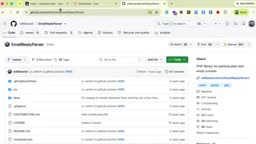
Anyone with experience in email development knows that a reply email often carries a lot of redundant content — quoted original messages, signatures, conversation history chains, and so on. Displaying the entire raw email in the UI would make for a terrible user experience. The email reply parser library's job is to extract the actual "new content" from all this noise, allowing replies to be presented in a cleaner, more user-friendly way in the UI.
This kind of seemingly small detail is exactly what separates a polished product from a rough one. A mature email system is often built on precisely this kind of careful attention to detail.
The email reply parser was originally open-sourced by the GitHub engineering team as a Ruby library, and has since been ported to multiple languages including PHP. Its core mechanism works by identifying specific markers in emails — such as > quote characters, citation headers like On ... wrote:, and -- signature separators — to split the email body into several fragments. Each fragment is then labeled as either "new content," "quoted content," or a "signature," and only the first non-quoted fragment is returned as the actual reply body. In a cold email context, this processing is especially critical: if the AI's downstream logic (such as sentiment analysis or intent recognition) mistakenly treats a conversation history chain as new content, it will significantly degrade the accuracy of those judgments. The email reply parser is therefore not just a UI-layer optimization — it's also a prerequisite filtering step for ensuring AI data quality.
Observability: Sentry Error Tracking Integration
With the project now live, the author also integrated Sentry for tracking production errors, specifically emphasizing that this step is "very important."
In a production environment, bugs are often difficult to reproduce, and without observability tools you're essentially flying blind when it comes to live issues. Sentry can capture exceptions in real time and record error stack traces, allowing developers to pinpoint problems immediately. For a project that has just launched and is still frequently fixing bugs, error tracking is almost essential infrastructure. This also serves as an important reminder for developers following this tutorial series: going live isn't just about deploying code — it also means setting up monitoring and error tracking systems.
Sentry is an open-source application performance monitoring and error tracking platform with SDK support for major frameworks including Laravel and Vue.js. On the Laravel backend, Sentry can be integrated via the sentry/sentry-laravel package, which automatically captures unhandled exceptions and reports them. On the Vue.js frontend, @sentry/vue captures JavaScript runtime errors. Each error record comes with a full call stack, request context, user environment information, and more, making it easy for developers to quickly reproduce and locate issues. For full-stack applications, integrating Sentry separately on both frontend and backend and configuring the sampling rate via tracesSampleRate enables end-to-end error coverage without impacting performance. Sentry offers a free tier, making it an ideal choice for personal projects or early-stage products looking to establish baseline observability right after launch.
Summary
This episode, as a progress update, revolves around four key actions: officially launching the project for testing, completing Google email send/receive integration, introducing a reply parsing library to improve display quality, and integrating Sentry for error tracking. While the episode is relatively brief, each item lands on a critical milestone in the journey of taking a real product from development to production.
For developers looking to build similar AI applications using the Laravel + Vue.js + Inertia.js stack, this update provides a clear practical roadmap: get the core functionality working first, then progressively fill in the email pipeline, data parsing, and production observability. Readers interested in following along can keep an eye on future updates in the series to see how this cold email system continues to evolve.
Related articles

OpenAI Reportedly Raising $30B at $1.25T Valuation Ahead of IPO
OpenAI is planning a $30B funding round at a possible $1.25T valuation, paving the way for an IPO. If completed, it would set a private company valuation record. This article analyzes the funding size, pre-IPO logic, and industry signals.

a16z Crypto Rebrands as a16z Frontier: Pivoting to Frontier Tech as Blockchain Investment Retreats
a16z's Chris Dixon-led crypto division rebrands from a16z Crypto to a16z Frontier, expanding into broader frontier tech. We analyze the blockchain investment retreat behind the rebrand and its impact on the crypto VC industry.

Next-Gen Xbox Could Cost Up to $1,800? The High-Price Strategy's All-In Gamble
Fortune reports the next-gen Xbox may launch in 2028 priced at $1,200–1,800. We analyze the market logic, competitive risks, and Microsoft's possible strategic pivot.