Building an AI Sales Agent with n8n + OpenAI: An 8-Step Automation Walkthrough

Use n8n to connect OpenAI, Sheets, and Gmail into an AI sales lead workflow with human approval.
The article breaks down an 8-node n8n workflow: receive form submissions via Webhook, call OpenAI to score leads with a structured prompt, then write data to Google Sheets and generate personalized Gmail drafts, finally sending after human confirmation via the wait-for-approval node. Its core design replaces polling with event-driven intake to compress response latency, and the human approval gate ensures AI errors never reach customers directly. The article emphasizes that the workflow's value lies in debuggability and prompt quality rather than black-box automation, and notes that the approach isn't cost-effective for low lead volumes or complex quoting scenarios.
Leads slip away in the silence of the first five minutes—a lesson the sales industry has validated again and again. An automated system can complete qualification scoring, data archiving, and email drafting the moment a user submits a form, while retaining human approval as a safety valve. That's exactly the workflow this article breaks down: using n8n to connect OpenAI, Google Sheets, and Gmail into an AI sales agent that runs 24/7.
Overall Architecture: An 8-Node Pipeline
The design philosophy behind this workflow isn't to build a chatbot, but a production line with clearly defined responsibilities. From lead intake to final human-confirmed sending, there are 8 nodes in total, each with a single job: Webhook receives the form submission, AI scores the lead, Google Sheets records the data, Gmail generates a personalized draft, waits for human approval, and sends once approved.

The value of this decomposition lies in debuggability. When something goes wrong at a step, you can quickly pinpoint whether it's inaccurate prompt-based scoring or misaligned table field mapping—rather than facing a black-box LLM call with no recourse. According to the official n8n tutorial, building the entire flow takes about 10 minutes, but what really determines the outcome is the subsequent prompt tuning.
Step 1: Webhook Intake—Eliminating Response Delay
The workflow starts with a Webhook node. After creating a Webhook node in n8n, you get a unique URL; plug this URL into the action address of your lead form, and every time a user submits the form, the data is pushed to the workflow instantly, triggering all downstream nodes.
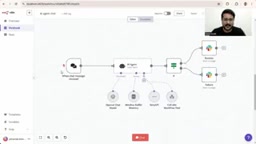
This design is more efficient than polling a spreadsheet or periodically pulling emails, because it's event-driven—submission triggers immediately, with no waiting window. For the "5-minute silence" problem, this step compresses response time to the second level.
A webhook is an event-driven callback mechanism: when a specific event occurs in an external system (such as a form submission), it proactively sends an HTTP request to a pre-configured URL, pushing data to the receiver in real time. Unlike polling, webhooks don't require the receiver to repeatedly query the data source at fixed intervals, resulting in lower latency and less resource overhead. In this workflow, n8n's Webhook node plays the role of that receiver—the external form only needs to point its submission address to that URL to achieve "submit-to-trigger" second-level response.
Step 2: The AI Brain—Lead Scoring via Prompt
After the Webhook, data flows into the AI node (OpenAI), whose core is a structured lead-scoring prompt. The tutorial's approach is to have the model score the lead and judge whether it warrants high-priority follow-up.
There are several design details worth noting: the prompt needs to specify the output format explicitly (e.g., score range, priority label, reasoning), otherwise the model's natural-language response will be hard for downstream nodes to parse. At the same time, scoring criteria should be hard-coded into the prompt—such as company size, budget signals, clarity of need—rather than letting the model improvise, otherwise the same batch of leads will get drifting scores at different times.
A prompt is the input instruction that guides a large language model to complete a specific task. In structured scoring scenarios, the prompt isn't just a task description—it also serves as an "output contract": it must explicitly require the model to return results in a specified format (such as score range, priority label, reasoning), otherwise the model may return free text that downstream nodes can't parse. In addition, baking the scoring criteria (company size, budget signals, clarity of need, etc.) into the prompt reduces output randomness and prevents the same lead from getting drifting scores at different times.
Step 3: Data Archiving and Email Drafting in Parallel
After scoring, the workflow branches into two paths. One writes to Google Sheets, recording the complete lead information; the other calls Gmail to generate a personalized follow-up email draft.
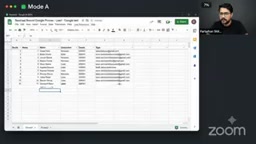
The tutorial demo mentions a practical touch: the draft proactively flags items to be confirmed, such as "we still need to discuss budget," explicitly leaving information the AI can't determine for a human to fill in. This is far safer than letting the model fabricate a number, and it lets the approver know at a glance where edits are needed.
Step 4: The Human Approval Gate—The Last Safety Lock
The most critical design in the entire architecture is the wait-for-approval node. No email is sent without a human clicking confirm.
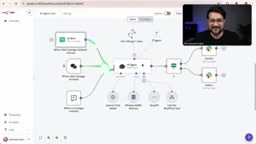
This "human-in-the-loop" gate solves the biggest trust barrier for AI sales agents: the model can get prices wrong, misunderstand needs, or use the wrong tone, but mistakes won't reach the customer directly. The approver sees an email with data already filled in and a draft already written—they only need to make judgments and minor adjustments, far less work than writing a reply from scratch.
From an engineering perspective, this node is also an observation window for prompt iteration. Last week's approval records are the best training data—which drafts got edited the most, which scores diverged from human judgment—all point to specific areas for prompt improvement. The tutorial's author also recommends closely monitoring logs during the first week after launch to fine-tune the prompt.
"Human-in-the-loop" is a human-AI collaboration model: the automated system handles most of the process, but pauses at key decision points to wait for human confirmation or correction before continuing. In n8n, the wait-for-approval node suspends workflow execution until the approver responds through a specified channel (such as an email link or interface action). This design preserves the speed of automation while keeping error risk behind a human gate—a compromise widely adopted in current AI sales agent deployments.
Deployment Advice and Limitations
The barrier to entry for this workflow is low: n8n can be self-hosted, OpenAI bills by token, and Google Sheets and Gmail are tools most teams already have. But it isn't suitable for every scenario. Businesses with very low lead volume are better off replying manually; for sales involving complex quotes or contract terms, the cost of editing an AI draft may exceed the cost of writing manually.
What really determines the success of this system isn't the tool stack, but the combination of prompt quality and approval process. Positioning AI as a "draft-prefilling assistant" rather than an "auto-reply machine" is the more pragmatic approach at this stage—it preserves the speed of automation while not fully handing the risk of customer communication to the model.
One-line Summary
Use n8n to connect OpenAI, Sheets, and Gmail into an AI sales lead workflow with human approval.
Paragraph Summary
The article breaks down an 8-node n8n workflow: receive form submissions via Webhook, call OpenAI to score leads with a structured prompt, then write data to Google Sheets and generate personalized Gmail drafts, finally sending after human confirmation via the wait-for-approval node. Its core design replaces polling with event-driven intake to compress response latency, and the human approval gate ensures AI errors never reach customers directly. The article emphasizes that the workflow's value lies in debuggability and prompt quality rather than black-box automation, and notes that the approach isn't cost-effective for low lead volumes or complex quoting scenarios.
Related articles

WorkBuddy Full Tutorial: Build an AI Office Automation Agent from Scratch
A complete WorkBuddy tutorial: installation, three working modes, multimodal picture book video practice, expert team agent building, and workflow configuration for low-cost AI office automation.

WorkBuddy Agent Complete Guide: From Beginner to Automation in 7 Days
Based on Bilibili's 256-episode WorkBuddy masterclass, this systematically breaks down Tencent's AI office workbench core capabilities: Agent principles, Skill encapsulation, cross-platform connectors, scheduled automation, knowledge bases, and zero-code development, with learning path recommendations.

8 AI Accounts, 7 Failed: An Honest Review of Using AI to Get Work Done
Only 1 of 8 AI-run Bilibili accounts succeeded. We break down the real difference between "performing AI" and "using AI to get work done."