Building an AI Second Brain with Claude + Notion: A Complete Guide
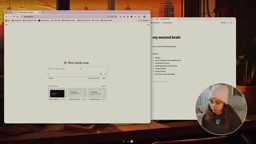
Build a low-friction AI task orchestration second brain with Claude Skills, Notion, and Calendar.
The article walks through YouTube creator Popo's full workflow for building a "second brain" with Claude and Notion. The core idea is not a note repository but a task orchestration layer: map out life "buckets," have Claude auto-create a color-coded Notion database, use a Skill to fix personal context and avoid repeated explanations, do a weekly voice brain dump that Claude converts into tasks grouped by week, and finally connect Google Calendar for auto-scheduling, with a Today column and weekly migration keeping plans clean. The author notes this relies on clear self-knowledge and initial tuning, with voice quality and task granularity determining usability—essentially "AI does rough scheduling, the human does final review."
Why Do You Need a Second Brain?
"You have nearly 20 to-dos, 2 videos to edit, 2 apps to build, a dinner party to prepare, and a flight within 24 hours." This is the scene at the start of a video by YouTube creator Popo, where her AI assistant presses her on her workload. Juggling dual roles as a software engineer and video blogger, she admits: it's impossible to keep everything in your head—sooner or later it will explode.
But Popo also offers an important caveat: don't feel you need a second brain just because everyone on YouTube is building one. First ask yourself—why do I need it? For her, the answer is that a multi-threaded life needs clear compartmentalized management. If your pain points are similar, this approach is genuinely for you.
Core Tools: Claude + Notion
The engine of the whole system needs just two tools: Claude handles understanding, planning, and execution, while Notion handles storage and visualization. Integrating the two is very simple—just connect Claude to Notion and complete authorization. Popo emphasizes that Notion is "the best thing ever," while Claude handles the vast majority of automation.
According to Popo's demo in the video, the entire setup starts from scratch and is divided into five steps.
Claude's Notion integration is part of the MCP (Model Context Protocol) ecosystem. MCP is an open protocol proposed by Anthropic that lets models like Claude connect to external data sources and tools in a standardized way—after authorization, Claude can read and write specified Notion pages, databases, and blocks without manual export/import. Compared with traditional direct API connections, MCP encapsulates authentication, resource discovery, and operation semantics, so users only need to describe their intent in conversation to create databases, write records, and update content. This also explains why Popo barely touches the Notion interface at all: Claude performs most database structure creation and record writing in the background via MCP. Note that authorization scope should be limited to the necessary pages as much as possible to avoid granting the model overly broad read/write permissions.
Step 1: List the "Buckets" in Your Life
Group the important areas of your life into what are called "buckets." Take the fictional character Alex: he's a 25-year-old software engineer who is also building a dog-finding app, rock climbing, teaching dance classes, maintaining relationships with friends and family, learning French, and running an Etsy shop—seven buckets in total.
The key to this step is first thinking clearly about the structure of your life; all subsequent tasks will be categorized by bucket.
Step 2: Let Claude Build the Database Automatically
Give Claude the Notion page link and ask it to create a "Life Database," where each task has five fields: bucket, notes, status, week, and priority. Provide the bucket list from the previous step as well, and Claude will automatically generate color-coded filter options.
In Popo's demo, the database was named "Yellow" (she originally wanted to call it "I Love Purple"). Claude quickly finished building the database and added the seven buckets. This step requires almost no manual work—you just need to state your requirements clearly and leave the rest to AI.
Step 3: Use a Skill to Teach Claude "Who You Are"
This is the smartest design in the whole system. To avoid re-explaining background every time a new conversation starts, Popo uses Claude's Skill feature (reusable workflows). Using the /create skill command, she created a skill called "Yellow Second Brain for Alex."
During creation, Claude proactively asks questions: What are Alex's working hours? What are the top priorities? Does he need weekly planning synced to Notion? You can keep answering until it understands you well enough. The final Skill document contains all the context: Alex's identity, priorities, communication style, Notion database links, and more.
This means you never have to copy-paste long prompts again—open the Skill and start working directly.
A Skill is a reusable instruction package in Claude, typically containing a structured system prompt, reference files, and optional script tools. Unlike temporarily pasting a long prompt into each conversation, a Skill is saved and can be invoked at any time, with the model automatically loading its context and constraints. It's suited to fixing "stable, unchanging" information: identity settings, work habits, output formats, external resource links, and so on. When creating a Skill, Claude proactively asks for missing details, essentially helping you make implicit preferences explicit. The difference between a Skill and a Project is that a Project focuses on isolating conversation spaces and sharing knowledge bases, while a Skill is more like a "capability module" that can be invoked across conversations, ideal for packaging repetitive workflows into one-click templates.
Step 4: Brain Dump
This is Popo's favorite part, which she does once every Sunday or Monday evening. When her head is filled with the anxiety of "this needs doing, that needs doing," she opens the Skill and speaks all her thoughts aloud. She uses a speech-to-text tool for a first round of compression to reduce Claude's processing burden; you can also use tools like Whisperflow directly.
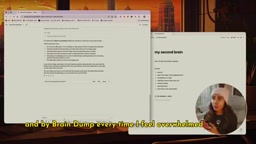
Claude turns this rambling into concrete tasks in Notion. Popo prefers the kanban view over the list view because lists "look more overwhelming." She also groups tasks by week, because her life rhythm moves week by week.
Claude then offers priority suggestions: what to do on which day, whether Tuesday is suitable for rock climbing, whether she's on-call, and so on, while continuing to ask follow-up questions to optimize the schedule.
Speech-to-text tools (such as Whisperflow, system dictation, Otter, etc.) play a role in the "brain dump" step that goes beyond saving typing: they lower the barrier to expression. When anxious, people tend to jump between thoughts and speak in fragments, and voice preserves these raw fragments, which the model then structures and summarizes. When choosing a tool, pay attention to three things: transcription latency, accuracy for accents and proper nouns, and whether it supports direct output to the clipboard or a specified app. If transcription quality is poor, errors propagate all the way into task breakdown and scheduling, so it's advisable to test recognition with short sentences first, and when necessary quickly proofread key names, times, and locations after transcription before handing it to Claude.
Step 5: Connect the Calendar So Plans Actually Happen
Popo is a heavy calendar user, so she went further and connected Claude to Google Calendar. After the Skill was updated, Claude not only writes tasks into Notion but also schedules them directly into the corresponding time slots on the calendar. Notion Calendar can also integrate with Google Calendar, but since she has used Google Calendar for years, she keeps it as is.
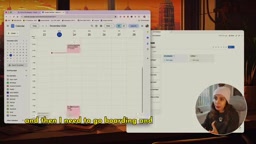
In the demo, Claude even proactively adds her daytime software engineering work hours and color-codes them by sub-calendar—different task types get different colors so the calendar doesn't look "insane."
Google Calendar's "sub-calendar" mechanism is key to keeping multi-threaded schedules readable. Multiple calendars (such as work, personal, project A) can be created under each Google account; they share the same timeline but can be independently color-coded and shown/hidden. When Claude writes events via the calendar API, it can specify the target calendar ID, thereby color-coding by task type. When scheduling, also pay attention to time zones, busy/free status, and event duration estimates: the time blocks the model produces are only a first draft, and you should allow drag-and-drop adjustments during actual execution. If a team collaboration scenario requires sharing, you can make the corresponding sub-calendar public or authorize it to others, avoiding piling everything into the default main calendar and causing visual clutter.
Daily Operation: The Today Column and Weekly Migration
Popo added a "Today" status column to the database. Every morning she opens the kanban, and whatever is in the Today column is what must be done that day; when finished, she drags it to Done. On Sundays, she simply tells Claude: "Move all unfinished tasks from this week to next week," and it automatically updates task statuses in Notion and Google Calendar.
The value of this workflow is that morning planning time shrinks from half an hour to nearly zero. Planning becomes simple, anxiety decreases, execution speeds up, and you're happier—which leaves more time for what truly matters.
My Observation: The Boundaries of an AI Second Brain
Popo's approach is essentially a task orchestration layer, not a traditional note-taking knowledge base. She herself admits that the term "second brain" is overused. The core value of this system is: Claude generates the first rough plan, and the human reviews and decides.
The notable limitations are: it relies heavily on a clear understanding of your own life structure (the buckets in step one), and it depends on Claude's continuous accumulation of personal context. The Skill mechanism solves the problem of repeated explanations, but initial tuning still requires investment. In addition, the accuracy of voice input and the granularity of task breakdown determine the usability of the final system—garbage in, garbage out.
For people working multi-threaded and pushing multiple projects forward at once, this combination of Claude + Notion + Calendar offers a reproducible, low-friction starting point. You don't have to copy the seven buckets, but the division of labor—"let AI do the rough scheduling, you do the final review"—is worth borrowing.
Related articles

A 19-Year-Old's Rental Horror Story: Ceiling Collapse, Bug Infestation, and the Lessons It Taught Me
At 19, my first off-campus rental brought bug infestations, no heat, a collapsed ceiling, and a ruined laptop with no renter's insurance. Here are the hard-won lessons for first-time student renters.

Veda Nurse's Cranial Nerve Exam: Why ASMR Role-Play Is Going Viral
Bilibili creator Veda's cranial nerve exam ASMR video goes viral, blending humor and sensory triggers through nurse role-play. This article analyzes its unique appeal and the audience psychology behind ASMR role-play.

LG Cinebeam AI Review: 120-Inch Giant Screen + 3000 Lumens, a New Choice for the Living Room Theater
LG Cinebeam AI projector review: 3000 ANSI lumens, 4K, 100 inches from about 8 cm and 120 inches from about 18 cm. Built-in webOS, AI Concierge voice recommendations, AI Sound Pro 11.1.2 virtual surround, and Game Optimizer—positioned for fixed living room installation, complementing the portable Cinebeam S.