Building an Enterprise AI Assistant from Scratch with Claude Code: A Complete Loop Engineering Walkthrough

Build a production-ready enterprise AI assistant from scratch using Claude Code and the Loop engineering methodology.
This article walks through a hands-on demonstration of building an enterprise AI assistant with Claude Code, covering the full journey from requirements document to a running, tested system. The frontend uses Streamlit, the backend is organized in FastAPI layers, and the system supports session management, streaming replies, and knowledge base integration. Non-functional requirements — unified exception handling, strict layer separation, and timeout controls — are explicitly enforced. Configuration requires only a DeepSeek API key, and services can be started conversationally through Claude Code. A built-in pytest suite covering chat, knowledge base, and health check modules provides objective acceptance criteria for AI-generated code.
As AI programming tools continue to mature, more developers are asking how to go from a requirements document to a fully functional enterprise-grade AI assistant system — fast, and with the help of Claude Code. This article is based on a hands-on demonstration by a Bilibili creator, tracing the entire project lifecycle from requirements definition, architectural layering, and API design through to testing and acceptance. The goal is to help you understand how Claude Code can deliver real value in production engineering scenarios.
Project Scope and Feature Set
The core of this project is building an enterprise AI assistant system using Claude Code, guided by the Loop engineering philosophy. The frontend is built with Streamlit, featuring a sidebar module and a chat area — an interaction pattern similar to familiar conversational applications.
On the feature side, the system covers the key touchpoints of session management: creating sessions, sending messages, message history, and streaming replies (typewriter-style character-by-character output). Beyond that, the system integrates a knowledge base capability with corresponding API endpoints, and even includes a health check endpoint for monitoring service status post-deployment.
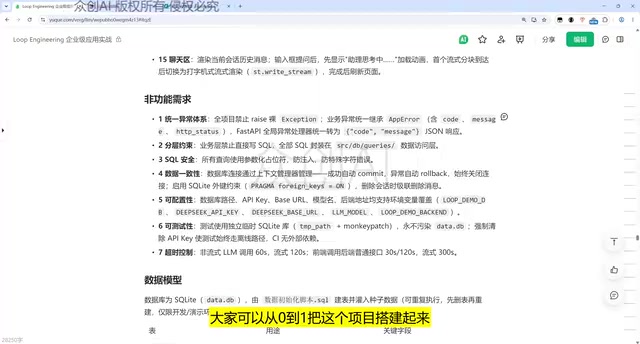
This feature set represents a solid foundation for an AI assistant ready to serve real users. The creator also noted that viewers can take the requirements document directly and use Claude Code to build a similar system from scratch — or use an existing project to reproduce and validate the results. Both approaches are viable.
What is Loop Engineering?
Loop engineering is an AI-assisted development methodology centered on a core "Plan → Execute → Verify" cycle. In this framework, developers don't write code directly. Instead, they continuously describe their intent to the AI, review the output, and provide corrective feedback — forming a closed iterative loop. Unlike one-shot prompting, Loop mode emphasizes that each conversation turn builds on accumulated context, allowing the AI to advance the project with a full understanding of the whole, rather than completing isolated fragments. Combined with AI coding tools like Claude Code — which can read and write files and execute terminal commands — Loop engineering can cover the entire development cycle from code generation and dependency installation to service startup, dramatically reducing the overhead of switching between tools manually.
What is Streamlit?
Streamlit is a Python frontend framework designed for data science and AI applications. It lets you build interactive web interfaces without writing any HTML, CSS, or JavaScript. Its core mechanic is "script as interface" — every user interaction triggers the entire Python script to re-execute, with component state managed automatically by the framework. This design makes AI-generated frontend code naturally readable and easy to debug, making it an excellent choice for the frontend layer of prototypes or internal tools.
Non-Functional Requirements: The Key to Engineering Quality
What truly distinguishes this project from a toy-level demo is its attention to non-functional requirements. The demonstration specifically called out several engineering constraints:
- Unified exception handling: Error management is centralized rather than scattered throughout the codebase.
- Layer enforcement: The business layer is prohibited from writing SQL directly; all database queries are encapsulated within the DB Query layer.
- Data consistency, configurability, and testability: All explicitly incorporated at the design stage.
- Timeout controls: Timeout mechanisms are set for time-consuming operations such as LLM API calls.
The strict separation between the business layer and the data layer is one of the most architecturally deliberate choices in this system. It prevents business code from becoming coupled to SQL, making future maintenance and testing far more manageable. For developers looking to produce maintainable code with AI programming tools, these kinds of constraints are often the most valuable part of a requirements document — they define the quality floor for the code Claude Code generates.
Data Models and API Design
The data model revolves around several core tables: employees, sessions, knowledge base entries, LLM interaction logs, and more. These tables form the data foundation of the entire assistant system.
The API documentation is organized by business category into three main groups:
- Session APIs: Handle session creation and management.
- Knowledge base APIs: Handle knowledge retrieval requests.
- Message sending APIs: Carry the core conversational interaction flow.
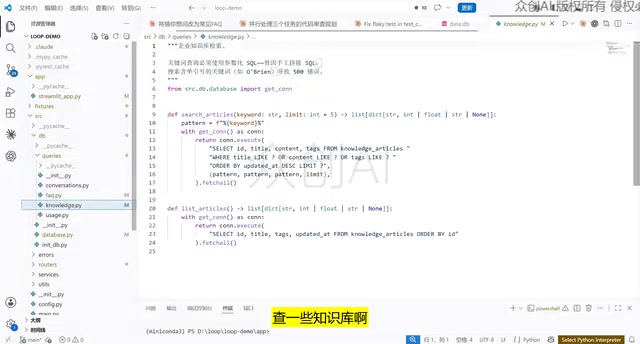
The directory structure reflects a clean separation of concerns: the DB layer handles database connections and knowledge base queries; the Error module centralizes error declarations; the Router layer declares all endpoints via FastAPI; and the Service layer contains the core business logic — including system prompt configuration, LLM invocation, session completion, and token usage and billing logic. This layered organization significantly improves the overall readability of the project.
What is FastAPI?
FastAPI is a high-performance asynchronous web framework in the Python ecosystem, with type annotation-driven API declarations at its core. Developers use Python's type hints to define request and response data structures, and FastAPI automatically generates OpenAPI documentation and performs runtime parameter validation. Compared to traditional frameworks like Flask, FastAPI natively supports async/await — a clear advantage for scenarios that require concurrent LLM API calls. In a layered architecture, the Router layer is solely responsible for declaring HTTP routes and parameter structures, while the Service layer focuses on business logic. The two are decoupled via dependency injection, allowing unit tests to target the Service layer in isolation without spinning up a full HTTP server.
Environment Configuration and Project Startup
The only parameter that needs to be configured manually before running the project is the DeepSeekAd API key, injected via an environment variable. The demonstration covered cross-platform configuration:
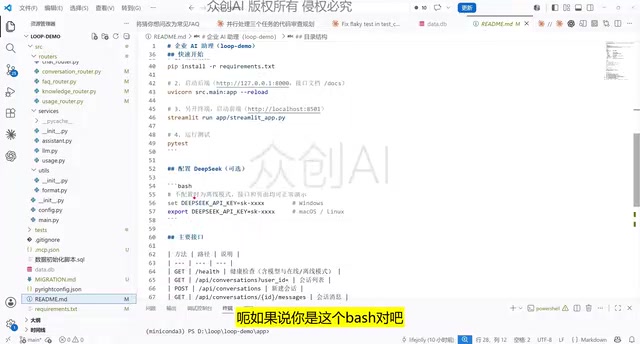
- Linux / Mac: Use the
exportcommand — note this is temporary. For persistence on Mac, add the environment variable to your shell configuration file. - Windows: Use the
setcommand, thoughsetxis recommended to persist the key locally for future sessions.
Once configured, the project is ready to run. There are two startup options, and the creator recommends the conversational approach: simply tell Claude Code to "start the project," and it will automatically read the startup instructions in README.md and bring up both the frontend and backend services together.
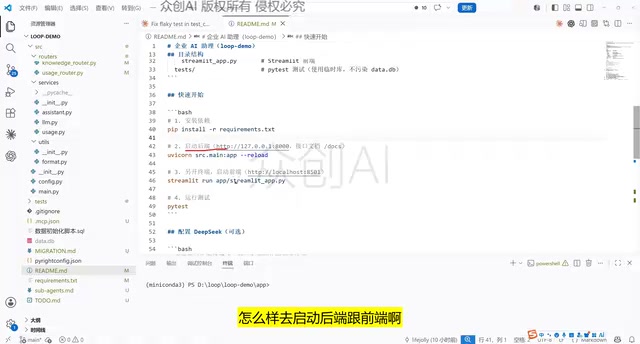
If you prefer manual control, you can copy the startup commands from the README and run them in an integrated terminal to start the backend and frontend services separately, then refresh the browser to access the app. This "documentation as executable instructions" pattern is a quintessential example of Loop engineering combined with AI-assisted development — the README is no longer just a manual; it becomes an input for the AI to act on.
Automated Testing and Acceptance
The project includes built-in acceptance tests with runnable test cases. Simply run pytest in the integrated terminal to trigger the automated test suite.
Test coverage is quite comprehensive, spanning: chat functionality, session planning, FAQ, Help, Health Check, Knowledge Usage, and more. These test cases can be used as-is or extended by developers as needed.
For AI-generated projects, the testing phase is especially important — it serves as the objective standard for verifying whether Claude Code's output meets expectations. With a complete test suite in place, whether you're building from scratch or reproducing an existing project, you can establish genuine confidence in the system's correctness.
What is pytest?
pytest is the most widely used testing framework in the Python community, replacing the class-inheritance style of traditional unittest with a clean, function-based approach. It supports parameterized tests, fixtures, and a rich plugin ecosystem, covering everything from unit tests to end-to-end integration tests at varying levels of granularity. In the context of AI-generated code, pytest's value is especially pronounced: since AI can introduce subtle deviations — inconsistent field naming, missing edge cases — a pre-defined test suite effectively encodes "expected behavior from requirements" into a repeatedly executable acceptance standard. Re-running tests after each code change quickly surfaces regressions introduced by the AI, shifting the burden of review from line-by-line code inspection to the test design phase.
Conclusion
What this demonstration showcases is not just an AI assistant project — it's a replicable methodology for AI-assisted development: start with a clear requirements document that defines both functional and non-functional constraints, use Claude Code to generate code within a well-layered architecture, and close the loop with automated testing. For developers looking to get hands-on with AI-assisted programming, this complete "requirements → development → testing" pipeline offers far more practical value than isolated code snippets ever could.
Related articles

Random Pruning of the DPO Computation Graph: 1.4x Training Speedup and Lower Peak Memory
DPO training too slow and memory-hungry? This paper proposes a random pruning framework for the DPO computation graph, sampling independently across position, sequence, and branch dimensions; branch pruning achieves a 1.426x step-time speedup and cuts training time by about 30%, with in-depth attribution of memory and time gains.

Why Does JEPA Underperform MLM in Longitudinal EHR Representation Learning?
New study compares JEPA and MLM for longitudinal EHR representation learning on MIMIC-IV: three JEPA variants train stably without collapse but underperform MLM; target size, not heterogeneity, drives prediction error.

Transfer Learning + Visible Light Communication: A New Approach to Energy-Efficient Indoor Positioning
A study proposes a transfer learning-based visible light communication indoor positioning method, achieving 47% accuracy improvement on the BOSCH factory dataset, 67.5% model efficiency under high noise, and introducing the ME composite metric for energy-efficient positioning in energy-constrained industrial IoT scenarios.