Building and Shipping a Mobile App from Scratch with Codex and GPT-6 Astra: The Full Workflow

Bilibili creator Bullock's Codex AI development workflow, covering the full pipeline from planning to App Store release.
This article details Bilibili creator Bullock's AI-assisted mobile app development workflow, using building an Instagram-style app called CodexGram to demonstrate the full lifecycle from planning and UI design to feature implementation and App Store release. It also covers the limitations: AI still struggles on large projects, human judgment is still needed for direction and compliance, and tools and developer accounts carry real costs.
Why This AI Development Workflow Deserves Attention
Using AI to write code is nothing new, but most people get stuck between "having AI generate a single page" and "shipping an app to the App Store." The core value of this Codex tutorial by Bilibili creator 布洛克 (Bullock) is that it demonstrates a path that covers the entire pipeline: from idea, planning, UI design, authentication, and backend database all the way to App Store submission and error monitoring.
According to Bullock in the video, he used this exact same workflow to build and ship his own mobile app to the App Store, and it passed review on the first submission. The tutorial uses building an Instagram-style social media app (project name CodexGram) as its case study, covering the complete development lifecycle.
The most valuable thing to learn from this workflow isn't any single tool—it's an engineering mindset of "context first": before writing any code, feed the AI your plan, designs, and specifications so it doesn't have to guess on critical decisions.
Step One: Use Planning Mode to Force a Vague Idea into an Execution Plan
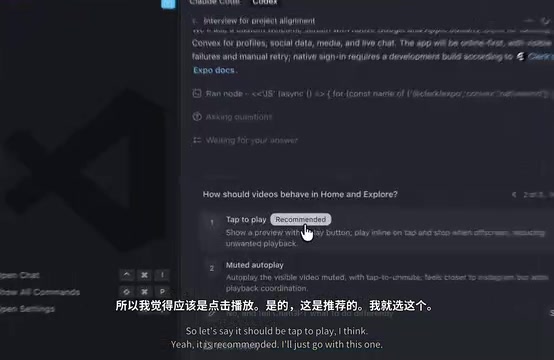
Bullock repeatedly emphasizes that the most common beginner mistake is getting too excited and jumping straight into writing code, which leads the AI to start "guessing" at feature details at some point. His solution is to use Codex's planning mode together with a fixed interview-style prompt that gets the AI to ask the developer questions proactively.
Questions arrive in batches of three or four, covering V1 success criteria, target platforms, media upload limits, whether push notifications are needed, payment features, and more. Bullock's advice: build a minimum viable product (MVP) first, and defer features like push notifications and payments to later versions. This Q&A continues until the AI has full project context and ultimately generates a Plan.md file.
For the tech stack, the project uses Expo (mobile framework), Clerk (authentication), Convex (backend and database), and NativeWind (styling solution). One noteworthy detail: he chose Expo's native tabs component to get the iOS liquid glass effect, which is far less work than implementing it from scratch.
Expo is an open-source mobile app development framework built on React Native. Its core value is letting developers write code once in JavaScript/TypeScript and build iOS, Android, and web apps simultaneously. Expo provides a complete toolchain, including a development server, device preview (Expo Go), a cloud build service (EAS), and rich wrappers for native modules (camera, notifications, location, etc.), greatly lowering the barrier to mobile development. For AI-assisted development, Expo's standardized project structure and detailed official documentation let AI quickly understand project context and generate code that follows conventions—one of the key reasons the tutorial chose Expo as its tech stack.
Step Two: Generate UI Design Mockups First, Then Have AI Implement Them
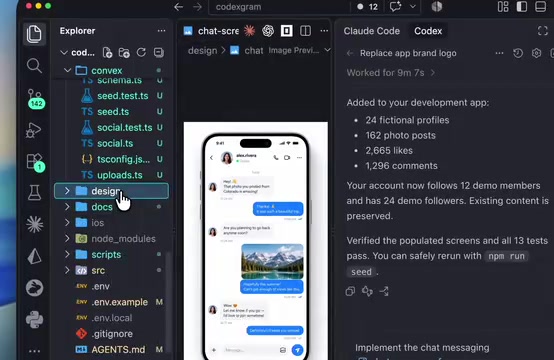
With Plan.md in hand, Bullock doesn't have the AI write page code directly. He first uses ChatGPT or Gemini to generate a full set of UI designs: converting Plan.md into image-generation prompts to produce a design system and multiple reference images (auth page, home page, explore page, profile page, etc.), then placing them all in the project's Design folder.
The key insight here is that AI agents can directly "see" these images and extract component, color, and font information from them. Compared with describing design requirements in text, visual references are far more constraining. When he's unhappy with an AI-generated draft, his approach is to follow up multiple times, provide references, and request higher resolution and variants—rather than giving up after one unsatisfactory result.
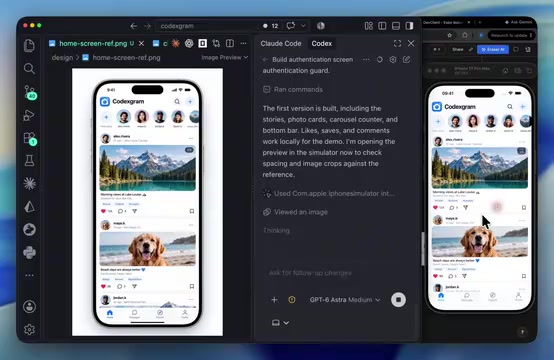
After the reference images are generated, development enters a reusable loop: have Codex build the page based on the reference image, take a screenshot from the simulator, compare it with the design mockup, and keep fixing until they match exactly. This loop was later abstracted into a Skill file (placed under the Agents folder) that loads automatically at the start of a new conversation, saving the need to re-enter long prompts each time.
Step Three: Agent Instruction Files Are the Guardrails for Project Quality
The tutorial includes one easily overlooked but highly valuable practice: using plain-Markdown instruction files like AGENTS.md and CLAUDE.md that load automatically into the AI's context at the start of a conversation. These files hold project conventions, architecture agreements, and "always do this / never do that" rules.
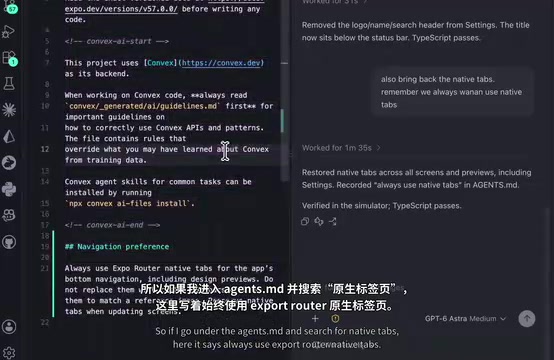
Bullock gives a cautionary example: during one refactor, the AI swapped the native tabs for JavaScript tabs, breaking the earlier design effect. The fix isn't to remind it verbally every time—it's to write "always use Expo Router native tabs" into AGENTS.md.
This is precisely the dividing line between "vibe coding" and engineering-grade AI programming—turning repeated verbal constraints into persistent project specifications.
Step Four: Real Feature Implementation—Auth, Database, and Real-Time Sync
Once the UI skeleton is complete, the project integrates Clerk for Google and Apple sign-in. There's a compliance detail here: if an app offers any third-party social login, Apple requires Apple sign-in to be offered as well, or the review will be rejected. After enabling the Clerk-Convex integration toggle in the dashboard, user profiles sync automatically.
The backend uses Convex: after installation, run npx convex dev to create a cloud project, which generates the directory structure for schemas, queries, and mutations. Convex's out-of-the-box real-time features are a major focus of the tutorial: a comment posted on one device updates the same post's page on another simulator in real time, with no refresh needed.
Development Build is another key concept. Expo Go is only suitable for learning and testing; a real project requires running npx expo install expo-dev-client and building a standalone app. To install the build on a physical device, you can connect via USB or use EAS (Expo Application Services) cloud builds and install by scanning a QR code.
Convex is a backend-as-a-service (BaaS) platform designed for full-stack applications, and its standout feature is a built-in reactive database with real-time query capabilities. Developers define schemas, queries, and mutations in TypeScript, and Convex handles data sync automatically: when one client modifies data, every client subscribed to the relevant query receives the update in real time, with no need to manually write WebSocket or polling logic. This out-of-the-box real-time capability is ideal for comments, likes, messages, and other scenarios in social apps. In addition, Convex has official integrations with authentication services like Clerk, so user profiles can sync automatically to the database after authentication, reducing backend boilerplate.
Step Five: App Store Compliance Checklist and Error Monitoring
Many AI coding tutorials stop at "the app runs," but this workflow covers the actual App Store review requirements: privacy policy, terms of service, support URL, and account deletion—missing any one of these can get you rejected. Bullock uses prompts to have the AI generate these legal pages, places them in a Legal folder, previews them locally with Live Server, and finally deploys them to Cloudflare Pages with Cloudflare Wrangler to obtain real public URLs.
The error monitoring step introduces Sentry. Bullock explains its necessity with a blunt logic: when users hit a bug, they don't send you an email—they uninstall and leave a one-star review. Sentry automatically captures errors and notifies you by email, and also offers structured logging, session replay, performance tracing, and a user feedback widget. One configuration note: Sentry is a native module, so the app must be rebuilt after installation for it to take effect.
For code review, the workflow uses CodeRabbit: by creating a separate branch, committing changes, and opening a pull request, you let the AI scan the entire codebase, get all review comments at once, and have Codex fix them in bulk.
Sentry is an open-source application monitoring platform focused on error tracking and performance monitoring. It automatically captures exceptions in frontend and backend code, records the context of errors (device model, OS version, user action path), and notifies the development team in real time via email, Slack, and other channels. Beyond basic error capture, Sentry also offers session replay (reproducing user actions), performance tracing (analyzing slow loads and jank), structured logging, and a user feedback widget—helping developers find and fix issues before users complain. For mobile apps, Sentry is a native module that requires rebuilding the development client to take effect, a common gotcha during configuration.
Judgment and Limitations from Multiple Perspectives
It's worth noting objectively that this tutorial's optimistic narrative rests on a specific premise: the project is modest in scale and its features are relatively standard. Bullock himself acknowledges in the video that AI can't build anything—yet—and that it "kind of falls apart" as projects grow, so programming fundamentals still matter.
His timing data is also worth considering: a few minutes for the planning phase, anywhere from a few minutes to a dozen-plus minutes per round of UI design iteration, 17 to 20 minutes for a single feature implementation, and roughly 14 days from concept to App Store submission for a complete project. These figures show that AI accelerates execution, while direction-setting, compliance decisions, and design taste remain human-led.
Another implicit cost is tool subscriptions: paid plans for Codex or Claude run about $20 per month, and the Apple Developer Program is $99 per year (with discounts in some regions). The "start completely for free" emphasis in the tutorial only applies to the learning phase.
For developers who want to replicate this workflow, the most practical starting point isn't copying the toolchain—it's understanding three principles first: plan ahead, constrain with visual references, and write specifications down as files. These three hold regardless of which model you use, and they apply to any AI coding tool.
One-line Summary
Bilibili creator Bullock's Codex AI development workflow, covering the full pipeline from planning to App Store release.
Paragraph Summary
This article details a Bilibili creator Bullock's AI-assisted mobile app development workflow, using building an Instagram-style app called CodexGram as an example to demonstrate the complete lifecycle from requirements planning and UI design to feature implementation and App Store release. Core methods include: using AI planning mode for interview-style requirement clarification to produce Plan.md; generating UI mockups as visual constraints for the AI's implementation; capturing project conventions in instruction files like AGENTS.md; and leveraging Clerk, Convex, Sentry, and CodeRabbit for auth, database, error monitoring, and code review. The article also notes the workflow's limitations: AI still struggles on large projects, human judgment is still needed for direction and compliance decisions, and tool subscriptions and the developer account carry real costs.
Related articles

Amphibious Transforming Drone: Beyond 100x Power Savings, What Are the Real Needs?
Is the amphibious transforming drone just a gimmick? Starting from the 100x power difference of the M4 Morphobot, explore real application scenarios and thesis topic ideas, analyzing boundary conditions where pure drones and pure ground robots both fail.

Warhound Raises $200 Million: Genetically Engineered "War Dogs" Paired with Anduril Gear
Warhound raises $200M, backed by Ben Lamm and Palmer Luckey, to genetically engineer dogs for military and law enforcement use and equip them with Anduril gear. This article analyzes its technology direction, funding logic, and ethical controversy.

Claude API Comes to Google Cloud: IAM Integration and SDK Access Guide
Anthropic hosts the full Claude API on Google Cloud with IAM-controlled permissions and unified billing. This guide covers the Vertex AI and Anthropic-hosted entry points, IAM role configuration, and SDK access.