Building Mini Programs with WorkBuddy from Zero: Boundaries and Costs Explained

WorkBuddy tutorial Episode 1: boundaries, suitable scenarios, and three cost accounts for AI-built mini programs.
Based on Episode 1 of the Bilibili *WorkBuddy Mini Program Development Course*, this article outlines the capability boundaries and cost expectations of building WeChat Mini Programs through conversation. WorkBuddy is positioned as "the domestic alternative to Codex," generating page code, integrating cloud services, uploading code, and submitting for review—but requirement descriptions, account registration, entity verification and filing, and review compliance must be handled by the user, and the account always belongs to the user. The article offers a suitability formula: requirements decomposable into "information display + form submission + simple query" suit mini programs, while real-time communication, high-frequency interaction, and high-performance rendering applications should not be forced; regulated industries like healthcare, finance, and education require checking category qualifications first. Costs split into three accounts—time, account, and cloud services. Finally, it introduces three entry points and a six-element prompt template.
No coding, no WeChat Developer Tools installation—just conversation can turn an idea into a live WeChat Mini Program. WorkBuddy lowers the barrier on this path to an extreme. But what truly determines success is often not the technology, but awareness of boundaries.
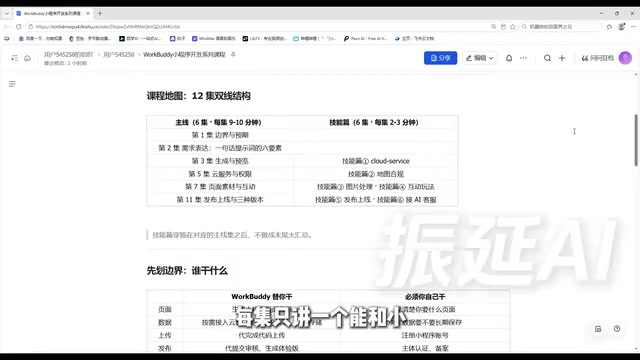
This series from a Bilibili creator, WorkBuddyAd Mini Program Development Course, spans 12 episodes and over 70 minutes total, split into two tracks: a main line of 6 episodes at about 9–10 minutes each, covering the complete journey from idea to launch; and a skills section of 6 episodes at 2–3 minutes each, interspersed throughout the main line to teach one supporting skill per episode. The author describes himself as a non-CS major with no AI experience, who traded 10 hours for 560 yuan in revenue, emphasizing that once the workflow is set up, it can roll in earnings automatically. This article is based on the first episode, Boundaries and Expectations, and clarifies "which work the AI does, which work you do yourself, and how much it costs."
What Exactly Is WorkBuddy
The author positions WorkBuddy as "the domestic alternative to Codex": an AI digital workhorse that works directly on your computer. Compared to similar tools, its barrier to entry is lower—no network environment required, no complex configuration, extremely beginner-friendly.
Its capabilities span writing proposals, building spreadsheets, analyzing data, creating content, designing posters, developing software, and even taking over software to operate various platforms on your behalf. In mini program development specifically, its officially stated capabilities include: generating mini program page code, integrating cloud services on demand, completing code uploads, submitting for review, and generating trial version release tasks.
This means you don't need WeChat Developer Tools installed on your computer, nor do you need to understand the project structure or file organization of a mini program. For mini programs that need to store data, support user login, or upload images, the AI will prompt you during generation to enable the corresponding cloud services; once you confirm, it handles the configuration—no manual filling in of technical parameters.
"Codex" here refers to OpenAI's series of code generation models (such as the coding capabilities in Codex and the GPT series), which can produce runnable code directly from natural language descriptions and is one of the core technologies behind programming assistants like GitHub Copilot. Domestic users typically need to deal with network environments, account registration, payment channels, and other issues to access such services, resulting in high configuration costs. The author calls WorkBuddy "the domestic alternative," meaning its user experience is close to these AI programming assistants—driving code generation through natural language conversation—but it removes the network and payment barriers and is specifically adapted for domestic platforms (such as WeChat Mini Programs). Understanding this positioning helps determine what kinds of problems it's suited for: lightweight development centered on "describe requirements → generate code → submit for launch," rather than engineering that requires deep debugging and complex architecture.
Core Boundaries: What the AI Does for You vs. What You Must Do Yourself
The author places "boundaries" in the first episode because: if you can't distinguish this, you'll be waiting in the wrong places and anxious in the wrong places.
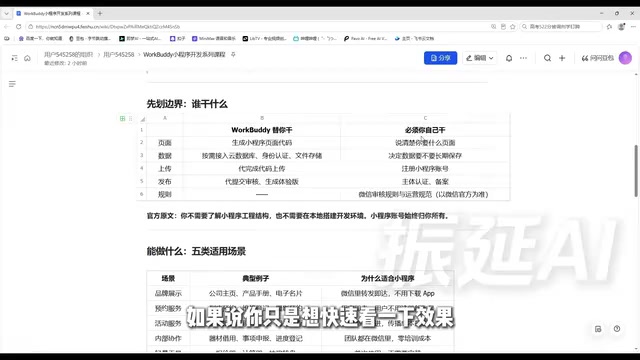
Four Things the AI Does for You
- Generates page code: no touching the project structure, no setting up a local environment.
- Integrates cloud services: database, identity authentication, and other headache-inducing technical parameters—you don't touch them at all.
- Completes code upload: the tedious steps of clicking upload in Developer Tools, filling in version numbers, and writing release notes are handled for you.
- Submits for review: note that it "submits for you," not "approves for you."
Four Things You Must Do Yourself
- Clearly state your requirements: the AI doesn't know how many stores you have or how appointment slots are arranged—requirements are your job.
- Register a mini program account: the trial version allows quick previews without registration, but a long-term operating account must be your own.
- Entity verification and filing: WeChat requirements that no one can do on your behalf.
- Review rules and operational standards: whether content is compliant and categories match—the responsibility is yours.
The author specifically emphasizes an official statement: the mini program account always belongs to you. You're not publishing under someone else's shell—this is what makes the whole thing safe and sustainable long-term.
Can Your Idea Become a Mini Program?
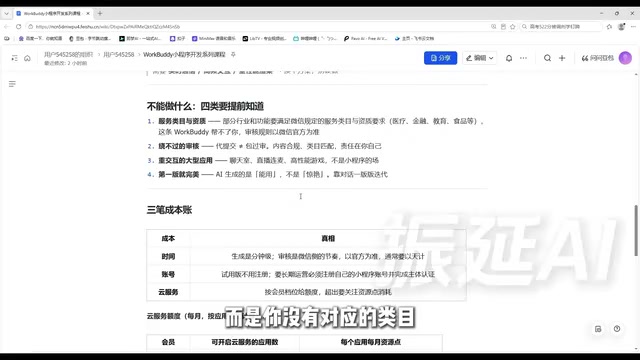
Officially, five types of scenarios suit mini programs, and the author provides examples for each:
- Brand showcase: company homepage, product catalog, digital business card. Forward to a client and they can open it immediately—more impressive than sending a PDF, more effective than asking them to save your phone number.
- Appointment services: in-store appointments, repair registration, photography bookings. Essentially a form plus a record table; users use it and leave without needing to register a new account for booking.
- Event services: event registration, on-site check-in, surveys. Scan a QR code to enter—lowest propagation cost, an experience neither web pages nor apps can offer.
- Internal collaboration: equipment borrowing, matter declarations, progress tracking. Teams already live in WeChat every day—the learning cost of installing an additional app is ten times higher than opening a mini program; zero training cost is the biggest value.
- Lightweight tools: quote calculators, calculators, lottery wheels. For single-use scenarios, asking users to install an app is simply impossible.
The author offers a judgment formula: If your requirement can be broken down into a combination of "information display + form submission + simple query," a mini program can do it—go ahead with confidence; if it requires real-time communication, high-frequency interaction, or high-performance rendering, switch approaches—don't force it. This formula helps you avoid half the pitfalls before you even start.
"Service categories" refer to the classification system the WeChat Mini Program platform uses for application content. Every mini program must select one or more categories when submitting for review, such as tools, education, healthcare, finance, e-commerce, etc. Different categories correspond to different open conditions: some categories are available to ordinary entities, while others (such as healthcare, finance, education, and live streaming) are regulated categories requiring additional qualification documents, such as a Medical Institution Practice License, Financial Business License, or school operating permit. Category selection directly determines whether review passes—content that doesn't match the selected category, or that involves restricted categories without submitting qualifications, will be rejected. Therefore, before starting, checking the service category page on the WeChat Public Platform to determine which category your target scenario falls under and what materials are required is more important than generating pages.
What You Can't Do: Four Walls You Can't Get Around
The author says this part "may not be pleasant to hear, but must be said upfront."
First, service categories and qualifications. Medical information, financial management, and education training all fall under regulated industries. Building consultations, selling courses, or recommending stocks isn't technically impossible—it's that without the corresponding category qualifications, you won't pass review. For such ideas, the first step isn't generating pages but checking the WeChat Public Platform to find out what qualifications are required.
Second, review cannot be bypassed. Submitting on your behalf doesn't equal guaranteed approval—content compliance, category matching, and whether there's induced sharing are your responsibility. Read the WeChat Mini Program operational standards in advance; don't put yourself in a gray area.
Third, interaction-heavy large applications. Chat rooms, live streaming co-hosting, and high-performance games are not the mini program's arena. Mini programs are designed to be lightweight and disposable—forcing real-time battle games will definitely result in a poor experience.
Fourth, don't expect the first version to be perfect. The AI-generated first version is "usable," not "stunning." Ugly pages and stiff interactions are normal—the right approach is conversational iteration: say what doesn't look good, and revise version by version.
Three Cost Accounts: Time, Account, Cloud Services
Calculate these three accounts in advance so there are no disappointments later.
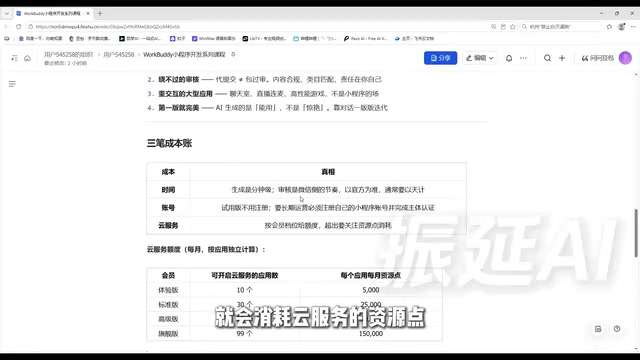
Time account: Generation takes minutes—one sentence and a few minutes later you see a clickable mini program. But review follows WeChat's pace, usually measured in days. The mental expectation should be "build fast, wait patiently"—plan your launch time in advance and don't expect to finish today and launch tomorrow.
Account account: If you just want to try it out, scan the QR code to authorize the trial version and generate an accessible version, but the trial period has clear limits. Long-term operation requires registering your own account on the WeChat Public Platform and completing entity verification and filing—don't skip this step; it's your mini program's legal identity.
Cloud service account: Storing data, logging in, and uploading images consume cloud service resource points, allocated by membership tier and calculated and refreshed independently per application. The tiers the author reads out are: Trial version—10 applications, 5,000 points per application per month; Standard version—30 applications, 25,000 points per month; Advanced version—50 applications, 50,000 points per month; Flagship version—99 applications, 150,000 points per month. Exhausting a single application's quota doesn't affect other applications. Resource points start counting from the day cloud services are activated, on a one-month cycle, and refresh automatically upon expiration. The author reminds: these numbers adjust with versions—refer to what your own account actually displays and don't treat them as promises.
"Mini program filing" is the implementation of the Ministry of Industry and Information Technology's internet information service filing requirement in the mini program context: since 2023, newly registered mini programs must complete filing before they can be published and operated normally, and the filing entity information must match the verified entity of the mini program account. The process typically includes submitting entity materials on the WeChat Public Platform, waiting for platform preliminary review, then final review by the communications administration, taking anywhere from several days to twenty working days—significantly longer than code generation and platform review. This also means "finish today, launch tomorrow" doesn't hold in most cases. Filing and entity verification are two different things: verification answers "who you are," filing answers "this service is legal and traceable"—both must be completed for a mini program to qualify for long-term operation.
Three Ways to Get Started and One Prompt Template You Can Copy
Entry one: Start from the homepage, enter code development, and select mini program. The platform offers recommended scenarios—pick a close one and modify it to get started, suitable when you haven't figured out your specific requirements yet.
Entry two: Describe your requirements directly. The most flexible and commonly used, but there's a hard requirement—you must explicitly write the words "WeChat Mini Program" in your requirements. Writing "help me build an appointment tool" versus "help me build a WeChat Mini Program for appointments" may result in one being a web page and the other a mini program.
Entry three: Convert an existing web page directly into a mini program. The most effortless, especially suitable if you've built H5 event pages before.
Cloud services likewise require no technical proposals. You don't need to say "I want a database" or "I want a login API"—just speak plainly: data needs to be stored long-term, WeChat login required, images need to be uploaded, multiple people involved—it understands, and will prompt you to enable things when needed.
The author provides a directly copyable prompt template (using an in-store appointment tool as an example—replace elements as needed). One sentence conceals six elements: who's using it, what they need to do, what pages are needed, whether login is required, whether data needs to be stored, and what style. Each of these six elements directly affects the generated result; the second episode breaks them down one by one.
Summary
- Code and upload go to the AI; account and review are yours;
- Can do: information display, form submission, simple queries;
- Can't do: bypass qualification review, interaction-heavy large applications;
- Cost: generation is fast, review requires patience, long-term operation must use your own account;
- Getting started: three entry points, describe cloud services in plain language.
This episode contains no hands-on operations, yet it's the foundation for the remaining 11 episodes. Now that you know which category your idea falls into, how much time it takes, and whether qualifications are needed, every step ahead will be much steadier.
Related articles
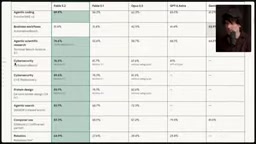
Is Anthropic Unbeatable? A Deep Dive into Fable 5.2
A deep dive into Anthropic Fable 5.2 and Mythos 5.2: benchmark dominance and a leap in the sciences, but self-built tests expose weaknesses. Why real competitiveness comes from task division between models, not a single strongest one.

Why Rockets Don't Land Horizontally Like Airplanes: A Physics and Engineering Trade-off
Why don't rockets land horizontally like airplanes with wings? This article explains the engineering trade-offs behind Shuttle-style landings and Falcon 9 vertical landings from three angles: wing lift conditions, orbital velocity costs, and reusable booster structural reuse.

Can AI Governance Tools Block Agent and API Calls?
A Reddit developer questions whether AI governance tools only flag Agent calls rather than block them. We analyze the flagging vs. real-time blocking capability gap, vendor demo mismatches, and key questions to ask when buying.