Building Online Monitoring with AI Agents: A Complete Automation Loop from Scratch
Build a full automated online monitoring loop using AI Agents driven entirely by natural language.
This article clarifies the difference between LLMs and Agents, arguing that real efficiency gains come from system-level Agents, not conversational AI. Using online monitoring as a hands-on case, it walks through loading Skills, enabling browser access, configuring scheduled tasks, and pushing results to WeCom — building a complete automation loop with natural language. It also compares AI visual recognition vs. traditional element selectors, and extends the methodology to auto-generating performance test plans. The core takeaway: AI efficiency requires a quality management mindset, not a hope that AI will fully replace human testers.
From LLMs to Agents: Getting the Concepts Straight
Many QA professionals still think of AI as conversational tools like Doubao, Coze, or DeepSeekAd — the "ask a question, get an answer" model. If that's your entire mental model of AI, you'll reach the wrong conclusion that "AI doesn't improve efficiency."
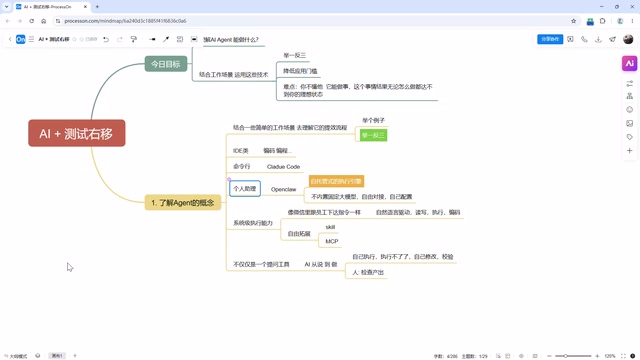
The key distinction to make is between Large Language Models (LLMs) and Agents. An LLM is the "brain" behind the scenes, while an Agent is the application shell that can actually operate a computer and execute tasks. Tools like Claude Code and OpenClaude are essentially command-line-style Agents — you hand them a folder to manage, and you can use natural language to count files, create files, or read and execute code. Strip away the underlying LLM, and the Agent becomes a hollow shell that can't do anything.
The biggest value AI delivers is lowering the barrier to entry for automation — but the catch is that it's "easy to start, hard to master." Anyone can get going just by talking to it, but producing correct, reliable results still requires a human standing by to guide, teach, and correct it. Keep this in mind — it's the foundation for everything that follows.
Three Types of Agents and Natural Language Driving
Current AI agents fall into roughly three categories:
- IDE-integrated tools: Primarily for coding, with powerful code-writing capabilities;
- Command-line tools: Such as Claude Code, which opens directly as a CLI interface;
- Personal assistant tools: Self-hosted engines like OpenClaude and Kola.
The key feature to focus on is the self-hosted engine. Tools like OpenClaude don't ship with a fixed LLM built in — you can freely connect and configure your own. They have system-level execution capabilities, are driven by natural language, can read/write/execute/code, and can be extended through MCP, Skills, and other mechanisms.

The biggest difference between these and online Q&A tools (GPT, Doubao) is this: online tools can tell you the steps "1, 2, 3, 4, 5" but can't guarantee those steps will actually run on your machine, since everyone's environment, OS version, and hardware differ. Personal assistant Agents, on the other hand, can see a task through from zero to done — if something throws an error, they fix it themselves and keep going until the result actually works.
This is why "AI replacing testers" has become such a hot topic: as these tools grow more popular, people are discovering they can operate computers directly through natural language. That said, it's important to stay clear-eyed: AI is nowhere near capable of fully replacing human testers — it can significantly reduce workload, but not eliminate the need for human judgment.
The Right Way to Use AI for Efficiency: AI + Automation + Human Oversight
Some ask: now that AI is here, do we still need to learn automation? That question itself reflects a misconception.
Automation and AI are fundamentally the same idea — delegating tasks to a computer to handle on its own. The difference is that traditional automation requires humans to write scripts and account for every scenario, whereas AI theoretically removes the need for scripts entirely. But "theoretically" is doing a lot of work there. In practice, AI is often unreliable when it comes to core algorithms and complex logic.
The most pragmatic approach is:
Human oversight + AI-driven execution + AI result analysis
Simple code can be auto-generated by AI, but core algorithms still need human review; AI handles test execution and analyzes whether results pass. That's the realistic picture right now.
Many people envision an AI-powered QA pipeline like: auto-analyze requirements → auto-generate test cases → integrate with bug management → auto-run tests → auto-send reports with group notifications. The direction is right, but once you try to implement it, you'll find: AI will catch some issues, but whether it catches all of them — and whether you can take those results straight into a meeting — are two different questions entirely. AI will always have hallucinations; human review remains a mandatory checkpoint.
When you push your prompts to the limit, the AI will start cycling between a few different answers (answer A, answer B, answer C...) — that's a sign it has hit the ceiling of what your current description can achieve. Understanding the boundaries of AI is a prerequisite for actually leveraging it effectively.
Hands-On: Building an Online Monitoring Solution with an Agent
Let's walk through a complete real-world implementation using "online monitoring" as the scenario. Online monitoring is a shift-right testing concept — actively inspecting live production systems to catch issues early and minimize damage. Unlike operations teams who focus on server health, business-layer monitoring is a QA responsibility.
Step 1: Confirm Whether the Agent Can Interact with Web Pages
First, determine whether the AI can operate web-based systems. Using a book-reading app as an example, ask Claude to check whether the page is loading correctly. Without any Skills loaded, the Agent takes a very roundabout route: it extracts page source via the command line, reads and analyzes it, repeatedly tweaks code to inspect the source, burning through huge amounts of tokens — yet still can't verify the actual rendered state of every page element.

The fix is to load a Skill. Create a skills folder, load the appropriate skill, and the Agent's execution flow changes immediately — it can render the page properly and detect issues, such as a book cover image failing to load (404). That's exactly what online monitoring is meant to catch.
It's worth noting that different agents work differently: minimal command-line tools don't have many bells and whistles, while UI-based Agents (like assistants built on MiniMax) may rely on screenshots to determine whether page elements are rendering correctly — and they also need the right Skill loaded to work well.
Step 2: Enable Browser Access
Using OpenClaude as an example, its built-in tools include a "web" capability for browser control — but this "door" is closed by default.

Once you enable browser access through the configuration, the Agent can take screenshots, inspect resources, and output the screenshot file path. This is a good time to highlight an important Agent characteristic — traceability: every action and every response has a verifiable result. If something doesn't match expectations, you can directly ask it "why didn't you catch this issue during monitoring?" It will tell you something like "I didn't check each static resource individually," which gives you actionable feedback to refine your prompt (e.g., "make sure to check every static resource for 404s and verify image dimensions").
Step 3: Scheduled Tasks and Automated Execution
Monitoring only provides value if it runs continuously and automatically over time. UI-based Agents typically have a built-in concept of "scheduled tasks." Set the execution frequency using a cron-like expression — today you can just describe the schedule in natural language and let the Agent figure out the syntax, no more Googling cron format — and include the monitoring requirements as parameters:
- Check every static resource;
- Verify actual image dimensions;
- Confirm the page is functioning normally.
Once configured, the Agent runs automatically on schedule and maintains a run history that records each execution time, issue descriptions, and results — fully traceable from end to end.
Step 4: Result Notifications
After monitoring completes, you can't expect someone to manually check the history logs — you need proactive notifications. There are many options: WeCom (Enterprise WeChat), DingTalk, Feishu, and other workplace tools all support message push.
The approach is straightforward: add a "Online Monitoring Bot" in your WeCom group, get the webhook URL, then tell the Agent: "check the page → push results to this URL." After execution, the group receives the monitoring summary: issue found in the bottom section of the page — a book cover image in the trending list has broken (404). And just like that, a complete automated monitoring loop is up and running.

AI Element Detection Uses Visual Recognition, Not Traditional Selectors
Some people ask: does AI work well on pages with anti-scraping measures or complex DOM structures? Yes — because AI's element detection mechanism is fundamentally different from traditional approaches. It relies on visual recognition.
Traditional automation often burns significant time on explicit waits, implicit waits, and elements that can't be located because they only appear after an interaction completes. With AI, you simply configure the LLM endpoint and describe in natural language: "click this button, pause briefly, then check whether a certain piece of text appears on the page." This dramatically lowers the technical barrier for element interaction.
This also highlights the core differences between traditional automation and AI-based monitoring:
| Dimension | Traditional Automation | AI Agent |
|---|---|---|
| Technical barrier | High (requires scripting, Jenkins/CI-CD setup) | Zero (natural language) |
| Detection method | Element selector scripts | Visual recognition |
| Cost | High development cost | Token consumption only |
| Stability | Consistent results | Results may vary; evaluation required |
Precisely because AI results can vary between runs, we need to conduct LLM evaluation (selecting the right model for your use case) and agent evaluation to ensure solution reliability.
Extending the Approach: Auto-Generating Performance Test Plans
The same methodology applies to performance testing. When you simply say "help me run a performance test," a good Agent won't blindly execute — instead, it will respond like a senior engineer by asking clarifying questions:
- Is this for a new feature launch to see how many users it can handle, or is the system running slow and you need to find why?
- What are your targets — concurrent users, TPS?
- Testing a single endpoint or a chain of endpoints?
- Should think time be added (1–3 seconds to simulate real users)?
- Server specs (CPU, memory, disk type), data volume, any third-party APIs?
Feed it a messy, non-standard API document and it can still parse it and generate a structured test plan with clearly defined phases and objectives. The process itself trains someone who "doesn't know how to do performance testing" to become someone who "knows how to ask the right questions."
Closing Thoughts: From Executor to Quality Manager
The core message of this article isn't about any specific tool's operation — it's about how AI-driven efficiency fits into everyday QA workflows. The methodology is consistent:
Describe the operational goal and expected outcome in natural language → Agent executes → Human reviews the results.
The real barrier isn't technical — it's mindset. If you're purely an "I do what I'm told" executor, you'll struggle to get real value out of AI. You need to develop a quality management systems mindset: understand what each phase of the testing lifecycle is trying to accomplish, and then use AI to eliminate large volumes of repetitive manual testing work. That is precisely where AI delivers its most significant efficiency gains.
Related articles

DeepSeek Harness: A Beginner's Installation and Testing Guide
A DeepSeek Harness tutorial for test engineers: set up Node.js, launch with one NPX command, configure official and third-party models, and explore web search, file I/O, and trace-view agent observability.
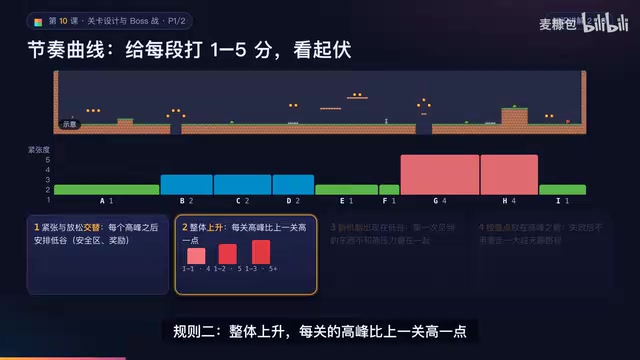
AI Game Development in Practice: Designing Levels with the Four-Step Method and Pacing Curves
AI game development lesson 10: design levels with the four-step method (teach, practice, combine, test) and a 1-5 pacing curve, plus sightline guidance and safety zones—implement Animatable Body 2D moving platforms and generate ASCII sketches for 1-2 Underground Cavern and 1-3 Guard Hall.

AI Game Development in Practice: Two-Phase Boss State Machines and Death Heatmap Tuning
AI game development lesson 10: implement a two-phase Boss with a state machine, guarantee fairness with color signals and a 0.4-second warning floor, locate difficulty cliffs with a death heatmap, and apply lightest-to-heaviest fixes one at a time, with an acceptance checklist and common pitfalls.