Building Production-Grade AI Agents: Browser-Use + SOCKS5 + Dedicated Hardware in Practice

How to combine Browser-Use, SOCKS5 proxies, and dedicated hardware to build resilient, production-grade autonomous AI agents.
This article systematically covers the three challenges of moving AI agents from local scripts to production: browser fingerprinting, IP reputation blocking, and resource-intensive execution. Using Browser-Use as the core framework, it explains how the accessibility tree and screenshots bridge the gap between LLM reasoning and DOM execution. On the infrastructure side, it highlights how bare-metal dedicated servers eliminate rendering misjudgments caused by virtualization noise, while SOCKS5 proxies bypass modern anti-bot systems by preventing DNS leaks, supporting WebSockets, and maintaining session persistence. A four-layer architecture — physical, connectivity, execution, and intelligence — is proposed alongside concrete implementation guidance, positioning the entire stack as a "digital employee" infrastructure that can replace official APIs.
AI is evolving from passive chat interfaces into proactive agents. We're no longer satisfied with asking models to tell us how to book a flight or scrape a JavaScript-heavy dynamic site — we want models to open a browser themselves, manipulate the DOM, handle authentication, and deliver results directly.
But moving from a local script to a production-grade autonomous agent means confronting three major challenges: browser fingerprinting, IP reputation, and resource-intensive execution. Building a truly resilient autonomous agent requires far more than the introductory LangChain + Playwright tutorial. The real engineering happens at the intersection of the Browser-Use framework, sophisticated SOCKS5 proxy management, and the raw performance of dedicated hardware.
Why Browser-Use Is a Game Changer
The core friction in web automation has always been the gap between LLM reasoning and DOM execution. Traditional RPA (Robotic Process Automation) is brittle — change a single div class and the script breaks.
Browser-Use bridges this gap by treating the browser as an "observable, actionable" environment: the agent observes via the accessibility tree and screenshots, then acts through clicks, typing, and scrolling. Unlike standard headless scripts, Browser-Use gives agents three critical capabilities:
- Self-correction: When a pop-up appears, the agent recognizes it as an obstacle and dismisses it.
- Contextual understanding: It doesn't just look for a button — it understands the intent behind the button.
- Multi-step workflow management: It maintains state through complex navigation that would typically time out in standard API calls.
This intelligence comes at a cost. Autonomous agents are resource-intensive — running a Chromium instance alongside a local LLM or a heavy orchestration layer demands a stable, low-latency execution environment, which makes hardware a critical factor.
The Accessibility Tree is a semantic tree maintained by the browser alongside the rendered DOM, originally designed for assistive technologies like screen readers. It exposes each element's role, name, and state in a structured form, allowing agents to understand page semantics without relying on visual coordinates. For example, a
<div>that visually looks like a button can only be recognized as a clickable "button" by the agent if its ARIA role is properly labeled. Compared to pixel-level screenshot parsing, the accessibility tree is computationally cheaper and more resilient to layout changes. Screenshots serve as a complement for pages with incomplete ARIA annotations or heavy visual rendering. Browser-Use blends both approaches, letting the agent dynamically switch between semantic and visual understanding — which is the fundamental reason it's more resilient than traditional XPath/CSS selector scripts.
Building High-Performance Infrastructure for Your Agent
Running AI agents on a shared VPS instance is almost guaranteed to fail. The "noisy neighbor" effect introduces micro-stutters during browser rendering, causing the AI to misjudge the visual state of a page.
The Advantage of Dedicated Hardware
Dedicated hardware provides predictable CPU cycles and memory bandwidth. When an agent processes complex DOM trees, it needs to serialize data into a format the LLM can consume. On a dedicated physical machine, the latency between a browser Action and a model Observation is minimized. This matters because the web is time-sensitive: a page that takes 5 seconds to render on an underpowered VPS may lead the agent to incorrectly conclude that an element simply doesn't exist.
Hardware Isolation and Security
The nature of autonomous agents is that they execute code and interact with external inputs. Isolating these processes on dedicated hardware limits the blast radius — even if a malicious site attempts a browser escape attack, the impact is contained to a single physical machine rather than a shared hypervisor.
The Invisible Shield: Why SOCKS5 Is Non-Negotiable
If the browser is the body and the LLM is the brain, then the proxy is the "passport." Modern websites deploy sophisticated anti-bot mechanisms (Cloudflare, Akamai, Datadome). Once your agent makes connections from a known data center IP range, it will face CAPTCHAs — and even the most advanced vision models struggle to solve them repeatedly.
SOCKS5 vs. HTTP Proxies
For autonomous agents, SOCKS5 is the gold standard. Unlike HTTP proxies, SOCKS5 operates at a lower layer and can handle any type of traffic, including UDP and DNS queries. When used with Browser-Use, SOCKS5 enables:
- DNS leak prevention: Ensures the target site sees DNS queries originating from the proxy's location, not your server's real location.
- WebSocket support: Critical for the modern "real-time" dashboards that agents often need to monitor.
- Session persistence: A stable SOCKS5 tunnel maintains session identity for the agent — essential for tasks involving logins and shopping carts.
DNS Leak is one of the most overlooked pitfalls in proxy configuration. It occurs when the browser sends HTTP requests through a SOCKS5 proxy, but DNS resolution is still performed directly by the operating system against the local ISP or the server's native DNS. This means the target site's DNS logs or third-party detection services can infer the requester's true network location. In Chromium/Playwright configurations, you must explicitly use the
socks5h://protocol in--proxy-server=socks5h://...(note the trailingh), wherehstands for "remote hostname resolution" — meaning DNS resolution is delegated to the SOCKS5 proxy server rather than resolved locally before the connection is forwarded. This detail is one of the most common root causes of the "configured a proxy but still identified as data center traffic" problem.
Residential IPs vs. Data Center IPs
On dedicated hardware, you have sufficient bandwidth to route multiple SOCKS5 streams. The sophisticated approach is a hybrid model: data center IPs for initial reconnaissance, and residential SOCKS5 for the final "transactional" steps — where trust score scrutiny is most intense.
Residential IPs come from IP address pools belonging to real home broadband users, typically sourced through proxy providers partnering with real user devices. Their ASNs (Autonomous System Numbers) are registered to telecom operators rather than data centers. Anti-bot systems like Cloudflare and Akamai maintain blacklists of known data center IP ranges (e.g., CIDR blocks from AWS, GCP, Azure), and requests from these IPs are automatically assigned higher risk scores. Residential IPs carry inherently higher trust scores, but also higher costs (typically billed by bandwidth) and unstable egress bandwidth. Data center IPs are fast and cheap, suitable for anti-bot-insensitive initial reconnaissance or internal testing. The engineering value of the hybrid model is concentrating high-trust costs only at the moments that truly need it — such as submitting forms, completing payments, or triggering login verification — achieving a balance between cost and success rate.
A Layered View of the Integration Architecture
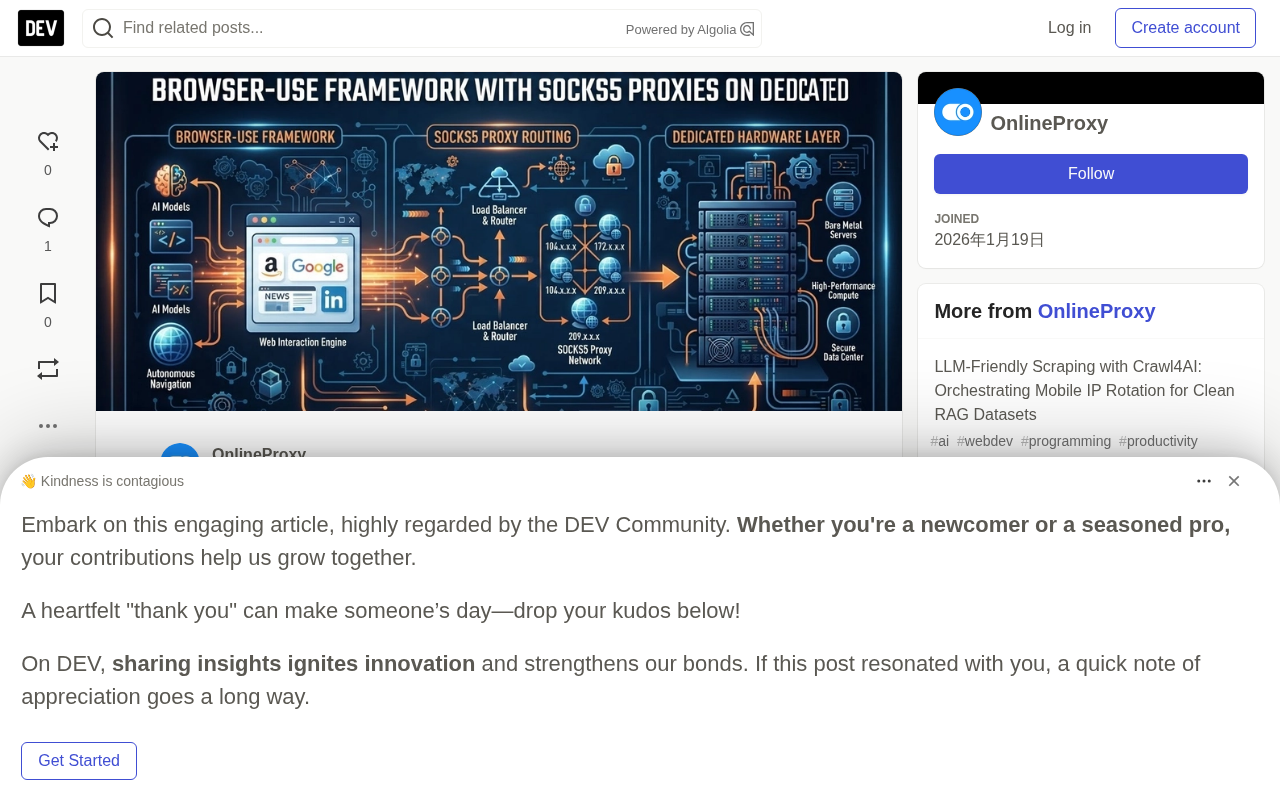
Building this system requires a layered architecture. It's not just about installing a library — it's about constructing a stack where each layer addresses a specific failure mode:
- Physical Layer: Bare-metal dedicated servers that eliminate virtualization overhead.
- Connectivity Layer: A SOCKS5 proxy manager that rotates credentials, handles failover, and never interrupts the
browser-usesession. - Execution Layer: Playwright or Selenium orchestrated by Browser-Use, running in containerized (Docker) environments to ensure a clean initial state for every task.
- Intelligence Layer: Frontier models (such as GPT-4o or Claude 3.5 Sonnet) that provide the reasoning engine.
Step-by-Step: Setting Up the Agent Runtime
If you're ready to move from theory to implementation, here's an architectural checklist for deploying Browser-Use with SOCKS5 on dedicated hardware.
1. Environment Setup
- OS: Ubuntu 22.04 LTS (minimal install) is recommended for stable compatibility with Playwright's dependencies.
- Dependencies: Install
Node.jsorPython(depending on your Browser-Use implementation), along with system-level browser binaries.
# Playwright / Browser-Use installation example
pip install browser-use playwright
playwright install-deps
2. Configure the SOCKS5 Tunnel
Don't hardcode proxy strings into your code. Instead, use environment variables or a local proxy rotator (such as goproxy or privoxy) to tunnel browser traffic.
- Action: Configure browser launch options within the framework to point to your SOCKS5 endpoint.
- Advanced tip: Always enable
remote-dnsin your SOCKS5 settings to prevent IP leakage via DNS.
3. Implement the Browser-Use Agent
Initialize the agent with a system prompt that has clearly defined boundaries. On dedicated hardware, you can increase the "observation" frequency — allowing the agent to take screenshots more often for higher accuracy.
4. Monitoring and Logging
Autonomous agents can "hallucinate" in the DOM — repeatedly clicking the wrong button. Implement a watchdog timer: if the agent makes no progress in the DOM within 60 seconds, terminate the process, rotate the SOCKS5 IP, and restart.
Conclusion: The Future of Agentic Web Interaction
We are moving beyond the API era. The software of the future won't need an official API to interact with another piece of software — it will use the web interface directly, just like a human. By combining the Browser-Use framework, the stability of dedicated hardware, and the anonymity of SOCKS5 proxies, what you're building isn't just a scraper — it's a "digital employee."
The true value of this stack is resilience. While others are still struggling with banned IPs and sluggish execution, the dedicated hardware + SOCKS5 approach gives AI a "clean lane" to operate in. The question is no longer "can AI use the web," but "how efficiently can we give AI the body it needs to navigate it."
Related articles

How Big Can Stars Really Get? The Physical Limits of the Largest Stars
Red supergiants are the largest stars by volume, with radii up to 2,000 times the Sun, engulfing the inner solar system. But there is no precise upper limit on stellar size—models predict up to 15,000 solar radii. The most massive blue stars are far smaller than red supergiants—biggest and heaviest are two different things.

Apple HomeView Smart Display Full Feature Breakdown: Wall-Mount or Desktop, $299
Apple launches HomeView, a $299 smart display with wall-mount and desktop options, 12MP camera for facial recognition, smart home control, music playback, and recipe step-by-step cooking. Full breakdown of watch faces, apps, privacy, and cooking integration.

Where Did the Promised New Studio Go? Craft Computing Answers After Five Years
Craft Computing's host responds to viewer questions: the new studio promised five years ago was shelved as construction costs soared from $30,000 to $75,000, and was replaced by a 168-square-foot garage conversion.