Calerto for Mac: Turn Your Calendar into Meeting Alarms You Simply Can't Ignore
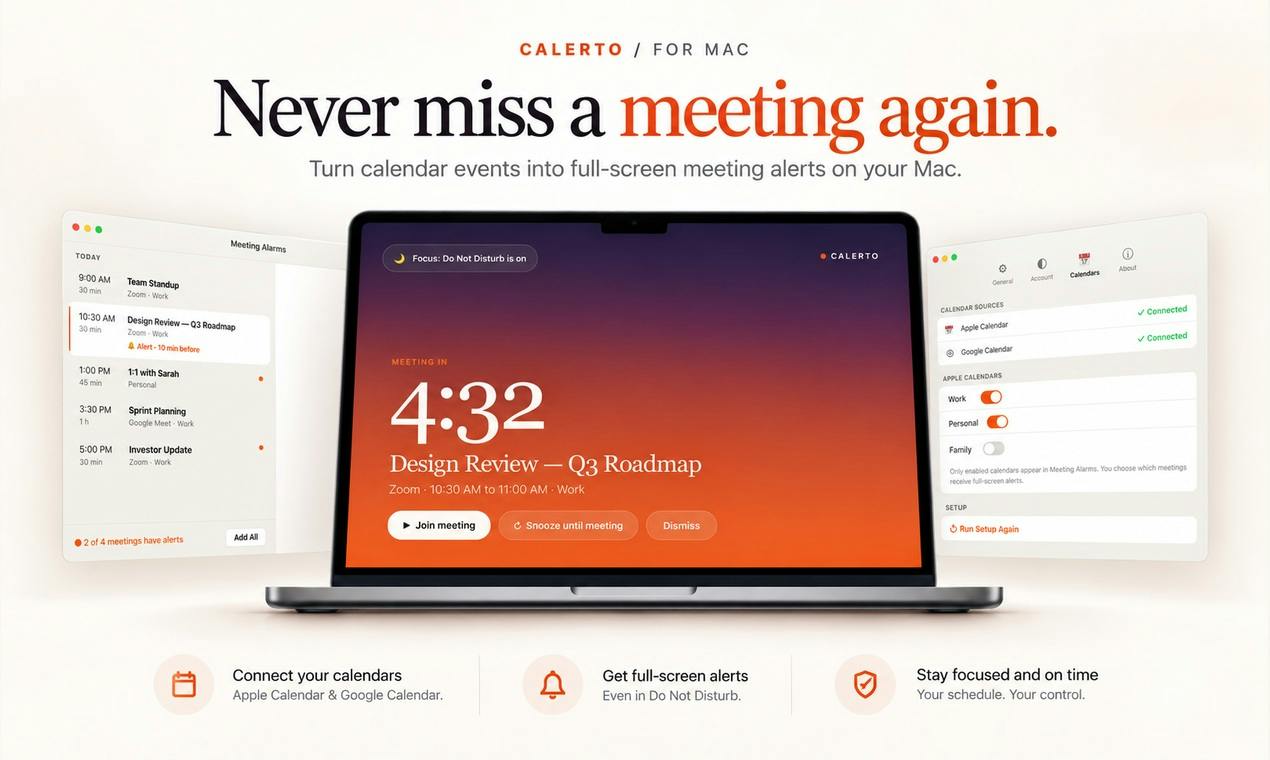
Calerto upgrades Mac calendar reminders to full-screen alarms so you never miss another meeting.
Calerto is a Mac meeting reminder tool that replaces passive calendar notifications with full-screen alerts, ensuring users never miss a meeting even when deeply focused or distracted. It syncs with Apple Calendar and Google Calendar, supports custom prep times per event, and shows a live countdown in the menu bar. The Pro plan auto-schedules alarms for an entire week, and all calendar data is processed locally — never uploaded to the cloud. The app earned 83 upvotes and ranked #5 on Product Hunt, targeting busy professionals, remote workers, and users who struggle with attention management.
For Mac users whose days are packed with meetings, few moments are more embarrassing than this: a notification pops up, you swipe it away without thinking, and by the time you snap back to reality, the meeting has been going for ten minutes. Calerto for Mac is built to solve exactly this problem. Instead of relying on those fleeting, easily-dismissed system notifications, it uses full-screen meeting alerts to yank you out of whatever you're doing — focused work or mindless distraction alike.
After launching on Product Hunt, the app earned 83 upvotes, 6 comments, and climbed to #5 on the daily leaderboard. It's categorized under Mac, Productivity, and Menu Bar Apps, developed by rohit jindal.
From "Notification" to "Alarm" — A Shift in Thinking
Calerto's core philosophy is captured in its tagline: turns your calendar into alarms you can't sleep through. That one line cuts to the heart of what sets it apart from ordinary calendar reminders.
Traditional calendar notifications are fundamentally passive — they appear in a corner of the notification center and hope you happen to be looking at your screen and willing to stop what you're doing. In reality, when you're deep in code, on another call, or simply away from your desk, the miss rate on these alerts is remarkably high.
Calerto elevates reminders to the level of an alarm: a full-screen takeover that forces you to actively respond rather than unconsciously swipe away. This design trades a bit of "do-not-disturb" elegance for rock-solid reliability. For people who genuinely dread being late, that's a trade worth making.
Feature Breakdown
Built around the single goal of never missing a meeting, Calerto offers a well-rounded set of features:
Calendar Sync and Custom Prep Time
It supports two-way sync with both Apple Calendar and Google Calendar, covering the most common calendar sources for Mac users. Even more practical is the ability to set a custom prep time per meeting — you can configure an important meeting to alert you 15 minutes early, giving you time to gather your notes and switch contexts, rather than getting slammed with a notification right as things kick off.
Menu Bar Countdown
Calerto displays a live countdown to your next event in the Mac menu bar — a low-friction, high-utility way to stay aware. No need to open any app; a quick glance tells you exactly how much time you have before the next meeting, helping you make the most of whatever window you have.
Launch at Login and Flexible Controls
The app supports auto-launch at login (which you can disable anytime), keeping it quietly running in the background. It also lets you pause alerts without losing them — when you need a temporary break from interruptions, you can suspend reminders without worrying about accidentally deleting or silencing your schedule entirely. This small detail shows real thought about how people actually use the tool.
Pro Plan and Privacy Promise
Calerto follows a free-plus-Pro model. The flagship Pro feature is auto-alarms your whole week — automatically scheduling alarms for your entire week's events in bulk, eliminating the need to configure each one manually. For power users juggling a dozen or more meetings a day, this dramatically cuts down on maintenance overhead.
On the privacy front, the team emphasizes that "Your calendar data never leaves your device." In an era when data routinely gets uploaded to the cloud, local processing is a meaningful commitment. Your meeting titles, attendees, and schedule details never end up on a third-party server — a genuine trust-builder for professionals handling sensitive business calendars.
Who Is This For?
Calerto clearly isn't for everyone. If your schedule is light or you're already in the habit of watching your calendar closely, standard notifications are probably enough. But it's a sharp fit for a few specific groups:
- Meeting-heavy professionals: Multiple meetings a day, prone to missing alerts while in deep focus
- Remote workers: No colleagues nearby to give you a nudge — it's all on you and your tools
- Users with ADHD or attention management challenges: Full-screen alerts tend to be far more effective than gentle notifications for this group
- Privacy-conscious professionals: Those who don't want their schedule data living in the cloud
A Few Thoughts
Calerto's product logic is simple but squarely on-target: it doesn't try to reinvent the calendar — it just improves the reminder experience. The full-screen alert concept isn't new (plenty of mobile alarm apps have done something similar), but bringing it systematically to the Mac meeting context — and layering in prep time customization, menu bar countdowns, and local privacy — creates a cleanly positioned utility.
The risk, of course, lies in the full-screen approach itself. An overly aggressive interruption can frustrate users, especially if a full-screen popup fires during a presentation, screen recording, or a focus session. That's exactly why the "pause without losing" feature feels so essential. For anyone who'd rather be interrupted than be late, Calerto is worth a try.
Related articles

T3 Code: The Open-Source AI Coding Assistant's Comeback Story
T3 Code is an open-source AI coding assistant that unifies subscriptions like Codex and Claude, with powerful remote control and parallel task management.

Never Elected, Yet Ruled New York for 30 Years: The Ultimate Case Study in the Mechanics of Power
Robert Caro's biographies reveal how unelected Robert Moses ruled New York for 30 years through legal drafting and public authorities, and how Lyndon Johnson built leverage as a "powerless" Senate Majority Leader. Unpacking the underlying logic of accumulating and sustaining power.

The CPython 3.10 Recursion Trap and Synthetic Recovery in TokenGuard, an LLM Circuit Breaker
TokenGuard's author recounts a recursion crash caused by OrderedDict.pop in CPython 3.10 and introduces v0.3.0's Loop Nudge synthetic recovery, inline DLP scanning, and other new LLM agent circuit-breaker capabilities.