Calnio: A Lightweight Tool for Two-Way Sync Between Notion and Apple Calendar

Calnio is a free indie tool that enables true two-way sync between Notion tasks and Apple Calendar.
Built by indie developer Myroslav Repin, Calnio addresses the information gap between Notion and Apple Calendar. Unlike common read-only webcal subscriptions, it creates real iCloud events with native reminders and syncs changes bidirectionally. The tool is completely free but hosted on the developer's home Raspberry Pi, meaning availability depends on personal maintenance — not ideal for high-reliability needs. For users tired of manual data entry between both systems and willing to accept self-hosting trade-offs, Calnio is a low-cost solution worth trying.
A Practical Tool That Bridges the Gap Between Notion and Apple Calendar
For users who rely on Notion for task management and Apple Calendar for scheduling, the disconnect between these two systems has long been a pain point. Tasks you create in Notion typically need to be manually re-entered in your calendar to trigger reminders — and changes made in the calendar have no way of flowing back to Notion. Calnio, built by indie developer Myroslav Repin, is designed exactly for this scenario: it establishes genuine two-way sync between Notion tasks and Apple Calendar.
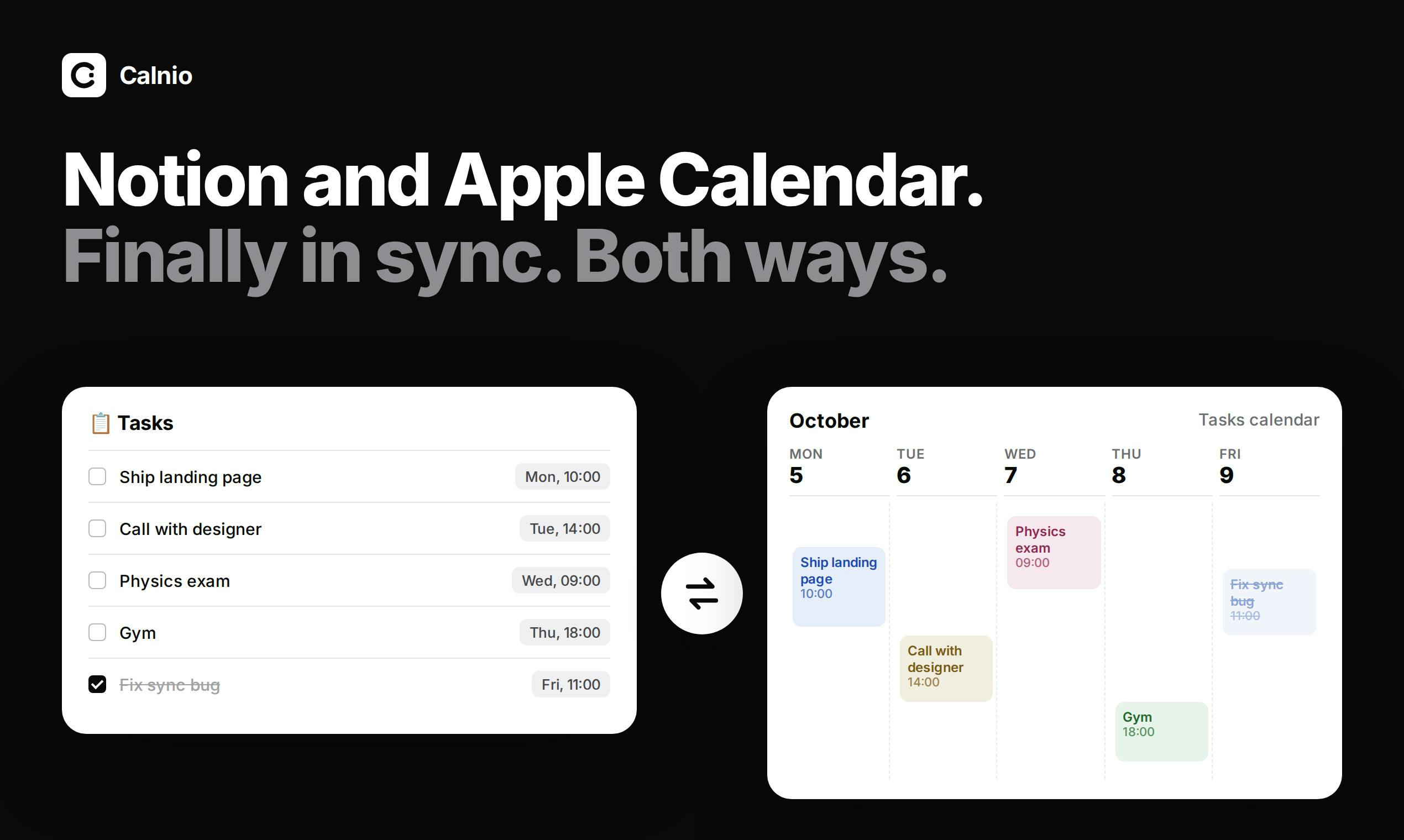
The product earned 64 upvotes on Product Hunt, ranking 14th on its launch day, under the Calendar, Apple, and Notion categories. While comments were sparse, the need it addresses is highly specific — the kind of tool where anyone who's faced the problem immediately understands its value.
The Key Difference: Real iCloud Events, Not Read-Only Subscriptions
There are already plenty of solutions for pulling Notion content into a calendar, but most rely on read-only webcal feeds. This approach has two notable limitations: events in the calendar can't be edited in reverse, and native reminder support is typically absent.
Calnio's key differentiator is that it creates real iCloud calendar events with system-level alerts. This means you can directly modify event times and set notifications within Apple Calendar, and those changes sync back to Notion. Likewise, updates made to tasks in Notion automatically reflect on the calendar side. "Edit on either end, and the other updates automatically" is its core value proposition.
This two-way mechanism upgrades Notion and Apple Calendar from a "one-way display" to a "collaborative editing" relationship — far better suited to real-world task management workflows.
webcal subscriptions are read-only calendar feeds based on the iCalendar (.ics) format, using URLs that begin with webcal://. Once subscribed, calendar clients periodically fetch the remote file and render the events — but users are essentially viewing a snapshot. Local editing isn't possible, and native system reminders can't be triggered because events aren't actually written to the local calendar database. Notion's built-in "Export to Calendar" feature uses exactly this approach, as does Google Calendar's "Other calendars" subscription feature. By contrast, events created directly via CalDAV or the iCloud API are written to the iCloud database, enabling two-way editing, conflict resolution, and local push notifications — which is the technical path Calnio claims to take.
An Indie Dev Project: Free and Hosted on a Home Raspberry Pi
Calnio carries a strong indie developer spirit. Built solo by one developer, it's currently completely free. What's particularly interesting is that the product description explicitly notes the service is hosted on a Raspberry Pi sitting in the developer's home.
This "home server + free and open" combination reflects the lightweight, earnest nature of independent projects — but it also signals that users should set reasonable expectations around service reliability. Self-hosted services running on a home network typically can't match the availability and operational consistency of commercial cloud services, which is worth factoring in when considering this kind of tool.
Raspberry Pi is a single-board computer developed by the UK-based Raspberry Pi Foundation, typically priced between $35–$80. About the size of a credit card and drawing only 5–15W of power, it's widely used by indie developers and the hacker community to self-host personal services — home NAS setups, DNS filters like Pi-hole, small web apps, and more. Hosting a sync service on a Raspberry Pi means the server is physically located in the developer's home, dependent on residential broadband upload speeds and a stable power supply. Any network outage, power failure, or hardware issue will interrupt the service, with no SLA guarantees like those offered by commercial cloud platforms — the most important risk to anticipate when using tools like this.
Who It's For, and What to Watch Out For
If you're a heavy user of both Notion and the Apple ecosystem, and you're tired of copying and pasting between two systems, Calnio offers an extremely low-cost option worth trying. The ability to create native iCloud events with real reminders is a meaningful advantage over standard subscription-based approaches.
That said, as an early-stage personal project, there are a few things to consider carefully:
- Stability: Raspberry Pi self-hosting means service availability depends on the developer's personal maintenance — not suitable for production environments with high reliability requirements.
- Data & Privacy: Two-way sync requires connecting both your Notion and iCloud accounts. You should understand how authorization and data handling work before proceeding.
- Long-Term Support: Free personal projects carry inherent uncertainty around continued updates and maintenance.
Summary
Calnio represents the kind of "small but precise" product that the indie developer community does well — not trying to be everything, but solving one specific pain point cleanly. By replacing read-only subscriptions with real iCloud events, it delivers genuine two-way sync between Notion and Apple Calendar, making it a genuinely useful supplementary tool for the right audience. For users willing to experiment and comfortable with the inherent limitations of self-hosted services, it's an option worth keeping on your radar.
Related articles

Gaussian Process Bandit Optimization: Exploration Strategies and Inference Regret Guarantees
Cumulative regret guarantees in Bayesian optimization fail to reflect final recommendation quality. This article examines a new study that provides inference regret guarantees for Gaussian process bandit optimization through exploration query strategies and fill distance analysis, validated on hyperparameter optimization and control tasks.

The Most Detailed Codex Guide on Bilibili: From Installation to Real-World Practice
The most detailed Codex guide on Bilibili: from app store installation to daily work mode configuration, with a real coffee shop project demonstrating file organization, data extraction, dashboard creation, and other practical tasks. Learn to use Plan Mode and desktop pets to leverage Codex efficiently.

Appearance Compensation in Volume Rendering: Why RGB Accuracy Cannot Guarantee Density Correctness
Volume rendering research reveals that volumetric data perfectly reproducing external RGB views may still contain density errors: appearance compensation can double central density and keep external rays unchanged even when L2 error exceeds 14.52%. Density recovery depends on appearance capacity, spatial resolution, and measurement design.