Can You Build and Ship an App with Gemini's Free Student Plan? A Hands-On Comparison with Claude and ChatGPT
Gemini's free student plan is fully capable for app development — here's how it compares to Claude and ChatGPT.
Google's one-year free Gemini Advanced trial for students is more than capable for building and publishing apps. This article compares Gemini, Claude, and ChatGPT for coding, finding that while Claude excels at code quality and ChatGPT leads in ecosystem maturity, Gemini's ultra-long context window and Google ecosystem integration make it a strong choice — especially for Flutter and Android development. The real challenge isn't the AI model, but the developer's own practice and understanding of the full app publishing process.
Google's Student Perk and the Real Developer Dilemma
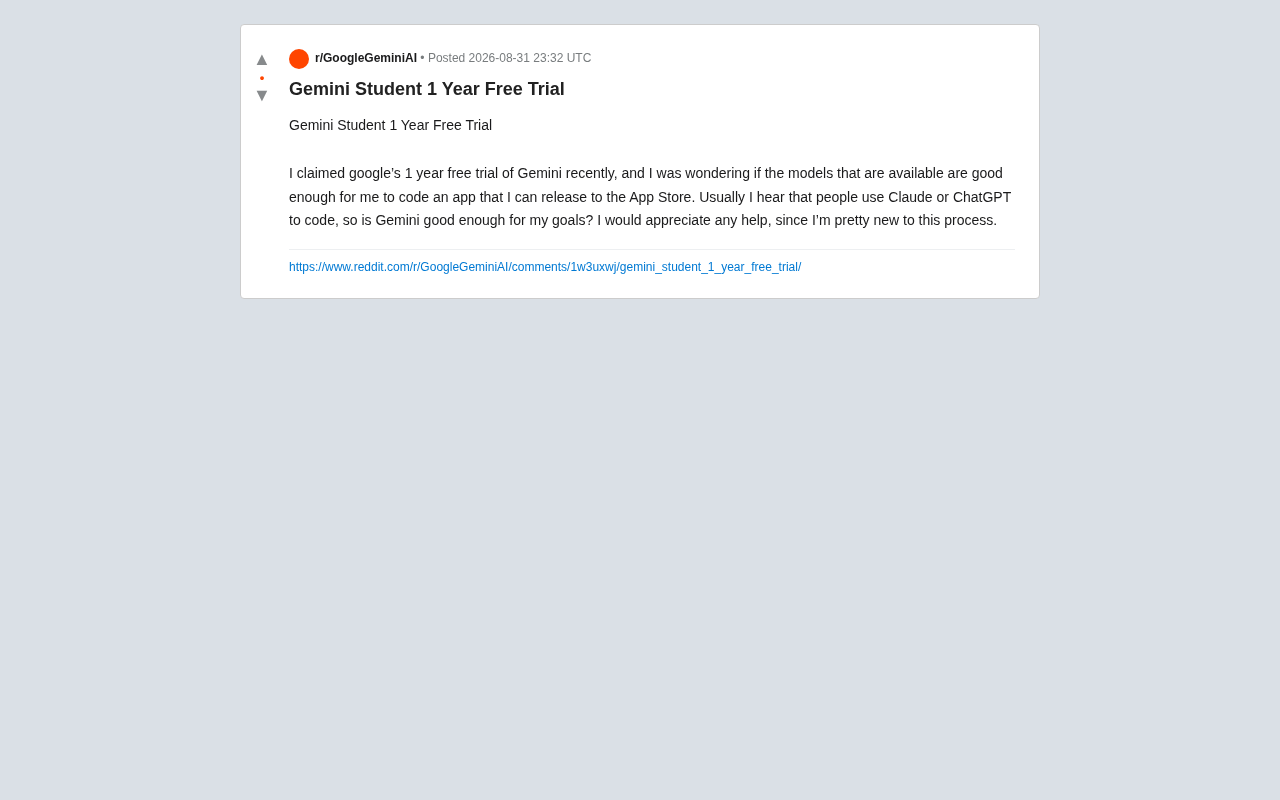
Recently, Google launched a one-year free Gemini trial for students, catching the attention of many beginner developers. On Reddit, a user who had just claimed this perk asked a question that resonated widely:
"I recently got Google's one-year free Gemini trial and want to know if the models it offers are good enough to write an app that can be published on the App Store. I usually hear that people use Claude or ChatGPT for coding — is Gemini good enough?"
The question seems simple, but it touches on a core issue in AI-assisted programming: With so many large models available — Gemini, Claude, ChatGPT, and more — how do you choose the right tool for your development goals? This article provides a detailed analysis.
How Good Is Gemini at Coding, Really?
What's Included in the Free Trial
Google's one-year free plan for students typically includes full access to Gemini Advanced (powered by its flagship model), along with extra Google One storage and other perks. For developers, the most valuable part is access to Google's most powerful Gemini model for code generation, debugging, and architectural guidance.
What you might not realize is that this perk is a subscription-level access, which differs from calling APIs through Google AI Studio or Vertex AI. Specifically, Gemini Advanced is a consumer-facing subscription service (the Google One AI Premium plan, normally $19.99/month), where users interact with the model through a web or app chat interface. Google AI Studio and Vertex AI, on the other hand, are developer-facing API platforms that allow programmatic model calls, with configurable inference parameters like temperature and top-p, and integration into automated workflows. Both use the same underlying models, but the access methods, rate limits, and use cases are fundamentally different. For student developers, subscription access means you can get code suggestions through conversation, but you can't batch-process code tasks or build automated pipelines the way API users can. Students primarily use the conversational interface (such as Gemini's web version or app) to assist with programming, rather than directly integrating into an IDE workflow.
Gemini's Real-World Performance on Coding Tasks
Based on community feedback and benchmark tests, Gemini's latest flagship model is now in the same tier as the GPT-4 series and Claude for code generation. It stands out in several areas:
- Ultra-long context window: Gemini supports extremely long context inputs (up to 1 million or even 2 million tokens), allowing you to paste multiple files from an entire project at once so the model can understand the global code structure. A context window refers to the total amount of text a model can "remember" and process in a single conversation. In programming scenarios, this means you can submit an entire project's source files, configuration files, and dependency manifests all at once, enabling the model to give more precise suggestions based on a holistic understanding of the architecture. By contrast, with a smaller context window, developers need to manually split code into chunks and submit them in batches, and the model may produce suggestions that conflict with other parts of the project due to a lack of global perspective. This advantage is especially pronounced when refactoring large codebases or debugging cross-file dependency issues.
- Multimodal understanding: It can directly read design mockups and UI screenshots to assist with frontend interface development.
- Deep integration with the Google ecosystem: It has a natural advantage in understanding Android development, Firebase, and other Google tech stacks.
How to Choose Between Gemini, Claude, and ChatGPT
The Developer Community's Consensus
The original poster mentioned that "people usually use Claude or ChatGPT," and this does reflect the current lean in the developer community. Among professional developers, each of the three models has its strengths:
- Claude (especially the Sonnet series): Widely regarded as the most consistent performer in code quality, instruction following, and long-text refactoring — the go-to coding assistant for many senior engineers. Claude is a large language model series developed by Anthropic, with Sonnet positioned as the balanced option between performance and speed. It has earned high praise in the programming community for several reasons: exceptional ability to follow complex instructions, strictly adhering to developer-specified code styles, framework conventions, and output formats; outstanding consistency in long-text scenarios, maintaining logical coherence without generating "hallucinated" code even when refactoring thousands of lines; and Anthropic's investment in safety and controllability research, making Claude more cautious about refusing to generate unsafe code patterns. These qualities have made it one of the default recommended backend models for AI coding tools like Cursor.
- ChatGPT: The most mature ecosystem, with rich plugins, Custom GPTs, and tool integrations, plus the most abundant community learning resources.
- Gemini: With its ultra-long context window and Google ecosystem integration, it has unique advantages in handling large projects and Android development scenarios.
That said, the gap between these three is closing rapidly. For an app built by a beginner, any mainstream model is more than capable. What truly determines a project's success or failure is usually not the model choice, but the developer's own understanding of requirements and debugging skills.
Practical Advice for Beginners
Since you already have a year of free Gemini Advanced, the most rational approach is: Start using it — don't rush to switch.
- Leverage zero-cost resources first: Make the most of the free resources you have. Use Gemini to complete the entire workflow from prototype design to app publishing, and only consider other tools when you genuinely hit a bottleneck.
- Focus on the workflow, not a single model: During app development, the IDE (such as Xcode or Android Studio) and AI coding plugins (like GitHub Copilot or Cursor) are often more efficient than pure conversational chat. GitHub Copilot runs as a plugin in editors like VS Code, providing real-time line-level or function-level autocomplete suggestions based on the current code context. Cursor goes further — it's a full IDE redesigned with AI at its core, supporting features like selecting code and chatting directly with the AI to modify it, cross-file referencing, and auto-applying diffs. For beginners serious about building apps, transitioning from conversational AI to IDE-integrated AI tools is the key step that transforms development efficiency. It's worth noting that Gemini's capabilities can also be used in similar workflows through Google's IDE plugins (such as Gemini Code Assist).
- Validate capabilities with real projects: Have Gemini generate a piece of core code your project needs and evaluate the output quality yourself — that's more reliable than any third-party benchmark.
Where the Real Challenges of Publishing to the App Store Lie
The original poster's ultimate goal is to "publish to the App Store," and here's a pragmatic reminder: AI can help you write code, but getting an app listed involves far more than code alone.
For iOS app development and publishing, you'll need to handle at least the following:
- Register for an Apple Developer Account (annual fee of $99)
- Learn Swift/SwiftUI or a cross-platform framework (such as React Native or Flutter). React Native, developed by Meta (Facebook), uses JavaScript/TypeScript for UI logic and calls native components through a bridge layer for rendering, backed by a massive npm ecosystem and community support. Flutter, developed by Google, uses the Dart language and employs a self-rendering engine (Skia/Impeller) to draw UI directly on the Canvas, offering superior cross-platform visual consistency. For beginners who want to publish on both iOS and Android, cross-platform frameworks allow one codebase to cover both platforms, significantly reducing development costs. Notably, since Flutter is a Google product, Gemini may have a natural training data advantage in understanding Flutter code, Widget architecture, and Dart syntax — adding extra justification for choosing the Gemini + Flutter tech stack.
- Understand the App Store Review Guidelines to avoid rejection due to missing privacy policies, incomplete functionality, and similar issues. Apple's App Store Review is a hurdle every iOS developer must face, with an average review cycle of 24–48 hours, though modifications and resubmissions after rejection can significantly extend the time to listing. The App Store Review Guidelines cover five major categories: safety, performance, business model, design, and legal compliance. Common rejection reasons include: missing privacy policy links, apps judged as "not providing lasting value" due to overly simple functionality, failure to properly declare data collection practices, and use of private APIs.
- Handle code signing, certificate configuration, TestFlight testing, and other publishing workflows. Code signing involves Apple's security chain of trust — every listed app must be signed with a developer certificate to ensure the code hasn't been tampered with and comes from a trusted source. TestFlight is Apple's official beta testing platform, allowing developers to invite up to 10,000 external testers before the official launch — a critical step for discovering bugs in real-world usage scenarios.
Gemini can help with every single one of these steps — from explaining review rules to generating privacy policy text, from debugging compilation errors to optimizing app performance. But it cannot replace the learning and hands-on practice you need to do yourself. For beginners, treating AI as an "on-demand programming tutor" rather than a "fully automated code factory" is the healthier mindset.
Conclusion: The Tool Is Good Enough — What Matters Is How You Use It
Back to the original question: Is Gemini good enough to develop an app that can be published? The answer is yes.
Today's mainstream large models have largely converged in their coding assistance capabilities, and Gemini is fully capable of supporting a beginner in building and publishing an app from scratch. Since you already have a year of free access, don't get caught up in community narratives like "everyone else uses Claude or ChatGPT" — free and capable is the best choice right now.
More importantly, regardless of which AI model you choose, real technical growth comes from hands-on practice, iterative debugging, and continuous improvement. AI is a learning accelerator, not a substitute for development skills. Make the most of this one-year free trial and treat it as a fast track to leveling up your programming abilities — that's where the true value of this student perk lies.
Related articles

LLM Application Development: A High-Paying Career Guide for Ordinary People
LLM application development offers fresh graduates up to 35K/month, with SP offers reaching 600K. This article explains the core skills, how to break in, and how ordinary people can seize AI opportunities through learning by doing.

Say Goodbye to AI Influencer Faces: A Complete Guide to Creating Visual Assets for AI Comic Dramas from Scratch
Bilibili creator shares a full workflow for zero-basics AI comic drama visual assets: use Doubao Work skills with script-first, visual references, and real-person texture to escape AI influencer faces, then lock character and scene consistency with asset sheet layouts, weapon detail images, scene nine-grids, and cinematic color palettes.

The AI Production Pipeline Behind Great Videos: From Research to Agent Validation
AI video production isn't just a model race. This article breaks down a transferable four-step pipeline: researching professional workflows, organizing a skill checklist, configuring agents, and experimental validation—and explains how general-purpose LLMs like DeepSeek can replace paid tools to run the entire process.