Chain Your Mac: Bringing Scrolling Window Management to macOS

Chain Your Mac brings Linux-style scrolling window management natively to macOS without disabling SIP.
Chain Your Mac is a scrolling window manager for macOS that brings the infinite horizontal strip layout popularized by Linux tools Niri and PaperWM to Apple's desktop. All windows line up on a scrollable virtual band, navigated naturally via trackpad gestures — no constant resizing needed. It runs natively without disabling SIP, supports window stacking, requires macOS 13+, and is positioned as a menu bar productivity tool for developers and power multitaskers. An official live demo is available before download.
Chain Your Mac: Bringing Scrolling Window Management to macOS
Window management has long been a pain point for macOS users. The system's built-in window layout logic is relatively conservative, and most third-party tools revolve around tiling or grid snapping. Chain Your Mac, which debuted on Product Hunt, takes a different approach — it brings the "scrolling window manager" paradigm, already popular in the Linux desktop world, natively to macOS.
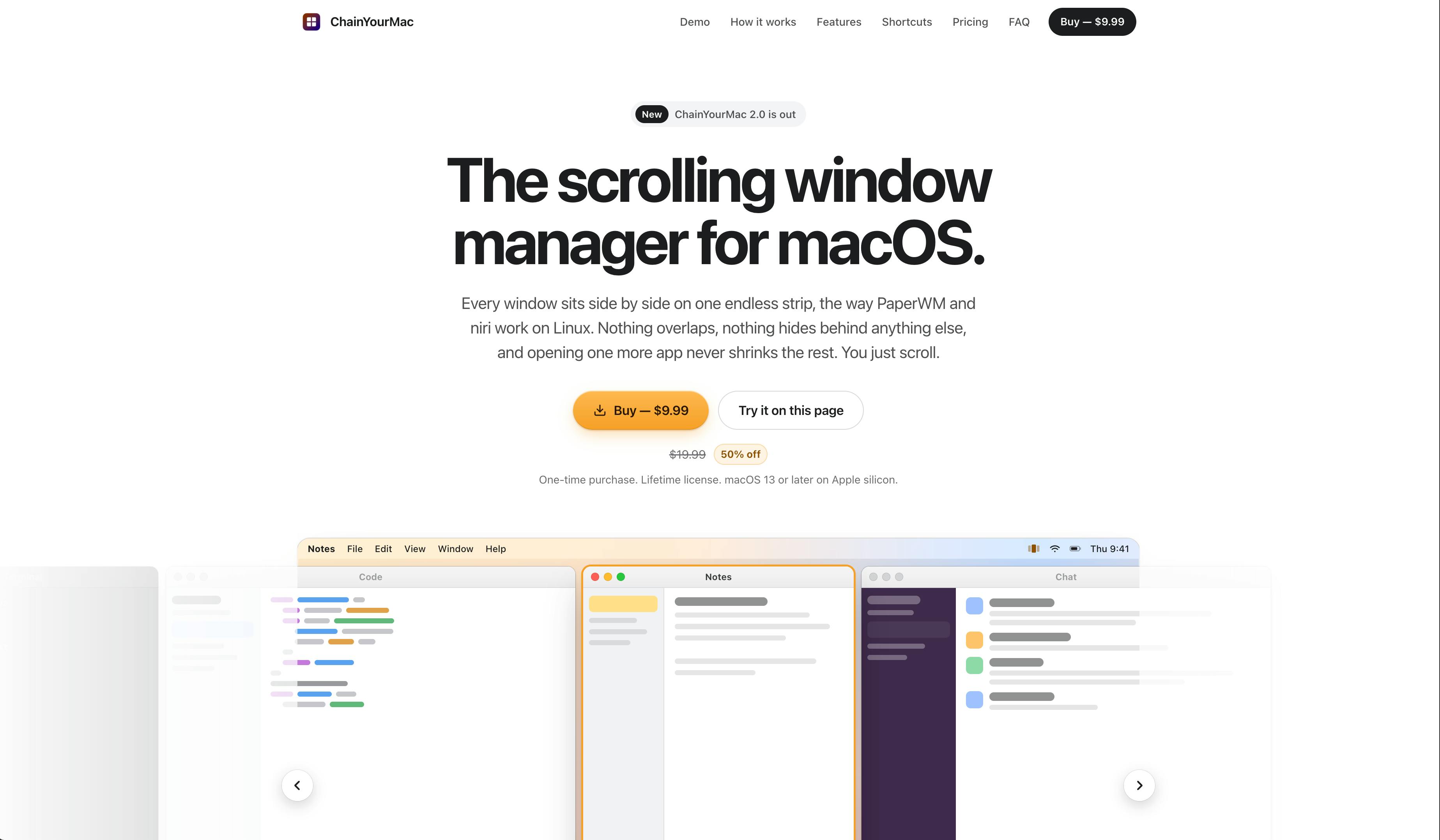
What Is Scrolling Window Management
The core idea behind scrolling window management is to arrange all windows along an "infinitely long horizontal strip" rather than cramming them into a fixed screen area. You don't need to constantly resize windows because of limited screen space — just scroll horizontally along the strip to switch between and browse different windows.
Chain Your Mac explicitly positions itself against two flagship Linux tools: Niri and PaperWM. The former is a rapidly rising Wayland scrolling compositor, while the latter is a classic GNOME extension. Their shared philosophy is that windows shouldn't compete for screen real estate — they should extend naturally, like a paper tape. Chain Your Mac transplants this concept into Apple's desktop environment.
Niri is a tiling compositor based on the Wayland protocol, written in Rust, which quickly gained traction in the Linux community around 2023. Its core design is "infinite horizontal scrolling columns" — each column of windows occupies a fixed width, new windows are always appended to the right, and users move horizontally between columns via keyboard or trackpad. Niri's smooth scroll animations and lightweight configuration have made it a key driver in bringing scrolling window management into the mainstream spotlight.
PaperWM takes a different route: it exists as a GNOME Shell extension, requiring no replacement of the entire desktop environment — it simply layers a scrolling layout on top of the existing GNOME framework. This gives it a broader audience than Niri — any GNOME user can install and try it without switching to a new Wayland compositor. PaperWM's name comes from the "paper tape" metaphor, where windows extend to the right like a continuous paper roll, partly inspired by early experimental Compiz plugins. Together, these two tools established the conceptual foundation for scrolling window management in the Linux ecosystem, and serve as Chain Your Mac's publicly acknowledged design references.
Three Key Selling Points
Based on the product description, Chain Your Mac has several noteworthy technical and experiential features:
Native Implementation, No SIP Required
Many advanced window management tools on macOS — especially deep tiling ones — require users to disable System Integrity Protection (SIP), which raises security concerns and increases the barrier to entry. Chain Your Mac emphasizes that it is a "native" implementation with "no SIP" required, meaning users don't need to sacrifice system security to use it. This is a clear accessibility win for everyday users.
System Integrity Protection (SIP) is a security mechanism Apple introduced in OS X El Capitan (2015) that restricts root-level write and modification access to critical system directories and kernel extensions. Its presence makes it difficult for malware to tamper with core system files even if administrator privileges are obtained. However, some window management tools that need to deeply hook into WindowServer or inject into system processes can only run with SIP disabled. Disabling SIP requires rebooting into Recovery Mode — a cumbersome process that also lowers the system's overall security posture. Chain Your Mac claims to run in a standard SIP-enabled environment, indicating it chose to control window behavior through macOS's publicly available Accessibility API and window management interfaces rather than lower-level system injection — a key design tradeoff that balances security and usability.
Trackpad Gesture Navigation
The tool supports navigating the window strip via trackpad swipe. This aligns closely with macOS's own heavy reliance on trackpad gestures, making the act of "scrolling" feel intuitive and natural rather than something you have to memorize keyboard shortcuts for.
Window Stacks
Beyond horizontal arrangement, Chain Your Mac also offers a stacks feature, allowing multiple windows to be grouped at the same position. This is useful when handling temporary windows or a set of related apps, preventing the strip from stretching too long with too many windows.
Additionally, the product requires macOS 13+ and provides an online live demo, letting users experience the interaction logic firsthand before downloading.
Who Does It Solve Problems For
For developers and heavy multitaskers who are accustomed to tiling window management but have switched to Mac, macOS has always lacked a sufficiently ergonomic alternative. Scrolling window management offers a middle ground between free-floating and strict tiling: more organized than floating windows, yet more flexible than tiling — without forcing you to shrink windows smaller and smaller within a limited screen.
Chain Your Mac is categorized under Productivity and Menu Bar Apps, with a clear positioning — it's a menu bar utility that lives quietly in the background, rather than a complex system that demands significant visual real estate.
A Measured Take: The Reality of an Early-Stage Product
It's worth noting objectively that, based on Product Hunt data, the product currently has limited traction (9 upvotes, 1 comment, ranked #20 for the day). This suggests it's still in its early exposure phase, with community feedback yet to fully develop. Scrolling window management, while conceptually forward-thinking, represents a relatively niche interaction paradigm on macOS, and whether it can gain mainstream adoption remains to be seen.
For interested users, the more prudent approach is to first experience the scrolling strip's actual feel through the official live demo before deciding whether to incorporate it into your daily workflow. The value of a window management tool is highly dependent on personal habits — whether it fits often only becomes clear after you've tried it yourself.
Summary
Chain Your Mac brings the scrolling window management paradigm represented by Niri and PaperWM to macOS, featuring native implementation, no SIP requirement, trackpad gesture navigation, and window stacking — targeting users who seek efficient multitasking. As an early-stage product, its concept is more noteworthy than its metrics — it represents a new direction in the exploration of macOS window management.
Related articles

AI Reverse-Engineers Monitor Firmware in 15 Minutes — Has the Hacking Barrier Been Flattened?
A security researcher used AI to reverse-engineer Dell monitor firmware in 15 minutes—entropy analysis, key extraction, MD5 verification—revealing encryption design flaws.

Mistral Voxtral 3: Real-Time Voice at 4 Cents per Minute, Challenging OpenAI
Mistral Voxtral 3 cuts real-time voice agent costs to 4 cents per minute, bundling three speech recognition models, a speech generation model, and a real-time voice toolkit, supporting 50+ languages and self-hosting. This article analyzes its pricing structure, sub-second response performance, and its strategic divergence from OpenAI and Gemini on data privacy versus out-of-the-box convenience.

WebMCP: Every Website as Its Own MCP Server, So AI Agents No Longer Rely on Screenshots
WebMCP lets websites expose tools via the document.modelcontext API, becoming directly callable MCP servers. This article explains its architecture, the Claude Code remote-debugging demo, Chrome's current support stage, and its impact on the agent ecosystem.