ChatCut Desktop: Humans and AI Collaborating on the Same Timeline to Edit Video

ChatCut Desktop lets humans and AI co-edit video on the same timeline using natural language.
ChatCut Desktop is a new desktop video editor designed for human-AI collaboration. It integrates GPT and Claude to let creators drive editing operations through natural language while maintaining full control on an editable timeline. Running entirely locally for privacy, it supports XML export for seamless integration with Premiere Pro, DaVinci Resolve, and CapCut, positioning itself as an AI accelerator for professional workflows.
When AI Enters the Video Editing Timeline
Video editing has long been a creative endeavor heavily dependent on manual work. Even with various smart tools, every cut point, every transition, and every subtitle still needs to be completed by the creator's own hands. The Timeline, as the core concept of non-linear editing (NLE), was first introduced into digital workflows by Avid Media Composer in 1989, arranging video, audio, graphics, and other assets horizontally as tracks, allowing creators to build narratives through dragging, trimming, and layering. This paradigm has dominated the industry for over thirty years — Premiere Pro, Final Cut Pro, DaVinci Resolve, and other major software all follow this design. It offers extremely high precision and predictability, but at the cost of a steep learning curve and tedious operations.
Recently, ChatCut Desktop landed on Product Hunt and surged to the #3 daily ranking, attempting to redefine this workflow. Its positioning: "a video editor built for humans and AI to edit together."
Unlike most "one-click video generation" AI tools on the market, ChatCut Desktop emphasizes human-AI collaboration: you can describe the effect you want to AI in natural language, then watch it come to life step by step on a fully editable timeline, rather than handing over all control to a black box.
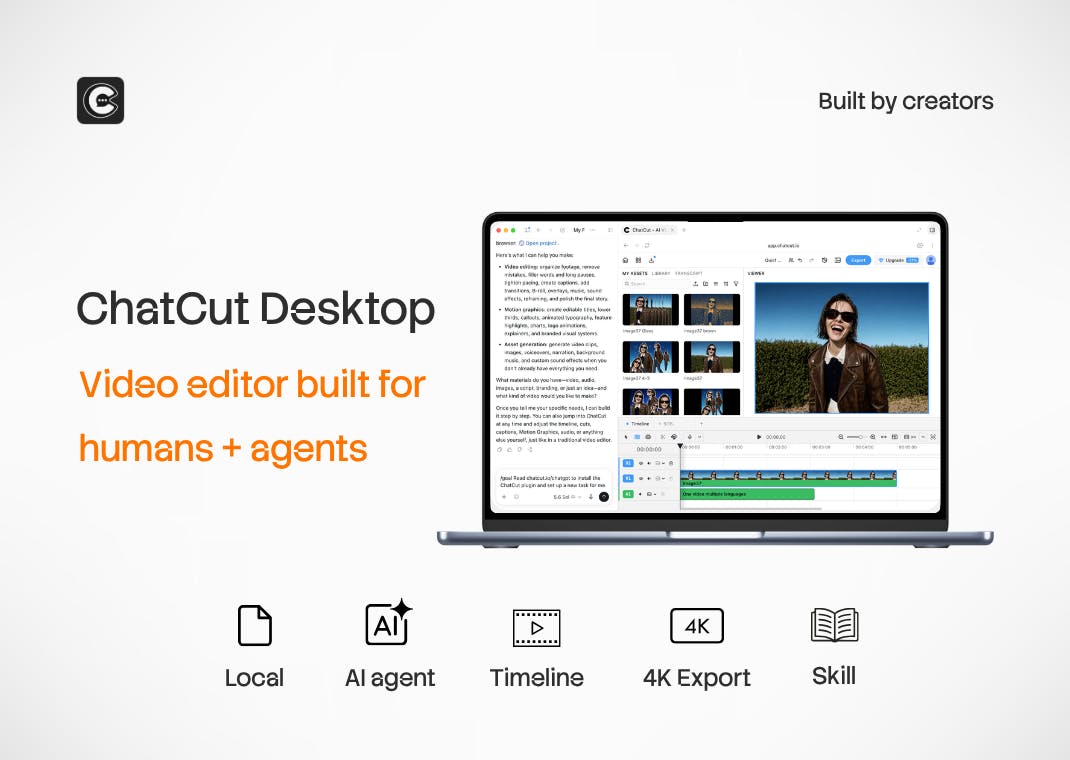
Dialogue-Driven Editing: Powered by GPT and Claude
ChatCut's biggest highlight lies in its openness. The product comes with its own built-in editing agent while also supporting connections to mainstream external large language models — including ChatGPT / Codex and Claude Code.
The concept of an Agent is a key term in the current AI landscape, referring to AI systems capable of autonomous planning, tool invocation, and task execution — distinct from simple Q&A chatbots. In creative tools, an Agent can decompose a user's high-level intent into a series of concrete operational steps, executing them progressively and self-correcting based on feedback. For example, when a user says "remove silent pauses," the Agent needs to first analyze the audio waveform to identify silent intervals, then calculate cut points, and finally execute deletions on the timeline while handling transition continuity.
As for the significance of multi-model support: OpenAI's GPT-4 and Codex excel at general-purpose reasoning and code generation, with Codex being particularly adept at converting natural language instructions into structured command sequences — ideal for executing precise editing operations. Anthropic's Claude is known for its longer context window and stronger instruction-following capabilities, potentially performing better at understanding complex creative intent. ChatCut's strategy of supporting multiple model integrations essentially lets users choose the most suitable reasoning engine for each specific task.
From "How to Edit" to "Just Say It"
In traditional editing, creators operate frame by frame within the software. In ChatCut, you simply describe your intent — for example, "remove the silent pauses from this interview" or "add an energetic title animation to the opening" — and the AI executes the corresponding operations on the timeline. The key point is that these changes are not irreversible final products but are presented as standard editing elements on the timeline, allowing users to manually fine-tune at any time.
This design elegantly balances efficiency with control: AI handles tedious repetitive work and creative generation, while humans retain ultimate aesthetic judgment and refinement capabilities.
ChatCut Desktop's All-in-One Creative Capabilities
According to official information, ChatCut Desktop covers multiple stages of video creation:
- Clip Editing: Splicing and trimming raw video footage
- Motion Graphics & Captions: Auto-generating motion graphics and captions
- AI-Generated Content: Generating video, images, music, and sound effects (SFX)
- Reusable Editing Skills: Saving commonly used editing workflows as "skills" for repeated future use
Motion Graphics refers to animating text, shapes, and visual elements through keyframe animation — traditionally requiring frame-by-frame creation in specialized software like After Effects. AI-generated motion graphics typically rely on template parameterization systems, where the AI selects appropriate templates based on semantic understanding and populates them with content parameters. Auto-captioning, meanwhile, depends on Automatic Speech Recognition (ASR) technology. Current leading solutions like OpenAI's Whisper model support over 90 languages with accuracy rates exceeding 95%, though post-generation challenges remain, including timeline alignment, sentence segmentation, and style adaptation.
"Reusable editing skills" is a design worth noting. It essentially crystallizes a creator's work habits into callable modules, enabling AI to improve collaboration efficiency based on an understanding of personal style — a concrete implementation of the "human-AI co-creation" philosophy.
Local Execution and Professional Editing Software Compatibility
In an era where data privacy and creative autonomy are increasingly valued, another selling point of ChatCut is that everything runs locally. This means not only that footage doesn't need to be uploaded to the cloud — ensuring greater privacy — but also that creators "stay in control" throughout the entire process.
Local execution faces significant technical challenges in the AI tool space: large language model inference typically requires high-performance GPUs, and video processing is inherently compute-intensive, meaning hardware requirements for users are higher. However, the advantages are equally clear: video assets often involve trade secrets or personal privacy, especially corporate promotional videos and unreleased film content. Between 2023 and 2024, several cloud-based AI tools faced backlash from creator communities over data breaches or training data controversies, making "local-first" an increasingly important differentiator for professional tools. Additionally, local execution eliminates network latency and bandwidth constraints, delivering a smoother experience for creators working with large 4K/8K files.
Seamlessly Integrating into Professional Editing Workflows
For professional creators, ChatCut doesn't aim to replace existing toolchains — instead, it chooses to integrate with them. It supports exporting in XML format, enabling direct interoperability with mainstream editing software like Premiere Pro, DaVinci Resolve, and CapCut.
XML (Extensible Markup Language) serves as a "universal translator" in the video industry. Final Cut Pro XML (FCPXML) and Adobe's export formats allow different software to exchange timeline data, including cut points, transition types, audio levels, and asset reference paths. This format interoperability is critical for professional post-production workflows, as large projects often involve multiple software tools working in concert — for example, rough cutting in one application, color grading in another, and audio mixing in a third. ChatCut's XML export support means it can seamlessly embed into this mature collaborative pipeline.
This approach is quite pragmatic. It acknowledges that professional editors will ultimately return to their familiar, mature software for fine-tuning, positioning itself as an "AI accelerator" at the front end of the workflow — using AI to rapidly build a rough cut framework, then handing it off to professional software for finishing.
Industry Perspective: A New Paradigm for AI Video Editing
The emergence of ChatCut Desktop reflects how AI video tools are evolving from "fully automated generation" toward "collaborative augmentation." Early AI video tools often pursued the ultimate automation of "input text, output finished video," but in practice were limited to amateur scenarios due to lack of controllability and difficulty in making modifications.
The current AI video tool market can be roughly divided into three tiers: the first tier consists of purely generative tools like Runway Gen-3, Pika, and Sora, focused on text/image-to-video generation; the second tier includes automated editing tools like Descript (editing video through text) and OpusClip (automatically slicing long videos into short clips); the third tier comprises AI-enhanced professional editors that attempt to introduce AI acceleration while preserving professional control. ChatCut positions itself in the third tier, with competitors including Adobe's AI features integrated into Premiere Pro (such as auto-transcription and scene edit detection) and Wondershare Filmora's AI editing assistant.
The path ChatCut has chosen aligns more closely with professional creators' real needs: AI boosts efficiency, humans lead the way. By openly supporting multiple large language models, committing to local execution, and maintaining compatibility with professional software, it seeks to find the sweet spot between automation and controllability. The core competitive advantages in this space come down to the quality of AI suggestions, the degree of integration with existing workflows, and the level of respect for creator control.
Of course, as a new product that just debuted on Product Hunt (163 upvotes, 11 comments), its actual editing intelligence, the quality of AI-generated content, and hardware requirements for local execution still await validation from more real-world users. But the concept it represents — "humans and AI collaborating on the same timeline" — undoubtedly offers a noteworthy new direction in the crowded AI video space.
Key Takeaways
Related articles

Automate Job Search with AI Agents and Residential Proxies for Precise Matching
Build an AI Agent with MCP and residential proxies to bypass recruitment site anti-scraping and geo-restrictions, scrape thousands of DevOps jobs, then have Claude score and rank each against your resume. Includes proxy comparison experiments, project structure, and cost analysis—filtering only, no auto-submission.

The AI Task Assistant That Knows When to Back Off: A Cure for Activation Struggles
One Small Step is an AI assistant for task initiation struggles, using agentic decisions for guilt-free reminders, timely retreat, and cross-platform task management. The developer shares real test results on 13 tasks and architectural trade-offs.

FastAPI: A High-Performance Python Framework and a Production-Ready API Development Powerhouse
FastAPI is a high-performance web framework based on Python type hints, supporting async and automatic OpenAPI docs. With over 100k GitHub stars, this article analyzes its core strengths, production readiness, and selection advice.