ChatGPT + Codex Beginner's Guide: AI Programming from Zero to Real-World Practice

A systematic overview of OpenAI Codex's usage forms, core capabilities, and specification-driven engineering design philosophy.
Based on the Bilibili creator's ChatGPT + Codex Beginner's Full Course, this article systematically organizes OpenAI Codex's core capabilities and engineering philosophy. It first introduces Codex's three usage forms — CLI, standalone App, and IDE plugin — with advice on mixed use; then covers mainstream scenarios such as code generation, open-source project learning, code review, and log troubleshooting, followed by seven core capabilities including multi-task parallelism, Git WorkTree code isolation, remote control, image generation, automated orchestration, the Skills system, and the plugin system. At the engineering level, the article focuses on Codex's shift from prompt-driven to specification-driven development (SDD), using Agents.md to define goals and boundaries, simulating human engineer workflows through the Agent loop, and optimizing context engineering with vector retrieval and AST awareness. Finally, it provides an advanced learning path from core capability awareness to multi-agent collaboration.
AI programming tools are reshaping the way developers work, and OpenAI's Codex has become one of the most closely watched products in this space. A full beginner's course on ChatGPT + Codex released by a Bilibili creator covers the complete chain from tool awareness to enterprise-level project deployment. Based on that course, this article organizes Codex's core capabilities and engineering design philosophy to help developers quickly build a global understanding of this tool.
What Is Codex: Three Usage Forms
Codex first appeared as a CLI command-line tool — developers can enter the codex command to enter the interactive interface for AI programming. According to the creator, in the earliest days everyone used Codex "basically through the command line," and this method remains one of the core usage forms today.
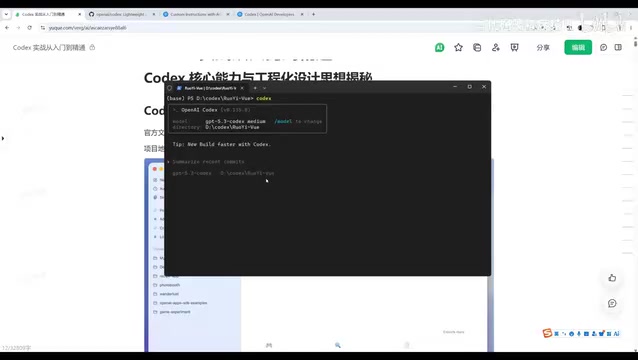
As the product has evolved, Codex now also offers a standalone App version, and can additionally be integrated into coding environments through Cursor or VS Code plugins. The creator recommends that developers adopt a "mixed CLI and App" approach. If you're used to working in VS Code or Cursor, installing the Codex plugin enables seamless switching between coding and AI conversation, avoiding the hassle of constantly switching windows.
Each of the three forms has its own suitable scenarios: the App is good for independent task handling, the CLI suits heavy terminal users, and the plugin form is best for developers who need to call AI while writing code.
Core Features: More Than Just Writing Code
Codex's feature coverage in the AI programming space is already quite broad. In the course, the creator lists several mainstream application scenarios:
Code generation and project scaffolding is the most basic capability — using conversation to have Codex generate code or build a project architecture. Learning open-source projects is an easily overlooked but very practical scenario — pull down an open-source project you're interested in, use Codex to analyze the project structure, and quickly understand how the code is organized. For developers taking over a company's legacy project, this feature can dramatically shorten the time needed to get familiar with the codebase.
Code review is another high-frequency scenario. Codex has a built-in review slash command that can quickly analyze uncommitted code changes or submitted PRs, identify potential vulnerabilities, and provide modification suggestions, reducing the cost of manual review. In addition, feeding online logs to Codex for bug localization and fix proposals, as well as full-process automated development from requirements analysis to testing and debugging, are also areas Codex excels at.
A Panorama of Seven Core Capabilities
To use Codex efficiently, you need to build a complete understanding of its underlying capability architecture. The creator emphasizes: "Don't look at any single feature in isolation — always integrate them for use."
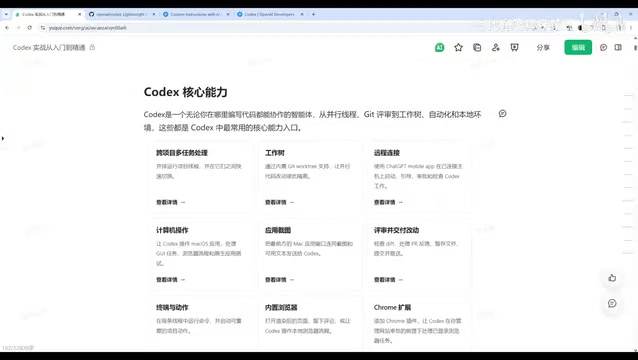
Multi-task parallel processing is one of Codex's most prominent capabilities. It uses a multi-thread mechanism and can simultaneously launch multiple threads to handle cross-project tasks. For example, if you ask Codex to analyze three projects at once and output a summary table, it will automatically allocate threads to execute in parallel and then merge the results.
The Git WorkTree mechanism solves the code isolation problem in parallel development. Traditionally, parallel development by multiple people requires branch isolation and merging, whereas Codex supports creating multiple WorkTrees under a single branch, enabling parallel collaboration with isolated code.
Remote connection and control lets developers remotely control Codex on a computer from a mobile device to execute tasks. Codex also supports invoking various applications on macOS, operating browsers, recognizing screenshots, executing terminal commands, and even adding Chrome plugins to manage browser tasks.
Image generation and editing capabilities give Codex the functionality of an AI drawing tool as well, thanks to its integrated multimodal models. Automated task orchestration allows developers to chain a series of operations into a fully automated workflow. In addition, Skills building and the plugin system provide Codex with enormous extensibility, enabling it to sync with the IDE, generate videos, and more.

Engineering Design Philosophy: Specification-Driven Replaces Prompt-Driven
The biggest difference between Codex and traditional AI programming assistants lies in its engineering design philosophy. The creator points out that Codex has "evolved from a simple AI coding assistant into a full-stack development partner," and this evolution is reflected at three levels.
Specification Engineering Replaces Prompt Engineering
Codex emphasizes Specification-Driven Development (SDD). Developers need to first write specification files such as Agents.md, clarifying goals, boundaries, and acceptance criteria, and then have AI generate code. The creator mentions an extreme case practiced internally at OpenAI based on Harness Engineering: three people generated over one million lines of code in five to six months, all completed by AI, with humans only responsible for defining specifications.
SDD (Specification-Driven Development) is a methodology that treats the "specification" as the core artifact of development: developers no longer directly describe scattered requirements to AI, but instead first produce structured, verifiable specification documents and then have AI generate implementations based on the specification. Its difference from traditional "prompt engineering" is that prompt engineering focuses on expression techniques for a single conversation, whereas specification engineering focuses on engineering contracts that are reusable, versionable, and shareable across multiple Agents. Specifications typically include goals, boundaries (what not to do), interface conventions, acceptance criteria, and testing requirements.
Agents.md is the key carrier in this system and can be understood as a "project manual" for AI Agents: it records project structure, coding conventions, tech stack constraints, build and test commands, and the rules that Agents must follow when executing tasks. When Codex starts up and reads this file, it is essentially obtaining a long-term memory and code of conduct, thereby reducing repetitive communication and lowering the risk of out-of-bounds modifications. During multi-person collaboration, Agents.md also serves as the anchor of team consensus, keeping the behavior of Agents invoked by different members consistent.
The Agent Loop Simulates a Human Engineer
Codex no longer simply generates code and stops there; instead, through the Agent loop mechanism, it simulates the human development process — first making a plan, confirming the approach, coding module by module, and then conducting strict review combined with context to analyze potential bugs, security issues, and performance bottlenecks. This mechanism significantly improves the quality of code produced by Codex, which is "basically ready to use directly."
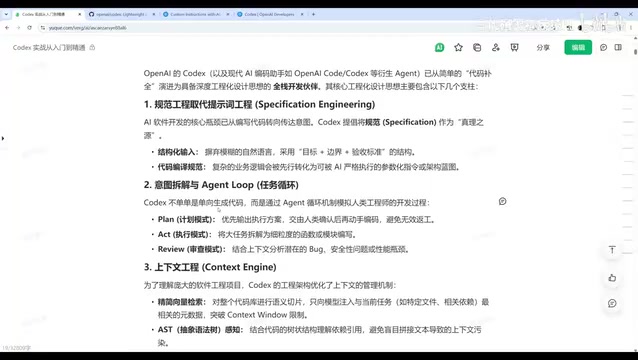
The Agent Loop refers to AI no longer outputting an answer all at once, but instead repeatedly executing a closed loop of "think — act — observe — think again" like a human: first planning the task, invoking tools (reading files, running commands, checking documentation), observing execution results, and then revising the next action based on the results until the goal is achieved. The termination condition of this loop is usually determined by the acceptance criteria in the specification.
Related to this, Harness Engineering can be understood as "the engineering scaffolding built around the model," including tool interfaces, context injection strategies, permission control, result validation, and feedback mechanisms. The model itself has limited capability, and the actual output quality depends largely on whether this exoskeleton design is reasonable. The "three people, one million lines of code in half a year" mentioned in the article is an extreme validation of this idea: humans invest their energy in writing specifications, building toolchains, and serving as quality gatekeepers, while repetitive coding is handed over to the Agent loop for execution.
Deep Optimization of Context Engineering
In terms of context management, Codex has made extensive optimizations. It uses a streamlined vector retrieval mechanism, injecting only code snippets and metadata relevant to the current task rather than loading the entire codebase, thus avoiding context overflow issues. At the same time, Codex has abstract syntax tree (AST) awareness, enabling it to understand dependency and reference relationships between code, avoiding compilation errors caused by insufficient dependency analysis.
At the environment interaction level, Codex possesses strong autonomous execution capabilities. In fully authorized mode, it can invoke tools such as compilers, debuggers, and package managers. When code errors occur, it automatically reads logs, locates the cause, and fixes the problem, achieving a fully automated closed loop.
AST (Abstract Syntax Tree) is a tree-structured representation formed after source code is parsed. It strips away surface syntax such as whitespace and comments, retaining only semantic information such as variables, functions, classes, and call relationships. Compared with plain text split by lines, an AST lets AI know precisely "who calls this function" and "what this class inherits from," so when modifying code it can synchronously update affected dependency points, avoiding compilation errors caused by changing a definition but missing the callers.
Vector retrieval solves the problem of a limited context window: the system first splits the codebase into fragments, converts them into vectors, and stores them in an index. When an Agent receives a task, it uses the task description to retrieve the semantically closest fragments and injects only those fragments along with necessary metadata into the prompt. This controls token consumption while reducing interference from irrelevant code in the model's judgment. Together, the two form the foundation that allows Codex to maintain accuracy even in large-scale codebases.
Suggested Learning Path
The creator recommends two core learning resources: OpenAI's official developer documentation is suitable for deeply understanding Codex concepts and guidelines, while the open-source repository is suitable for developers who want to study the CLI source code and detailed documents such as Agents.md. For developers who want to systematically master Codex, it is recommended to gradually go deeper along the path of "core capability awareness → practical setup → CLI interaction conventions → slash command system → Agents.md configuration → enterprise-level Skills development → MCP protocol integration → multi-agent collaboration."
The follow-up content of this course will also cover the complete development of a RAG intelligent customer service system from zero to one, as well as enterprise-level plugin development and retrospective best practices, forming a complete learning loop from beginner to real-world practice.
MCP (Model Context Protocol) is an open protocol used to standardize the integration of external data sources and tools into AI applications. You can think of it as the "USB-C port of the AI world": whether it's a database, file system, Git repository, or internal management system, as long as the corresponding MCP Server is implemented, an Agent can discover and invoke these capabilities in a unified way without writing separate adapter code for each tool.
Multi-Agent collaboration further divides labor on top of a single Agent: a planner breaks down tasks, an executor writes code, and a reviewer verifies quality. Multiple Agents pass results to each other through shared specifications and context. Compared with a single Agent processing serially, multi-agent systems are better suited to complex enterprise-level projects, but they also place higher demands on the clarity of specification definitions and the division of task boundaries — which is exactly why the learning path places MCP and multi-agent collaboration after Agents.md and Skills.
Related articles

How Big Can Stars Really Get? The Physical Limits of the Largest Stars
Red supergiants are the largest stars by volume, with radii up to 2,000 times the Sun, engulfing the inner solar system. But there is no precise upper limit on stellar size—models predict up to 15,000 solar radii. The most massive blue stars are far smaller than red supergiants—biggest and heaviest are two different things.

Apple HomeView Smart Display Full Feature Breakdown: Wall-Mount or Desktop, $299
Apple launches HomeView, a $299 smart display with wall-mount and desktop options, 12MP camera for facial recognition, smart home control, music playback, and recipe step-by-step cooking. Full breakdown of watch faces, apps, privacy, and cooking integration.

Where Did the Promised New Studio Go? Craft Computing Answers After Five Years
Craft Computing's host responds to viewer questions: the new studio promised five years ago was shelved as construction costs soared from $30,000 to $75,000, and was replaced by a 168-square-foot garage conversion.