ChatGPT Desktop Arrives on Linux: Developers Get a Native AI Coding Experience

OpenAI releases ChatGPT Linux desktop preview with native Codex integration for developers.
OpenAI has officially launched a Linux preview of its ChatGPT desktop application, bringing ChatGPT, ChatGPT Work, and Codex to the platform. The release targets Linux's developer-heavy user base with native AI coding assistance, eliminating the need to switch between browsers and terminals. While still in preview with potential limitations, it signals OpenAI's long-term commitment to Linux support.
ChatGPT Officially Comes to the Linux Desktop
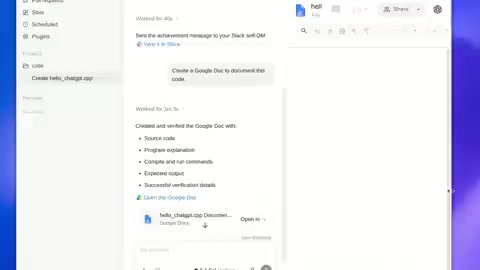
OpenAI recently announced that the Linux preview of the ChatGPT desktop application is now available. This means Linux users can finally use ChatGPT, ChatGPT Work, and the programming-focused Codex features through a native desktop app on their preferred operating system.
Previously, ChatGPT's desktop client was available on macOS and Windows, while Linux—a critical platform for developers and technical professionals—lacked an official desktop app for a long time. The launch of the Linux version completes OpenAI's coverage of all major desktop operating systems and answers a longstanding request from the developer community.


Core Use Cases for Developers
Invoking AI Right Where You Work and Build
According to OpenAI's official description, the app's core positioning is to let users leverage AI capabilities "where they already work and build." This is especially significant for Linux users—Linux powers over 90% of the world's servers and serves as the core runtime environment for cloud infrastructure (AWS, Azure, GCP). In developer workflows, Linux underpins critical components of modern software engineering including container orchestration (Kubernetes), continuous integration/continuous deployment (CI/CD), and microservices architecture. According to the Stack Overflow 2024 Developer Survey, approximately 33% of professional developers use Linux as their primary development OS, with even higher adoption among backend developers, DevOps engineers, and systems engineers. Furthermore, Linux is the preferred platform for machine learning model training and inference, with NVIDIA CUDA, PyTorch, TensorFlow, and other AI frameworks treating Linux as their first-priority platform. As the go-to platform for server development, systems programming, cloud-native applications, and open-source software, Linux's user base inherently overlaps heavily with the demand for AI-assisted programming.
The new desktop app allows users on supported Linux systems to use ChatGPT alongside their project files and browser workflows. This deep integration means developers no longer need to constantly switch between browser tabs and terminals, enabling a smoother incorporation of AI into their daily development process.
Native Codex Integration: Code Generation and Understanding Delivered to the Desktop
Notably, this preview release specifically emphasizes Codex support. Codex is OpenAI's core capability for code generation and understanding, with technical roots tracing back to 2021 when OpenAI fine-tuned a specialized model on large-scale open-source code corpora using the GPT architecture. The early Codex powered GitHub Copilot's code completion features, capable of understanding natural language descriptions and generating corresponding program code. With the evolution of GPT-4 and subsequent models, Codex's capabilities have expanded from simple code completion to cross-file code understanding, complex refactoring suggestions, test case generation, and multi-language translation. In 2025, OpenAI repositioned Codex as an independent programming agent product line, supporting autonomous execution of multi-step programming tasks in sandboxed environments, including bug fixes, feature implementations, and writing complete modules.
Bringing Codex to the Linux desktop is clearly a precision move targeting the platform's developer-dominated user base. Developers can leverage Codex for code completion, refactoring suggestions, error diagnosis, and more, further boosting efficiency in their native development environment.
A Unified Desktop Entry Point for Three Product Lines
The Linux version integrates three product lines at once:
- ChatGPT: The core product for general-purpose conversation and content generation
- ChatGPT Work: A workplace version designed for enterprise and team collaboration. It adds enterprise-grade security guarantees on top of standard ChatGPT, including commitments that data won't be used for model training, SOC 2 compliance, SSO single sign-on, admin consoles, and shared team workspaces. The enterprise version also supports longer context windows and higher usage quotas, enabling entire teams to share prompt templates, knowledge bases, and workflows on a unified AI platform.
- Codex: Specialized capabilities for programming and code tasks
Unifying all three in a single desktop application reflects OpenAI's integration-focused product strategy—providing users across different use cases with a single desktop entry point, lowering barriers to adoption while reinforcing a consistent experience across the product ecosystem.
Why the ChatGPT Linux Version Took So Long
From an industry perspective, AI application vendors typically prioritize Windows and macOS support because these two platforms cover the vast majority of consumer and enterprise desktop users. Linux's desktop market share is relatively small, and its distribution fragmentation is severe (Ubuntu, Fedora, Debian, Arch, etc.), making adaptation and maintenance costs considerably higher.
Specifically, the complexity of adapting desktop applications for Linux far exceeds that of Windows and macOS. Different distributions use different package management systems (apt, dnf, pacman), different display server protocols (X11 is transitioning to Wayland), different desktop environments (GNOME, KDE Plasma, XFCE), and different system library versions. This means development teams must handle graphics rendering compatibility, input method framework differences, inconsistent system notification interfaces, file dialog implementation variations, and numerous other adaptation tasks. In recent years, universal packaging formats like Flatpak, Snap, and AppImage have partially alleviated this problem by packaging applications and their dependencies in sandboxed containers for unified cross-distribution delivery.
However, Linux has extremely high penetration among developers, researchers, and tech enthusiasts. As AI coding assistants become standard in development workflows, ignoring the Linux platform means abandoning a large cohort of high-value, highly active core users. OpenAI's release of the Linux preview is a direct response to this reality. The official note specifying "supported Linux systems" also hints that the current version may only cover select mainstream distributions, with broader compatibility expected to expand over time.
Expectations and Limitations of the Preview Stage
As a preview release, this version is primarily an early-access experience for adopters, and its features and stability may still be undergoing refinement. Users may encounter incomplete functionality, insufficient performance optimization, or compatibility issues with certain distributions. However, from a strategic standpoint, the preview release itself sends a clear signal: OpenAI has officially included Linux in the long-term support scope of its desktop ecosystem.
For technical professionals who have long relied on Linux for development, this is undoubtedly welcome news. Native desktop applications offer significant advantages over browser-based web versions across multiple dimensions: in terms of system-level integration, native apps can register global shortcuts (such as summoning a chat window at any time), directly access the local file system, deeply interact with the system clipboard, and send native system notifications; in terms of performance, native apps can directly leverage system GPU-accelerated rendering, avoiding the overhead imposed by browser sandboxes; additionally, native apps support offline caching and background execution, allowing users to retain partial functionality during unstable network conditions. It's worth noting that many modern desktop applications (including VS Code and Slack) are built on the Electron framework, essentially wrapping the Chromium browser engine as a desktop application to gain access to system-level APIs while retaining the development efficiency of web technology stacks. These capabilities—system integration, shortcut support, offline experience, and local file access—are all important factors in boosting developer productivity.
Conclusion
ChatGPT's arrival on the Linux desktop marks a complete step in OpenAI's cross-platform strategy. Although still in the preview stage, its focus on developer scenarios, native Codex integration, and unified entry point for three product lines all demonstrate a clear product direction. For developers in the Linux community, this is not just a tool upgrade—it's another milestone in the deep integration of AI into development workflows. As compatibility and features mature, this application is poised to become an important addition to the everyday toolbox of Linux developers.
Related articles

RAGFlow Deep Dive: An Open-Source Knowledge Engine Combining RAG and Agent Capabilities
Deep dive into RAGFlow, an open-source RAG engine with 87K+ GitHub Stars. Explore its deep document understanding, Agent orchestration, traceable Q&A, and enterprise knowledge base applications.

Qwen 3.8 Weights Open-Sourced: Technical Analysis and Ecosystem Impact of Alibaba's Open-Source Model
Alibaba's Qwen 3.8 model weights are now open-source. This article analyzes Qwen's open-source strategy, the value of weight release for private deployment and fine-tuning, and its competitive position in the global open-source LLM landscape.

Tailscale Traces the Source: A 16-Year-Old SQLite WAL Reset Bug
Tailscale's engineering team discovered a 16-year-old hidden bug in SQLite's WAL reset mechanism in production. Learn how WAL works, what triggered the bug, and key takeaways for developers.