ChatGPT Plugin LiveReacting: Launch 24/7 Live Streams with a Single Sentence

ChatGPT plugin LiveReacting lets users create multi-platform cloud looping live streams with a single sentence.
LiveReacting is a ChatGPT plugin that lets users create 24/7 looping live streams or schedule pre-recorded videos by simply typing @LiveReacting and describing their needs—no OBS or streaming software required. It supports simultaneous streaming to YouTube, Facebook, Twitch, LinkedIn, X, and custom RTMP addresses. Streams are hosted on LiveReacting's servers, so broadcasts continue even when the user's computer is off, and playlists can be adjusted in real time while viewing status. Included in all paid plans and positioned as a value-added entry point for the ChatGPT ecosystem. The article also notes limitations: limited community feedback, undisclosed key parameters like media formats and duration limits, and better suitability for content carousels than real-time interaction.
The barrier to live streaming is being lowered even further by AI. The newly launched LiveReacting plugin on Product Hunt lets ChatGPT users create 24/7 looping live streams or pre-recorded broadcasts directly with natural language instructions—no need to open OBS, configure streaming software, or even keep your computer turned on.
The Distance from Chat Box to Live Room Is Just an @
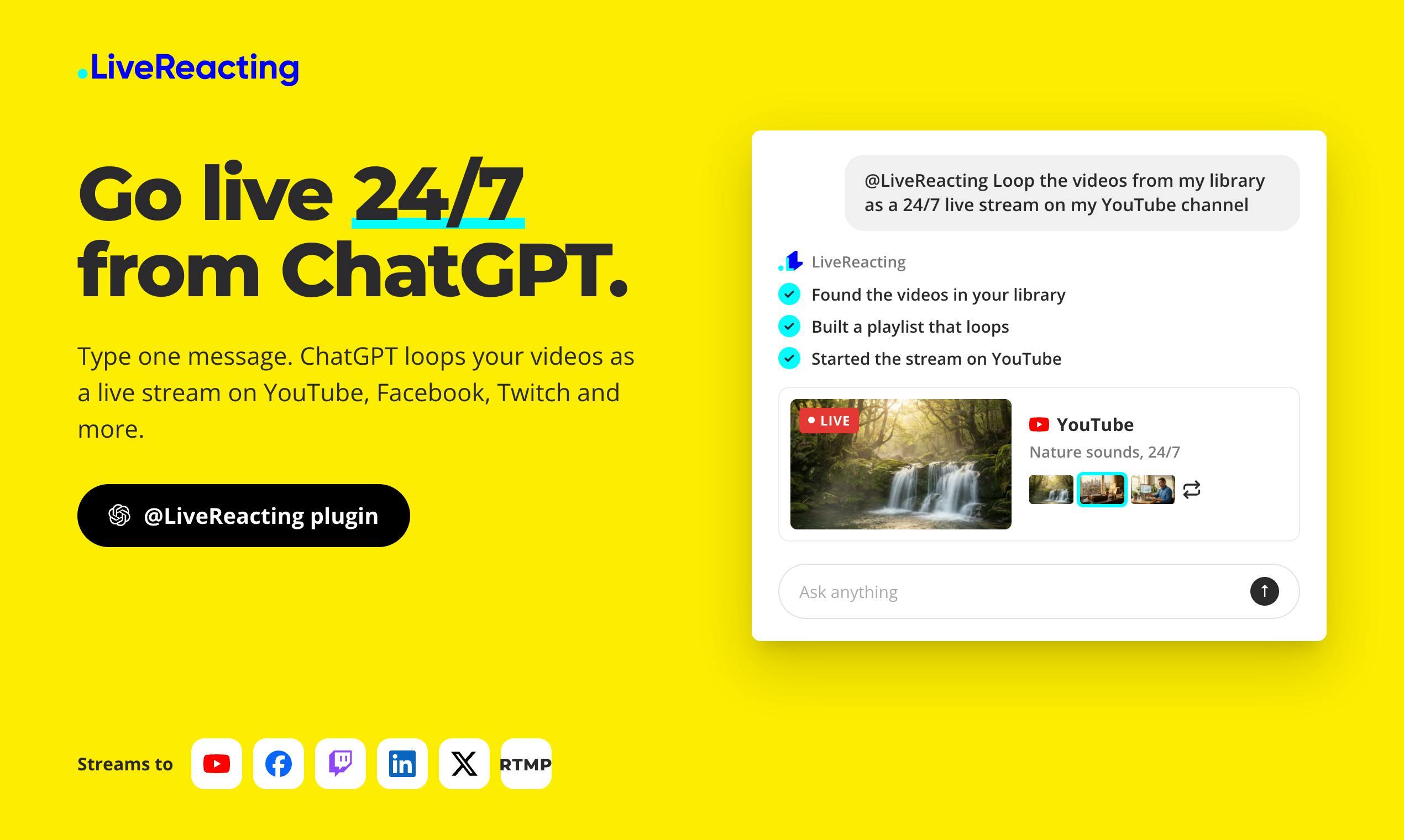
LiveReacting works simply: type @LiveReacting in a ChatGPT conversation and describe your needs. The plugin builds a looping playlist from your media library and immediately starts a 24/7 live stream, or schedules a recorded video to go live later. The entire process happens within the chat interface—no need to switch to a third-party console.
The core value of this design is "de-toolification." Traditional live streaming requires a series of professional operations—encoders, stream URLs, bitrate settings—and LiveReacting encapsulates all of this behind a ChatGPT plugin call. For scenarios that require long-running broadcasts—such as music channels, product showcase carousels, or looping educational videos—the efficiency gain of this interaction method is orders of magnitude.
ChatGPT Plugins mechanism: ChatGPT plugins are an extension mechanism launched by OpenAI in 2023 that allows third-party services to integrate into conversations as "tools." Users explicitly invoke a plugin via the @plugin_name syntax, and the model parses natural language instructions, converts them into structured calls to the plugin API, and integrates the returned results into the response. A plugin essentially acts as an intermediary layer between the LLM and external systems: the model handles understanding intent and orchestrating parameters, while the plugin executes specific actions (such as creating a live stream or querying data). The advantage of this design is that users can complete cross-application operations without leaving the chat interface, but it also means that plugin reliability depends heavily on the model's accuracy in understanding instructions—complex or ambiguous requests may require multiple rounds of clarification.
Multi-Platform Synchronization and Cloud Hosting
According to the product page, LiveReacting supports simultaneous streaming to YouTube, Facebook, Twitch, LinkedIn, X, and custom RTMP addresses. This means one configuration can cover major social and video platforms, eliminating the hassle of repeated setup for each platform.
More importantly, the hosting method: streams run on LiveReacting's servers, so the live stream continues even if the user's computer is turned off. This feature directly addresses the most practical pain point in long-running broadcast scenarios—no one wants to keep their computer on all year for a 24/7 live stream.
During the stream, users can also change the playlist in real time and view stream status and viewer counts. This "adjust while broadcasting" capability means AI-driven live streaming is no longer a "set it and forget it" black box, but retains operational flexibility.
RTMP and multi-platform streaming: RTMP (Real-Time Messaging Protocol) is the most widely used streaming protocol in the live streaming industry. Originally designed by Adobe for Flash, it remains the default entry point for platforms like YouTube and Twitch to receive live streams. The streamer needs to send encoded audio and video data to the RTMP URL and stream key provided by the platform. There are usually two approaches to simultaneous multi-platform streaming: first, a local encoder streams separately to multiple addresses, multiplying upstream bandwidth requirements; second, a cloud service receives one stream and relays it to each platform—LiveReacting belongs to the latter. The benefit of cloud relaying is that the user only needs to upload once, shifting bandwidth pressure to the service provider, but the cost is additional transcoding and network hops, which may introduce several seconds of latency, and image quality is constrained by the provider's transcoding strategy.
A Signal of the Business Model: Included in All Paid Plans
LiveReacting clearly states that the plugin is included in all paid plans. This reveals a clear strategy: the plugin itself is not a separate revenue point, but an value-added entry point within the ChatGPT ecosystem that drives traffic to the existing subscription system.
For the ChatGPT ecosystem, this is a sample of plugins evolving toward "productivity tools"—not just generating text, but directly triggering external services to complete real actions. For the live streaming tool sector, this also raises a new question: when AI assistants become the operation entry point, how much interface value remains for independent live streaming SaaS?
The interface value of live streaming SaaS and the API-first trend: The core competitiveness of traditional live streaming SaaS (such as OBS with Restream, StreamYard, etc.) is largely built on "interfaces"—scene switching, multi-source layouts, comment aggregation, and other operations all require a visual console. When AI assistants become the new operation entry point, users no longer directly face these interfaces, and the value of SaaS shifts toward the "capability layer": stable cloud relay infrastructure, platform authorization integration, and media processing pipelines become the real moats, while the importance of front-end UI relatively declines. This trend is consistent with the broader "API-first" product philosophy—services are decomposed into atomic capabilities that can be invoked by programs and orchestrated by AI or automated workflows. For independent live streaming tools, the challenge is how to avoid becoming pure pipes; the usual response is to retain detailed consoles as a differentiated entry point for professional users.
Limitations Worth Noting
The product received 71 votes and ranked 17th on the Product Hunt page, indicating moderate discussion heat, and 3 comments mean the community feedback sample is still limited. In addition, the official description does not disclose key parameters such as supported media formats, maximum duration per stream, or number of concurrent streams—details that often determine a tool's usability in real operational scenarios.
Simultaneous multi-platform streaming places considerable demands on bandwidth and stability, and actual image quality and latency still need to be verified through testing. For scenarios that rely on live interaction (such as real-time commerce or co-hosting), pre-recorded and looping playback modes are inherently unsuitable—this tool is better suited for "content carousels" rather than "real-time interaction."
Who Should Try It
If your need is to keep a piece of content continuously exposed across multiple platforms, or to schedule pre-recorded videos to go live, LiveReacting provides a sufficiently short path. It turns live streaming from a "technical job" into "a single sentence"—exactly what AI plugins excel at. But if you need real-time interaction or fine-grained live directing control, traditional streaming solutions remain irreplaceable in the short term.
One-line Summary
ChatGPT plugin LiveReacting lets users create multi-platform cloud looping live streams with a single sentence.
Paragraph Summary
LiveReacting is a plugin integrated with ChatGPT. Users simply type @LiveReacting in a conversation and describe their needs to create 24/7 looping live streams or schedule pre-recorded videos to go live—no OBS or streaming software required. It supports simultaneous multi-platform streaming to YouTube, Facebook, Twitch, LinkedIn, X, and custom RTMP addresses. Streams are hosted on LiveReacting's servers, so broadcasts continue even if the user's computer is turned off, and playlists can be adjusted in real time during the stream while viewing status. The plugin is included in all paid plans and positioned as a value-added entry point for the ChatGPT ecosystem. The article also notes its limitations: limited community feedback sample, undisclosed key parameters such as media formats and duration limits, and better suitability for content carousels rather than real-time interaction scenarios.
Related articles

Snapchat Opens AI Assistant Lens Building: Supports Claude Code and Cursor
Snapchat lets Lens creators describe AR filters in natural language, with AI assistants like Claude Code and Cursor handling the full build process, greatly lowering the AR creation barrier.

Is the Planck Length the Smallest Distance? Why Physicists Are Skeptical
The Planck length is often called the smallest distance in the universe, but science videos point out this claim has never been experimentally confirmed. This article explains the origins of the Planck length, the obstacles of microscope thought experiments, and what it really tells us—the scale at which quantum gravity becomes unavoidable, not spacetime pixels.

AI Agents Drive Spend Management: Payhawk Raises $280M
Payhawk raises $280M at a $2B valuation. The 2018-founded enterprise finance platform uses AI agents to track and manage expenses and procurement. This article analyzes its product evolution, valuation signals, and impact on the spend management space.