ChatGPT's Three Modes Explained: How to Use Chat, Work, and Codex Without Burning Your Quota

A practical guide to ChatGPT's three modes—Chat, Work, and Codex—covering quota pools and token-saving tips.
After merging Codex into ChatGPT, OpenAI introduced three distinct modes: Chat for Q&A, Work for end-to-end office tasks, and Codex for coding. The update brought a confusing new quota system with two separate pools—one for Chat, one shared by Work and Codex. This guide breaks down each mode, explains model tiers, and offers practical tips to avoid unexpected token drain.
ChatGPT's Big Update: Three Modes in One Place
OpenAI has finally merged Codex into ChatGPT, rolling out a major new version. But plenty of users upgraded and found themselves immediately confused — Chat, Work, and Codex suddenly crammed into the same interface, the UI looking unfamiliar, and the quota logic impossible to figure out. According to a hands-on analysis by Bilibili creator "AI实战派," the update was live for less than three days before blogger Charlie nicknamed it the "Token Assassin" — because one wrong move can burn through a huge chunk of your quota.
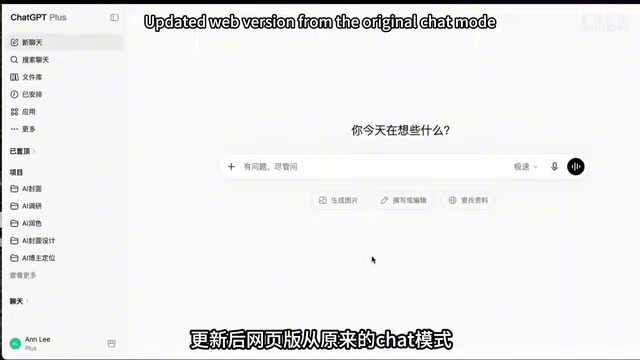
The core change in this update is the consolidation of product lines. Before the update, OpenAI maintained two separate products: the web-based ChatGPT (a large language model focused on chat and image generation) and the desktop Codex (an AI Agent capable of working across apps and writing code). After the update, the web version evolved from a single Chat mode into two modes — Chat and Work — while the desktop Codex now offers all three: Chat, Work, and Codex.
It's worth noting that this integration reflects a major trend in AI products: the shift from "single-purpose tools" to "unified platforms." LLMs are fundamentally text-prediction systems built on the Transformer architecture, designed to understand and generate natural language. AI Agents build on top of LLMs by adding a "perceive–reason–act" loop, allowing them to call external tools, read and write files, and execute multi-step tasks. Bringing both into the same interface means users no longer need to switch between apps to go from "asking questions" to "getting things done" — which is exactly the product direction that Microsoft Copilot, Google Gemini, and other major competitors are all racing toward.
Understanding the Three Modes Through Workplace Roles
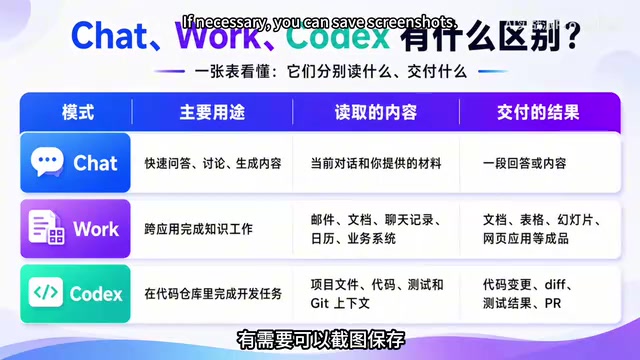
The most intuitive way to understand the three modes is to think of them as three different colleagues in your workplace.
Chat Mode: Your Office Buddy
Chat mode is like a colleague sitting next to you. If you ask them to "give me the key takeaways from this project summary," they'll tell you the conclusions verbally — answering your question but not taking any action. It can read the current conversation and any files you upload, and outputs text or images. At its core, it's a lightweight conversational tool.
One thing to keep in mind: the desktop Chat is a lightweight dialog box suited for quick chats or image generation — use it and move on. If you need to do a lot of chatting or image creation, switching back to the web version of ChatGPT Plus is the smarter choice.
Work Mode: Your Personal Assistant
Work mode is more like a capable personal assistant. Tell them "help me prepare the materials for next week's meeting," and they'll go through emails, pull data, build a deck, schedule the meeting, and hand you the finished product. Its signature feature is completing office tasks end-to-end, across applications — true automated execution.
Powering this "end-to-end execution" is the AI Agent's chain-of-thought reasoning mechanism: the model automatically breaks a complex goal into sub-tasks, sequentially calls different tool APIs (calendar, email client, document editor, etc.), feeds each step's output back into the context, and plans the next move. That's precisely why Work mode consumes far more tokens per session than a normal conversation.
Codex Mode: Your Developer
Codex mode is essentially your dev colleague. Tell them "there's a bug in the backend export function," and it can open the codebase, locate the issue, fix the code, and submit a pull request — solving the problem at the code level. It's purpose-built for completing development tasks inside a code repository.
In one line: Chat answers questions, Work handles office tasks, Codex writes code.
Interface Layout and Model Tiers
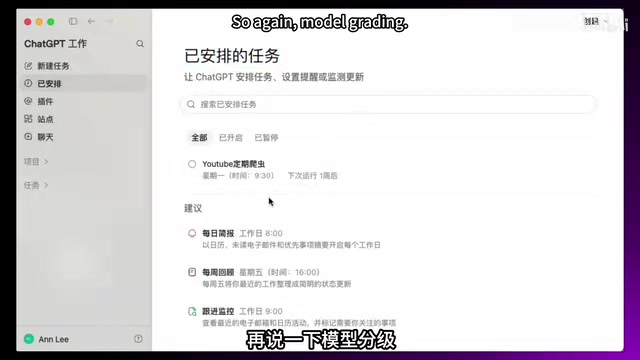
In the desktop interface, clicking the logo in the upper-left corner lets you switch between Work and Codex. Regardless of which mode you're in, the Chat entry point remains in the left sidebar. There's also a new "Sites" entry in the sidebar — websites or small apps built with ChatGPT can be deployed and accessed locally, which is one of the highlights of this update. The Tasks entry supports viewing scheduled tasks, consistent with the previous version.
On the model capability side, there are three tiers from most to least powerful:
- Sore (High-tier): The most capable and most expensive — ideal for complex tasks.
- Terror (Mid-tier): A balanced option in terms of both capability and cost; a good default for everyday use.
- Nuner (Lightweight): The fastest and most quota-efficient — suited for quick Q&A.
This tiered design reflects the trade-off between model parameter scale and inference cost. High-tier models typically have more parameters or longer reasoning chains, enabling them to handle complex problems that require multi-step logical deduction. Lightweight models use techniques like distillation or pruning to compress their scale, preserving baseline capabilities while drastically reducing per-inference compute overhead. For everyday simple questions, the output quality difference between lightweight and high-tier models is minimal — yet the token savings can be several times greater.
Choosing the right model tier is your first line of defense against runaway token consumption. Use Terror for routine tasks, switch to Nuner for simple Q&A, and only reach for Sore when you genuinely need deep reasoning.
Quota Pools: The Biggest Trap
The quota system is where most people get burned — and it's the reason for the "Token Assassin" nickname. To understand token consumption, you first need to understand what a token is: the fundamental unit of measurement for text processed by a large language model. Roughly speaking, one English word equals about 1–2 tokens, and one Chinese character equals about 1–2 tokens as well. Every inference consumes both input tokens (what you send) and output tokens (the model's response). In AI Agent modes, the model also generates large numbers of intermediate reasoning steps that are invisible to the user — but these still count toward token consumption, making the actual cost of a single task far exceed what users expect.
ChatGPT has two separate quota pools:
The first pool belongs exclusively to Chat mode, where chat and image generation each have their own limits and reset cycles — completely independent of each other.
The second pool is shared between Work mode and Codex mode. This means: you can chat in Chat mode all day without touching your Work and Codex quota. But if you spend the afternoon running a bunch of document tasks in Work mode, by the time you open Codex to write some code in the evening, you may find your quota nearly depleted.

Token consumption from both pools is tied to your subscription plan, with different limits for different tiers. Free users have a limited usage allowance, while Plus and Pro users can purchase additional quota when they run low. Important note: if you select a powerful model in Codex and enable Fast mode, token consumption will accelerate noticeably — watch out.
The reason Fast mode burns more tokens comes down to its underlying "parallel inference" strategy. In normal mode, the Agent executes sub-tasks sequentially; in Fast mode, it launches multiple reasoning threads simultaneously, letting the model handle code analysis, problem localization, and fix generation all in parallel. This parallelization dramatically cuts wait times, but the compute resources consumed within a given time window multiply accordingly, causing the token bill to spike sharply. In scenarios where speed isn't critical, turning off Fast mode is usually the more economical choice.
Practical Tips: Make Every Token Count
The key to using all three modes effectively is to "know your roles and manage your quota":
- Choose the mode based on task type — Q&A goes to Chat, office work goes to Work, coding goes to Codex.
- Remember the quota pool logic — Chat quota is independent; Work and Codex share a single pool. Don't mix them up and waste tokens.
- Select the right model tier for the job — Avoid defaulting to the most expensive Sore; prioritize Terror or Nuner for everyday use.
- Think carefully before enabling Fast mode — Codex's Fast mode is speedy, but it accelerates quota consumption.
Understanding the difference between Chat, Work, and Codex not only saves you time figuring things out — it actively prevents unnecessary quota waste. As AI tools grow increasingly powerful, making every token count is the real key to boosting your productivity.
Key Takeaways
Related articles

Android ML Kit On-Device AI: Performance Optimization and Quality Breakthroughs
A full breakdown of Google Android ML Kit on-device AI: Gemini Nano cuts memory via 2-bit quantization and shared KV cache, a 2B model rivals last year's 27B, plus speech translation, function calling APIs, and an end-to-end scam detection demo.

Firebase AI Logic + Gemini Nano 4: A Practical Guide to Android AI Development
How Firebase AI Logic and Gemini Nano 4 help Android developers ship generative AI: App Check and prompt templates ensure security, hybrid routing cuts latency and cost, Spend Caps control budgets, and AI monitoring provides observability.

Microsoft AI Agent Breakthroughs: More Efficient, Better at Code and Weather Forecasting
Microsoft Research Focus Issue 97: ForkPilot cuts agent inference costs, Cabra reveals coding agents' code-understanding gap, Teletune learns workflows from logs, PBC improves extended forecasts, BioEMU-2 opens preview.