Cherry Studio + MCP in Practice: A Complete Guide to Building a Local Knowledge Base and AI Agent

Build automated AI agents and a private local knowledge base using Cherry Studio, MCP, and Ollama.
This article explains how to use Cherry Studio as the core platform, combined with the MCP protocol and locally deployed models, to build a personalized AI agent and knowledge base from scratch. MCP — Anthropic's open standard protocol — acts like a "USB port for AI," enabling models to call external tools like file systems, web scrapers, and shell commands. The guide demonstrates three automation scenarios and highlights that DeepSeek R1 lacks function calling support (requiring V3 instead). The knowledge base section uses Ollama with Qwen3 and the BGE-M3 embedding model to enable RAG-based document Q&A, all running locally for full data privacy.
Why Choose Cherry Studio for Building AI Agents
Among the many AI desktop clients available, Cherry Studio is rapidly gaining traction among developers thanks to its open-source, free, and cross-platform nature. It supports Windows, Mac, and Linux simultaneously, making it a truly cross-platform solution. More importantly, Cherry Studio offers native support for MCP (Model Context Protocol), dramatically lowering the barrier to building personalized AI assistants.
This article, based on a detailed hands-on tutorial from Bilibili, walks through how to use Cherry Studio combined with MCP and locally deployed models to build an AI agent and personal knowledge base from scratch — one that can automate tasks while protecting data privacy.
Basic Setup: Connecting to DeepSeek
After installation, the first step is configuring an AI model. Cherry Studio defaults to SiliconFlow's service — register and enter an invitation code to get 20 million free tokens. However, this tutorial takes a different approach by connecting to DeepSeekAd.
The configuration process is straightforward: find "DeepSeek" in settings, obtain an API Key from the DeepSeek open platform, paste it into the client, and click to verify. One detail worth noting: DeepSeek Chat corresponds to the DeepSeek V3 model, while DeepSeek Reason corresponds to the R1 reasoning model. Once the connection test shows success, you can start chatting on the conversation page.
MCP Protocol: The Standard Interface for Connecting AI to External Tools
MCP is an open standard protocol introduced by Anthropic, designed to give large models a standardized way to connect to external data and tools. A helpful analogy: MCP is like a USB port — it lets different devices connect together easily.
In simple terms, MCP is an intelligent adapter that allows AI to not only understand questions but also handle specific tasks automatically — querying databases, calling APIs, reading and writing files, and more — greatly expanding AI's practical reach. This "building-block" approach is the core idea behind automated AI agents.
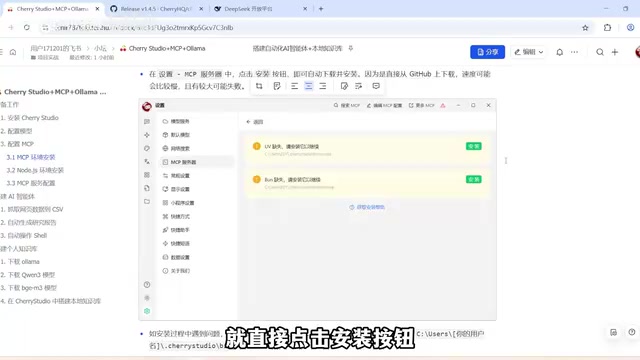
MCP Environment Setup: Installing UV, Bun, and Node.js
Before configuring MCP, you need to install two key tools:
- UV: for managing Python environments
- Bun: for running JavaScript and TypeScript applications
Most MCP servers are built with Python and TypeScript, so both tools are essential. There's a common pitfall here: Cherry Studio only uses its built-in versions of UV and Bun — it does not reuse versions already installed on your system. Even if you have these tools installed globally, you must install them again within Cherry Studio. Since the installation packages are downloaded from GitHub, the process can be slow or may fail. In that case, you can manually download the files and place them in the designated path. Remember to restart the client after installation for the changes to take effect.
Additionally, some MCP services are built on Node.js, so you'll also need to install the latest stable version of Node.js from the official website and verify the installation with node -v and npm -v.
Two Ways to Configure MCP in Cherry Studio
Cherry Studio offers two ways to configure MCP:
- Quick Create: Configure via command-line arguments, similar to Cline's configuration method
- JSON Import: The same configuration method used by Claude Desktop
On GitHub's MCP project pages, you can find a large number of ready-to-use MCP Servers. For example, filesystem handles local file operations automatically — just update the path in the JSON to a directory you want to grant access to. The web scraping tool Firecrawl requires you to first obtain token credits on their website and replace the API Key.
MCP was officially open-sourced by Anthropic in November 2024. Its design philosophy draws from the Language Server Protocol (LSP) — establishing a unified communication standard that makes integration between AI models and external tools interchangeable and reusable. Before MCP, every AI application that needed to call external tools had to write custom adapter code, leading to a highly fragmented ecosystem. MCP defines three core primitives: Resources (data for models to read), Tools (functions for models to call), and Prompts (prompt templates). Developers only need to implement a Server following the MCP specification, and any MCP-compatible client (such as Cherry Studio, Claude Desktop, Cursor, etc.) can connect directly — enabling "build once, use everywhere." The MCP ecosystem now has hundreds of open-source Servers covering file systems, databases, search engines, browser automation, code execution, and virtually every common use case.
MCP in Action: Three Automation Task Scenarios
Once configured, return to the conversation page and activate the desired servers via the MCP option (a green indicator means it's active). One important reminder: turn off MCP when you don't need it, to reduce token consumption and save costs.

Note: DeepSeek R1 Does Not Support MCP Calls
A critical gotcha: the native DeepSeek R1 model does not support function calling. When attempting to use R1 to have the AI create a new txt file, the model spun its wheels and ultimately returned an error. Since Cherry Studio's MCP server calls rely on the model's function calling capability, you must switch to DeepSeek V3 to complete these tasks successfully. This is a key distinction many users overlook.
Function calling is a key capability of large language models that allows a model to recognize — while generating a response — that "an external tool needs to be called here," and to output a structured call instruction (containing the function name and parameters) rather than a natural language answer. The client then executes the corresponding function, returns the result to the model, and the model generates the final response based on that result. This mechanism is the underlying foundation for MCP, OpenAI plugins, and all other tool-calling frameworks. DeepSeek R1 is a model designed for complex reasoning, with its training focused on long-chain Chain-of-Thought reasoning. Anthropic officially states that the current version does not support function calling or system prompts, making it unable to drive the MCP tool chain. DeepSeek V3, on the other hand, is a general-purpose conversational model with full function calling support, making it suitable for agent scenarios that require frequent interaction with external tools.
Three Typical Automation Scenarios
After switching to the V3 model, the following three scenarios demonstrate MCP's real-world effectiveness:
- Web Scraping to CSV: Using the Firecrawl tool to scrape an AI model leaderboard webpage and automatically organize the data into CSV format
- Generating Analysis Reports: Searching for information on NVIDIA's RTX 50 series GPUs, then automatically generating a Markdown analysis report in Chinese covering architecture, core technologies, and performance specs via the filesystem tool
- Executing Shell Commands: Using MCP Shell to query the Docker version number, successfully returning
28.0.4

It's worth emphasizing the security aspect: MCP Shell is powerful and can execute a wide range of system operations, but you should strictly limit permissions to ensure only pre-defined tasks are executed, to avoid accidental operations that could halt tasks or cause data loss.
Building a Local Knowledge Base with Cherry Studio
The second part covers using Cherry Studio combined with a locally deployed AI model to build a personal knowledge base. Compared to cloud-based solutions, the core advantage of local deployment is data privacy and offline availability.
Deploying a Local Model with Ollama
Ollama is the tool of choice for local model deployment. After installation, no desktop shortcut appears — verify it's running by using ollama version in the command line, or by checking for the "little sheep" icon in the system tray.
When selecting a model, here's a practical tip: the Qwen3 flagship version has 235B parameters and weighs 142GB, far beyond what a typical personal computer can handle. For local use, start with smaller versions to find a balance between performance and resource consumption. The demo uses the smallest option, Qwen3 0.6B.
Building a knowledge base also requires an Embedding Model, which converts text into vector representations so the computer can understand semantic meaning and enable fast retrieval. The recommended choice here is the BGE-M3 model.

Embedding models and conversational models serve very different roles: conversational models understand instructions and generate responses, while an embedding model's sole job is to convert text into high-dimensional vectors (arrays of floating-point numbers) so that semantically similar texts are closer together in vector space. During knowledge base retrieval, the system first uses the embedding model to vectorize the user's question, then searches the vector database for document chunks with the highest cosine similarity, and finally sends the retrieved content along with the question to the conversational model to generate an answer — a process known as RAG (Retrieval-Augmented Generation). BGE-M3 is an open-source multilingual embedding model from the Beijing Academy of Artificial Intelligence (BAAI), supporting over 100 languages including Chinese and English, handling up to 8,192 tokens per text. It performs exceptionally well on Chinese semantic retrieval tasks, making it one of the most popular choices for local knowledge base scenarios.
Creating and Using a Knowledge Base in Cherry Studio
Back in Cherry Studio's settings, enable Ollama and add the two downloaded models — note that you must enter the exact and complete model names. Use ollama list to view the full names and copy them directly.
Then create a new knowledge base in the left-side Knowledge Base section, selecting the locally deployed BGE-M3 as the embedding model. Knowledge bases support multiple data formats: files, directories, URLs, notes, and more. In the demo, an AI-generated "Stress-Free Cat Care Manual" was uploaded, and once the file loaded successfully, it became searchable.
With the local Qwen3 model selected and the knowledge base linked on the conversation page, the AI can accurately answer questions based on document content — such as "When did pet cat Xiaohua get vaccinated?" or "When was Xiaohua born?" Once the knowledge base is unlinked, the AI can no longer answer these questions, confirming the effectiveness of RAG-based retrieval.
Local Deployment vs. Cloud: Making the Right Trade-Off
Local deployment has clear advantages: no internet connection required, works offline, and all operations are performed locally so sensitive information never leaves your machine. This is critical for scenarios involving confidential company files or personal privacy data.
However, local deployment has a notable drawback — model performance is typically not on par with cloud-based online services. When choosing a deployment approach, you'll need to weigh your actual requirements, hardware limitations, and how much you prioritize performance versus privacy.
Summary: Build Personalized AI Agents with a Low Barrier to Entry
With the Cherry Studio + MCP + local LLM combination, users can quickly build personalized automated agents and personal knowledge bases like assembling building blocks. The value of this stack lies in its dual capability: automating tedious tasks to boost efficiency while keeping data secure when needed.
For developers and enthusiasts looking to get started with AI agents, this is a practical path with a low entry barrier and high extensibility. Start with simple file operations and knowledge base queries, then gradually explore more useful server tools available in the MCP marketplace.
Related articles

AI Comic Drama with WorkBuddy from Scratch: A Step-by-Step Skill Pack Installation Guide
Learn how to create AI comic dramas with WorkBuddy from scratch. This guide covers installation, Skill pack import and invocation, plus a script generation demo with manual revision tips to get you through the first step from script to storyboard.

WorkBuddy Agent Runs the Entire GEO Database Mining Pipeline with a Single Prompt
WorkBuddy agent automates GEO database mining: from data search and curation to batch correction, differential analysis, co-expression networks, feature gene screening, and immune infiltration—a single prompt generates a complete bioinformatics report, greatly lowering the barrier to bioinformatics analysis.

PC Memory Wasted? Hacker News Debates Centralized Data Centers
Hacker News users argue that personal computer memory is wasted and should be centralized in data centers, sparking debate on centralized vs. distributed computing resource allocation. This article analyzes the logic behind the claim, the costs of centralization, and new tensions in memory resource allocation in the AI era.