Cherry Studio + MCP in Practice: Building a Local Knowledge Base and Automated AI Agents

Cherry Studio + MCP + Ollama: build automated AI agents and private knowledge bases on your desktop.
This article covers the full Cherry Studio workflow across three layers: configuring DeepSeek V3/R1 models, connecting external tools (file system, web scraping, shell) via MCP to automate tasks like report generation, and building a private knowledge base with Ollama and the bge-m3 embedding model. A key pitfall is highlighted: DeepSeek R1 lacks Function Calling support and cannot use MCP — DeepSeek V3 is required. Local deployment offers strong privacy and offline capability, but trades off performance against cloud services.
Cherry Studio is a free, open-source AI desktop client that supports Windows, Mac, and Linux. Its standout feature is MCP (Model Context Protocol) support introduced in recent versions, enabling everyday users to assemble highly customized, automated AI assistants like snapping building blocks together. This article, based on a detailed tutorial from a Bilibili creator, walks through the full pipeline — from model configuration and MCP integration to local knowledge base setup.
Cherry Studio Basic Setup: Connecting to DeepSeek
After installing the client, the first step is configuring a conversation model. Cherry Studio defaults to SiliconFlow's service — register an account, enter an invite code, and you'll receive 20 million free tokens. However, the tutorial demonstrates an alternative: connecting to DeepSeekAd.
To do this, go to Settings, find DeepSeek, then head to DeepSeek's API platform to create an API key. Copy it, paste it back into Cherry Studio, and click Test Connection. One easily overlooked naming detail: DeepSeek Chat corresponds to the DeepSeek V3 model, while DeepSeek Reasoner corresponds to the R1 reasoning model. Once both show a successful connection, you can add an assistant on the chat page and select the corresponding model to test it.
What Is MCP and Why It's a Game-Changer for AI Clients
MCP is an open standard protocol introduced by Anthropic, designed to give large language models a standardized way to connect with external data and tools. The tutorial uses a fitting analogy: MCP is like a USB port — it lets different devices plug in easily.
In other words, MCP acts as a "smart adapter," allowing AI to not only understand questions but also automatically execute tasks — querying databases, calling APIs, reading and writing files — dramatically expanding what AI can do. This modular design is exactly what makes it possible to build personalized AI assistants so quickly.
MCP was officially open-sourced by Anthropic in November 2024, with the design goal of solving the "last mile" connectivity problem between large models and the outside world. Before MCP, every AI application that needed to integrate a specific tool (such as a database, browser, or file system) required developers to write custom adapter code for each combination — extremely costly to maintain. MCP standardizes the communication between large models (as Clients) and external tools (as Servers) through a unified Client-Server specification: as long as a tool provides an MCP-compliant Server, any MCP-compatible AI client can call it directly without redundant development. This architecture mirrors the REST API standardization approach in web development, and has rapidly grown the AI tool ecosystem — there are now hundreds of publicly maintained MCP Servers covering search, databases, code execution, calendars, email, and more.
Setting Up the MCP Environment: UV, Bun, and Node.js
Before enabling MCP in Cherry Studio, you need to install two foundational tools: UV for managing Python environments, and Bun for running JavaScript and TypeScript applications. Since most MCP servers are built on either Python or TypeScript, both tools are essential.
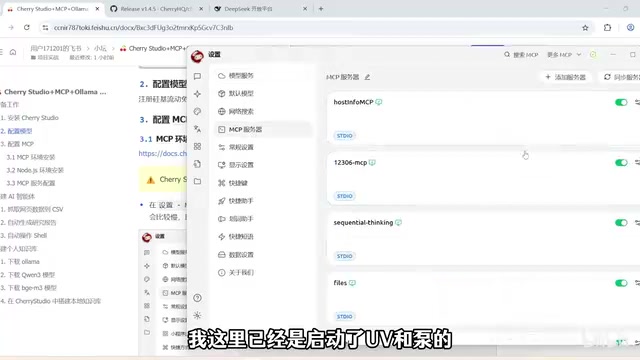
One critical note: Cherry Studio uses its own built-in versions of UV and Bun — it does not reuse any versions already installed on your system. Even if you have them installed system-wide, you'll need to install them again within Cherry Studio. Since the installation packages are downloaded from GitHub, the process can be slow or fail. If that happens, you can manually download the files and place them in the designated path — refer to the official documentation for specific steps. Remember to restart the client after installation.
Additionally, some MCP services are built on Node.js, so you'll also need to visit the Node.js official site to install the latest stable version. After installation, verify it with node -v and npm -v.
Two MCP Configuration Methods and Useful Servers
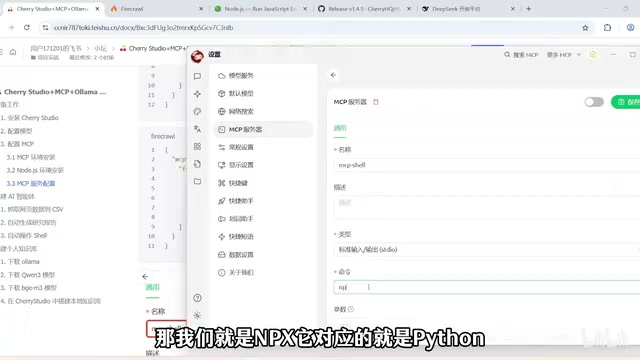
Cherry Studio offers two ways to configure MCP: JSON import (the same method used for Claude Desktop) and quick creation (command-based configuration, similar to Cline).
The GitHub MCP project page hosts a wide variety of ready-made MCP servers. The tutorial demonstrates three typical services:
- File System: Automates local file operations. When configuring, update the path in the JSON to a local directory you want to allow access to.
- Firecrawl: A web scraping tool. Obtain a token from the official site and replace the API key before use.
- MCP Shell: Controls system shell commands. Configured via the quick-create method with the type set to
stdio(standard input/output communication).
After adding them, you need to manually activate each one — a green button indicates successful activation. Back on the chat page, click the MCP icon to select which servers to enable. The tutorial strongly recommends turning these switches off when MCP functionality isn't needed, to reduce token consumption and save costs.
Key Limitation: R1 Models Don't Support Function Calling
This is the most important gotcha in the entire tutorial. During testing, asking the DeepSeek R1 model to create a txt file locally resulted in the model spinning indefinitely before throwing an error — R1 does not support Function Calling, and Cherry Studio's MCP invocation relies entirely on the model's Function Calling capability.
Switching to DeepSeek V3 and resending the request completed the task successfully, creating a txt file containing "hello" in the local directory. This means that when using MCP automation features, you must choose a model that supports Function Calling — pure reasoning models cannot handle tool-invocation tasks.
Function Calling refers to a large model's ability to proactively determine during a response that "this task requires calling an external tool," then output a structured invocation instruction (tool name + parameters) for the client to actually execute, returning the result back to the model. This capability requires the model to be specifically aligned for tool-calling scenarios during training — not all models have it by default. DeepSeek R1 is a pure reasoning model driven by reinforcement learning, with its training focused on complex logical inference and mathematical proofs. It has not been aligned for tool calling and cannot output a properly formatted Function Call, which breaks Cherry Studio's MCP invocation chain. DeepSeek V3, as a conversational model, natively supports Function Calling and integrates seamlessly with the MCP protocol. When selecting a model, it's important to distinguish between "reasoning-enhanced" and "tool-calling" model types and their respective use cases.
Three Automated Use Case Demonstrations
Using DeepSeek V3, the tutorial demonstrates three real-world scenarios:
Scenario 1: Scraping Web Data to CSV. Ask the AI to scrape all data from a model leaderboard page and organize it into CSV format. It calls Firecrawl's scrape tool, successfully retrieves the content, and presents the results.
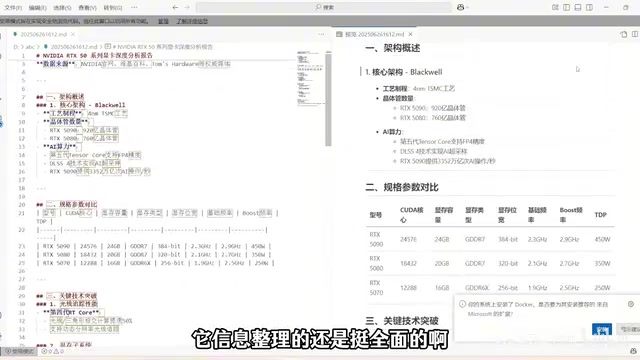
Scenario 2: Generating an Analysis Report. Ask the AI to search for information on NVIDIA's RTX 50 series GPUs, write a Markdown-formatted Chinese analysis report, and save it locally. The AI first uses firecrawl-search to gather information, then uses the file system tool to create the document. The report covers GPU architecture, core technologies, performance specs, and more — quite comprehensive. (Note: local saving occasionally fails; you can download it directly instead.)
Scenario 3: Controlling Shell Commands. Ask the AI to check the Docker version. It successfully runs docker version and returns version number 28.0.4. The tutorial emphasizes that when using MCP Shell, you must strictly restrict permissions and only execute pre-defined tasks to avoid accidental operations that could interrupt workflows or cause data loss.
Building a Local Knowledge Base with Ollama + Cherry Studio
The second half of the tutorial shifts to building a local knowledge base, with Ollama as the core tool. After installing Ollama, no desktop shortcut appears — use ollama --version to confirm a successful installation; a small sheep icon will appear in the system tray.
The ollama run command downloads and runs a model. The tutorial notes that Qwen3's flagship version (235B parameters) weighs in at 142GB — far beyond typical personal computer capacity — so it recommends starting with smaller versions. The demo uses the smallest Qwen3 0.6B model for a quick showcase.
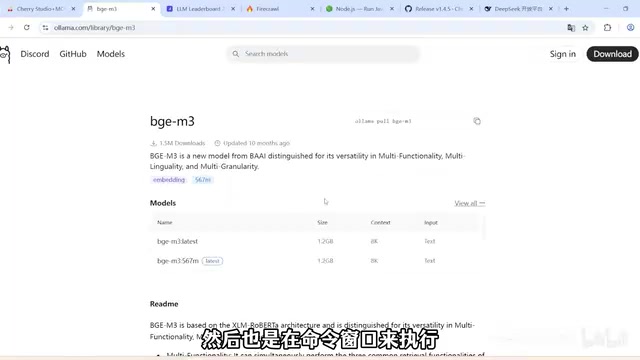
Building a knowledge base also requires an embedding model, which converts text into vector representations so the computer can understand semantic meaning and retrieve information quickly. The tutorial uses the bge-m3 model for this step.
In Cherry Studio's Model Services, enable Ollama, run ollama list to view your models, then copy the full model name and add it. Next, go to Knowledge Base, create a new knowledge base, select your local embedding model, and you can upload files, directories, URLs, notes, and other data types. A green checkmark on an uploaded file indicates it loaded successfully.
In testing, after uploading a document about a pet cat, the AI accurately answered specific questions like "vaccination schedule" and "date of birth" from the document. When the knowledge base link was removed, the AI could no longer answer — confirming that knowledge base retrieval was working correctly.
An Embedding Model is the core component of knowledge base retrieval. It converts text into high-dimensional numerical vectors so that semantically similar content ends up closer together in vector space. When a user asks a question, the system converts the question into a vector as well, then uses algorithms like cosine similarity to quickly find the most relevant passages in the knowledge base. These passages are then provided as context to the conversational model to generate an answer — a process commonly known as RAG (Retrieval-Augmented Generation). The
bge-m3model used in this tutorial is an open-source multilingual embedding model from the Beijing Academy of Artificial Intelligence (BAAI). It supports over 100 languages including Chinese and English, with particularly strong Chinese semantic understanding, making it a popular choice for local knowledge base scenarios. The embedding model itself does not participate in conversation — it only handles text vectorization — so its hardware resource consumption is relatively low.
The Trade-offs of Local Deployment
The biggest advantage of deploying AI models locally is no internet dependency — it works fully offline — while also guaranteeing data privacy and security. All operations run locally, so sensitive information is never sent to external servers. This is especially important when handling confidential business documents or personally sensitive data.
The trade-off is performance: locally deployed models typically produce lower-quality results compared to cloud-based services. When choosing a deployment approach, you'll need to weigh performance, hardware constraints, and privacy priorities.
With Cherry Studio and MCP working together, users can automate tedious tasks and free up time for work that truly matters. For advanced users, the MCP marketplace has a wealth of servers waiting to be explored and integrated.
Related articles

Should U.S. College Fraternities Be Banned? A Researcher's Incisive Observations
Why not just ban U.S. college fraternities? A researcher finds the key resistance comes from decision-makers' own fraternity identities and schools' "willful ignorance."

Microsoft Discovery: Accelerating Scientific Discovery with AI Agents
Microsoft's Discovery platform runs specialized AI agents to help researchers screen and prioritize the most promising compounds and experimental paths, reducing experiments and accelerating scientific discovery.

Cambridge Heavy Industries Secretly Develops Desktop-Scale Nuclear Fusion Device
Cambridge Heavy Industries is secretly developing a desktop-scale laser-driven nuclear fusion device, targeting the equipment supply market for fusion power plants. This article analyzes its miniaturization technology path, commercialization logic, and unique positioning in the fusion startup wave.