Claude Code 2.0 Deep Dive: Multi-Agent Collaboration for Fully Automated Project Development

Claude Code 2.0 brings multi-agent collaboration, Auto Mode security, and real-device debugging to AI-powered software engineering.
Claude Code 2.0 delivers three major upgrades: cross-session message routing enables multiple Agents to auto-coordinate with minimal token overhead; Auto Mode becomes the default permission model with an 89% dangerous-command interception rate — far above the human baseline of 13.6%; and the desktop app integrates a native iOS simulator for real-time debugging alongside a sandboxed browser. A new five-tier code review system raises bug elimination rates from 17% to 25% at high tiers, while MCP-connected Artifacts evolve from static previews into live business applications. The overall trajectory is a clear shift from AI-assisted autocomplete toward industrialized software production.
Claude Code 2.0 has finally shipped after months of anticipation. Anthropic didn't settle for incremental tweaks — instead, the team conducted a systematic overhaul around three core pillars: multi-terminal collaboration, automated permission management, and real-device debugging. Based on hands-on testing from content creators on Bilibili, this is no longer just a code generation assistant. It's evolving toward a "fully automated software engineering control center." Let's break down every major upgrade in this 2.0 release.
Cross-Window Message Routing: The Foundation of Multi-Agent Collaboration
In the old Claude Code workflow, you'd open one terminal for the frontend and another for the payment API — and any field rename meant manually shuttling changes between windows. Version 2.0 introduces a cross-session message routing mechanism: when you tell the "payment session" to rename UserName to UserDisplayName, Claude automatically scans all active terminals via List Agents, then delivers the update precisely using Send Message, transmitting only the minimal semantic delta to avoid wasting extra tokens.
More importantly, Claude can autonomously detect relationships in the background — once a change in the frontend session triggers a cascade in the backend, Claude initiates cross-terminal coordination automatically. In the official demo, two independent Agents played a full game of chess against each other across separate terminals, offering a vivid demonstration that multi-agent distributed collaboration now actually works end-to-end.
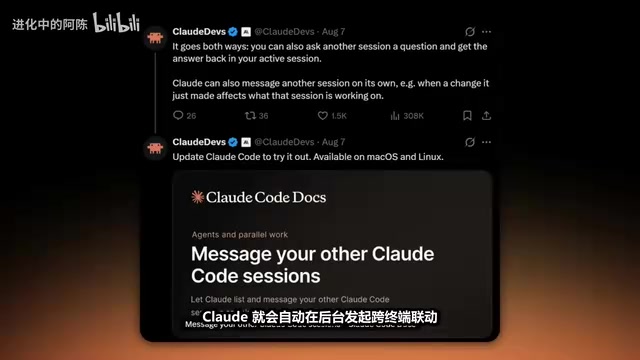
The significance here is that this upgrades single-point AI coding from "one assistant, one task" to "multiple Agents dividing labor" — much closer to how real development teams operate. That said, there's still a gap between demo performance and reliable production deployment in complex engineering contexts, and real-world stability will need ongoing validation.
The core idea behind a Multi-Agent System is to decompose complex tasks and distribute them across multiple specialized Agents running in parallel, with each Agent coordinating state through message passing. Traditional single-Agent architectures run into context window limits — when a codebase is large enough, a single session can't hold all the relevant files and history, and task handoffs rely entirely on manual copy-paste. Cross-session message routing solves this by maintaining a global Agent registry, allowing any session to deliver messages in either "publish-subscribe" or "point-to-point" mode — similar to message queues in microservice architectures (like Kafka or RabbitMQ), but targeting AI sessions rather than service processes. The "semantic delta only" design is critical: LLMs are billed by token, and broadcasting full context to all Agents on every update would cause costs to grow exponentially. Transmitting only the minimal semantic unit of a change (e.g., UserName → UserDisplayName) keeps communication costs as low as possible.
Auto Mode Default Permissions: Six Times the Human Interception Rate
One of the most frustrating parts of CLI-based AI coding is having to manually confirm every single file edit or command execution. Version 2.0 sets Auto Mode as the default permission model, with a background risk classifier automatically evaluating command danger levels — and critically, these safety interception calls don't count against your usage quota.
The official benchmark data is striking: in a test of 1,053 paying professional developers, humans in a fatigued coding state intercepted only 13.6% of destructive dangerous commands. Auto Mode's machine interception rate hit 89%, and PR delivery efficiency improved by roughly 25%. A red team conducted 720 extreme prompt injection attacks, and Anthropic claims zero bypasses.
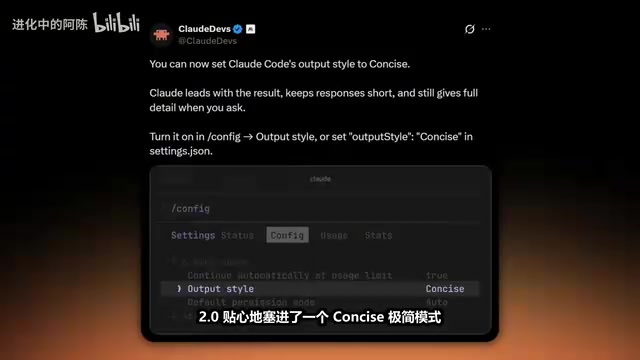
To address token billing concerns, 2.0 introduces a Concise mode — set Output Style to Concise in the config file, and Claude will cut filler phrases like "Sure, no problem" and deliver code output directly, saving meaningful usage over long-running projects. There's also an auto-resume feature for quota overruns: check the auto-continue option, and once your quota resets, Claude will automatically restore context and finish writing the remaining code.
On the architecture side, desktop startup speed is approximately 2x faster. The CLI tool also optimizes garbage collection logic — freezing GC during task execution and batch-cleaning during idle periods, significantly reducing peak VRAM and memory usage.
The risk classifier is the core safety component of Auto Mode — essentially a purpose-trained classification model that evaluates the potential harm of a command across multiple dimensions before execution, covering categories like filesystem destructiveness (e.g., rm -rf), network exfiltration behavior, and privilege escalation instructions. The "interception calls don't count against quota" design is noteworthy: it deliberately places the security review layer outside the billing boundary, creating an incentive for Auto Mode to trigger review as frequently as possible rather than loosening filters out of cost concerns. Prompt injection attacks are the most common adversarial technique against systems like this — attackers hide malicious instructions inside code comments, documentation content, or API responses, attempting to trick Agents into executing unauthorized operations. Anthropic's red team claiming zero bypasses across 720 attacks — if the data holds — suggests their defense mechanisms include additional isolation at the input parsing stage, rather than relying solely on the main model's instruction-following capabilities.
Native iOS Simulator and Sandboxed Browser: Real-Device Debugging in Real Time
Mobile developers will find this upgrade particularly exciting. The Claude Code desktop app now seamlessly integrates a native iOS simulator on the right panel: write Swift code on the left, watch it compile and run in real time on the right. You can interact directly with the simulated interface — navigate between screens, verify UI rendering, and test button interactions — without ever switching between your editor and a separate simulator.
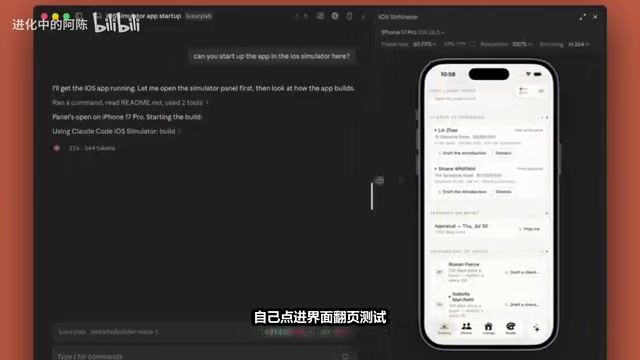
The desktop app also includes an isolated sandboxed browser. Claude can independently open official documentation, developer communities, or design mockups to capture first-hand context, and supports persistent login under isolated credentials. When a UI needs adjustments, you can annotate directly on screenshots — circle the area and add comments — and Claude will implement the changes accordingly. Type design to generate an interactive, editable canvas where you can drag and adjust elements, then reverse-generate frontend code from the layout, attempting to close the gap between design and engineering.
For users who prefer plain text or need accessibility features, 2.0 also offers a screen reader mode that converts the interface to a linear text stream with numbered menus, and uses audio chimes at key decision points to prompt human review.
Five-Tier Code Review and Dynamic Artifacts
Version 2.0 completely rebuilds the Code Review system with five depth tiers: Low runs a rapid scan cheap enough to trigger on every Git push; Medium performs multi-dimensional cross-comparison; High spins up sub-Agents playing distinct roles — a "bug detective" and a "fix validator"; X-High traces downstream dependency modules to surface hidden issues; and top-tier Ultra deploys a full expert review panel to independently reproduce bugs.
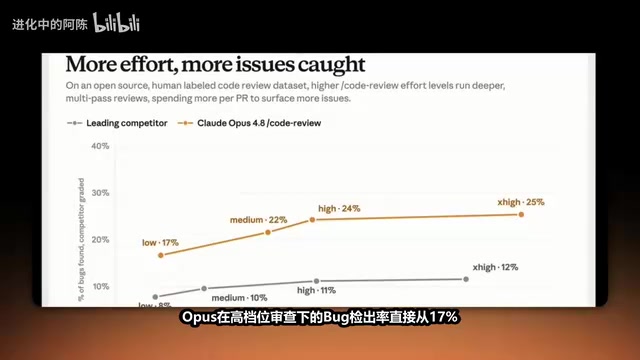
Benchmark data shows that Opus under high-tier review improved its bug elimination rate from 17% to 25%, with Anthropic claiming a 12% lead over competing products.
Artifacts have also evolved from static frontend previews into dynamic applications. Version 2.0 embeds an MCP connector, enabling generated Artifacts to pull from enterprise databases and dynamic APIs in real time via MCP — transforming them from "pretty static mockups" into fully functional applications capable of handling real business logic and performing cloud-based read/write operations.
MCP (Model Context Protocol) is an open protocol led by Anthropic that defines a standardized interaction interface between AI models and external data sources and tools — essentially a "USB standard" designed for large language models. Previously, every third-party integration required custom plugins or API wrappers, which were expensive to maintain and mutually incompatible. By standardizing the connection logic through MCP, any database, SaaS platform, or internal service that supports the protocol can theoretically be called directly by Artifacts without additional adaptation layers. Embedding MCP into Artifacts fundamentally changes the nature of AI-generated output: in the past, frontend code generated by AI was a static demo prototype with data hardcoded inside. With MCP integration, Artifacts can dynamically fetch real business data at runtime, giving them the potential to replace some lightweight internal tools — such as data dashboards or approval forms.
From Code Assistant to Engineering Control Center
Paired with the next-generation Opus 5 and Sonnet 5, Claude Code 2.0 completes a qualitative shift from code generation assistant to fully automated software engineering platform: multi-Agent collaboration, real-device debugging, and a full-cycle code review pipeline. Together, these capabilities signal that AI coding is moving from "assisted autocomplete" to "industrialized production."
One caveat worth noting: the data in this article is primarily drawn from Bilibili creators' hands-on coverage of official demos. Some performance and safety figures reflect Anthropic's official claims, and real-world production performance will require broader user validation. But the direction is clear enough — the industrialization race in AI coding is entering a far more intense second half.
Related articles

How Big Can Stars Really Get? The Physical Limits of the Largest Stars
Red supergiants are the largest stars by volume, with radii up to 2,000 times the Sun, engulfing the inner solar system. But there is no precise upper limit on stellar size—models predict up to 15,000 solar radii. The most massive blue stars are far smaller than red supergiants—biggest and heaviest are two different things.

Apple HomeView Smart Display Full Feature Breakdown: Wall-Mount or Desktop, $299
Apple launches HomeView, a $299 smart display with wall-mount and desktop options, 12MP camera for facial recognition, smart home control, music playback, and recipe step-by-step cooking. Full breakdown of watch faces, apps, privacy, and cooking integration.

Where Did the Promised New Studio Go? Craft Computing Answers After Five Years
Craft Computing's host responds to viewer questions: the new studio promised five years ago was shelved as construction costs soared from $30,000 to $75,000, and was replaced by a 168-square-foot garage conversion.