Claude Code: A Complete Guide from Terminal Anxiety to AI Programming Mastery

A complete guide to mastering Claude Code's terminal version, from zero to AI programming pro.
This comprehensive guide walks beginners through overcoming terminal anxiety to mastering Claude Code's full potential. It covers essential terminal commands, safe sandbox practice environments, and advanced features including Skills for custom workflows, MCP for connecting AI to real work environments, and sub-agent automation for parallel task execution.
Many people are drawn to AI-powered programming but instantly retreat the moment they see that black screen with a blinking cursor. Claude Code is one of the most powerful AI programming tools available today, and its terminal version far surpasses the client mode in functionality — but the need for command-line operations scares away a huge number of potential users.
This article provides a systematic, step-by-step path from absolute beginner to advanced Claude Code user, helping you conquer the terminal barrier once and for all.
Breaking Through Terminal Anxiety: It's Not the AI You're Afraid Of
Here's a truth that's both harsh and a little funny: the reason you can't learn Claude Code isn't because it's too hard, nor because the AI isn't smart enough. What most people are actually afraid of is that black screen with nothing but a blinking cursor.
When you're used to clicking around in graphical interfaces, suddenly facing a wall of English error messages without knowing what a "path" even means can be paralyzing. But let's be honest — you're not afraid of AI. You're just afraid of that black screen.
Why You Must Choose the Terminal Version
There are currently two main ways to use Claude Code: client mode and terminal mode. Client mode typically means interacting with Claude through a graphical interface (such as a VS Code plugin or web interface) — it's intuitive but limited to whatever options the GUI exposes. Terminal mode means interacting with Claude Code directly through the command-line interface (CLI), where you drive all operations with text commands. The CLI's advantage lies in its programmability — you can write commands into scripts, chain them through pipelines, and set up scheduled tasks, none of which are easily achievable through a graphical interface. This is why virtually all professional development tools (Docker, Git, various package managers) prioritize CLI as their first-class interface.
The client mode is lightweight and ready out of the box, great for a quick taste. But the terminal version is the full-powered experience — only through this path can you unlock automation, install powerful extensions like Skills and MCP, and build a truly all-capable AI assistant.
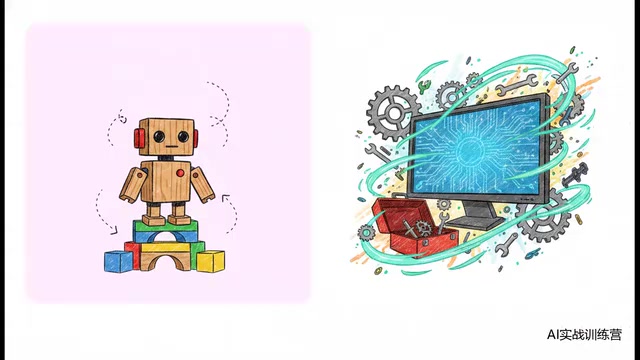
For these powerful capabilities, overcoming that little fear of the black screen is absolutely worth it.
Practice Safely with Interactive Sandboxes
Since the enemy is terminal anxiety, find an absolutely safe training ground. The best choice is interactive platforms that run in your browser — no need to mess with installations on your own computer, and no risk of crashing your system with a wrong command.
These platforms typically run on containerization technology under the hood. Each user is assigned an independent Linux container instance, and all operations execute within this isolated environment. Even if you run a dangerous command like rm -rf /, it only destroys your own temporary container without affecting the host machine or other users. After the container is destroyed, it can be recreated to restore everything — that's the technical guarantee behind the "safe training ground."
These platforms work like a video game with a progress bar at the top — when you make a mistake, they correct you immediately. In this fully immersive sandbox environment, feel free to experiment and make mistakes. Through repeated practice, you'll build the muscle memory and intuition you need.
Three-Stage Progression Path
- Step 1 · Breaking the Ice: Build a solid foundation and answer the question "how does this even work?"
- Step 2 · Leveling Up: Understand the underlying logic of how code runs
- Step 3 · Mastery: Master advanced configurations and fully unleash AI productivity
From complete beginner to technical proficiency, one step at a time, with a smooth transition.
Building Developer Fundamentals: The Terminal Isn't That Mysterious
Everything Is a Container
Strip away the magic, and the underlying logic is actually dead simple: everything is a container. Whether it's photos, documents, or apps, they're all essentially "boxes" that hold things. File extensions like .txt and .jpg are just labels stuck on the outside of the box, telling the computer which tool to use to open it.
The terminal works the same way — it's not some black magic technology. It's simply a minimalist dialog box without a mouse. You normally talk with your voice; now you're just typing to give the computer instructions.
Five Essential Terminal Commands
Master these five commands and you'll navigate the terminal with ease:
| Command | Function | Plain English |
|---|---|---|
pwd | Show current path | Where am I right now? |
ls | List directory contents | What's in this room? |
cd | Change directory | Go to another room |
mkdir | Create a new directory | Build a new room |
touch | Create a new file | Place a new item |

These simple English words are your flashlight and compass in the terminal world.
The Four Pillars of Software Development
On top of this foundation, you need to understand the four pillars that keep the software world running:
- Code Logic: Understanding the different purposes of various programming languages
- Version Control: Git is a distributed version control system developed by Linux creator Linus Torvalds in 2005. Its core idea is to create a snapshot (commit) for every change in a project, forming a traceable timeline. GitHub is a cloud-based collaboration platform built on Git, offering code hosting, Pull Request reviews, Issue tracking, and more. Version control is especially important for AI programming — when AI-generated code goes wrong, you can use
git diffto view changes andgit revertto roll back to a correct state. That's the mechanism behind the so-called "undo button." - Network Communication: Understanding how browsers and servers communicate
- API Interfaces: An API (Application Programming Interface) is essentially an agreed-upon set of "conversation rules" between software systems. The most common Web APIs are based on the HTTP protocol and follow the REST architectural style. A complete API call includes: the request method (GET to retrieve / POST to create / PUT to update / DELETE to remove), the endpoint URL (specifying the resource location), request headers (carrying authentication tokens, content types, and other metadata), and the request body (carrying the actual data). The server processes the request and returns a status code (200 for success, 404 for not found, 500 for server error, etc.) along with response data (typically in JSON format). Once you understand this mechanism, you'll see how Claude Code interacts with external services through APIs.
Once you understand the essence of network requests — a client sends a request with parameters and authentication (headers), the server processes it and returns a response — you've grasped the core logic of internet-level communication.
Claude Code Advanced Features Explained
Skills: Custom Abilities That Eliminate Repetitive Prompting
Skills perfectly solve a major pain point: you never have to write a long prompt from scratch every time you start working.
Configure your standard workflows once — specific coding conventions, testing procedures — and Claude becomes an on-demand command library. From then on, you just toss out a single sentence, and it executes precisely according to your custom rules. Skills configurations are typically stored as Markdown files in the .claude/ folder at the project root. Claude Code automatically reads these files as system-level context on startup, effectively "remembering" your preferences and standards.
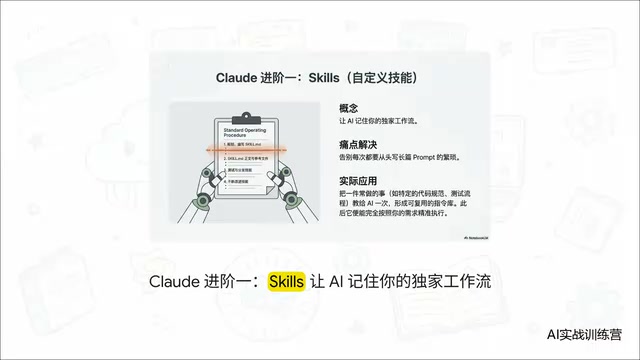
This is essentially building a personally customized digital worker, dramatically reducing repetitive labor.
MCP: Connecting AI to Your Real Work Environment
MCP (Model Context Protocol) is an open standard protocol released by Anthropic in late 2024, designed to provide large language models with a unified interface for external tool invocation. Its architecture follows a client-server model: Claude Code acts as the MCP client sending requests, while various MCP servers (such as file system servers, database servers, and GitHub servers) handle specific operations and return results. This design is similar to the USB interface standard — as long as developers follow the protocol specification, anyone can write an MCP server to connect AI to new data sources or toolchains. The community currently has hundreds of open-source MCP servers available for direct use.
Previously, no matter how powerful an AI was, it was still a brain locked in a "black box." MCP gives AI "hands" and "eyes":
- Browse the local file system
- Connect to external databases
- Fetch real-time data from GitHub
With a single command, information silos are completely shattered. AI is no longer just a chat companion — it's truly embedded in your actual work environment.
Sub-Agents and Automation: Claude Code's Ultimate Form
This is Claude Code's ultimate evolution. The sub-agent mode draws from the "master-slave architecture" concept in software engineering. Master Claude plays the role of project manager, responsible for Task Decomposition and result integration; sub-agents are independent AI instances focused on executing individual subtasks. Each sub-agent has its own independent context window and can process different modules' code writing, testing, or documentation generation in parallel. The advantage of this mode is that it breaks through the length limitation of a single context window while dramatically shortening completion time for complex projects through parallelization. Guardrails ensure that sub-agents can only operate within preset permission boundaries, preventing accidental modifications to critical files.
At this stage, Claude has been promoted from an ordinary assistant to the chief architect of a digital R&D team:
- For complex projects, Master Claude automatically breaks down tasks and distributes them to sub-agents for parallel execution
- Once safety boundaries are set, it can run unattended in the background as an automated pipeline
- All you need to do is sit back with a cup of coffee and watch it perform
An Honest Look at Claude Code's Limitations
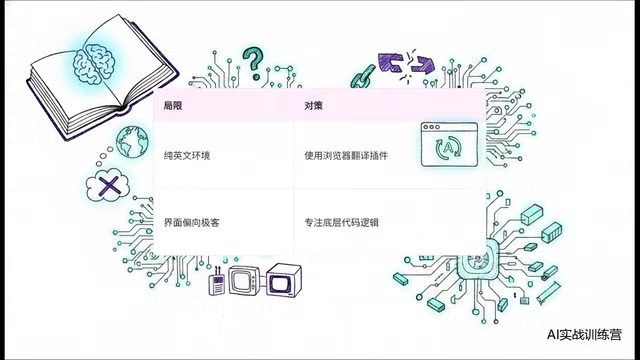
A responsible tech guide shouldn't only share the good news. Claude Code currently has two notable barriers:
First, it's an English-only environment. This can intimidate some users, but the solution is simple — just use your browser's built-in page translation plugin. In practice, it has virtually zero impact on terminal interactions.
Second, the interface is extremely geeky. It's far from polished, but in this hardcore domain, underlying code logic and functionality matter far more than UI aesthetics. Let go of your obsession with pretty interfaces, focus on the logic, and the strengths absolutely outweigh the rough edges.
This remains one of the most systematic AI programming paths you can find today.
Action Plan: From "Understanding" to "Doing"
After reading most tutorials out there, you'll at best understand the concepts — that's just armchair theory. Between understanding and doing lies an enormous gap, and the only bridge across it is the real keyboard at your fingertips.
In the world of AI programming, you'll never learn by just watching. You must type on the keyboard again and again, see real feedback, investigate errors, and try again. There are no shortcuts. This learning approach is known in cognitive science as a combination of "Active Recall" and "Spaced Repetition" — neural pathways are only truly strengthened when your brain is forced to actively produce answers rather than passively read them. Programming is especially suited to this, because every error and debugging session is an intense active learning experience.
Action checklist for absolute beginners:
- Open an online terminal sandbox today and type
pwd,ls, andcd - Install the Claude Code terminal version and start with the simplest conversations
- Configure your first Skill to codify your most common workflow
- Try connecting an MCP tool to let AI truly connect to your work environment
- Gradually explore sub-agent mode and experience the power of automation
Getting started is always the hardest part, but every challenge can be overcome. As long as you stay patient and follow the interactive process step by step, even a complete beginner can absolutely tame that intimidating black terminal window and turn Claude Code into a powerful weapon in your arsenal.
Related articles

The Truth Behind Codex 'Build a Website in 5 Minutes': AI Isn't Creating Sites—It's Helping You Copy Them
Exposing the truth behind viral Codex 5-minute website videos: creators aren't building original sites with AI—they're copying shared prompts or scraping others' work. Learn AI coding tools' real limits.

Getting Started with AI Agent Development: A Complete Guide from Concept to Practice
A comprehensive guide to AI Agent architecture and development, covering automated marketing, intelligent customer service, and investment analysis scenarios with single and multi-agent collaboration.

The Truth Behind Codex 'Build a Website in 5 Minutes': AI Isn't Creating Sites — It's Helping You Copy Them
Exposing the truth behind viral Codex 5-minute website videos: creators aren't building original sites with AI — they're copying shared prompts or scraping others' work.