Claude Code Beginner's Guide: Desktop Setup and 6 Key Settings to Avoid Pitfalls
Zero-barrier Claude Code desktop onboarding: Opus plans, Sonnet builds, folder isolation, and session hygiene.
Based on a bilingual tutorial, this article walks through Claude Code from installation to four projects. The core is a few habits: Opus for planning and Sonnet for building to lower the cost of changing your mind; an independent empty folder per project as workspace; claude.md for persistent rules; compact for long sessions and fresh sessions after repeated bug failures. It also covers plan mode, task briefs, cloud parallel beta, and advises beginners to keep auto mode off.
Title
Claude Code Beginner's Guide: Desktop Setup and 6 Key Settings to Avoid Pitfalls
Meta Description
Claude Code desktop tutorial: covering the paid tier requirement, Opus for planning and Sonnet for building, workspace folder selection, approval rules, claude.md persistent rules, compact session compression, and the six settings beginners most often get wrong, plus four hands-on project demos.
Article Content
The barrier to installing Claude Code has just been completely removed. In the past you had to install Node.js, run NPM, and set up Cursor just to see files—now you just download the desktop app from the official site, double-click to install, log in, and you're ready. This bilingual Chinese-English tutorial on Bilibili compresses the entire journey from zero to a working full project into a clear path, and what's truly valuable isn't "how to click the buttons" but a few settings habits that determine efficiency and security boundaries.
Before You Start: Paid Tier and Model Selection
The video points out right away a pitfall that's easy to miss: Claude Code requires a Pro or higher paid plan, and the free version can't even open this entry point. Once the app is installed, your attention should go to the model dropdown next to the send button—this is the most worthwhile place to repeatedly adjust in the entire workflow.
The core methodology the author gives is "one model plans, the other builds." Use Opus for the planning phase—it reasons more slowly and deeply, and can think through edge cases and the file list before any files are generated. Even after Opus 5.5's price cut, its per-token cost remains higher than Sonnet. Switch to Sonnet for the building phase—it writes code fast and costs less per unit, perfect for following the blueprint. The author specifically emphasizes that the planning phase is the moment when changing your mind costs the least—moving a section in a plan costs nothing, but changing it after the code is written gets expensive. For a small single-page site this handoff seems like overkill, but on larger projects, this division of labor is useful almost every time.
The positioning difference between Opus and Sonnet stems from Anthropic's Claude model family hierarchy: Opus is the flagship tier with the largest parameter scale and reasoning depth, suited for complex planning and long-chain reasoning; Sonnet is the balanced tier with better speed and cost, its coding ability sufficient for most implementation tasks. Both are priced separately by input/output tokens, and Opus's per-token price is typically several times that of Sonnet—this is the economic basis for "expensive for planning, cheap for building." Note that the options in the model dropdown vary with subscription tier, and the Pro tier may have stricter usage limits on Opus during peak hours.
The Most Critical Step: Choosing the Right Folder
Open the Code tab, select local, specify a folder, and from that moment on Claude treats that directory as its workspace—able to read, modify, and run everything inside it. The author's advice is to create a new empty folder for each project, and never just hand it your desktop or downloads directory. A focused directory gives the model the right context and also isolates it from irrelevant files.
Verifying the connection is simple: type "what files are in this project?" If it can list the contents or tell you the folder is empty, the link is working.
The hidden risk of this step deserves more discussion. Workspace permissions are the source of Claude Code's capabilities, and also the source of potential file damage. The author devotes a whole section later to approval rules: installing well-known packages, starting local servers, and running tests are routine operations that can be quickly approved; commands involving deleting files, overwriting data, or pushing to production should be slowed down and read carefully. Things that are easily reversible carry little risk; things that can't be undone deserve ten seconds of confirmation.
Workspace is Claude Code's permission boundary: the selected directory and its subdirectories constitute the file system range the model can read, write, and execute commands in—paths outside it are neither visible nor modifiable. This is similar to the concept of opening a folder in an IDE, but the difference is that Claude Code actively runs shell commands, installs dependencies, and starts services within that directory, so the directory choice directly determines the "blast radius." The industry-standard practice is to set up an independent git repository for each project before handing it over, so any change can be rolled back via version control, turning irreversible operations into reversible ones.
The Complete Loop Through Three Projects
The tutorial demonstrates the same rhythm through four projects of increasing size. The first is a podcast single-page site, used to see the complete closed loop from "empty folder to something viewable in the browser." The second is a Chrome extension: select a sentence on a webpage, right-click to save it as a quote, with the popup carrying the original text, page title, and link, and one-click copy into a clean note. For this project the author skips the planning step and goes straight to Sonnet, reasoning that the scope is small and clear—knowing when not to use the expensive model is itself half of this methodology.
The third project has no interface—it's a Python script that watches the downloads folder and sorts PDFs, images, installers, and spreadsheets into subfolders by file type, adding numbers to duplicate names rather than overwriting. This project touches many parts, so it goes back to Opus for planning, then switches to Sonnet for building. It's also here that Claude is no longer a chat box: it executes commands itself, first showing which packages it will install and what it will start, waiting for your approval, with output scrolling in the same window.

The fourth project is a purely browser-side subscription tracker, a single HTML file that opens with a double-click, with data staying only in the local browser. The author deliberately adds a "cram everything into one file" constraint to prevent the project from bloating into something it doesn't need to be. After it works, a small requirement is added—highlighting renewals due within 7 days in red, and adding an annual total next to the monthly total—and the diff shows only list styles and the total calculation changed, with nothing else touched. This is exactly the loop you fall into when using this tool: quickly deliver a working version, then polish it into your own thing with short request after short request.
Two Easily Overlooked Habits
The first is claude.md. By the fourth project you'll notice you keep repeating the same things: use plain JavaScript, don't add libraries, name things clearly. Claude itself doesn't remember across sessions—every new conversation starts from zero. The solution is to put a claude.md in the project root; it's read every time Claude works in this project, so your persistent rules are in context before you type the first character. If you're too lazy to write it by hand, just ask it in the conversation to scan the project and draft one, then add a few rules yourself. The author's rules for the subscription tracker are only four lines, but the effect is immediate.
The second is session hygiene. Both traps come from long conversations: one is letting the session grow indefinitely—after a few hours the context gets crowded, Claude starts repeating itself or forgetting earlier decisions, at which point you type compact to compress out key decisions and discard the noise; the other is fixing the same bug three times in a row without success, which usually means the conversation itself has become the obstacle, full of wrong guesses. At this point, start a new session, describe the problem cleanly, paste the full error, point to specific files—a short, clean context almost always beats a long context full of failed attempts, and claude.md follows you into the new session, so nothing important is lost.

Context window is the upper limit of total tokens a model can hold in a single conversation, including system prompts, history messages, file contents, and command output. The longer the conversation, the more early information gets pushed out or compressed, and the less reliable the model's recall of prior decisions becomes—manifesting as repeated questions, contradictions, or forgotten agreements. The compact command summarizes the history into a condensed context, preserving key decisions and conclusions while discarding the lengthy trial-and-error process, thereby freeing up window space without losing the main thread. This is why "a short, clean new session" often beats "a long session stuffed with failed attempts."
Advanced: Plan Mode, Task Briefs, and Cloud Parallelism
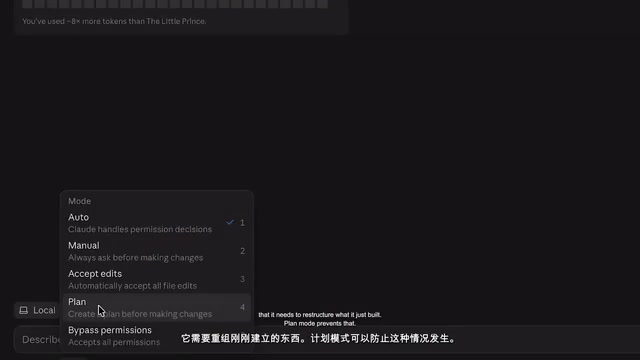
Plan mode builds the manual "Opus planning" from earlier into the tool: when enabled, Claude only reads the project and writes a plan without modifying files, and you review the plan before letting it build. Any change involving two or three or more files is worth going through this step first, to avoid it getting halfway through and realizing it needs to refactor what it just built.
One step further is whole-package handoff: give Claude a multi-step task and let it not wait for you after every file it writes. This depends on a qualified brief containing four parts—goal, constraints, what counts as done, and explicitly what not to add. The author uses a content calendar as an example: after one message it plans, builds the structure, creates forms, a week view, a publish toggle, and a delete button in sequence. This is when auto mode really becomes useful: routine commands pass automatically, and only risky operations stop to ask. When it's done, your role switches to acceptance testing—open the preview and test each of the four actions in the brief one by one.
There's also a new feature still in beta: running multiple such handoff tasks in parallel in the cloud, each in its own independent thread. The author's attitude is very pragmatic—beginners shouldn't start here, because each parallel task is another result you have to review, and reviewing is always your side of the work.
Auto mode refers to an approval policy that lets Claude Code automatically approve tool calls (executing commands, writing files, installing packages, etc.) without asking for each one, as opposed to the default mode where every command requires manual confirmation. Its value is reducing interruptions from high-frequency, low-risk operations, but the cost is handing judgment to the model: a seemingly routine rm or git push could cause irreversible consequences. Therefore the common practice is to first use the default mode to build intuition for the model's behavior patterns, then enable auto for projects with clear boundaries, while retaining confirmation outside the whitelist for delete, overwrite, and deploy commands. Cloud parallel tasks run each handoff in an independent thread and environment, without sharing context, and the review cost grows linearly with the number of tasks.
Honest Talk About Boundaries and Costs
The author doesn't oversell the tool as a panacea. Work like bank backends or medical platforms with strict security requirements needs deep architectural decisions and years of domain knowledge—Claude Code can't replace engineering teams, and the desktop version doesn't change that. What it changes is who can start: if your workflow has a specific problem no app on the market can solve, this is the starting point; if you're not sure whether an idea is worth paying a developer for, build a rough version in an afternoon, show it to a few real users, and then decide. If all you need is a clickable prototype to show someone, the artifacts built into regular Claude chat are enough—you don't even need to create a project folder.
On cost, Claude Code is included in the paid plans—the Pro tier is about $20/month, a suitable starting point if you use it a few times a week; only consider Max, starting at about $100, if you keep hitting usage limits. Pay-per-token API sounds cheap, but a single long Opus planning session can itself cost several dollars—wait until you understand your real usage before switching over.
The author says that if you change only one default setting, it should be auto mode—beginners should see every command first, rather than letting Claude skip the questions.
Looking at the whole thing, your job has shifted from writing code to deciding what to build, what to cut, and whether the result is actually good. Claude builds fast, but it has no opinion on whether file names make sense or whether the podcast page looks cheap. That judgment always stays in your hands.
One-line Summary
Claude Code desktop zero-barrier onboarding: Opus plans, Sonnet builds, folder isolation, and session hygiene form a complete workflow.
Paragraph Summary
Using a bilingual Chinese-English tutorial as a thread, the article walks through the complete path of Claude Code from installation to running four projects. The core isn't the clicking steps but a few habits that determine efficiency and security: use Opus for planning and Sonnet for building to minimize the cost of changing your mind; create a new empty folder for each project as the workspace, giving the right context while isolating risk; use claude.md to lock in persistent project rules, compensating for the model's lack of cross-session memory; compact long sessions periodically, and switch to a new session if the same bug resists three fixes. The advanced section introduces plan mode, structured task briefs, and the cloud parallel beta, and reminds beginners to turn off auto mode and confirm each command first. The article ends by honestly acknowledging that the tool can't replace engineering teams—what it changes is who can start, and judgment always stays with humans.
Related articles
Can Qwen3.8-27B Really Take On Fable 5? Breaking Down the GVS5H Benchmark Controversy
GVS5H claims five Qwen3.8-27B instances match Fable 5 on LiveCodeBench Hard, but Hacker News questions its evaluation method. This article breaks down the harness's logic, the controversy, and what's genuinely worth learning from multi-model ensembles.
Groot Releases Four Small Models: New Options for Reasoning, Coding, and Tool Calling
Groot releases four small models for reasoning, coding, and tool calling. Analysis of the division logic, small model competition, and developer implications.

Writing a Novel with Claude AI: A Creative Practice Case Study of the Free Ebook 'Lake Michigan Artifacts'
A Reddit author shares the free ebook 'Lake Michigan Artifacts,' created with Claude AI. We analyze AI's real role in ideation, drafting, and polishing, plus the transparency trend in AI-assisted writing.