Claude Code Beginner's Tutorial: Installation, Configuration, and Hands-On Coding in China

A Bilibili creator shares a Claude Code beginner's tutorial on installing, configuring, and using domestic models in China.
This article is a Claude Code introductory tutorial for domestic developers. It explains why to choose Claude Code and details the preparation work, including installing Node.js and Git Bash, then installing Claude Code via npm. It proposes using domestic models as an alternative to the Claude model (which is blocked in mainland China), demonstrating API key creation and environment variable configuration with the TiSpark platform. A hands-on coding exercise showcases Claude Code's code generation capabilities.
Want to use AI to write code but get stuck on environment setup? Want to experience the power of Claude Code but can't access it due to official restrictions? A Bilibili creator brings you a step-by-step Claude Code beginner's tutorial, walking you through everything from installation to hands-on practice so you can avoid the pitfalls.
Why Choose Claude Code?
Many developers share this experience: using AI to write code feels great at first, but once the project logic gets complex, the conversation starts going in circles—it can write seven or eight files with duplicate functionality, and fixing one bug can even introduce three new ones. The creator went through this phase too, once thinking AI programming was just a toy. It wasn't until using Claude Code that they realized the problem might not be with AI, but with the tools being used.
The creator decided to share their experience from nearly giving up to completely mastering it—no fluff, just how to start from the first installation and configuration, step by step finding those core techniques that can double your efficiency.
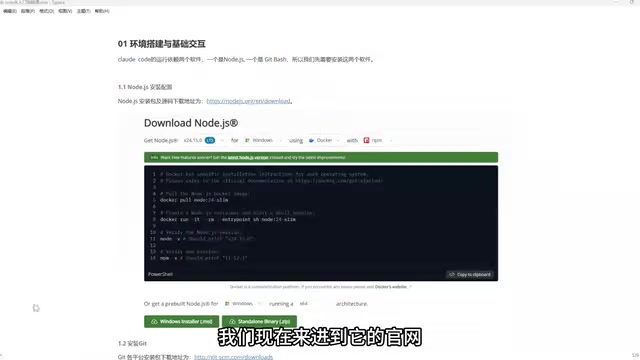
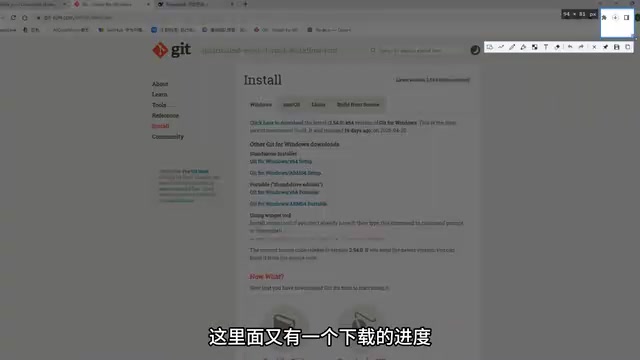
Preparation: Installing Node.js and Git Bash
Claude Code is software written in JavaScript (essentially a JS package), so you need to install the Node.js runtime environment first. At the same time, to use Linux commands on Windows (Claude Code is more familiar with Linux commands), you also need to install Git Bash.
The creator demonstrates the process of downloading Node.js and Git Bash from the official websites. Since the servers are overseas, download speeds may be slow, so the creator thoughtfully prepared installation packages—leave a comment if you need them. The installation process is simple: double-click the installer and click "Next" all the way through.
After installation, open the command line, type node and press Enter. If version information appears, Node.js is installed successfully. Type git and press Enter. If a large amount of introductory information appears, Git Bash is installed successfully.
Node.js is a JavaScript runtime environment based on the Chrome V8 engine that allows JavaScript to run outside the browser on servers or local command lines. As a command-line tool written in JavaScript, Claude Code relies on the Node.js environment for both installation and operation. Installing Node.js automatically includes npm (Node Package Manager), the most commonly used package management tool in the JavaScript ecosystem, used for downloading, installing, and managing third-party code libraries. Git Bash is a terminal emulator on Windows that provides a Linux-like command-line environment and supports most common Linux commands (such as ls, grep, ssh, etc.). Since Claude Code is designed with a preference for Linux command style, using Git Bash on Windows avoids command incompatibility issues and ensures the tool runs properly.
Installing Claude Code
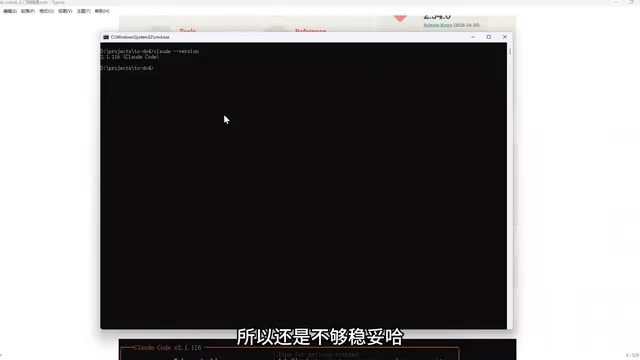
With Node.js ready, you can use npm (Node.js's package management tool) to install Claude Code. Execute the installation command in the command line, press Enter, and wait for installation to complete. After installation, type the claude command—if you see version information, the installation was successful.
Configuring a Domestic Model: Breaking Through Regional Restrictions
Claude Code connects to the Claude model by default, but this model cannot be used directly in mainland China—the official service has blocked mainland Chinese IPs. Although you can register an account through certain methods, the risk is high and accounts are easily banned.
Therefore, the creator recommends using a domestic model instead. Here, TiSpark is used as an example (note: the platform name mentioned in the original video, inferred from pronunciation). First, create an API key on the TiSpark open platform. After creating it, be sure to copy it before closing the window, because once closed, there's nowhere to copy it from.
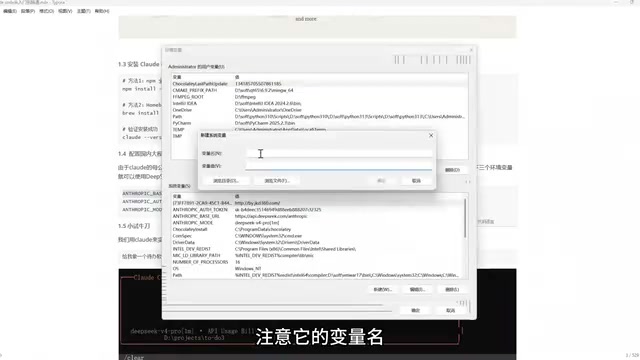
Next, you need to configure three environment variables: the API address, the API key (token), and the model name. Add these three items to the system environment variables, filling in the variable names and values according to the platform's requirements.
After configuration, type claude in the command line to start. The creator demonstrates a simple hands-on coding exercise: asking Claude Code to create a piece of software. Claude Code will ask whether to create files—after confirming, it automatically generates the code. The creator tested the software's functionality, such as adding a "meeting" item, which appears immediately after clicking, then adding a "tutoring" item and marking it as completed—the software runs normally. The creator commented that it was "written pretty well."
An API key (Application Programming Interface key) is a unique identifier generated by a platform, used to verify the developer's identity and authorize them to call the corresponding model services. When using a third-party model platform, the API key is equivalent to an account password and must be kept safe to avoid leakage. Environment variables are dynamic values stored in the operating system for configuration information; programs can read these variables at runtime to obtain key parameters without hardcoding sensitive information in the code. In Claude Code's configuration, by setting these three environment variables—API address, API key, and model name—the tool can send requests to the specified domestic model service endpoint instead of the default Claude official server. This bypasses regional restrictions and also improves configuration flexibility and security. Note that the names and values of environment variables must strictly match the platform documentation, otherwise the connection will fail.
Summary
Through this tutorial, you can successfully install and use Claude Code in China, leveraging domestic models for AI programming. The creator emphasizes that the configuration process isn't complicated—the key is choosing the right tools and methods. Future videos will share more core techniques to help developers truly master Claude Code.
One-line Summary
A Bilibili creator shares a Claude Code beginner's tutorial, teaching you how to install, configure, and use domestic models as replacements in China.
Paragraph Summary
This article is a Claude Code introductory tutorial for domestic developers. It first explains why to choose Claude Code: compared to ordinary AI programming tools, it handles complex project logic better. It then details the preparation work, including installing the Node.js runtime environment and Git Bash terminal, and then installing Claude Code via npm. To address the issue that the Claude model cannot be used directly in mainland China, the article proposes using domestic models as an alternative, using the TiSpark platform as an example to demonstrate the specific steps of creating an API key and configuring three environment variables. Finally, a simple hands-on coding exercise demonstrates Claude Code's code generation capabilities, and the core points are summarized.
Related articles

T3 Code: The Open-Source AI Coding Assistant's Comeback Story
T3 Code is an open-source AI coding assistant that unifies subscriptions like Codex and Claude, with powerful remote control and parallel task management.

Never Elected, Yet Ruled New York for 30 Years: The Ultimate Case Study in the Mechanics of Power
Robert Caro's biographies reveal how unelected Robert Moses ruled New York for 30 years through legal drafting and public authorities, and how Lyndon Johnson built leverage as a "powerless" Senate Majority Leader. Unpacking the underlying logic of accumulating and sustaining power.

The CPython 3.10 Recursion Trap and Synthetic Recovery in TokenGuard, an LLM Circuit Breaker
TokenGuard's author recounts a recursion crash caused by OrderedDict.pop in CPython 3.10 and introduces v0.3.0's Loop Nudge synthetic recovery, inline DLP scanning, and other new LLM agent circuit-breaker capabilities.