Claude Code Desktop: A Complete Guide to Chinese Localization, Account-Free Use, and DeepSeek Integration
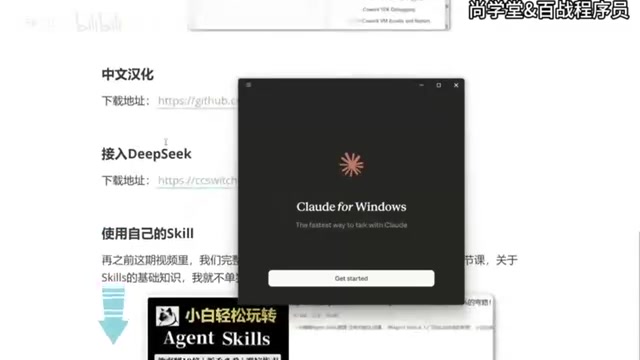
Run Claude Code Desktop with DeepSeek, Chinese UI, and no account — a complete budget-friendly setup guide.
This guide covers a complete low-cost setup for Claude Code Desktop: enable Developer Mode to bypass account login, use CC Switch (v3.15.0+) to swap the backend to the cheaper DeepSeek API, apply a localization patch for a Simplified Chinese interface, and import custom Skills as zip archives. All steps are unofficial and subject to version changes, but offer a practical alternative for users who want full Claude Code functionality without the high official pricing.
For users who want to use Claude Code but are put off by the steep cost of official models, connecting the desktop version to a domestic model is a far more budget-friendly path. This guide is based on a hands-on tutorial from a Bilibili creator and walks through the complete workflow for Claude Code Desktop — from installation and account-free usage to Chinese localization, DeepSeek integration, and importing custom Skills — so you can run this setup at minimal cost.
1. Installing Claude Code Desktop
Anthropic offers several ways to use Claude Code, with the Desktop version listed first. On the official download page, the site automatically detects your operating system — Windows users get the Windows installer, while Mac users get the appropriate Mac build.
Installation is straightforward: once the download is complete, run the executable and wait for it to finish. When you see a login prompt on screen, the installation was successful. You'll notice options like signing in with a Google account — but since this guide uses an account-free approach, skip that step for now.
2. Enabling Developer Mode for Account-Free Use
The key to using Claude Code without an account is enabling Developer Mode. Click the three-line menu in the top-left corner, go to Help, scroll down to find Enable Developer Mode, and click to turn it on. The app will ask you to confirm, after which Claude Code automatically restarts.
After restarting, you'll land on a new screen — leave it for now, because actually connecting to a model requires a third-party tool called CC Switch. Developer Mode's role here is to unlock the Configure Third-Party entry point for the steps that follow.
What is Developer Mode? Developer Mode is a built-in debug and extension channel found in many desktop apps, typically aimed at developers who want custom integrations. In Claude Code Desktop, enabling it unlocks a "Configure Third-Party" option, letting you replace the default Anthropic API endpoint with any compatible interface. This means any third-party service that implements the same API protocol as Claude can be plugged in seamlessly — no Anthropic account authentication required. This design is especially popular among users in China, as it sidesteps both the credit card requirement and high API pricing, while keeping the full Claude Code frontend experience intact.
3. Connecting to DeepSeek via CC Switch
CC Switch is a tool for centrally managing AI workflow configurations — think of it as a model switcher. One important version note: you must use version 3.15.0 or higher. Older versions of CC Switch don't include configuration support for Claude Code Desktop. If you have an older version installed, update it first.
Once installed, open CC Switch. You'll notice a new Desktop entry at the top (marked with a small computer icon) alongside the existing CLI option. Here's how to configure it:
- Click Settings → Routing on the left, find Local Routing, and click the down arrow to enable it;
- Go back and select Desktop, then click the Add button on the right;
- Choose DeepSeekAd from the model list;
- Enter your DeepSeek API Key.
To get an API Key, visit the DeepSeek website's API documentation, go to the Key management page, and create a new key (you can name it something like CodeDesktop for easy identification). Copy it and paste it into CC Switch.
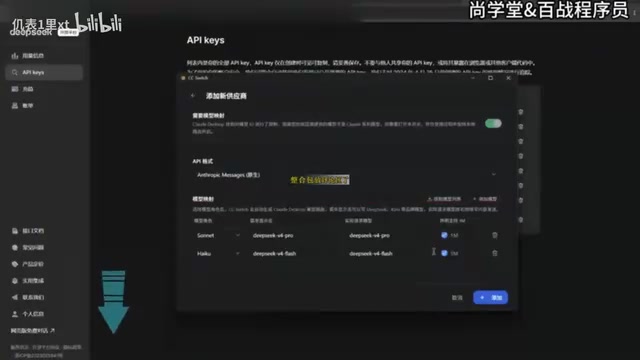
Scrolling down, you'll see two checkboxes. One is a context size setting — enabling it extends Claude Code's context window to 1M (one million) tokens. The tutorial recommends turning this on for maximum context capacity. Leave everything else at default. When done, click Add, and be sure to click Start — without starting it, nothing takes effect. You can then minimize CC Switch; it won't exit when you close the window.
Back in Claude Code, click the top-left menu and you'll now see a Developer option. Go to Configure Third-Party — CC Switch will have already auto-filled the connection details, so no manual edits are needed. Click Upload and restart. After restarting, Claude Code is now running on DeepSeek. The model list will show options like Flash, Pro, and a 1M context version. Select one, start a conversation, and if you get a response, the setup is working.
About DeepSeek DeepSeek is a large language model series developed by DeepSeek (深度求索). Its API pricing is significantly lower than Anthropic Claude's, and it offers an OpenAI-compatible interface format, making it a popular domestic alternative to official models. DeepSeek's API is billed per token, and for the same workload, costs are typically one-tenth of Claude's official pricing or even less. The 1M (one million) context option is especially useful for long codebase analysis or large document processing — the larger the context window, the more code and conversation history the model can "see" in a single session, resulting in more coherent and accurate responses. Note that DeepSeek and Claude differ in model capability and instruction-following style, so some Skills or prompts designed specifically for Claude's behavior may need adjustment.
4. Installing the Chinese Localization Patch
By default, Claude Code is entirely in English, which isn't ideal for Chinese-speaking users. Localization is handled through a patch package that includes both Windows and Mac versions — pick whichever applies to you.
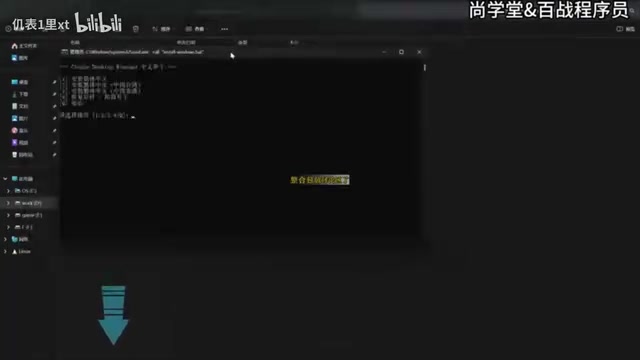
After downloading and extracting the archive, find the .bat file and double-click to run it. The script will present five options:
- Install Simplified Chinese
- Install Traditional Chinese
- Install Traditional Chinese (Hong Kong)
- Restore original / Uninstall patch
- Exit
Type 1 and press Enter to install Simplified Chinese. The script requires Claude Code to be closed during installation — it will close it automatically (or you can close it manually beforehand). Once localization is complete, the app restarts automatically. When it opens again, you'll see menus like "新建任务" (New Task), "项目" (Projects), "计划任务" (Scheduled Tasks), and "自定义" (Custom) all displayed in Chinese. Your previous conversation history is preserved.
5. Importing Custom Skills in the Desktop Version
Using Skills in the desktop version works quite differently from the old CLI approach. In the CLI era, you simply placed files in the Skills folder under the Claude directory. In the desktop version, Skills must be installed as a compressed archive.
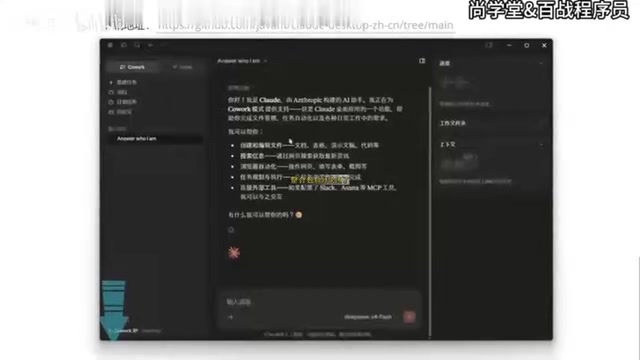
Here's how: create a new task, click the plus button, and go to Skills → Manage Skills. There's a common pitfall here — clicking Add Skill directly will take you to an organization/plugin screen where you can't actually upload a local Skill. The correct path is to go into Manage Skills first, then click Add Skill, and select Upload Skill. Supported file formats include MD files, zip archives, and .skill files.
Pack your custom Skill (for example, a creative skill named IvanCreative) into a zip archive and drag it in to complete the installation. To use it, type a slash / in the chat box to bring up the Skills list, select the Skill you want, and give it an instruction (e.g., "Generate a creative campaign idea for a free beer weekend"). Claude Code will invoke the Skill to complete the task. Test results show the output follows the custom Skill's logic as expected — the feature works correctly.
What are Skills? Skills are reusable prompt modules in Claude Code, similar to "custom instructions" or "agent templates" in other AI tools. Users can pre-write domain-specific background information, output format requirements, persona settings, and more into a Skill file, then invoke it with a slash command during conversation — no need to paste long prompts every time. In the CLI era, Skills were stored as individual Markdown files. The desktop version switched to zip archives (
.zip) or the proprietary.skillformat, making it easy to bundle multiple related files and configuration items into a single distributable unit that's straightforward to share across a team and manage across versions.
Summary: A Practical Path to Running Claude Code on a Budget
This workflow addresses the main pain points of Claude Code Desktop one by one: Developer Mode eliminates the need for an account, CC Switch connects to the more affordable DeepSeek model, a patch handles Chinese localization, and custom Skills are imported via zip archive. For users on a tight budget who still want the full Claude Code Desktop experience, this is a viable alternative worth trying.
One thing to keep in mind: connecting to third-party models and using a localization patch are unofficial operations. Stability and future compatibility may be affected by version updates, so pay attention to version requirements for tools like CC Switch as you go.
Related articles

Deleted Reddit Post Sparks Debate Over AI Content Moderation
A Reddit post removed with only a 'Removed by Reddit' notice highlights AI content moderation's transparency gaps, misjudgment risks, and appeal challenges for platforms and creators.

DSH + Ollama Local LLM Deployment in Practice: Free Chat with Da Fei Yu
Bilibili creator tests DSH + Ollama local LLM deployment end to end: Ollama install, Xunlei-accelerated downloads, ModelScope GGUF model import, DSH custom API address setup, and a comparison of Qwen 3.5 4B, 8B, Gemma, and other models on 8GB VRAM, with advice on choosing local deployment vs. API calls.

Tested: A $899 Mac Mini vs. a $200/Month AI Subscription
Real-world test of whether an M4 Mac mini can replace a $200 AI subscription: 16GB can't fit large models, and both speed and quality fall short—but privacy, no caps, and near-zero running costs make it an ideal host for an always-on agent. Includes buying advice per configuration and money-saving strategies.