Claude Code Desktop in Action: A Complete Workflow from Design to Automated GitHub Merges

Claude Code desktop unifies design, coding, PR, CI, and auto-merge into one seamless AI-powered dev workflow.
This article recaps a live demo by an Anthropic team member showcasing Claude Code's desktop app and surrounding toolchain. Highlights include: one-click handoff from Claude Design to auto-scaffolded code; built-in preview and element selection that pass React component context to the model without browser extensions; GitHub App-based CI integration that iterates fixes on failing PRs and pairs with native auto merge for fully hands-off workflows; the `compact` command's support for hints to prevent key plans from being lost during compression; and auto memory, which writes repeated instructions to `memory.md` but currently focuses on personal preferences over project-level config.
Claude Code's desktop app is pulling AI-assisted programming out of the command-line "black box" and into a visual, interactive development experience. During a live demo from an Anthropic team member, we witnessed a complete pipeline — from Claude Design prototype, to web handoff, to desktop coding, and finally to an automated GitHub PR merge. This article breaks down the key capabilities and tips demonstrated along the way.
From Design to Code: A One-Click Handoff Workflow
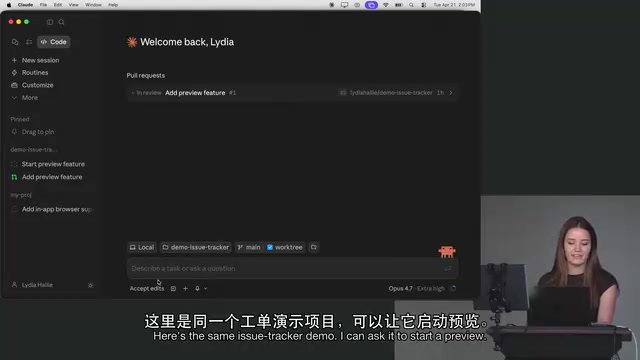
The presenter admitted that "design has always been my biggest headache" — but Claude Design changed that. Prototypes generated in a single shot can be handed off directly to Claude Code, or even sent immediately to the web version of Claude Code.
What's interesting is that when a prototype with no connected codebase is opened, Claude Code proactively asks, "Would you like me to scaffold this for you?" This transition from "I have an idea" to "I have a working prototype" dramatically lowers the barrier from concept to reality. As the presenter put it: "Being able to hand it off to Claude Code that effortlessly — it's a very smooth workflow."
Scaffolding in frontend development refers to the automated generation of a project's initial structure — directory layout, config files, dependency declarations, and other foundational boilerplate. In traditional workflows, developers manually run CLI tools like create-react-app, vite, or next and answer a series of configuration prompts to get a runnable project. Claude Code's breakthrough here is that it can read the visual structure of a design prototype, infer an appropriate tech stack and component hierarchy, and directly generate a runnable project with real code — not just empty directory templates. This means the state of "I have a design but haven't written a single line of code" can jump to "local server is running and components are split out" in seconds.
Desktop App: Visual Editing Without an IDE or Browser Extension
The presenter's personal favorite remains the Claude Code desktop app. Compared to the CLI, the desktop app's core advantage is visual context.
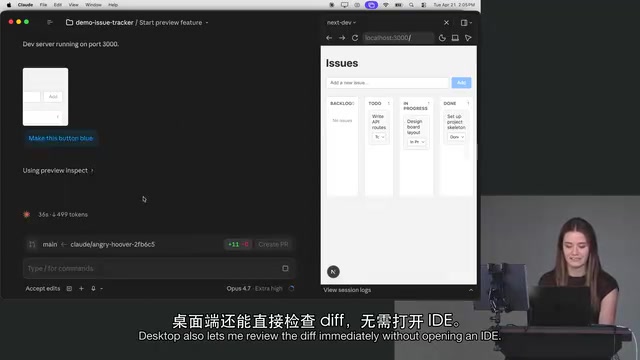
For any frontend project, the preview integrates directly inside the desktop app — no Chrome extension required, no extra configuration. The app uses a launch.json file to start the dev server, rendering the frontend view right inside the application.
The real star feature is element selection. In the demo, the presenter simply selected a button on the screen and said, "Make this button blue." The desktop app captures a screenshot and sends the corresponding React component along with all its props and type information to the model — so the model knows exactly what to change.
This solves a major CLI pain point: if you tell the CLI "make the button blue," the model often responds with "which button?" — and without a manual screenshot, the back-and-forth communication cost adds up fast. The desktop app automates that step entirely.
After changes are made, you can review the diff directly inside the app without opening any IDE, and even add comments on the diff to send back to Claude Code for further adjustments.
PR Creation and Automated CI Fixes: Delegating GitHub Workflows to AI
The "Create PR" button in the desktop app is powered by a skill under the hood. Clicking it triggers the PR creation skill, with Claude automatically added as a co-author.
On the permissions side, the presenter highlighted the newly added auto mode as particularly useful. The previous two modes each had drawbacks: bypass mode skips all permission prompts (a bit risky), while accept edits mode asks too frequently (too noisy). Auto mode strikes a balance between the two.
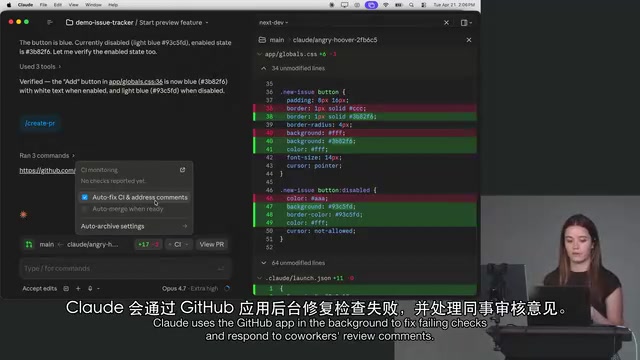
The real power comes from CI integration. Via a GitHub App, when a CI check triggered by a PR fails, you can simply ask Claude to "auto-fix CI and handle review comments." Claude iterates in the background to fix failing tests and responds to review comments left by teammates on the PR.
Pair this with GitHub's auto merge setting, and the entire workflow becomes fire-and-forget — Claude iterates until CI is fully green and all comments are addressed, then GitHub merges automatically. This frees developers from the tedious CI debugging loop.
GitHub App is an integration mechanism provided by GitHub that allows third-party services to access repository events and APIs using their own identity, rather than borrowing a user's account. Unlike OAuth Apps, GitHub Apps offer fine-grained permission control — they can declare that they only read CI status and write PR comments, without needing full account access. Claude Code uses this mechanism to listen for check_run failure events on PRs and automatically trigger a fix workflow when test failures are detected. Auto merge is a native GitHub feature: when a PR satisfies all branch protection rules (such as all CI checks passing and required reviews approved), GitHub automatically executes the merge without any manual button click. Combined, these two features create a complete closed loop between AI-driven fix iterations and GitHub's merge strategy.
Context Management: The Difference Between compact, clear, and a New Session
In response to a question about token optimization, the presenter gave a detailed explanation of several easily confused concepts.
compact
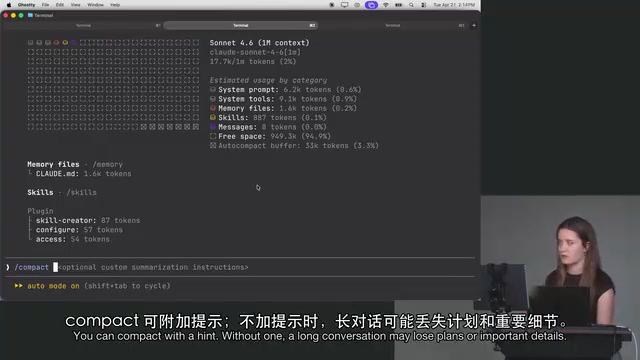
When your context is approaching its limit (say, 600K tokens used out of 1 million) and many early messages are no longer relevant, you can use compact. It triggers one additional model call that merges and compresses all conversation messages, retaining only what's relevant to the current session — freeing up a large amount of occupied context.
A tip many people don't know: compact supports a hint. For very long conversations, compressing without a hint may cause Claude to forget your plans or things you explicitly stated earlier — because it doesn't know what to prioritize. You can prompt it with something like "make sure to preserve all my previous comments and the entire plan," and the compression will be much more effective.
clear vs. New Session
clear: Use this when switching to a completely new task in the same window. It retains no history.compact: Retains a summarized version of history.clearvs. new tab: The presenter considers them essentially the same — useclearif you want to stay in the same window, or open a new terminal/tab if you prefer.
Understanding the difference between these commands requires familiarity with the context window concept in large language models. Every time you send a request to the model, all previous conversation messages must be packed into this window, which has a fixed token limit (Claude currently supports approximately 200K tokens). Once the window fills up, the model either refuses to process the request or drops the earliest messages. compact essentially replaces a large volume of raw messages with a high-density summary via a single "summarization call" — like compressing 100 pages of meeting notes into a 2-page summary. The trade-off is losing some detail, but retaining the thread most useful for subsequent tasks. This also explains why hints are so critical: explicitly telling the model "these items must be preserved" during compression prevents it from accidentally deleting important technical decisions or to-do items according to a generic summarization strategy.
Memory Files: What Does Claude Actually Remember?
The desktop app's new auto memory feature automatically writes to a memory.md file when it detects that you've repeated certain instructions multiple times.
It's worth noting that current memory leans more toward personal corrections and preferences rather than project-specific configuration. The presenter mentioned they're working on a blog post about "what Claude actually remembers," because it's still not entirely clear which prompts get remembered and which need to be re-added each session.
Conclusion
The core value of this demo is clear: Claude Code is evolving from a pure coding assistant into a full development platform spanning "design → coding → preview → PR → CI fixes → merge." Capabilities like visual element selection in the desktop app, automated CI fixes, and auto memory are all reducing the friction of AI collaboration. For developers who've long struggled with the design phase, or who want to delegate repetitive GitHub workflows, this is a workflow well worth trying.
Related articles

Random Pruning of the DPO Computation Graph: 1.4x Training Speedup and Lower Peak Memory
DPO training too slow and memory-hungry? This paper proposes a random pruning framework for the DPO computation graph, sampling independently across position, sequence, and branch dimensions; branch pruning achieves a 1.426x step-time speedup and cuts training time by about 30%, with in-depth attribution of memory and time gains.

Why Does JEPA Underperform MLM in Longitudinal EHR Representation Learning?
New study compares JEPA and MLM for longitudinal EHR representation learning on MIMIC-IV: three JEPA variants train stably without collapse but underperform MLM; target size, not heterogeneity, drives prediction error.

Transfer Learning + Visible Light Communication: A New Approach to Energy-Efficient Indoor Positioning
A study proposes a transfer learning-based visible light communication indoor positioning method, achieving 47% accuracy improvement on the BOSCH factory dataset, 67.5% model efficiency under high noise, and introducing the ME composite metric for energy-efficient positioning in energy-constrained industrial IoT scenarios.