Claude Code in Practice: A Configuration Guide to Permissions, Context, and MCP
Claude Code in Practice: Getting installation, permissions, context, and MCP right in four steps
Starting from real-world project results, the article argues that, absent special requirements, Claude Code and Codex outperform tools like Cursor, but configuration is what really determines efficiency. It covers four areas: at installation, the official one-click script often fails due to network issues, so the less prominent NPM method in the official docs is recommended; permission modes fall into three tiers—confirm each time, auto-accept edits, and full auto—which should be chosen based on task reversibility and blast radius rather than the number of confirmations; context management emphasizes proactive cleanup and compression, with precise relevant information preferred over massive history; MCP integration should follow the principles of enabling on demand and controlling permission boundaries to avoid consuming context budget. The core conclusion is that a tool's value depends on whether its configuration fits your workflow.
When it comes to choosing AI coding tools, if your company has no specific requirements, Claude Code and Codex often outperform tools like Cursor and Tree in real-world project development. This is a shared sentiment among many developers who have used these products in depth—especially for code generation and project-level collaboration tasks, where the gap is quite pronounced.
But picking the right tool is just the starting point—configuration is what really determines efficiency. This article lays out a practical, implementable approach across four areas of Claude Code: installation, permission modes, context management, and MCP integration.
Installation: Avoiding the Pitfalls of the Official Command
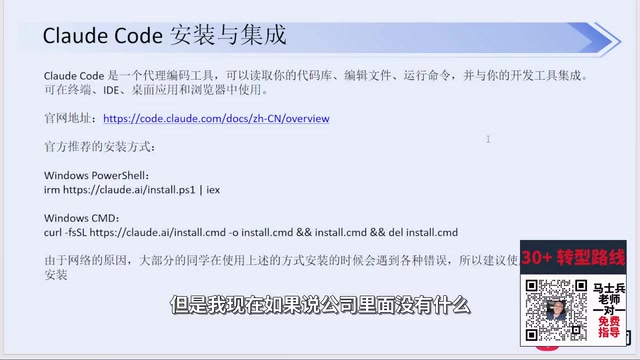
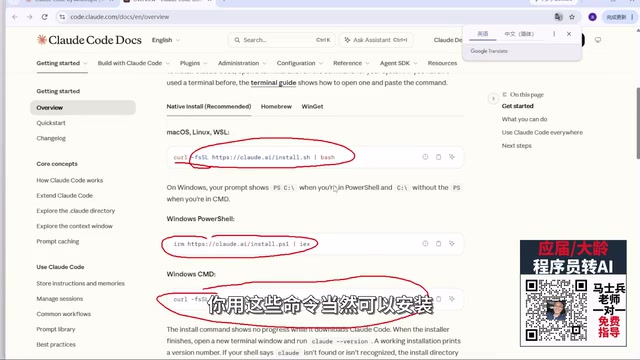
Most people installing Claude Code for the first time open the official documentation and run the official Mac/Linux or Windows PowerShell command directly. In practice, these commands are highly likely to fail—network issues, proxy problems, or other environment factors can all interrupt the installation, and the error messages are often messy, making troubleshooting costly.
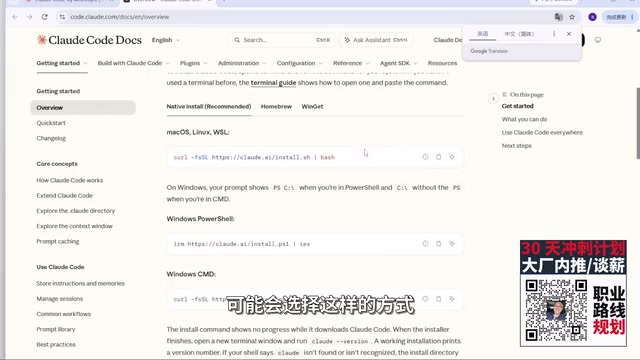
If your network environment is confirmed to be fine, the official command will of course work. But once a pile of abnormal errors appears, it's best not to keep banging your head against the official command.
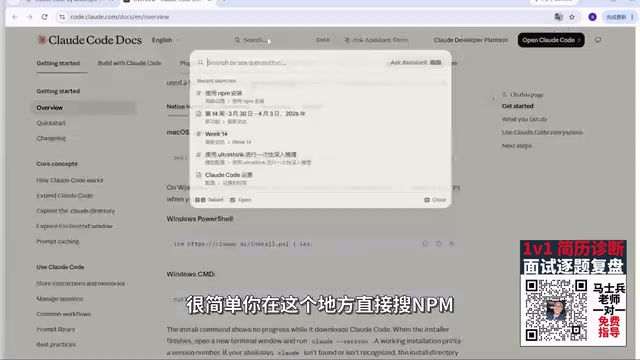
A more reliable approach is to install via NPM. This isn't a shady workaround—the official documentation explicitly includes NPM installation instructions; the entry point just isn't prominent. Search for NPM in the docs to find the corresponding method. Compared with the official one-click script, NPM installation is more tolerant of network fluctuations and makes it easier to pinpoint problems.
NPM (Node Package Manager) is the package manager for the Node.js ecosystem and the world's largest registry of open-source software. Claude Code is essentially a command-line tool built on Node.js, so it can be obtained through a global install with npm install -g. Compared with the official one-click script, NPM installation's fault-tolerance advantages are reflected in the following: it reuses the system's existing Node environment and mirror configuration, the download process can be retried from where it left off, and on failure it gives clear package names and dependency errors rather than a vague script execution failure. Users in China can also configure an npm mirror (such as the Taobao mirror) to further reduce the impact of network fluctuations.
Permission Modes: Trading Off Between Efficiency and Safety
The first decision after installation is which permission mode to choose. The scope of operations Claude Code needs to confirm directly determines the pace of interaction.
- Confirm each time: Every file modification or command execution requires manual approval. This is the most secure, but the interruptions are strong under high-frequency operations—suitable for first-time use or handling sensitive repositories.
- Auto-accept edits: File changes are approved automatically, while command execution still requires confirmation. This is the sweet spot for daily development.
- Full auto mode: All operations are approved, offering the highest efficiency, but it requires you to have a solid grasp of the current task scope and codebase state. It's recommended only in isolated environments or clearly controllable tasks.
The core criterion for choosing is the reversibility and blast radius of the task, not simply minimizing the number of confirmations.
Claude Code's permission mechanism is essentially a "human-in-the-loop" confirmation system: the AI proposes an operation intent, and the user decides whether to approve it. This contrasts with fully autonomous agents. In confirm-each-time mode, every file write and command execution triggers a confirmation request, suitable for permission-sensitive production repositories; auto-accept edits approves low-risk, easily reversible operations like "modifying files" while still intercepting "executing commands," because shell commands can have irreversible side effects. Understanding this layered logic is more important than memorizing the specific options.
Context: Compression Matters More Than Stacking
Claude Code's effectiveness depends heavily on context quality. Conversation history that keeps piling up in long sessions dilutes useful information, causing the model's attention to scatter and its answers to drift.
The practical approach is proactive management rather than passive waiting: after completing a phase of a task, clear irrelevant history and keep only the code snippets and conclusions relevant to the current goal; when the context is nearing its limit, compress in time, distilling key decisions and constraints into a brief summary before continuing. More context isn't better—precise, relevant information improves generation quality more than a massive history.
A large model's context window is finite, meaning the total number of tokens the model can "see" in a single inference. Conversation history, code files read in, and tool return results all count against this budget. When the window nears saturation, not only are the excess parts truncated, but the model's attention to key information is also diluted by a large amount of irrelevant content, leading to phenomena such as "forgetting early constraints" and "answering off-topic." This is why Claude Code provides a context compression mechanism: distilling lengthy history into a summary to free up space for the information the current task truly needs.
MCP: Bringing External Capabilities In
MCP (Model Context Protocol) lets Claude Code connect to external tools and data sources, and is the key to extending AI coding from standalone conversation into a workflow. Two things to note when integrating: first, integrate on demand—every MCP service consumes context budget, so unrelated services should be disconnected promptly; second, clearly define each service's permission boundaries to avoid tool calls exceeding the expected scope.
MCP (Model Context Protocol) is an open protocol introduced by Anthropic at the end of 2024 to standardize how AI models connect with external tools and data sources. You can think of it as a "universal plug for AI tools": an MCP server exposes a number of tools or resources, and Claude Code, as a client, calls them according to the protocol, thereby connecting to external capabilities such as databases, document systems, and browsers. Since each MCP service's tool descriptions and return content consume context, more integrations don't equal stronger capability—enabling on demand is the basic principle of using MCP.
Summary
The value of Claude Code isn't in using it right after installation, but in whether the configuration fits your own workflow. Install via NPM to avoid network pitfalls, choose permission modes based on task reversibility, maintain quality through proactive context compression, and integrate MCP on demand with controlled permissions—get these four things right, and the tool's actual output will be noticeably different.
One-line Summary
Claude Code in Practice: Getting installation, permissions, context, and MCP right in four steps
Paragraph Summary
The article starts from real-world project development results and argues that, absent special requirements, Claude Code and Codex outperform tools like Cursor, but configuration is what really determines efficiency. It covers four areas: at the installation stage, the official one-click script often fails due to network issues, so it recommends the less prominent NPM installation method in the official docs; permission modes fall into three tiers—confirm each time, auto-accept edits, and full auto—which should be chosen based on task reversibility and blast radius rather than the number of confirmations; context management emphasizes proactive cleanup and compression, with precise relevant information preferred over massive history; MCP integration should follow the principles of enabling on demand and controlling permission boundaries to avoid consuming context budget. The core conclusion is that a tool's value depends on whether its configuration fits your workflow.
Related articles

Michael Nielsen Takes Down His Classic Neural Network Textbook, Sparking Community Discussion
Michael Nielsen's classic free textbook Neural Networks and Deep Learning has been taken offline, sparking discussion on Hacker News about the reasons and impact.

Inside the AI Training Data Market: The Trade-off Between Exclusivity and Discounts
G2i founder Gabe Greenberg reveals the dual-track pricing of the AI training data market: labs pay a premium for exclusive data or accept discounts that allow others to buy it.

SessionGraph: Unifying All Coding Agent Sessions in One Interactive Graph
SessionGraph aggregates coding agent sessions into an interactive graph, helping developers review, debug, and manage AI coding workflows across sessions. This article examines its positioning, value, and open questions.