Claude Code in Practice: Building a Zero-Code Clip Factory That Turns Long Videos into Vertical Shorts Automatically
A creator uses Claude Code to build a zero-code clip factory that auto-transcribes, clips, and generates covers for long videos.
The article describes how Bilibili creator "Wukong" used Claude Code, without writing code, to turn long videos into vertical shorts. Starting from the pain of manual clipping, he progressively built a "clip factory" including Plan Mode planning, Whisper transcription with script alignment, claude.md rule enforcement, hook-based QA, subagent independent review, and headless unattended mass production. In testing, a 35-minute video automatically produced 10 vertical clips with matching covers; unattended operation took 25 minutes 18 seconds, with humans only needing to confirm the cut-point table and approve covers. The article emphasizes that each AI tool has its boundaries, and human judgment remains the final quality gate.
Low completion rates on long videos are a pain point for many creators. Bilibili creator "Wukong" shared his real data: a 35-minute LLM chronology video on Douyin got 9,474 views in 10 hours, with an average watch ratio of just 4.34% — each viewer watched only a minute and a half. His solution was to cut long videos into 1–2 minute vertical shorts, each with a single hook. After manually cutting 5 long-form videos and 21 sets of clips, the most exhausting part wasn't the editing — it was finding segments, matching sentences, making covers, and checking for errors. So he tried using Claude Code to automate the whole workflow without writing a single line of code, ultimately building a reusable "clip factory."
From Manual to Automated: The Four-Step Evolution of the Clip Factory
The entire factory was built around four parts: getting it to make the cut, getting it to understand the video, hard-coding the rules, and automated QA plus mass production. All timings are the creator's actual measurements; long waits were sped up.
Step 1: Getting It to Make the Cut — From Plan Mode to Precise Clipping
The first requirement was to cut the 3:10–4:20 segment of the chronology into 9:16 vertical video. Claude Code first read that the source was 1920x1080 at 30fps, then asked the creator to confirm the command three times in a row. After the 70-second landscape clip was shrunk into a vertical canvas, the picture occupied only the middle third. The creator asked whether there was a better vertical approach and required it to "propose options first, don't act yet." Claude Code sampled eight frames to look at the content, gave three options, and pointed out that this segment wasn't suitable for left-right cropping — the picture was a horizontal infographic, and cropping the middle would lose information. They ultimately chose option one: keep the original frame complete and centered, fill the top and bottom with the same frame enlarged, blurred, and darkened, then use ffprobe to report 1080x1920, and export three-second H264 with AAC.
This step exposed the problems: no subtitles, no cover, the opening wasn't a hook, and segment selection still relied on a human. Plan Mode (press Shift+Tab twice) is read-only and only produces a plan, making it suitable for planning before acting.
Plan Mode is a read-only interactive mode in Claude Code, entered by pressing Shift+Tab twice. In this mode, Claude Code does not directly execute file modifications or commands; instead, it first analyzes the request, reads relevant files, and outputs a reviewable plan, waiting for user confirmation before entering the execution phase. It suits tasks that require planning before acting — such as video editing, an irreversible operation — and effectively reduces the risk of mistakes. The core difference between Plan Mode and normal mode is permissions: read-only means it won't automatically write or delete files, and all decision-making remains in the user's hands.
Step 2: Getting It to Understand the Video — Whisper Transcription and Script Alignment
Claude Code can't see the picture, so let it read the audio. The creator used OpenAI's open-source Whisper, running on CPU via the community FasterWhisper build. He first ran the first 10 minutes with both the Small and Base tiers and found the machine had no GPU, hit a library version incompatibility, and patched the script without modifying the installed library. Result: Small processed 10 minutes of audio in 70 seconds, Base in 28 seconds, but Base's output was in Traditional Chinese and "Diao Ming" was basically ruined, with the ending collapsing into gibberish; Small remained coherent at the 10-minute mark, erring on homophones — for example, hearing "Word2Vec" as "WordOfTough."
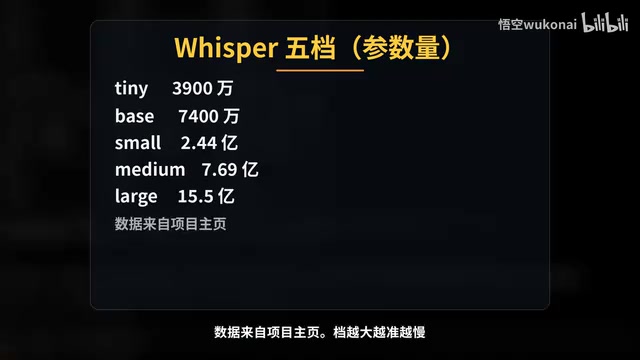
Whisper has 5 tiers: Tiny at 39M params, Base at 74M, Small at 244M, Medium at 769M, Large at 1.55B. The higher the tier, the more accurate but slower — but Base's problem this time wasn't speed, it was errors. So he tested with 10 minutes first before deciding on the full video. The full 35:02 transcription took 253.3 seconds measured, about 8.3x real-time, producing 1,209 subtitle entries. Then he had Claude Code use the script as ground truth: timestamps follow the subtitles, text follows the script. During alignment, about 1,400 characters of the script couldn't be anchored to the timeline; checking segment by segment revealed 4 places where the full transcription had missed entire passages, one of which was at 25:44 where the model fell into a repetition loop. Re-transcribing those separately and re-aligning: of 1,207 subtitle entries, 336 had text changes, not a single timestamp moved, and the body text matched the script word for word. A 190-entry glossary could be reused next time. This step took about 21 minutes total — with a script, you essentially get an accurate subtitle file for free.
Whisper is OpenAI's open-source automatic speech recognition model, supporting multilingual transcription and translation. It offers 5 tiers from Tiny to Large, with parameter counts from 39M to 155M; higher tiers are more accurate but slower. FasterWhisper is a community-maintained accelerated inference version that runs on CPU, suitable for environments without a dedicated GPU. Whisper's output includes timestamps and text, commonly used for subtitle generation, meeting notes, and similar scenarios. In practice, you typically test a small tier on a segment of audio first to evaluate the accuracy-speed tradeoff, then decide which tier to use for the full video.
Step 3: Hard-Coding the Rules — claude.md and Cut-Point Rules
The task of picking 10 segments was handed to Plan Mode: each segment 40–90 seconds, opening must be a counterintuitive or conflict-driven sentence, ending must stop at a complete sentence, and numbers must be verifiable against the script. Seven minutes later, Claude Code delivered a 10-row table plus three alternatives, and self-checked that three segments were under 40 seconds and redefined their boundaries. Each row had a topic word, start/end, duration, opening sentence, hook type, rationale, and suggested title. The creator pressed Ctrl+G to write edits in the editor: don't spread evenly by time, pick by content strength, and allow two segments from the same chapter. He located the Sora entry whose opening was "earn one buck, lose three, market cap in the hundreds of billions" and swapped it for the alternative "AI is better at using computers than people," then reordered the other 9 by hook strength. After approval, they were cut one by one; the Six Little Tigers disaster was only 28.7 seconds, so it was extended to the next complete sentence at 40.8 seconds to meet the bar. All 10 were 1080x1920, and fixing errors on paper costs nothing.
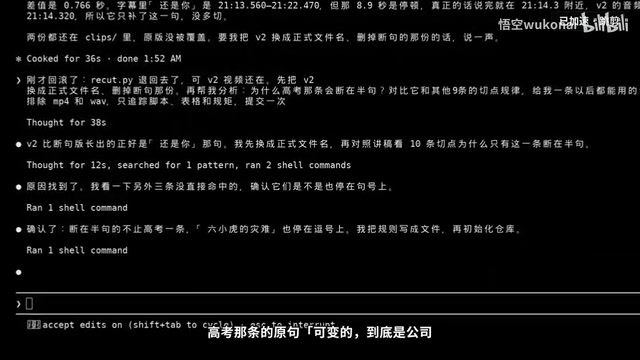
But on review, the Gaokao segment's ending stopped mid-sentence at "is it the company" — cut off halfway. Claude Code wrote recut.py to re-cut a v2, but after rolling back, it didn't remember it had cut v2. Investigation revealed the cause: subtitles were split by breath, not by sentence; Q endings were often commas, and 8 of the 10 segments' endings happened to be periods or question marks, while the Gaokao segment's original sentence "is it the company or you that's variable" was split into two Q entries. New rules were written into the cut-point rules file: cut points must fall at the end of a Q, and that Q must be the end of a sentence in the script.
Rules spoken out loud are forgotten the next time you switch canvases, so he used /init to read the repo and generate claude.md, which is read at the start of every session. At the end, the creator added 5 rules distilled from manually cutting 21 sets: cut only at sentence boundaries, leave an extra 0.3 seconds at the end; the first two seconds are the hook, don't start with "well then," "so," or "and then"; add a 3-second redirect card at the end of 40–120 second clips; name files with topic word plus aspect ratio; write everything into the manifest table. /memory shows two levels: the user directory applies to all projects, the project-level one applies only to this project.
For verification, he used /clear to wipe the context and said only "re-cut the Six Little Tigers segment." Claude Code read the rules and extended the ending to the period at 16:49.56, but didn't proactively add a redirect card, cover, or manifest — it only did what was asked. After reading the five rules again and checking item by item, it then added the redirect card, a 3:4 cover, and a manifest checklist; four passed, and the first was only half done. It pulled up the waveform and saw the mirror tail was up to 16:49.62, the next sentence "2024" began at 64, an interval of about 20 milliseconds — leaving an extra 0.3 seconds would necessarily cut into the next sentence, so it didn't. Two lessons: claude.md is a reference, not automatic execution; rules can conflict, and it can explain why.
claude.md is Claude Code's project-level memory file, auto-generated by the /init command, covering project structure, coding conventions, common commands, and more. Each time Claude Code starts, it prioritizes reading this file as context. But claude.md is essentially a "reference rule" — the model may ignore it or only execute part of it, and it is not guaranteed to take effect. The /memory command, by contrast, shows two levels of memory: memory in the user directory applies to all projects, while memory in the project directory applies only to the current project. For rules that must be strictly enforced, convert them into programmatic mechanisms like hooks rather than relying solely on claude.md's text descriptions.
Step 4: Automated QA and Mass Production — Hooks, Subagents, and Headless
Covers followed the finalized style: gold hook on top, white bold topic word with black outline below, leaving the middle for the picture. Claude Code first measured pixel positions from the finalized design, then time-aligned each cover with the source, insisting the hook only use numbers actually spoken in the video, and installed face detection to scan which segments had people on screen. The script produced 10 3:4 covers and 10 9:16 covers, with 0 flagged as covering faces. But it didn't stop at that conclusion — looking at each image, it found two kinds of problems: the character 义 wrapped alone to the next line because the outline made 8 characters exceed the canvas; and the Gaokao cover had a row of back-view figures that the detector recognized none of. It changed the layout algorithm and made the Gaokao cover skip the front section with people when selecting frames.
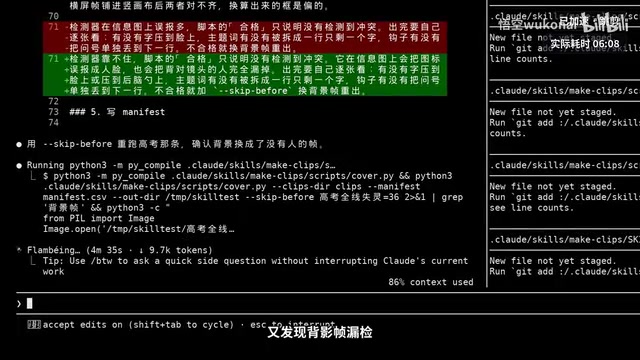
To demonstrate what face-covering looks like, the creator had it make a set of demo samples: the same frame of the NVIDIA entry's presenter's face, one deliberately not avoided, one with text laid out around the avoidance zone, both labeled "demo sample" in the top right. While making the samples it tripped over its own mistake: converting the original frame's detection box to the vertical canvas, the face position was off by about 150 pixels — the text looked like it avoided the face but actually still covered it. It switched to re-detecting the face on the final image before laying out text, and wrote this pitfall into claude.md: the avoidance zone is calculated by the final image's actual position, the face box is expanded 24 pixels on all sides, and text must not enter it.
Re-explaining from scratch every time is tedious; a skill is a job description plus a toolbox. The creator spent 5 minutes 17 seconds packaging the make-clips skill: skill.md describes when to use it and how many steps; scripts holds three scripts for transcription, clipping, and cover generation; templates holds fonts and redirect card. While packaging, he test-ran it on the Gaokao segment and found the back-view frame was missed again, so he added a skip-first-few-seconds parameter to the cover script. On startup only the name and description are read; the full text loads only when used, so installing 10 doesn't consume context. The first two lines of skill.md are the name and description; the description determines when it automatically recalls the skill, written here as "use when the user wants to cut a long video into vertical shorts." Division of labor with claude.md: claude.md is read every time and holds rules; skills load only when used and hold workflows. Judgment goes to humans — which segment to pick, what hook to write; execution goes to fixed scripts — how to cut, how to generate images — so results are reproducible.
In a new canvas he typed only "/make clips add the Musk video," and it output 1,107 subtitles, found two missed transcriptions (14:38 and 20:28), re-transcribed to fill in up to 1,175 entries, then delivered a 22-entry cut-point table that covered the entire video, because the skill didn't specify how many to pick. The second confirmation asked for only the 10 strongest hooks. After cutting, checking the dictionary revealed cut.py had only output video, not audio into the file, so the script was fixed and re-cut. Cover generation then found 8 single-character line breaks, plus one cover that used a frame with the presenter on screen, changed to select frames only after 55 seconds. This section took about 19 minutes; the creator confirmed twice plus several command permission confirmations — it wasn't done in one sentence, and the gaps were all filled into the skill.
Validated with another video: the AI buzzword primer "No One Is Directing" ran 2,541 seconds. The creator had manually cut 5 clips from this video, and 3 of the 5 overlapped in time with the 10 automatically picked. He said "done doesn't mean done well." A hook is a program attached to the workflow that runs at the trigger point without his judgment. The /hooks menu currently only allows viewing; adding requires editing settings.json or delegating to Claude Code. He had Claude Code write two into the project shared config: PostToolUse checks after every bash that width/height is 1080x1920, duration is 40–123 seconds, and black frames before the redirect card don't exceed 0.5 seconds; Stop checks before wrapping up that manifest rows, video count, and cover count are all equal, and writes failures to a file with the project's measured standard exit code 2. Per the official docs, Claude Code receives the reason and continues fixing.
Manually running the 10 Musk clips: width, height, and duration all passed; 4 were blocked for black frames, the longest 4.07 seconds. On review he judged they were dark-background infographics in the body, not bad clips, and moving the cut point would split a sentence in half, so he changed the probe to detect black pixel ratio at 99.5%, excluding the redirect card. To guard against being too lax, he made a 5-second true-black probe, which was still caught, reported at 5.021 seconds measured; all 10 passed with exit code 0. The Malin batch had no naturally occurring black frames, so he had Claude Code make a demo sample: copy the sleep-on-the-floor down-payment clip and insert a black screen 2 seconds before the redirect card. The moment it finished writing, the hook blocked it, measured at 1.967 seconds against a standard of no more than 0.5. Following the range given in the error, he subtracted the black screen and re-ran with exit code 0, then deleted the sample.
Hooks have more time points than these two: PreToolUse before tool execution can block dangerous commands, PostToolUse after execution does QA, and Stop when preparing to wrap up does the accounting. The difference from claude.md: claude.md tells it, and it may only do half; a hook is a program that runs at the trigger point. Rules that can be judged programmatically should be moved from claude.md into hooks.
Covers need review, but letting the one that made the cover self-review means its context is full of its own thinking. A subagent opens a separate clean context. This version's /agents wizard has been removed; the prompt directly tells Claude Code to write it. It wrote the cover-reviewer description, enabling only two tools — read file and find — with three criteria: no face covering, no typos, text complete after centered 4:3 cropping. The new file wasn't registered in the current canvas, so he dispatched a general subagent with the description as the prompt to review in read-only mode. Report: all ten failed, all stuck on the third criterion — centered 4:3 cropping retains y315 to y1125, and each cover's hook top edge and topic word bottom edge were cut off. No typos, no face covering; the main workflow hadn't noticed this when looking at images itself. The main workflow fixed it per the report: measured the outline making each line actually about 30 pixels taller than the font size, and pulled the text into the safe zone by the true bounding box. During the fix it found the sleep-on-the-floor down-payment hook, after moving down, covered the presenter's face, so it changed to select frames after 34 seconds and swapped in a rocket infographic. Re-review: all ten passed. The maker and the reviewer are separated; the reviewer is read-only.
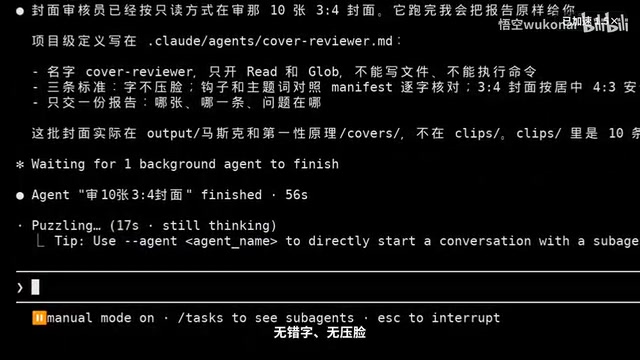
The difference from a skill: a skill works in the same context; a subagent opens a new context and returns only conclusions when done. The details of the 20 crop issues stayed with the reviewer; the main workflow received only a report. The reviewer has limitations too — judgment relies on looking at images, back views and profiles may be missed, so the report is not final. The rule is that covers must be approved by a human before going live; the tool's job is to minimize what a human has to look at, and the interface still has to be guarded.
claude -p followed by a sentence is officially called headless mode — no interface, exit when done, unattended. No one clicks confirm, so permissions must be tightened. The creator only allowed a few command types like ffmpeg, and first tried "use rm to delete the temp directory"; the answer was "rm is blocked in this canvas." The formal run "/make clips The Next Ten Years of LLMs" output json, measured at 25 minutes 18 seconds, and the cost counted in 66 rounds of logs was $150 million (editor's note: this is the cost figure as relayed by the creator from the logs; the original text says so), with three permission denials, one of which was because curly braces were used when writing a file and it was blocked, so it changed the syntax. It also found two misheard years, re-transcribed and corrected to "before 2029" and "before 2028," and these two were no longer among the selected 10. Outputs: 10 vertical clips, 10 each of 3:4 and 9:16 covers, a 10-row manifest, and the final 3-second transcription all silent. Publishing this one isn't in the factory — title, description, and topics are still checked by a human, and each is submitted only once. Choosing json as the output format lets other programs read it directly; elapsed time, round count, and background commands are all in it, and it can be handed to a scheduling table or a nightly cron job. Unattended tool permissions should be tighter than when someone is watching, and background records should be kept for review. Moving to another computer or handing to a colleague requires reconfiguring three things: skill, hook, and reviewer.
A plugin is an all-in-one installation package. The creator had Claude Code package it, and it once went digging through program files for the format definition; 14 minutes with no result, and after being interrupted it wrote plugin.json directly per the official docs' structure, with only name, version, and description; hooks go in hooks.json, paths use the plugin root variable. The first time it reported the marketplace was missing owner; after adding it, it passed with exit code 0. Simulating a clean colleague's computer, switching to an empty config directory, in the terminal using claude plugin marketplace add with this repo, claude plugin install list showed 1.0.0 enabled. A plugin marketplace doesn't need an app store — a git repo plus a manifest file is enough. The meaning of version numbers: if the cover layout changes someday, the plugin goes from 1.0 to 1.1, and colleagues update and unify — no one using the old layout while another uses the new one.
A Subagent is a sub-agent in Claude Code independent of the main conversation context, with its own context window and tool permissions. The main workflow can dispatch a subagent to perform a specific task (like cover review); the subagent returns only conclusions and does not bring intermediate reasoning back to the main context, avoiding the main workflow being disturbed by its own thinking. Subagents suit scenarios requiring independent judgment, read-only review, or parallel processing. Their limitation is that judgment depends on the materials given and may miss edge cases like back views and profiles, so reports are usually references rather than final verdicts. Hooks, by contrast, are programmatic triggers bound to the tool-call lifecycle, executing automatically at time points like PreToolUse, PostToolUse, and Stop — they run at the trigger point, suitable for mandatory QA.
Lessons from the Clip Factory: The Boundaries and Collaboration of AI Programming
On the left is the first cut: black bars, no subtitles, no cover, and the segment was found by the creator himself. On the right is the factory output: automatic segment selection, cutting at sentence boundaries, blur-fill background, redirect card, 3:4 cover, passed through hook QA and reviewer re-review. Each layer was forced out by the previous layer's problems: can't find segments, so transcribe subtitles; cut wrong, so plan first; can't remember, so write claude.md; need re-explaining, so make a skill; errors unnoticed, so add hooks; can't self-review, so use a subagent; need guarding, so go headless; need sharing, so package a plugin.
Final accounting: the first cut's segment was specified by the creator himself, and only one of seven things was done. On the factory side, "The Next Ten Years of LLMs" went from transcription to ten sets of clips and covers, unattended in 25 minutes 18 seconds, during which he didn't touch it once, and only two things were left for humans: reviewing the cut-point table and approving covers.
The core of this workflow isn't letting AI replace humans, but separating human judgment from program execution. claude.md manages rules but may be ignored; hooks manage enforcement but need precise thresholds; subagents manage independent review but still have blind spots; headless manages unattended operation but permissions must be tightened. Each layer of tooling has clear boundaries, and the final quality gate is still a human. For creators who don't code, Claude Code offers a viable path: describe requirements in natural language, plan with Plan Mode, encapsulate workflows with skills, fill QA gaps with hooks and subagents, and ultimately turn repetitive labor into one sentence plus a few confirmations.
Related articles
WorkBuddy Complete Guide: How AI Agents Automate File Conversion for You
WorkBuddy hands-on guide: from Doubao giving only plans to AI agents that actually execute—batch-convert PDFs and archive them in three minutes. Includes installation, points system, Codex comparison, and getting-started tips.
Zero to One: Java + DeepSeek in Practice — A Programmer's Guide to Transitioning into AI Large Model Development
Based on a Bilibili livestream tutorial, this article explains how Java programmers can transition into AI large model development from zero, covering skill paths, building your first Java AI app, resume packaging, and job-hunting strategies to help you seize opportunities in the large model era.

Claude Code in China: A Practical Guide from Installation to Real-World Coding
A Bilibili live class explains Claude Code in China: installation and integration, built-in commands, MCP configuration, SQL skills, and the DRMD file, plus a stable login workaround to avoid account bans and help developers avoid pitfalls.