Claude Code in China: A Practical Guide from Installation to Real-World Coding

A Bilibili live class systematically covers Claude Code installation, six key modules, and a workaround for account bans in China.
The article reviews a Bilibili live class on Claude Code, noting that many users only use it superficially as a chat tool, while the course covers six modules—installation and integration, full-line mode and built-in commands, MCP tool configuration, SQL skills, Subject theme configuration, and the DRMD file—emphasizing hands-on operation to reduce trial and error. It also proposes a login workaround for account bans in China, flags compliance risks, and compares Claude Code, Codex, Cursor, and Tree, arguing that tool choice should match personal habits and scenarios.
As AI coding tools become part of developers' daily workflows, Claude Code is widely regarded by programmers as a top choice for production environments thanks to its performance in code generation and documentation writing. A live-streamed class on Bilibili walked through Claude Code's installation, configuration, and hands-on operation, covering everything from basic integration to advanced skills, and offered a workaround for the account bans that many users in China encounter. Below is a breakdown of the key operations and the reasoning behind them, based on that tutorial.
Why devote a dedicated session to Claude Code?
Many people assume Claude Code is simple enough—just chat-style conversation. But the live class pointed out that a large number of users only scratch the surface and never get into the specifics. For experienced users, this is a chance to fill in gaps; for beginners, it's an opportunity to get up to speed systematically.
The course noted that in the company's current production environment, traditional "hand-written code" or "old-school programming" has dropped sharply, with most development now assisted by web coding tools. Among programmers in China, common choices include Claude Code, Codex, Cursor, and Tree. Cursor and Tree have a lower barrier to entry, while Claude Code and Codex, as coding agents, tend to perform better at code and documentation generation—though this is only the instructor's personal impression, and users can still choose based on their own habits.
Web coding tools refer to AI tools offered as browser apps or IDE plugins that assist code writing through natural-language interaction, with typical examples including GitHub Copilot, Cursor, and Claude Code. Unlike traditional IDE autocompletion, these tools usually embed large language models that can understand project context and generate multi-line code, explain logic, or even refactor modules. Cursor, mentioned above, is a code editor with integrated AI capabilities, while Tree leans toward a lightweight conversational programming assistant.
Coding agents go a step further than ordinary code completion: they can not only generate code but also autonomously call tools for file reading and writing, terminal commands, and search, breaking tasks down toward a goal and iterating on execution. Claude Code and Codex fall into this category, making them better suited to cross-file engineering tasks and documentation generation, whereas Cursor and Tree have a lower barrier and are good for quick completion and snippet-level assistance.
The six modules covered in the course
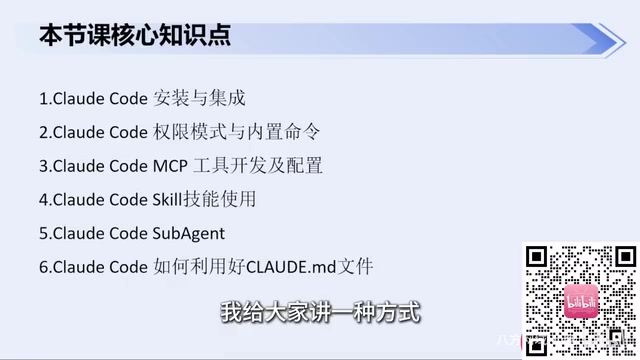
The live class divided its content into six parts, forming a complete path from environment setup to advanced usage:
- Installing and integrating Claude Code
- Full-line mode and built-in commands
- Developing and configuring MCP tools
- Using SQL skills
- Subject (theme configuration)
- Claude's DRMD file
Each module maps to high-frequency scenarios in real development—for example, MCP tools extend the boundaries of what an agent can do, while SQL skills tie directly to data-query tasks. The course doesn't stop at theory; it emphasizes hands-on operation to help students reduce trial and error.

MCP (Model Context Protocol) is an open protocol proposed by Anthropic that lets AI models connect to external tools and data sources in a standardized way. In Claude Code, MCP servers can expose capabilities such as database queries, file systems, and API calls, and the model discovers and invokes these tools according to the protocol description, thereby going beyond plain conversation. The course lists "developing and configuring MCP tools" as a separate module because it determines which real systems the agent can reach; configured well, it can significantly expand the scope of automation.
SQL skills in this context don't refer to a SQL dialect built into the model, but rather to skills or tools that let Claude Code safely generate, execute, and explain SQL queries. A common approach is to connect to a database via MCP, have the model write queries based on natural-language requirements and return results, and pair this with permission controls to prevent mistakes.
The core pain point for users in China: account bans and stable login
The live class specifically addressed a real-world problem: how to use Claude Code reliably. Many users have had their accounts banned, with the root cause being account bans imposed by Claude's official website. The instructor noted that this relates to certain platform policies that make users in China prone to triggering risk controls.
To address this, the course offered a workaround: log in without registering an account, thereby avoiding the risk of a ban. The instructor said he has not been banned from the first day of installation to now. Of course, users can still configure foreign or domestic models themselves, and Claude Code itself is relatively stable under normal use.
It should be noted that bypassing the official account system may fall into a gray area of the terms of service, and readers should assess compliance and sustainability for themselves.
The sixth module: what is the DRMD file?
The course lists "Claude's DRMD file" as the final topic. From context, this should refer to a configuration or description file related to Claude Code (possibly CLAUDE.md or a similar project-level documentation file), used to define the agent's behavioral rules, context, or project conventions. The fact that the tutorial treats it as a separate module shows that this file has practical significance for customized use—proper configuration makes Claude Code fit a specific project structure better and reduces repeated communication overhead.
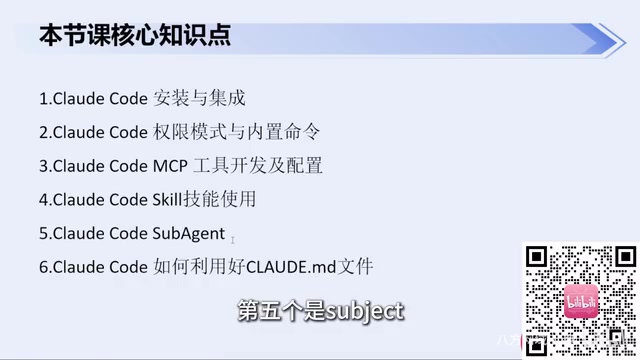
In actual use of Claude Code, CLAUDE.md in the project root is a common project-level documentation file that provides the agent with coding standards, directory structure, build commands, and conventions. The model reads this file at the start of a session, reducing the need for repeated explanations. The "DRMD file" mentioned in the article is very likely the live class's colloquial name for this kind of description file (Description/Markdown); the exact filename should follow the official documentation. Maintaining this file properly is effectively building a persistent context manual for the project.
A rational view of tool selection
While recommending Claude Code and Codex, the live class also kept an open attitude: if you're more familiar with other agents, feel free to choose as needed. This pragmatic style runs throughout—there is no absolute best tool, only usage that matches the scenario. For developers in China, the difficulty often lies not in the tool itself but in the network environment, account stability, and configuration details. The value of this tutorial lies precisely in breaking down these "non-technical" obstacles one by one.
Overall, the course suits beginner-to-intermediate developers who want to systematically master Claude Code, especially users in China troubled by account bans or configuration issues. Through a complete path from installation and integration, the command system, MCP extensions, and SQL skills to project file configuration, students can quickly get past the introductory stage and truly integrate Claude Code into their daily development flow.
One-line Summary
A Bilibili live class systematically covers Claude Code installation and configuration, six key modules, and a workaround for account bans in China.
Paragraph Summary
The article reviews a Bilibili live class on Claude Code, noting that many users only use it superficially as a chat tool, while the course covers six modules—installation and integration, full-line mode and built-in commands, MCP tool configuration, SQL skills, Subject theme configuration, and the DRMD file—emphasizing hands-on operation to reduce trial and error. For the account bans common among users in China, the course proposes logging in without registering an account and flags the compliance risks. The article also compares the positioning of Claude Code, Codex, Cursor, and Tree, arguing that tool choice should match personal habits and scenarios, and that the tutorial's value lies in breaking down non-technical obstacles such as network, account, and configuration issues.
Related articles
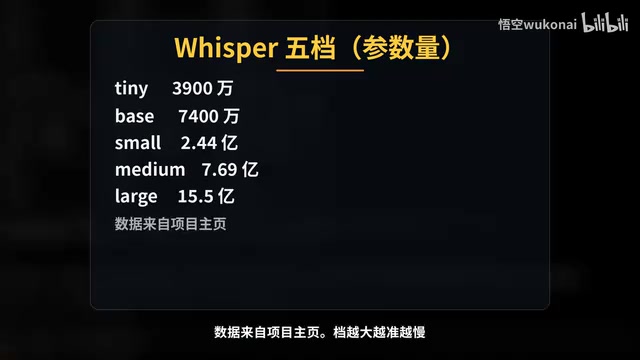
Claude Code in Practice: Building a Zero-Code Clip Factory That Turns Long Videos into Vertical Shorts Automatically
Bilibili creator Wukong uses Claude Code to build a zero-code clip factory, automatically turning a 35-minute long video into 10 vertical shorts. Full workflow from Plan Mode, Whisper transcription, claude.md rules, hook QA to subagent review and plugin distribution, with real measured data.
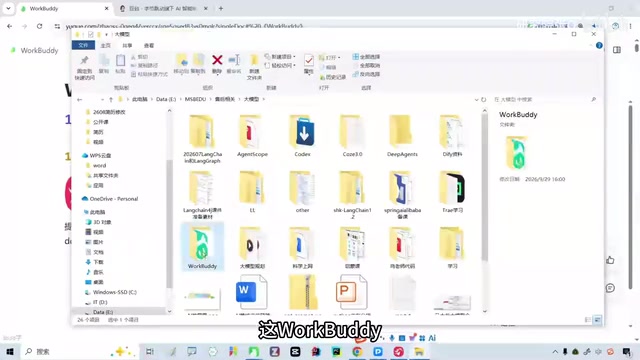
WorkBuddy Complete Guide: How AI Agents Automate File Conversion for You
WorkBuddy hands-on guide: from Doubao giving only plans to AI agents that actually execute—batch-convert PDFs and archive them in three minutes. Includes installation, points system, Codex comparison, and getting-started tips.
Zero to One: Java + DeepSeek in Practice — A Programmer's Guide to Transitioning into AI Large Model Development
Based on a Bilibili livestream tutorial, this article explains how Java programmers can transition into AI large model development from zero, covering skill paths, building your first Java AI app, resume packaging, and job-hunting strategies to help you seize opportunities in the large model era.