Claude Code in Practice: Mastering AI Coding Agents, MCP, and Skills

Claude Code upgrades AI from a chat assistant to an autonomous terminal coding agent, built on command control, context budgeting, layered permissions, and MCP/Skills extensions.
The article systematically explains how Claude Code works as an autonomous coding agent in the terminal. Its key difference from chat assistants is end-to-end execution, shifting developers to commanding and verifying. Control relies on slash commands: /model and /usage manage models and cost, /compact and /clear regulate context, and custom commands codify repetitive workflows. Context should be treated as a budget, with /init-generated claude.md serving as the project's permanent memory. Permissions offer four modes—Plan, Manual, Accept Edits, and Auto—plus Hooks for automated security checks. MCP connects external tools while Skills inject organizational methods, complementing each other. The TDD loop lets the agent iterate autonomously toward verifiable goals, emphasizing that clearer boundaries enable greater autonomy.
From Chat Assistant to Autonomous Execution: The Paradigm Shift of AI Coding Agents
A traditional AI chat assistant is like a cookbook—it tells you the steps, but you're still the one doing the cooking. You still need to copy code, paste it into the editor, and run it manually. Claude Code's positioning is completely different: it runs directly in the terminal, can read files, write code, execute deployments, and finally hand you a usable result. According to the tutorial, this "end-to-end execution" is precisely the dividing line between an AI agent and an AI assistant.
The direct impact of this shift is a migration of focus. Developers no longer spend time transporting and pasting; instead, they turn to "commanding and verifying": defining tasks, setting boundaries, and reviewing outputs. Anthropic describes Claude Code as "a powerful tool with no preset workflow"—it gives you raw access to the model, and how you shape it is entirely up to you. Understanding this gives all the subsequent commands, permissions, and workflows a unified logical starting point.
Controlling the Agent's Rhythm with Slash Commands
Built-in Commands: Model Switching and Cost Monitoring
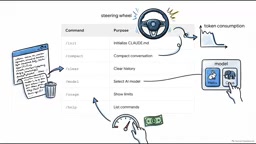
Claude Code is controlled via slash commands. /model switches between different models, such as the speed-oriented Haiku or the more capable Opus; /usage keeps an eye on billing quotas to avoid runaway costs. These commands form the foundational layer of daily operations.
Context Management: compact and clear Are the Steering Wheel
As the conversation progresses, a large amount of text accumulates in the terminal, and all of it enters the context. The tutorial emphasizes that too much context significantly degrades response quality, so /compact and /clear are key means of controlling agent behavior and token consumption—the former compresses history, the latter clears it. They are not optional cleanup tools but the "steering wheel" that keeps the agent producing stable output.
Custom Commands: Codifying Repetitive Workflows
For recurring work, such as a complete PR review or a standardized git commit, you can create a Markdown file in the project's .claude/commands directory, write YAML front matter at the top (for example, specifying Haiku for speed or pre-granting git tool permissions), and use the arguments keyword to capture dynamic input. After saving, entering a command like /fix-issue 123 will execute the entire workflow.
Context Budget and claude.md as the Project Brain
Treat Tokens as a Budget, Not a Parameter
The tutorial suggests a different perspective on token limits: don't treat them as a technical spec, but as a budget that needs careful planning. Everything Claude can see—files, terminal history—consumes context. The model does have hard limits: Haiku supports about 256,000 tokens, while Opus and Fable reach about 1 million, but once you cross the line, performance drops noticeably and it may even start hallucinating; using an oversized model for trivial tasks is likewise a waste of budget.

/init Generates the Project's Permanent Memory
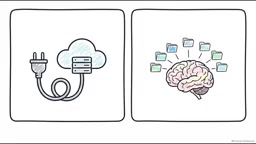
The /init command generates a claude.md file that serves as the project's "permanent brain." Rather than repeatedly explaining the project structure each session or reminding it to use ES modules instead of CommonJS, write it into this file once. Claude automatically reads it at the start of every session, instantly loading architectural conventions, rules, and code style. This is a way to trade a one-time investment for long-term token savings.
Permission Boundaries: Reining In an Autonomous Agent
Handing the terminal to an autonomous agent is enormously powerful, and the risks are equally real—a moment of carelessness and it could wipe the entire file system. By default Claude is quite conservative, pausing to request confirmation before dangerous operations; /permissions opens a customization interface where you can maintain a whitelist of safe tools and also set strict deny rules, such as forbidding reading environment secrets or arbitrarily fetching network data.
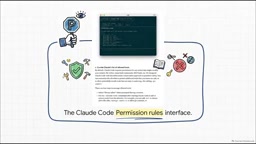
The tutorial introduces four permission modes, quickly toggled with Shift+Tab: Plan mode is read-only and analysis-only, producing plans without executing them; Manual mode is the safest default, requiring approval before writing files; Accept Edits mode automatically writes code but pauses to ask before executing shell commands (such as git, bash); Auto mode grants the highest autonomy, executing code and commands directly with zero human approval—exercise extra caution and switch to it only once you truly trust the configuration.
Hooks: Automating Security Checks
If you're aiming for enterprise-grade security, Hooks are the key. They allow shell commands to run at specific points in the agent lifecycle, forming an automated security narrative: the moment you press Enter, a user-prompt-submit hook can intercept the text and check whether API keys are accidentally leaked; before Claude executes a bash command, a pre-tool hook can validate the command content; after a file edit succeeds, a post-tool hook can immediately trigger a code formatter like Prettier; when a task ends, a stop hook can even push a notification to Slack. Security shifts from "a human watching" to "a mechanism watching."
The Hooks execution model is based on agent lifecycle events, currently covering mainly nodes such as PreToolUse, PostToolUse, UserPromptSubmit, Stop, and Notification. Each hook declares matching conditions (such as a specific tool name) and the shell command to execute in a configuration file; the command receives JSON-formatted event context via standard input and can return exit codes or structured output to influence agent behavior—for example, a PreToolUse hook returning a non-zero exit code can block that tool call. This mechanism upgrades security policy from "prompt constraints" to "process-level enforcement," because hooks run outside the agent's control flow and the model cannot bypass them. Enterprises can thereby implement secret-leak scanning, command whitelist validation, audit logging, and compliance checks without modifying the model itself or relying on human supervision.
MCP and Skills: Connecting to the Outside World, Injecting Organizational Knowledge
MCP Is a Universal Adapter
Large models by default have no access to a company's private infrastructure. MCP (Model Context Protocol) securely exposes external data sources to the agent by installing MCP servers. The tutorial's example is intuitive: have Claude troubleshoot a Kubernetes pod in an abnormal state, and it will pull cluster logs via MCP, analyze them, and propose a fix.
MCP (Model Context Protocol) is a standardized protocol open-sourced by Anthropic in late 2024, aimed at establishing a unified interaction interface between LLMs and external data sources and tools. Before MCP, every AI application that wanted to connect to databases, code repositories, or monitoring systems had to write custom plugins or function-calling logic, resulting in severe fragmentation. MCP borrows the design philosophy of LSP (Language Server Protocol): define a universal client-server protocol so that any MCP-compliant server can be called by any MCP-supporting AI client. This means developers only need to implement a server once and can reuse it across different environments such as Claude Code and Claude Desktop. MCP servers typically run as local processes or remote HTTP services, communicate with clients via standard input/output or SSE, and declare the tools, resources, and prompt templates they provide.
Division of Labor: MCP Manages Capabilities, Skills Manage Methods
Here's a key distinction: MCP servers provide external connections, giving Claude the physical ability to query Postgres; Skills provide organizational knowledge—Markdown files placed in the .claude/skills directory that teach Claude the team-approved way of doing things, such as a standardized Kubernetes deployment process. In one sentence: MCP connects tools, Skills teach it how to use them.
Agent Skills is a lightweight knowledge-injection mechanism Anthropic introduced for Claude. Unlike fine-tuning or RAG, Skills are stored as pure Markdown files in the project directory, and Claude automatically loads the corresponding content by name and description when needed, with no manual switching. Each Skill file can contain process descriptions, code templates, checklists, or even example dialogues—essentially writing the team's accumulated best practices into an agent-readable "operations manual." Its design philosophy is progressive disclosure: Claude first sees the skill list and brief descriptions, judges relevance, and only then reads the full content, thereby avoiding occupying too much context at once. This enables organizations to make tacit knowledge—deployment standards, code review criteria, troubleshooting procedures—explicit and manage it alongside project versions, without relying on verbal instructions in each session.
Test-Driven Development: Letting the Agent Converge on Correctness on Its Own
Because Claude Code can run autonomously, it has a clear advantage in test-driven development (TDD). The loop recommended by Anthropic is: first have Claude write tests based on expected inputs, explicitly instructing it not to write the implementation at this point; then have it run the tests and confirm they fail; then open up the implementation code, and it will autonomously write, run, observe failures, adjust, and run again until everything passes; finally have it wrap up and commit. This loop gives the agent a clear, verifiable goal, and the software produced after repeated iterations is more resilient.
Conclusion
Claude Code's value isn't in writing all your code for you, but in putting the knobs—command control, context budget, permission modes, security Hooks, and MCP external connections—into your hands. The real difference comes from how you configure it: the clearer the boundaries you set, the more room it has to run autonomously.
Related articles

Last Week Tonight Exposé: The Dangerous Ties Between Politicians and White Supremacy
Last Week Tonight investigates Georgia Senate candidate Mike Collins and Florida candidate Marshall Rawson, exposing their multiple ties to white supremacists and the Republican Party's silent response.
AI Buzz Weekly: GPT-6.5 Leak, New Claude Model, and MiniMax's Cost-Effectiveness
This week's AI buzz roundup: suspected GPT-6.5 leak, Microsoft configs showing GPT-6.1 Tera, Anthropic's new model that can identify entire classes of bugs, disappointing early Gemini 4 Carbon results, and MiniMax M3.1 Flash beating Claude Opus 5 and GPT-5.6 Sol in benchmarks at extremely low cost.

AI Briefing: Gemini 4 Carbon Released, Ant Open-Sources Ling-3.1
AI Briefing: Google releases Gemini 4 Carbon qubit model, claiming to surpass Opus 5.5 with half-price tokens; Ant open-sources Ling-3.1-1019 for real-task Personal Agents; domestic AI drug discovery succeeds in 18 of 19 projects, hitting all 6 GPCR targets; zero-revenue company valued at $20B raises another $1B; Sichuan convenience store robot sales fail.