Claude Code Installation and Model Switching Guide for Users in China
A Claude Code installation guide for developers in China to bypass login bans and configure any model with CC Switch.
Based on a Bilibili creator's hands-on sharing, this article outlines a stable process for developers in China to install and use Claude Code. Because official install commands easily time out or report permission errors under China's network, and logging directly into an official account carries ban risk, the author recommends prioritizing NPM installation and, after installation, only verifying the version number without logging in. Then, using the open-source tool CC Switch to visually modify the local configuration file and enter API Keys for models like DeepSeek, Kimi, and GLM, it works normally—no Claude subscription or official website account required throughout. The article also clarifies the misconception that Claude Code is tied to Claude models, emphasizing that it's just an agent tool and any model offering an API interface can be integrated; ordinary models are sufficient for daily programming needs.
Claude Code is an agentic coding tool released by Anthropic that can read codebases, edit files, run commands, and integrate with development tools. Essentially, it's a vertical-domain agent focused on programming scenarios. For developers in China, using the official recommended installation and login methods often runs into network restrictions and account bans. Based on a hands-on sharing from a Bilibili creator, this article outlines a stable and workable installation and configuration process.
Environment Preparation Before Installation
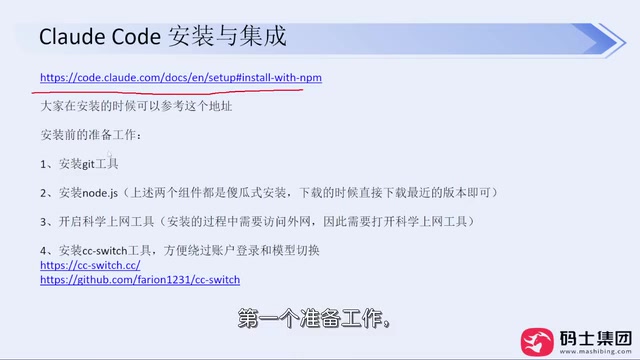
The official documentation offers multiple installation methods, but under China's network environment, the commands listed on the official site don't have a high success rate—common errors include permission errors or network timeouts. The creator recommends prioritizing the NPM installation method because it has looser network requirements and a significantly higher success rate; even when installing for non-programmer colleagues, it basically never failed.
Before installation, three preparations are needed: install Git, install Node.js (during installation, just change the install directory and keep the rest as default), and enable a VPN/proxy tool.
Once ready, run the NPM install command in the terminal to complete the Claude Code installation. The creator specifically emphasizes: do not log in immediately after installation—this is the key step to avoid account bans later.
The Roles of Node.js, NPM, and Git
Node.js is a JavaScript runtime built on the Chrome V8 engine that lets JavaScript code run locally outside the browser; NPM is the package manager installed alongside Node.js, used to download, install, and update third-party tool packages from software sources. When you run the NPM install command, it actually pulls Claude Code's release package and its dependencies from a remote repository to your local machine and registers it as a global command. Git is a distributed version control tool that Claude Code calls when reading codebases, tracking file changes, and generating diffs; lacking Git may cause some features to malfunction. That's why these three are listed as prerequisites. Keeping the default options when installing Node.js ensures NPM is correctly added to the system environment variables so the terminal can recognize the npm command.
Why Not to Log In Directly
On first run after installation, Claude Code guides users to trust a folder, choose a theme, and then enter the account login step. Officially, you can log in with a Claude subscription account, a Console account, or a cloud provider account. But the creator points out that no matter which account login method you use, you may get banned at some point during use—a reality commonly faced by users in China.
Therefore, the correct order is: after installation, first verify the version number to confirm successful installation, but skip the login step and instead configure the CC Switch tool.
CC Switch: Bypassing Login and Switching Models
CC Switch is a small open-source tool that provides a Windows installer; after local installation it's ready to use, and it itself doesn't require a VPN or a Claude subscription. Its core function is to help users modify Claude Code's local configuration file, thereby completing model configuration without logging into an official account.
Specific steps: open CC Switch, click the plus sign to add a model provider, choose the large model you want to use (such as DeepSeekAd, Kimi, GLM, etc.), fill in the corresponding API Key—the official website address is usually auto-filled. After adding, click enable, then go back to the command-line window and enter the Claude command, and it will work normally.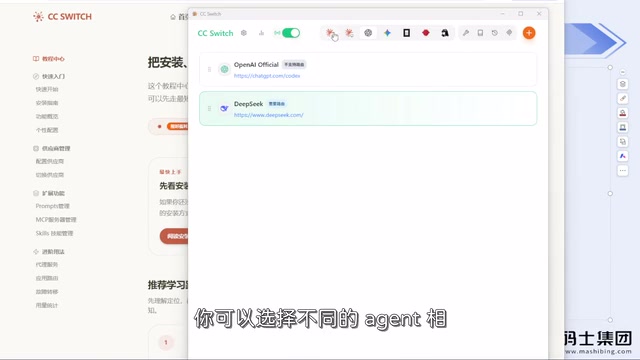
The creator explains that CC Switch is essentially a configuration file modifier. Originally, to switch models, you had to manually edit .claude/settings.json in the user directory, which is error-prone for beginners. CC Switch visualizes these configuration operations; it still modifies the same configuration file, doesn't add extra token consumption, and doesn't make other system changes.
After configuration, enter Claude in the command line to enter the interactive interface; the rest is natural language communication. The whole process requires no Claude subscription and no prior registration of a Claude official website account.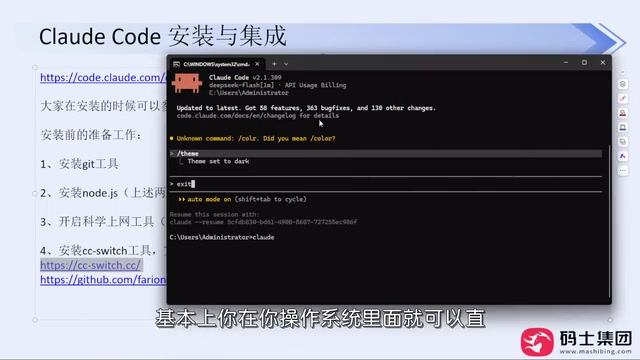
API Key and Configuration File Mechanism
Claude Code's model integration relies on provider information in the local configuration file, and the API Key is the invocation credential issued by the model service provider. After registering on platforms like DeepSeek, Kimi, and GLM, users can generate an API Key in each console; it's equivalent to an account password, used to identify the caller and bill by usage, so it should not be leaked or committed to public repositories. CC Switch organizes fields such as provider name, API Key, and request address (Base URL) into a visual form, and writes them back to .claude/settings.json after filling in. Understanding this helps troubleshoot: if the command line reports authentication failure, it's usually because the API Key is wrong or expired; if it reports connection timeout, check whether the official website address is correct. When switching providers, just re-enable another configuration in CC Switch—no need to manually edit JSON.
Freedom in Model Choice and a Pragmatic Attitude
A common misconception is that using Claude Code means you must pair it with a Claude model. The creator explicitly denies this—Claude Code is just an agent tool; as long as a model provider can offer an API interface, any model can be configured for use. DeepSeek, Kimi, GLM, GPT, and even Xiaomi's models can all be freely switched within Claude Code.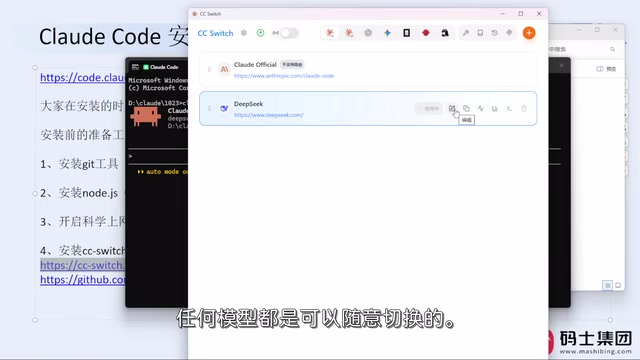
Regarding model leaderboards, the creator's attitude is pragmatic: the core needs of daily work are nothing more than writing code, organizing documents, and analyzing requirements, which ordinary models can fully satisfy. There's no need to deliberately pursue the so-called strongest model—use whichever you're comfortable with. In his personal experience, the new version of DeepSeek is very capable, and domestic models like Kimi and GLM are already quite impressive.
Installation Process Review
The whole process can be summarized in four steps: install Claude Code via NPM; after installation, don't log in—just verify the version; download and install CC Switch, configure the model provider and API Key; return to the command line and enter Claude to start using. This approach avoids problems at every stage: download, configuration, login, and bans.
If you encounter problems during installation, the creator suggests providing feedback through consultation channels, and he will personally assist in resolving them. For developers in China, this process lowers the barrier to using Claude Code and returns model choice to the essence of the tool.
One-line Summary
A Claude Code installation guide for developers in China to bypass login bans and configure any model with CC Switch.
Paragraph Summary
Based on a Bilibili creator's hands-on sharing, this article outlines a stable process for developers in China to install and use Claude Code. Because official install commands easily time out or report permission errors under China's network, and logging directly into an official account carries ban risk, the author recommends prioritizing NPM installation and, after installation, only verifying the version number without logging in. Then, using the open-source tool CC Switch to visually modify the local configuration file and enter API Keys for models like DeepSeek, Kimi, and GLM, it works normally—no Claude subscription or official website account required throughout. The article also clarifies the misconception that Claude Code is tied to Claude models, emphasizing that it's just an agent tool and any model offering an API interface can be integrated; ordinary models are sufficient for daily programming needs.
Related articles
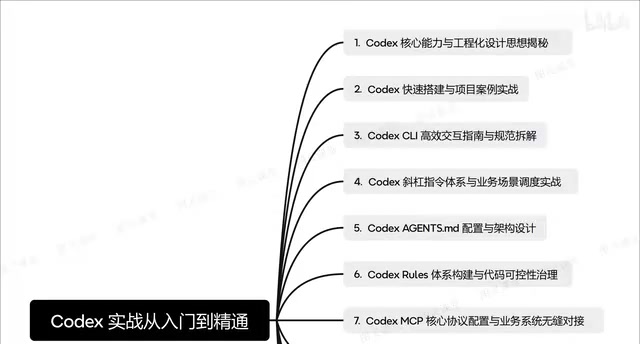
Codex in Practice: From Installation and Configuration to Multi-Agent Collaboration
Based on a Bilibili Codex course overview, this guide maps the full path of AI coding assistants from installation and agents.md context design to CLI commands, MCP integration, and multi-agent collaboration.
AI Supply Chain Security: What Canary Tokens Reveal
Starting from a Hacker News discussion, this article analyzes the role of canary tokens in AI supply chain security: how they detect abnormal access to model weights, training data, and credentials, as well as coverage blind spots and cost constraints during implementation.

Backblaze Privacy Policy Sparks Debate: Where Are the Boundaries of Cloud Storage Privacy?
Backblaze's privacy policy and collection notice sparked debate on Hacker News with 237 points and 87 comments. This analysis examines cloud storage privacy boundaries, policy readability, and privacy evaluation points for developers choosing services.