Claude Code Installation and Pitfalls: Using CC Switch to Bypass Login and Account Ban Risks
Install Claude Code via npm and use CC Switch with third-party APIs to bypass login and avoid bans.
Based on a Bilibili creator's hands-on guide, this article covers using Claude Code in China: the official install command often fails, so use npm instead, with Git, Node.js, and a monthly proxy ready. After installation, don't log in; install CC Switch and fill in API keys from DeepSeek, Zhipu, or Kimi to bypass official login and avoid ban risk. The trade-off is losing Anthropic's official models, and relay services carry quality-degradation risks, so top up in small amounts.
As a command-line coding agent released by Anthropic, Claude Code is being adopted by more and more developers into their daily toolchains thanks to its excellent code generation capabilities. But domestic users generally face two practical problems: frequent errors during installation, and accounts being blocked due to IP fluctuations. Based on a hands-on sharing by a Bilibili creator, this article lays out a complete workflow that bypasses the official login and uses CC Switch to configure third-party models, while objectively discussing its applicable boundaries.
Why coding agents are worth prioritizing Claude Code or Codex
Among the many coding agents such as Cursor, Trae, and DeepSeekAd Harness, the creator gives a relatively clear preference: if the company has no special requirements, he recommends Claude Code or Codex. The reason is that these two clearly outperform tools like Trae or Cursor in actual project development and code generation experience — "if you've used every component, you should have this obvious feeling."
This is not a denial of other tools, but a reminder to developers: there is a perceptible gap in code generation quality among different agents, and it's worth comparing them by hand when choosing. Cursor and Trae win on IDE integration and low barrier to entry, while command-line agents like Claude Code and Codex perform more stably on complex tasks.
The essential difference between command-line coding agents (CLI coding agents) and IDE-type tools lies in the interaction paradigm. Tools like Cursor and Trae embed the model into the editor, with completion and inline rewriting as the main interaction methods; their advantages are automatic context carrying and low onboarding cost. Claude Code and Codex, by contrast, use the terminal as their entry point, and the agent can autonomously read and write files, execute shell commands, run tests, and iterate based on errors, forming a "perceive—act—verify" loop. This difference determines that the former is better at local code generation, while the latter is better suited to cross-file refactoring, building projects from scratch, and troubleshooting build failures — tasks requiring multi-step reasoning and tool calls. The cost is that command-line agents have higher requirements for model capability, context window, and tool-calling stability, and model quality gaps get amplified — which is the technical reason the original article emphasizes "comparing by hand."
Why the official installation command often fails
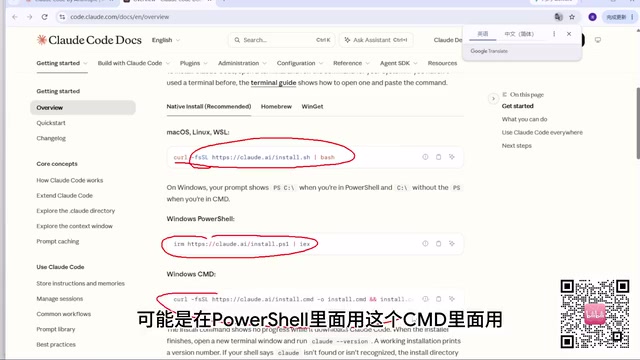
According to the official documentation, Mac/Linux users can use a single installation command, and Windows users can run the corresponding command in PowerShell or CMD. But the creator says frankly that anyone who has actually run these commands will most likely encounter failures — network issues, proxy problems, and "a bunch of messy exceptions" that may not be resolved even after a long time of debugging.
His advice is: if the network conditions are confirmed to be fine, the official command is certainly usable; but once hard-to-troubleshoot errors appear, don't keep hammering at it — switch to installing via npm. This approach is not invented by him; the official documentation explicitly provides npm installation instructions — just search for npm in the docs.

Three preparations before installing via npm
Before going the npm route, you need to complete three basic tasks, none of which can be skipped:
- Install Git
- Install Node.js
- Prepare a usable VPN/proxy tool
Git and Node.js can both be downloaded as installers from their official websites — just keep clicking Next, and you can adjust the installation directory as you like. The proxy tool is key during the installation phase — it may not be needed for daily use of Claude Code afterward, but it is needed during installation. The creator also gives a pragmatic reminder: proxy tools getting blocked is the norm, so it's advisable to buy monthly plans rather than a full year at once — the cost is about one or two yuan per day, reducing losses from service interruptions.
Once ready, run the npm install command. With normal network speed it finishes in three to five minutes; with poor speed it may take tens of minutes — just wait patiently.
npm (Node Package Manager) is the package management tool bundled with Node.js. Installing Claude Code via npm essentially means downloading and globally installing a Node package from the public npm registry, so a Node.js runtime must be present first. Compared with the official installation script, npm uses the standard HTTP download channel, can reuse system proxy or npm mirror configurations, and provides clear error codes and logs when something goes wrong, making troubleshooting more straightforward. Note that globally installed packages are placed in Node.js's global bin directory; if that directory is not in the system PATH, you may still get a "command not found" message even after a successful installation — in that case you need to manually add the npm global path to your environment variables. Also, a Node.js version that is too old can cause installation or runtime failures, so using the current LTS version is recommended.
CC Switch: use Claude Code without logging in
After installation, many people's first instinct is to type claude to start it. The creator suggests not doing that yet: starting directly will sequentially ask you to trust the current folder, choose a theme (Dark/Light, etc.), and then enter the account login step — and login is precisely the source of ban risk.
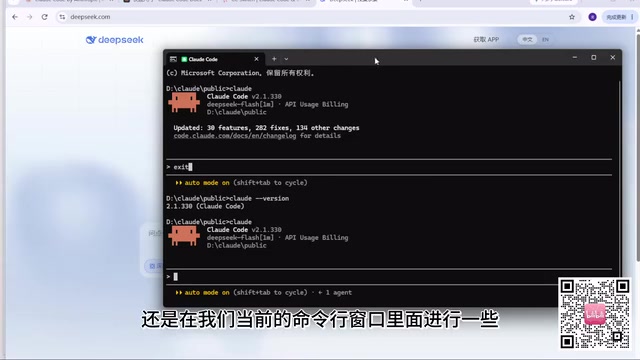
The safer approach is to first verify the version — enter the version-check command on the command line; as long as it outputs a version number, Claude Code is installed successfully.
Next, install CC Switch. This tool was originally an open-source project on GitHub and now has an official website — just download and install it. After opening it, you can switch between different agents such as Claude Code and Codex in the terminal options; Claude Code corresponds to the default configuration, Codex to the OpenAI family, and it also supports other tools like Hermes Agent.
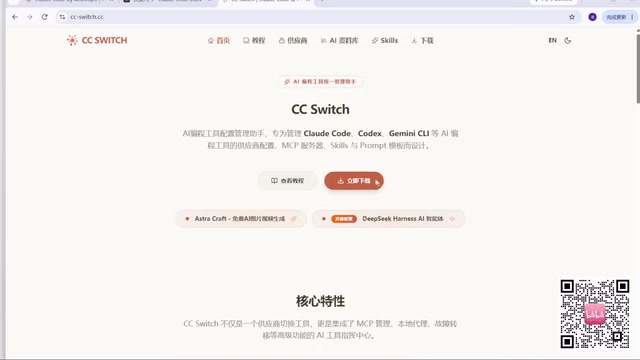
The configuration process is very direct: click the plus sign, first select a provider — DeepSeek, Zhipu, Kimi, etc. all have corresponding options; then fill in the API Key generated on that provider's platform below. Taking DeepSeek as an example, go to its open platform and you'll see the balance and API Key management entry, create a Key (name it as you like), copy it and paste it into CC Switch, click add, and it's ready to use. After that, type claude in the command-line window to bypass the official login flow.
The creator says that since using this method he has never had an account banned — because no Anthropic account is bound at all.
The working principle of CC Switch is to modify the local configuration read by Claude Code, pointing the request endpoint (base URL) and authentication credentials (API Key) to a third-party service instead of the official Anthropic interface. Claude Code itself supports overriding the default endpoint via environment variables (such as ANTHROPIC_BASE_URL and ANTHROPIC_AUTH_TOKEN); what such switching tools do is manage these configurations visually and switch them with one click. Therefore, whether it actually works depends on whether the target provider offers an Anthropic-compatible API format; domestic vendors such as DeepSeek, Zhipu, and Kimi have successively provided compatible endpoints, but their support for tool calls, streaming output, and long context varies, so actual experience will differ — when you encounter functional anomalies, suspect compatibility first rather than installation problems.
The boundaries of this approach: using Claude models still requires login
It must be made clear that the price of bypassing login is giving up the official models. If you specifically want to use Anthropic's models (the creator cites "Folible 5.5," presumably referring to its model family), you still must log in to an official account — and as long as you log in, ban risk is unavoidable. The creator's judgment is direct: unless you have a fixed, unchanging overseas IP, detection is almost inevitable when proxy IPs switch frequently.
Another pitfall mentioned is relay/proxy services. Many relay services on the market nominally offer a certain model but may actually substitute a smaller model at degraded quality; you need judgment when choosing. The creator himself has tried many relay services and hasn't found a particularly stable one so far, so when topping up he insists on small amounts and multiple times, to avoid losing the balance if the account is banned.
Conclusion
The essence of this workflow is to treat Claude Code as a "shell" — keeping its command-line interaction and engineering capabilities while swapping the underlying model for a third-party service accessed via API Key, thereby avoiding account risk. It suits developers who want to experience the Claude Code workflow at low cost; but if your tasks strongly depend on Anthropic's own models, this path won't work and you'll need another plan. On installation: use the official command if it works, switch to npm if errors are hard to resolve; on tool selection: the code generation experience of Claude Code and Codex is worth prioritizing.
One-line Summary
Install Claude Code via npm, then connect third-party models through CC Switch to bypass official login and avoid bans.
Paragraph Summary
Based on a Bilibili creator's hands-on sharing, the article lays out a viable path for using Claude Code in China. The author believes that among coding agents, Claude Code and Codex offer better code generation experience than Cursor and Trae, but the official installation command often errors under domestic networks, so it's advisable to use the npm method provided in the official docs, and to prepare Git, Node.js, and a proxy tool in advance, buying the proxy monthly. After installation, don't start and log in directly; instead install CC Switch first and fill in API Keys from providers like DeepSeek, Zhipu, and Kimi to bypass official account login and fundamentally avoid ban risk. The cost is being unable to use Anthropic's official models, plus the risk of degraded substitutes on relay services — top up in small amounts multiple times.
Related articles

A 19-Year-Old's Rental Horror Story: Ceiling Collapse, Bug Infestation, and the Lessons It Taught Me
At 19, my first off-campus rental brought bug infestations, no heat, a collapsed ceiling, and a ruined laptop with no renter's insurance. Here are the hard-won lessons for first-time student renters.

Veda Nurse's Cranial Nerve Exam: Why ASMR Role-Play Is Going Viral
Bilibili creator Veda's cranial nerve exam ASMR video goes viral, blending humor and sensory triggers through nurse role-play. This article analyzes its unique appeal and the audience psychology behind ASMR role-play.

LG Cinebeam AI Review: 120-Inch Giant Screen + 3000 Lumens, a New Choice for the Living Room Theater
LG Cinebeam AI projector review: 3000 ANSI lumens, 4K, 100 inches from about 8 cm and 120 inches from about 18 cm. Built-in webOS, AI Concierge voice recommendations, AI Sound Pro 11.1.2 virtual surround, and Game Optimizer—positioned for fixed living room installation, complementing the portable Cinebeam S.