Claude Code Launches Code Mode: Chaining Tool Calls with JavaScript

Claude Code launches experimental Code Mode to orchestrate multi-tool calls with JavaScript scripts and enable parallel conversation during long commands.
Anthropic introduces Code Mode as an experimental feature in Claude Code v2.1.323. Instead of issuing Bash, Read, and Edit tool calls one by one, Claude can write JavaScript to chain multiple calls into a single execution, compressing model round-trip overhead in chained tasks. Long-running commands no longer block the session, allowing Claude to keep conversing during execution. The article argues the change essentially lets Claude organize its actions in code, turning tool calls from conversational step-by-step requests into composable, reusable script logic—valuable for complex refactoring, multi-file edits, and conditional automation. However, scripting makes error localization and intermediate state inspection more dependent on logs and output, and the experimental status means interfaces and behavior may change, so it is advisable to validate on low-risk tasks first.
From "Step-by-Step Execution" to "Script Orchestration"
Anthropic has added Code Mode to Claude Code v2.1.323, an experimental feature. The core change is straightforward: Claude no longer needs to issue tool calls to Bash, Read, Edit, and others one at a time. Instead, it can write a piece of JavaScript that chains multiple tool calls into a single execution. At the same time, while long commands are running, Claude can continue conversing with the user rather than being blocked waiting for results.

On the surface, this change looks like merely "switching to a different calling method," but it touches on a long-standing bottleneck for AI coding assistants: the orchestration efficiency of tool calls.
What Problem Does Code Mode Solve
Tool Call Overhead Is Compressed
In the traditional model, every time Claude calls Bash, Read, or Edit, it requires a separate round of reasoning and return. When a task involves multiple steps—such as first reading a file, then executing a command, then modifying code based on the output—these calls happen serially, and each round carries the latency of model inference.
Code Mode gathers these calls into a single JavaScript script, completing multiple tool calls in one execution. For chained tasks, this reduces the number of back-and-forth round trips.
Tool Calling / Function Calling is the standard mechanism by which large language models interact with the external environment: the model produces a structured call request in its reply (for example, specifying a command to execute or a path to read), the runtime executes it and feeds the result back to the model as a new message, and the model continues reasoning. This "request—execute—feed back" loop includes a complete model inference each round, so latency grows linearly with the number of steps. The essence of Code Mode is to move this loop down from the "model layer" to the "code layer": the model reasons only once to generate a script, and the script triggers multiple tools sequentially or concurrently within the runtime, thereby compressing N rounds of model round trips into 1. This approach is in line with "programmatic tool calling," at the cost that the model must anticipate subsequent steps when generating the script, placing higher demands on error handling and state assumptions.
Long Commands No Longer Block the Conversation
Another capability explicitly mentioned is that while long-running commands are executing, Claude can "keep talking." This means users do not have to wait until the command finishes, and interaction can proceed in parallel. For time-consuming operations such as compilation, testing, and batch processing, the difference in experience will be quite noticeable.
In the traditional synchronous tool calling model, a tool call blocks the entire session: the runtime must wait for the command to return before handing the result back to the model for the next round. For commands that take tens of seconds or even minutes—such as compilation, test suites, and dependency installation—this causes obvious idle time. Making long commands "non-blocking for the conversation" usually relies on asynchronous execution and task handle mechanisms—the command is submitted as a background task, returns a queryable identifier, and the model or user can continue interacting while the task runs, retrieving the output later. This not only improves the experience but also changes error-handling semantics: timeouts, partial output, and interrupted tasks need to be explicitly handled at the script level rather than relying on the success or failure of a single call.
The Experimental Positioning Is Worth Noting
Anthropic marks Code Mode as an experimental feature. This usually means the API shape, behavioral boundaries, and stability may all change. Teams with heavy production dependencies should try it first on low-risk tasks and observe toolchain compatibility.
"Experimental feature" (experimental / beta) in developer tools usually has a clear meaning: interface signatures, default behavior, permission models, and even whether the feature is retained may change without compatibility commitments. For agent tools like Claude Code that directly hold filesystem and Shell permissions, experimental status also involves additional security boundaries—scripted execution means a single generation can trigger multiple write operations or commands, and the granularity of permission confirmation and the completeness of audit logs need to be re-evaluated. A more prudent approach in practice is to try it in an isolated branch or container, whitelist the set of tools the script can reach, and keep a rollback-capable version-controlled state, avoiding introducing early uncertainty directly into the main workflow.
Impact on Development Workflows
The significance of Code Mode is not to make Claude "better at writing JavaScript," but to let Claude organize its own actions in a code-like way. Tool calls change from conversational step-by-step requests into composable, reusable script logic.
This is more valuable for complex refactoring, multi-file modifications, and automation tasks that require conditional judgment—these scenarios are naturally suited to being expressed in a script rather than advanced step by step through multiple rounds of conversation.
However, scripting also brings new observation points: when multiple tool calls are encapsulated in a single execution, error localization and intermediate state inspection become more dependent on logs and output. Teams need to adjust their debugging habits accordingly when adopting it.
Summary
Code Mode is a structural adjustment at the tool orchestration level of Claude Code: using JavaScript to chain Bash, Read, and Edit calls, and allowing long command execution to run in parallel with conversation. It is currently an experimental feature, suitable for developers who are sensitive to efficiency and willing to bear early uncertainty to validate first.
Related articles

Zero-Code Replication of a $10,000 3D Website with Claude Code: A Six-Tool Breakdown
Bilibili creator Yomi used Claude Code plus five free tools to build a 3D product landing page quoted at $10,000 overseas—zero code. Breakdown of the six-tool division of labor, image-to-3D workflow, and the core collaboration method: "give AI a reference, not 'make it look better.'"
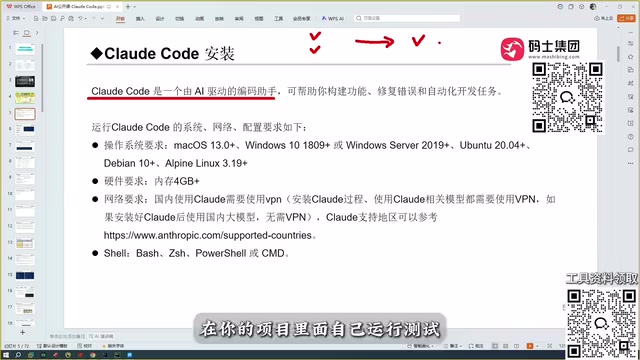
Claude Code in Practice: Install, Connect Models, Calculate Tokens, and Ship a Full-Stack Project with a Single Document
Based on a Bilibili public course demo, this covers Claude Code installation, model connection, token cost calculation, and the practical path of shipping a full-stack project with a single document, plus comparisons with Copilot, Cursor, Trae, and other coding assistants.
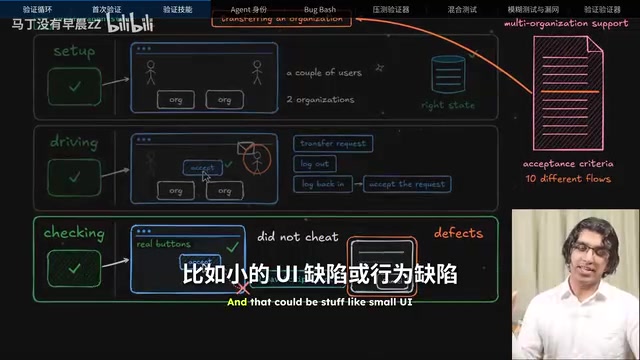
Who Accepts AI-Written Code? A 25-Minute Deep Dive into Verification Loops and the New Code Review Paradigm
After AI writes lots of code, how should Code Review verify it? This article breaks down the Claude Code team's verification loop framework: surface-level end-to-end verification, setup/drive/check three-stage skills, hybrid end-to-end testing and reliability checklists, and how to tighten the loop when issues slip through.