Zero-Code Replication of a $10,000 3D Website with Claude Code: A Six-Tool Breakdown

A non-technical creator built a $10,000-grade 3D product landing page in two days using Claude Code and five free tools.
The article documents how Bilibili creator Yomi, with no programming background, used Claude Code plus five free tools—GPT Image, Trellis 2, Blender, Google Fonts, and Cloudflare—to build a 3D product landing page rivaling a $10,000 quote in two days. He first had Claude summarize the five gaps between $100 and $10,000 websites—purpose, absence of AI feel, dynamic effects, multi-device adaptation, and genuine functionality—and used them as an acceptance checklist. The core methodology: telling AI to "make it look better" doesn't work; you must provide specific references and specify whether to learn the texture, color scheme, or shape. Through a Three.js glass octopus reference, GPT Image three-views, Trellis 2 image-to-3D, Blender splitting and compressing to 3MB, and the Ferrari official site as an overall style reference, he ultimately achieved scroll-driven camera advancement, X-ray透视, and a 46-part disassembly animation. The workflow emphasizes asking for a design draft before code and recording decisions in files to save tokens.
A 3D product landing page that commands up to $10,000 in overseas tutorials was built by a creator with no technical background using Claude Code and five other free tools—without writing a single line of code. The real value in this workflow shared by Bilibili creator Yomi isn't the already-familiar fact that "AI can write code," but rather how he broke down "collaborating with AI to produce something with real quality" into a reusable methodology.
What Separates a $10,000 Website from a $100 Website
Before starting, Yomi asked Claude a question: what exactly is the difference between a $100 website and a $10,000 website? The answer boils down to five points.
- Purpose: A $100 website looks nice but visitors don't know what to do; a $10,000 website guides visitors to complete an action from the moment they arrive—leave an email, book an appointment, place an order.
- AI feel: Rounded cards, purple gradients, a pile of emojis—you can tell at a glance it's a template or AI-generated; an expensive website makes people unable to tell how it was made, they just feel it's expensive.
- Dynamic effects: The former is static images plus buttons; the latter has scroll animations, and the 3D model rotates as you drag your mouse.
- Multi-device adaptation: A $100 website has text crammed together on mobile; a $10,000 website looks just as designed on phones and tablets.
- Genuinely functional: Forms connect to a database, there's a real URL you can send to anyone—not just a decoration.
These five criteria later became his checklist for accepting his own work—the final product was compared against each item, and all passed.
How the Six Tools Divide the Work
Only Claude Code requires payment in this entire workflow (Pro membership is about $22/month); the other five tools are all free.
Claude Code handles all execution work from writing code and adjusting design to deployment and launch—all Yomi does is talk to it. GPT Image (a free account suffices) generates the robot design images—with prompts written by Claude on his behalf. Trellis 2 is Microsoft's open-source image-to-3D tool under the MIT license for commercial use, accessed through Hugging Face's free quota—about two minutes per day without logging in, five minutes per day after registering and verifying your email. Each generation takes about two minutes, and two generations per day on a free account are enough for one model. Blender, as free open-source 3D software, was not operated manually at all this time—instead Claude was asked to write scripts to invoke it in the background. Google Fonts provides commercially usable wide fonts. Cloudflare uses the free tier of D1 database to collect subscription emails and D2 Pages for hosting and launch—compared to overseas bloggers' usual choice of Hostinger which requires buying a host, this solution costs zero.

Blender is a free, open-source, cross-platform 3D creation suite covering the complete pipeline of modeling, sculpting, UV unwrapping, texturing, rigging, animation, rendering, and video editing. Its Python API (bpy) allows programmatic operation of nearly all functionality through scripts, which means an AI assistant can generate Python scripts to have Blender batch-execute tasks like modeling, splitting, decimation, and exporting in headless mode—without a human clicking through the graphical interface. The article's "have Claude write scripts to invoke Blender in the background" leverages exactly this feature to automate repetitive 3D processing work.
Cloudflare Pages and D1 are two free services on the Cloudflare developer platform. Pages provides static website hosting and global CDN distribution, supports automatic deployment linked to Git repositories, and its free quota is usually sufficient for personal projects; D1 is a Serverless database based on SQLite, readable and writable through Workers or Pages Functions via a SQL interface, suitable for storing lightweight data like form submissions and subscription emails. Combined, the two can give a purely front-end 3D website real backend data capabilities without purchasing traditional virtual hosting—this is precisely the technical foundation for achieving "zero-cost launch with genuinely functional forms" described in the article.
The Key Method: Don't Tell AI to "Make It Look Better"
The most valuable sentence in the entire分享 is: Telling AI "help me make it look better" is completely useless, because it doesn't know what "better-looking" looks like in your mind.
When Yomi's first version came out, all the functionality was there—it could rotate, do X-ray透视, and be disassembled—but the robot was just a white capsule figure. Every step he took afterward was essentially showing AI a better example.
When Giving References, Be Clear About What to Learn
He gave Claude a glass octopus robot made by a creator with Three.js as a texture reference. The result was that the number of parts suddenly multiplied several times over—glass materials, lighting, data panels all appeared—but Claude "learned too seriously" and directly made an octopus. He had to add: no octopus, still a humanoid robot. This exposes a common trap when giving references: you must be clear about whether you want to learn the texture, the color scheme, or the shape.
Where to find references? He searched Three.js and 3D website keywords on X, where developers spontaneously share their work; Awwwards publicly lists award-winning websites, and Dribbble showcases designer work; then there are big brand official websites—cars, watches, phones—these websites are made by designers hired at great expense, and in the AI era you can directly learn the design feel from them.

Image-to-3D Takes Quality Up a Notch
When the humanoid robot came back, it had more parts and could be disassembled, but it still looked like a toy—because Claude had assembled it piece by piece from blocks and cylinders in code. Yomi changed his approach: draw the image first, then build the 3D model based on the image.
He had Claude design the robot structure and write image-generation prompts, then handed them to GPT Image to generate three images: a front main view, an exploded view, and a three-view (front, side, back). The three-view is a method commonly used by game and modeling people—with it, 3D has a "standard answer." Claude connected to Blender and modeled according to the three-view, completing it in about twenty minutes, with each part labeled with its disassembly order and direction—but the shell lacked muscle-like curves, the hand design was too simple, and it still fell short.
The real qualitative change came from image-to-3D: crop the front main view into a square, clean up the background, upload to the Trellis 2 page on Hugging Face to generate, and results come out in about two minutes—the shell even matched the reference image almost exactly down to the parting lines. But the generated model was a single solid piece that couldn't be disassembled, and the file was over 20MB—the web page simply couldn't run it.
So he went back to Blender and had Claude do three things: cut away most of the data panels and shrink the textures; split the shell into 20 pieces by body part (visor, back of head, chest, arms, thighs, calves, etc.), insert mechanical-looking bones and hydraulic rods into each limb segment, and move the gears, circuit boards, optical sensors, and rear radar from the previous version back into the body; finally compress—20+MB directly became about 3MB.
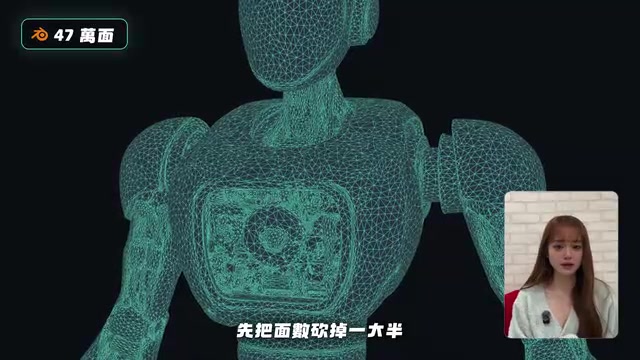
Image-to-3D is a branch of generative AI that refers to the technology of automatically reconstructing a 3D model from one or more 2D images. Its mainstream approaches are usually based on multi-view diffusion models (such as Zero-1-to-3, SyncDreamer) or large-scale 3D-native generative models (such as Trellis, TripoSR), first inferring multi-angle views of the object, then reconstructing geometry and texture through representations like Neural Radiance Fields (NeRF) or 3D Gaussian Splatting. Compared to pure code-based modeling, the biggest advantage of image-to-3D is its ability to capture organic curves and surface details that are hard to describe through manual modeling, but the output is often a single mesh lacking part hierarchy, and with high polygon counts and large texture volumes, requiring subsequent splitting and decimation optimization in Blender before it can be used for real-time web rendering.
Three.js is an open-source JavaScript 3D library based on WebGL that allows developers to render 3D scenes, models, and animations directly in the browser without installing additional plugins. It encapsulates the complex low-level WebGL interface, provides high-level abstractions like cameras, lights, materials, and geometries, and supports loading standard 3D formats like GLTF/GLB. The scroll-driven animations, mouse-drag rotation, and X-ray透视 effects mentioned in the article are essentially all implemented through Three.js's camera controls, material switching, and animation loops. Because the Three.js ecosystem is mature and well-documented, it is also one of the 3D web solutions most familiar to AI code assistants—Claude Code can directly generate runnable Three.js code.
Change the Reference, and the Overall Style Falls into Place
The robot looked good, but the website itself still looked "like a backend" when opened—white background with panels piled around it. Yomi directly had Claude learn from the Ferrari official website. After looking, Claude summarized the design highlights: dark studio, product filling the screen, almost no panels, camera changes as you scroll down, large advertising typography. After redoing it, the style was completely different.
Watch out for trademark issues when using references. Yomi was selling GrokBot, but the robot didn't carry any Grok or XAI logos—only the text name, with a disclaimer added at the footer. His advice: when unsure whether you can use something, just ask Claude—it doesn't just write code, it also helps you stay compliant.
Two Token-Saving Tips in the Workflow
Ask for a design draft before asking for code. After starting a new conversation and pasting in the requirements, add: "Don't write code yet—give me a design draft first, and wait until I've reviewed it before starting." Claude will list the plan first, and you revise before it starts working—much more token-efficient than diving straight into writing.
Use files to record decisions. In every conversation, have it write "what decisions were made, which folder they're in" into a file. This website went through 8 versions in total, and this file alone kept conversations reopened the next day on track with the task.
Cost and Output
The entire website took two days and went through 8 versions, consuming about a week's worth of Claude quota. Of the six tools, only Claude requires payment; GPT Image, Trellis 2, Blender, Google Fonts, and Cloudflare all ran on free tiers.
The finished product includes: a rotating robot in a dark studio on the hero screen; as you scroll, the camera advances frame by frame to four modules (eyes corresponding to market monitoring, chest to trading assistant, belly to secondary market, back to airdrop chasing); when scrolling to the belly module, X-ray automatically opens; continuing to scroll, parts disassemble from 0 to 46, and scrolling back reassembles them automatically; plus a playable page referencing the Ferrari configurator where you can adjust lighting, color, transparency, and degree of disassembly.
Yomi's own assessment: by overseas tutorial standards, this qualifies for a $10,000 quote. His methodology can be condensed into one sentence—see what isn't good enough, then give AI a better reference. Master this, and you can build websites for your own products or take on client work for others.
Related articles

Claude Code in Practice: Install, Connect Models, Calculate Tokens, and Ship a Full-Stack Project with a Single Document
Based on a Bilibili public course demo, this covers Claude Code installation, model connection, token cost calculation, and the practical path of shipping a full-stack project with a single document, plus comparisons with Copilot, Cursor, Trae, and other coding assistants.

Who Accepts AI-Written Code? A 25-Minute Deep Dive into Verification Loops and the New Code Review Paradigm
After AI writes lots of code, how should Code Review verify it? This article breaks down the Claude Code team's verification loop framework: surface-level end-to-end verification, setup/drive/check three-stage skills, hybrid end-to-end testing and reliability checklists, and how to tighten the loop when issues slip through.

500,000 Robots to 'Refreeze' the Arctic? Real Ice's Wild Plan
A startup called Real Ice plans to use 500,000 underwater drones to thicken Arctic ice, with test-area ice already 50 cm thicker. This article breaks down the technology, the 4-million-fold scale gap, the controversial $10 billion annual cost, and the window before an ice-free summer in the 2030s.