Claude Code Launches Projects: Claude as Coordinator for Parallel Multi-Task Development

Claude Code launches Projects, letting Claude act as coordinator for auto-threaded tasks and full dev flow tracking.
Claude Code officially launches the Beta Projects feature, defining a project as an ongoing conversation. After the user hands over tasks, Claude as coordinator opens an independent thread for each or hands it to an existing one, with context explained once. Threads typically run in the cloud on separate branches, can open PRs, and follow CI and reviews; when local resources are needed, they run via Remote Control. An Overview panel summarizes thread status. Official guidance: write solid project instructions, start with a small task, keep the coordinator at Low Effort, and use project memory to share preferences. Currently supports web, desktop, and mobile, max 200 new threads/day, and projects can't be shared.
Title
Claude Code Launches Projects: Claude as Coordinator for Parallel Multi-Task Development
Meta Description
Claude Code launches Projects, defining a project as an ongoing conversation where Claude acts as coordinator, spinning up threads for each task. It supports cloud and local execution, with an Overview panel summarizing status—suited for cross-repo upgrades, large migrations, and more. This article covers the mechanics, scope, and getting-started tips.
Article Content
Claude Code has officially rolled out the Projects feature, defining "a project" as an ongoing conversation. You simply hand over everything you want done at once, and Claude opens an independent thread for each task, coordinating the entire development process for you. The feature is currently in Beta and has been fully opened to Pro and Max users on the waitlist, with an official four-minute getting-started demo released alongside it.
Core Mechanics of Projects: From Manual Coordination to Automatic Dispatch
Before Projects, coordinating multiple concurrent sessions was entirely on you: deciding what each session should do, repeating the context at the start of each one, and then checking back one by one to see who finished and who was waiting on your answer. According to the official Bilibili demo video, Projects consolidates all of this into one place—you paste in a bug report, an error message, or a list of tasks, and Claude opens a thread for each item or hands it off to a thread already working on that area. Simple questions get answered directly in the conversation, context only needs to be explained once, and project instructions carry over to every new thread. For example, say "which branch to commit to" once, and all threads know.
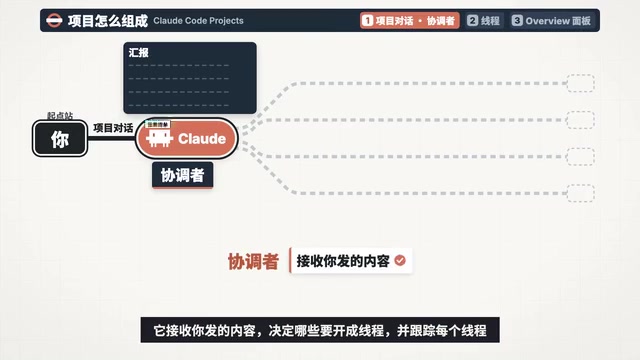
This design solves the context fragmentation problem of parallel multi-session work. You can walk away and come back an hour later or the next day, and the Overview panel will list which threads are done, which PRs are waiting for your review, and which thread is waiting on your answer.
Three Components: Coordinator, Threads, and Overview Panel
Projects consists of three parts. Claude in the project conversation is the coordinator: it receives what you send, decides what to spin up as threads, and tracks each thread—seeing only the results each thread reports back, not every step of the process. Threads do the work: each thread is an independent session with its own context window, typically running in the cloud, working on its own branch, and opening PRs when needed; cloud threads keep running after you close your laptop, and you can check on and adjust them from your phone. When something requires the local machine—like a local database, a device simulator, or an API behind a VPN—you can have Claude run that thread on your computer via Remote Control. The Overview panel summarizes the status of all threads, with a Library alongside it.
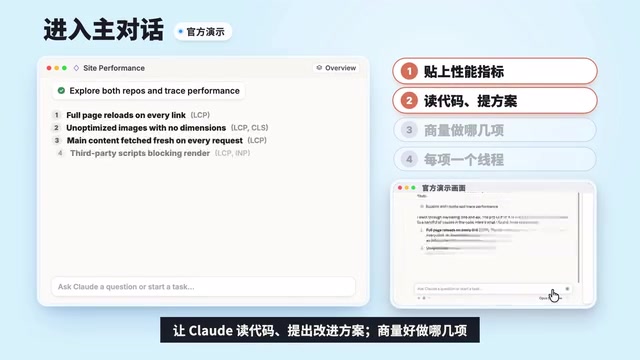
The official demo strings together the complete flow using an example of diagnosing and fixing website performance issues: create a new project in the Code tab on desktop or in the web version, fill in the name, goals, and relevant repos or folders; after entering the main conversation, paste in the website's performance metrics and have Claude read the code and propose improvements; once you agree on which items to tackle, Claude opens a thread for each to work in parallel. When a thread has a concrete change—say, fixing a bug—it opens a PR on its own and then keeps watching CI: if it fails, it pushes a fix; if there's review feedback, it addresses it; when ready to merge, just tell Claude. Finally, have Claude write a summary with before-and-after performance data and save it to the Library, then connect a monitoring service and set up a daily routine to check for performance regressions, spinning up a thread to investigate if one is found.

Remote Control is a bridging mechanism provided by Claude Code: when a thread needs access to resources only available on the local machine (such as a local database, device simulator, or intranet API), the coordinator can schedule that thread to execute on your own computer rather than in a cloud sandbox. You still view progress and review changes through the web or mobile conversation interface, while the actual command execution and file operations happen locally. This effectively extends the "remote control" capability of cloud threads to your development machine, balancing parallel efficiency with the necessity of the local environment.
Applicable Scenarios and Boundaries
When is it worth opening a project? The official documentation's criterion is: the goal lasts longer than a single session and keeps generating new tasks. The docs cite four types of scenarios: a goal spanning many repositories, such as upgrading all services to a new lint configuration; an area you keep feeding problems into; a build or migration larger than a single session; and non-code work, such as a batch of contracts or tickets, with exported results delivered to the Library as files.
Conversely, there are cases better suited to other tools: a single task that one session can complete—just open a cloud session; tasks that all require your machine—use a local session or Agent View; things that only need to run on a schedule without conversation—create a standalone routine; teams dispatching work together in Slack—use Claude Tag.
Routine is a scheduled, automatically triggered task mechanism in Claude Code that isn't tied to the main conversation and doesn't require your real-time involvement. You set the run frequency (e.g., once a day), and at the scheduled time Claude automatically performs preset checks or operations, such as scanning for performance regressions or pulling the latest metrics. If it finds a problem, it can further open a thread to investigate. Routine suits periodic, conversation-free monitoring work and complements Projects' "ongoing conversation + multi-thread" model: Projects coordinates multi-task work that requires human involvement, while Routine handles unattended scheduled inspections.
Four Things Worth Doing Before Getting Started
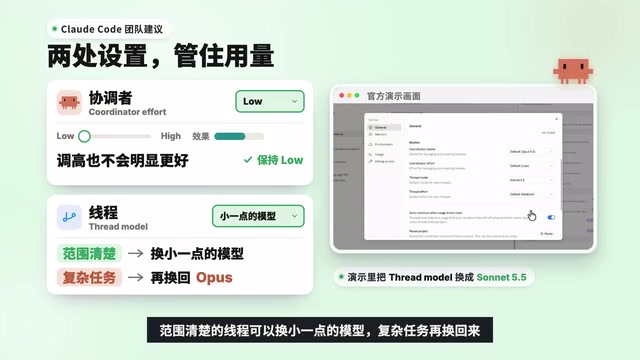
Before officially dispatching work, the official guidance suggests doing a few things first. First, write good project instructions—this is the brief every thread receives when it starts, up to 16,000 characters, clearly stating the project goals, which repos and branches to work on, how threads should handle missing information on their own, and what must be asked of you first. Second, dispatch a small piece of real work first, then when the thread finishes, open it up and see how it reports back and what it did on the branch. Third, check the model and effort—per the docs, new projects default all threads to Opus High Effort for the best quota; the Claude Code team recommends keeping the coordinator at Low Effort, since it's mainly responsible for dispatching tasks and raising it won't obviously help; threads with a clear scope can switch to a smaller model, then switch back for complex tasks.
Fourth, directly tell Claude how you want it to work: list a plan and wait for your approval before starting, run at most a certain number of threads at once, report back at what interval. These preferences get stored in project memory, and Claude will follow them, but they aren't hard constraints. Project memory is shared across threads, letting Claude remember a requirement, a decision, or a pitfall, which all subsequent cloud threads will read when they start; the memory file can be viewed and edited in project settings.
Project memory is a persistent context store shared across threads in Projects. The preferences you express, decisions you make, or pitfalls you've encountered in the main conversation get written to project memory, and each new cloud thread reads this memory at startup, avoiding repeated context-setting. It differs from project instructions: instructions are a static brief you write proactively (up to 16,000 characters), while memory accumulates dynamically through the conversation. The memory file can be viewed and edited in project settings, but it's soft guidance rather than a hard constraint—Claude will try to follow it but doesn't guarantee absolute compliance.
Usage, Limits, and Current Status
On usage, Projects shares the same quota as other Claude Code sessions but burns through it faster—each thread is a complete session, and several can run at once. You can open at most 200 new threads per day; threads that hit the quota limit will wait on their own and continue after the quota resets. Projects is currently in Beta and available on the web, desktop, and mobile app, but not yet in the command line or IDE plugins; a project belongs to only one user and can't be shared.
From a product logic standpoint, Projects hands off the work of "manually scheduling multiple sessions" to the model itself, and the layered design of coordinator and execution threads also explains why the official guidance recommends Low Effort for the coordinator: its job is dispatching and tracking, not deep reasoning. For teams that frequently handle multiple development tasks in parallel, this may be a more practical step than simply improving single-session capability.
Effort is a parameter in Claude Code that controls how much reasoning the model invests, typically divided into tiers like Low, Medium, and High. The higher the tier, the more internal reasoning the model does before answering, and the more tokens and quota it consumes. In Projects, new projects default all threads to Opus High Effort for the best task completion quality; but the coordinator thread is recommended to stay at Low Effort, because its core job is dispatching tasks and tracking progress rather than deep reasoning—raising effort yields limited improvement in coordination and instead wastes quota. For execution threads with a clear scope and well-defined steps, you can also switch to a smaller model or lower effort to save usage.
One-line Summary
Claude Code launches Projects, letting Claude act as coordinator to automatically open threads for tasks and track the full development flow.
Paragraph Summary
Claude Code officially launches the Beta Projects feature, defining a project as an ongoing conversation. After the user hands over tasks all at once, Claude as coordinator opens an independent thread for each item or hands it to an existing thread, with context explained only once. Threads typically run in the cloud on independent branches, can open PRs, and keep following CI and reviews; when local resources are needed, they run on the local machine via Remote Control. An Overview panel summarizes each thread's status. The official guidance recommends writing good project instructions, dispatching a small piece of real work first, keeping the coordinator at Low Effort, and using project memory to share preferences. The feature currently supports web, desktop, and mobile, allows at most 200 new threads per day, and projects can't be shared.
Related articles

Open-Source Windows Global Font Replacement Tool: One-Click Font Swap That Survives Reboots
A Bilibili creator open-sourced a Windows global font replacement tool with one-click apply, automatic backup, and one-click restore that survives reboots—plus repo and Quark drive download.

Memory Star Map That Forgets: An Open-Source Plugin Where Every Memory Is a Star
An open-source memory plugin visualizes memory decay as a star map: each memory is a star, size reflects weight, brightness reflects forgetting. Three orbits for stable, to-do, and archive; fixed stars never forget. Zero dependencies, 66 tests, HTTP interface support.

Anthropic IPO: The $80.7 Billion Loss and the Scariest Prospectus Ever
Anthropic's IPO prospectus reveals an $80.7B loss—about 90% is a book-entry accounting effect—plus Amazon/Google/Microsoft's triple role as landlord, shareholder, and channel, founder-controlled governance, and a 94-page risk section. Here's what it means for investors.