Claude Code Local Installation Guide: NPM Setup & Account Ban Prevention

Install Claude Code via NPM, bypass account bans with ccswitch, and use domestic models to cut costs.
This guide, based on a Chinese developer instructor's tutorial, covers how to reliably install and run Claude Code in China. Since official PowerShell/CMD installs often fail due to network restrictions, NPM is the recommended method, requiring Node.js 22+ and Git with a VPN active. To avoid account bans, skip the official login and use ccswitch to route requests through a domestic model API like DeepSeek. The instructor considers domestic models sufficient for daily dev work and advises monthly VPN plans over annual ones. Advanced features like MCP, Skills, and Subagents are where real AI coding efficiency gains are found.
Why Choose Claude Code
For developers in China, AI coding agents have evolved from novelty tools into everyday essentials. According to an instructor from Mashibing Education, most companies — except for a handful of legacy or small-scale ones — have already begun pushing AI-assisted coding into their workflows. Some require that 50% of code be AI-generated; the more aggressive ones aim for 90% or even 100%.
The most widely used coding agents today include Claude Code, Codex, Cursor, along with Alibaba's Tongyi and Amazon's offerings. The instructor's personal take: if your company doesn't impose strict tool constraints, Claude Code or Codex should be your first choice. He also mentioned the recently released DeepSeekAd Harness as worth trying.
One common misconception worth addressing: many users only interact with Claude Code through plain natural language prompts — "help me build something" — which rarely delivers great results. The real productivity gains come from properly leveraging Claude Code's built-in permission modes, MCP, Skills, Subagents, and other components.
Two Prerequisites Before Installation
The instructor strongly recommends following the official documentation, which is available in Chinese and quite clear. Windows users can run the official commands in PowerShell or CMD — but there's a practical catch: due to network restrictions in China, both methods have a low success rate, especially when ISPs impose limitations.
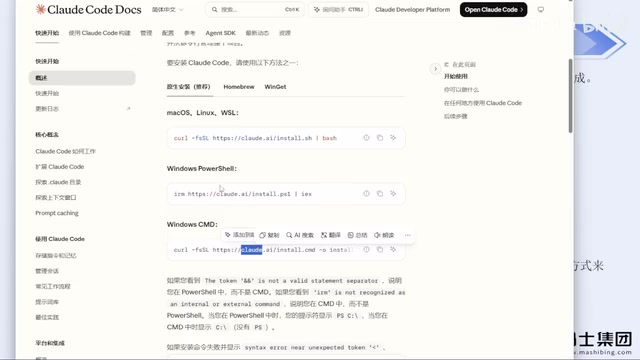
The more reliable approach the instructor recommends is installing via NPM, which is also the method listed under "Advanced Options" on the official site. This requires two prerequisites:
- Install Node.js: Version 22 or higher required; downloading the latest version (currently 24) directly from the official site is recommended.
- Install Git: Download from the official site as well.
Both are straightforward installs — just download and click through the setup wizard. If your C drive is tight on space, you can change the install directory. Note that a working proxy/VPN is required during NPM installation; otherwise it will fail. According to the instructor, as long as your network environment is properly configured, this command rarely throws errors.
Once installed, open a terminal, navigate to any directory, and run claude --version to verify the installation. If a version number is printed, you're good to go.
Three-Step First-Launch Configuration
The first time you run claude, you'll be guided through three steps:
- Trust the current folder — confirm to proceed.
- Choose a display theme — black, white, or another color scheme; purely personal preference.
- Choose a login method — this is the most critical step in the entire setup process.

The instructor strongly advises: do not use the official account login. Even if you have a valid account, logging in through the official flow carries a real risk of getting banned. He has personally been banned multiple times, and recovering by switching accounts is a significant headache.
Bypass Account Login with ccswitch
The key tool for avoiding bans is ccswitch. Originally an open-source GitHub project, it now has a dedicated website with a Chinese interface and can be downloaded from the official site or the GitHub releases page.

For Windows users, go to the releases page, click "show all," select the .msi installer, download, and double-click to install. The configuration is straightforward:
- Open the app and click "+" to add a new configuration
- Select a model provider (e.g., DeepSeek, Zhipu, etc.)
- Enter the corresponding API Key
- Save
Once configured, run claude again — the login step will be automatically skipped. Since you're no longer going through the official account system, there's no account to ban. The instructor says he's been running this way stably for several months without a single ban.
Another advantage of ccswitch is that it supports switching between multiple tools and providers without manually editing config files. Most mainstream model providers are already built in, and for those that aren't, you can use the "custom configuration" option to enter an API Key and a third-party relay endpoint.
A note for Codex users: ccswitch supports Codex as well, but the Codex and Claude Code configurations are separate. If you've only set up DeepSeek under Claude Code, Codex won't inherit that config — you'll need to enter the API Key again specifically for Codex. Codex may also require a basic login step.
As of the time of this post, DeepSeek Harness does not yet support ccswitch, but it's simple to configure on its own — just fill in the settings directly and you're ready to use it. For Mac users, the NPM installation process is identical to Windows.
How ccswitch works: it modifies the local environment configuration that Claude Code reads, redirecting requests to third-party or domestic API endpoints, thereby completely bypassing Anthropic's official account authentication. Claude Code uses a standard OpenAI-compatible API format under the hood, which means virtually any major domestic large language model — DeepSeek, Zhipu GLM, Tongyi Qianwen, etc. — can be plugged in as a backend as long as it provides a compatible interface. An API Key is the access credential issued by the model provider; you can typically generate one from the provider's console after registering. Billing is based on actual token usage, and pricing varies significantly across providers.
Model Selection and Cost Recommendations

The instructor offered a few practical suggestions on model selection:
- DeepSeek's recent price increase makes it less cost-effective. If you're budget-conscious, consider DeepSeek Harness. The instructor noted that cache hit rates tend to be notably higher with DeepSeek Harness compared to other coding agents.
- Domestic models are more than sufficient for everyday development. Despite the ongoing competition among major AI providers, current model capabilities already cover the vast majority of day-to-day coding needs. There's no need to fixate on overseas models.
- Think twice before buying long-term VPN memberships. Given the current regulatory climate, purchasing a year-long plan is risky unless you're very confident in the service's stability. Monthly plans are safer, even if slightly more expensive per month.
One clarification: ccswitch bypasses the official account login, but an API Key is still required — without one, requests can't be made. A previous approach of setting the API Key as an environment variable to skip the official login was also tried, but the instructor found it still resulted in bans, which is what ultimately led him to switch to ccswitch.
Cache hit is an important concept in large model API billing: when the prefix portion of consecutive requests (such as system prompts or already-loaded code files) is identical to the previous request, the provider can reuse the already-computed KV cache and charge a lower "cached" rate — or even nothing — for those tokens. In coding agent scenarios, repository context often consumes a large number of tokens, so a higher cache hit rate directly reduces the cost per conversation session. The instructor's observation that DeepSeek Harness has a higher cache hit rate suggests that in long, multi-turn coding sessions, its total cost may be more competitive than calling the raw DeepSeek API directly.
Summary
This tutorial covers the full picture of getting Claude Code up and running in China. The core path can be summarized as: set up Node.js + Git as prerequisites, install via NPM, then use ccswitch to bypass the official login and avoid account bans. For developers in China, this combination offers a more realistic balance of stability and cost control. As for advanced features like MCP, Skills, and Subagents — those are where the real productivity gains lie, and they're well worth exploring in depth.
Related articles

Random Pruning of the DPO Computation Graph: 1.4x Training Speedup and Lower Peak Memory
DPO training too slow and memory-hungry? This paper proposes a random pruning framework for the DPO computation graph, sampling independently across position, sequence, and branch dimensions; branch pruning achieves a 1.426x step-time speedup and cuts training time by about 30%, with in-depth attribution of memory and time gains.

Why Does JEPA Underperform MLM in Longitudinal EHR Representation Learning?
New study compares JEPA and MLM for longitudinal EHR representation learning on MIMIC-IV: three JEPA variants train stably without collapse but underperform MLM; target size, not heterogeneity, drives prediction error.

Transfer Learning + Visible Light Communication: A New Approach to Energy-Efficient Indoor Positioning
A study proposes a transfer learning-based visible light communication indoor positioning method, achieving 47% accuracy improvement on the BOSCH factory dataset, 67.5% model efficiency under high noise, and introducing the ME composite metric for energy-efficient positioning in energy-constrained industrial IoT scenarios.