Claude Code Mods in Action: Install AI Editor Plugins with a Single Sentence

Claude Code Mods let you customize the AI editor's UI and behavior using plain natural language — no coding required.
Anthropic has introduced Mods to Claude Code, turning it from a fixed AI editor into a fully customizable open platform. Unlike Skills and MCP — which extend the model's capabilities — Mods directly modify the client's UI and interaction logic, packaged as installable Plugins. Users can describe what they want in natural language and have Claude generate panels, buttons, or pixel mini-games on the spot. The four core capabilities — see, draw, intercept, and write — power everything from the Blast Radius safety net that pauses dangerous commands to a voiceover timer that visualizes script length in real time.
What Claude Code Mods Support Actually Means
Anthropic has officially announced that Claude Code supports Mods (modifications) starting from version 2.1.287 and above. Simply put, a Mod is a small piece of code that runs inside Claude Code, directly modifying its interface and behavior, and is distributed packaged inside a "Plugin" container.
This is an easy concept to confuse, so it's worth clarifying the distinction between all three: Skills are instruction sets you give Claude, MCP gives it tools to use, and Mods modify Claude Code itself. In other words, the first two extend the model's capabilities, while Mods change the skin and interaction logic of the client application.
According to hands-on demonstrations by Bilibili creator Axton, the most compelling part of this feature is that you don't need to write any code — you can describe what you want in plain language and have Claude build a Mod with panels, buttons, or even mini-games on the spot, bringing the barrier to entry extremely low.
MCP (Model Context Protocol) is an open protocol proposed by Anthropic that allows external services to expose tools and data sources to Claude in a standardized way — for example, enabling Claude to search the web, query databases, or call APIs. Skills, on the other hand, tell Claude how to think and act in specific scenarios via system prompts or instruction files, essentially adjusting the model's "software layer." Both operate on the model's own capability boundaries. Mods take a completely different approach: they run at the client application layer, directly controlling UI rendering and event hooks in the Claude Code app. Regardless of the model's capabilities, the Mod code determines what the interface looks like and which operations should be intercepted. This layered design allows all three to coexist without interfering with each other.
Building Your First Mod from an Empty Folder
The whole process is simpler than you'd expect. In the Code tab of Claude Desktop, create a new empty folder (e.g., First MOD), choose to trust that directory, then just describe what you want: "Make a sidebar focus card with a number in the middle — click to increment by 1, with a reset and a close button."
There's one key detail worth emphasizing: when Claude finishes writing the code and is ready to apply it, the interface will prompt you with a "Allow Hot Reload" toggle — you must manually click to allow this in the UI. Claude Code's permission rules won't automatically approve it for you; this is part of its security design.
Once you click allow, a card appears in the right panel titled "My First MOD" with the number 0 in the center. Click once and it becomes 1, again and it's 2, click close to dismiss it, and type a slash command to bring it back up.
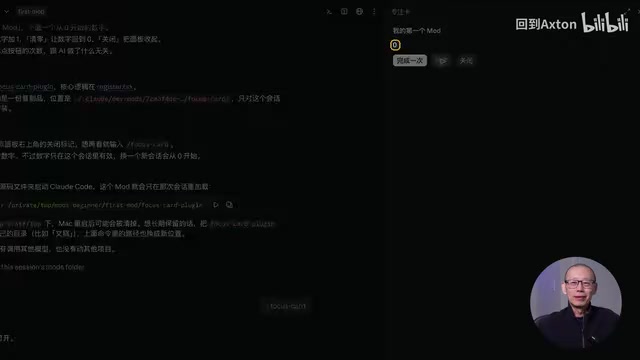
However, temporarily built Mods have one limitation: if you start a new session, the card won't reappear on its own — you need to have Claude reload the saved source code and authorize it again. To have something "install once, appear in every session," you need to go through the proper plugin marketplace installation process.
Temporary Loading vs. Formal Installation
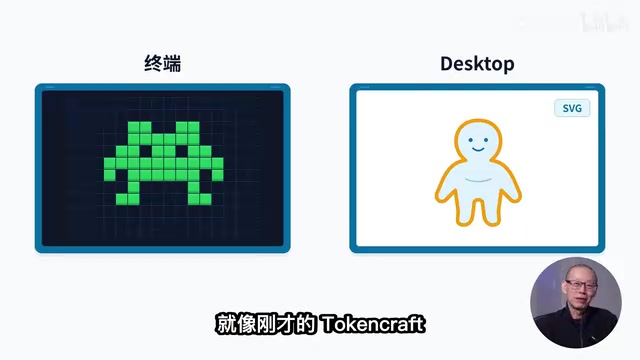
Axton switched to a community-made Mod called "TokenCraft" to demonstrate formal installation — just two steps: add the plugin marketplace, then install. After installation, a Minecraft-style pixel world appears above the input box, complete with a character, health bar, experience bar, and inventory. When Claude reads a directory to do work, the character starts mining; when a tool is called, the TNT count in the inventory increases by 1 and the experience bar grows.
The core difference lies in how they're loaded: the focus card was temporarily loaded in a single session, while TokenCraft is written into user configuration and takes effect in every session after a one-time install. Your own Mods, packaged as a local plugin marketplace following the official documentation, can also be permanently installed using the same command.
"Hot Reload" refers to dynamically replacing module code while a program is running, without restarting the entire application. Claude Code brings this mechanism to its Mod system, allowing developers to see changes take effect immediately after modifying Mod source code, eliminating the need to repeatedly exit and relaunch. The reason users must manually click to authorize rather than having it apply automatically is that hot reload fundamentally executes new code inside a running process — a highly permission-sensitive operation. Malicious code could use this opportunity to inject itself without the user's knowledge. The manual confirmation design ensures every code change has explicit user approval, embodying the principle of least privilege at the interaction layer.
The Four Things a Mod Can Do
Why can a single sentence cause buttons and visuals to appear in the interface? The principle isn't mysterious. Claude Code is a continuously running program. Every time you send a message, it follows a fixed timeline: input → model thinking → tool calls → end of round. A Mod is code hooked into the nodes of this timeline, and it can do four specific things:
- See: Read the current session — see real context usage, every tool call;
- Draw: Render a panel on the right side, or a status strip above the input box, with text and buttons;
- Intercept: Pause a tool before it executes, wait for you to confirm or cancel — and if you cancel, it tells Claude why;
- Write: Read and write files on your computer, run commands.
All the examples below ultimately come down to combinations of these four things.
"See": Context Weather
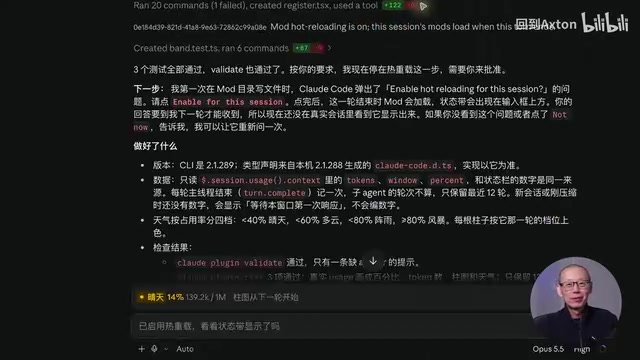
Axton used a single sentence to have Claude build a "context weather" display — a small weather forecast strip appearing above the input box showing usage percentage. As the conversation progresses, a bar chart fills in segment by segment, with values sourced from the same data as the official status bar at the bottom — this reflects actual context usage, not cost. A follow-up prompt changed the color scheme to cyan-blue. The value of this Mod is giving you a clear sense of your remaining context, with blue signaling that you're still in safe territory.
"Intercept": Blast Radius Safety Net
The official open-source Mod "Blast Radius" demonstrates the power of interception. When you ask Claude to delete the build folder, a panel pops up on the right listing the command rm -rf build, noting it will delete approximately 20 files (about 11 MB), with a full itemized list and Proceed / Cancel buttons at the bottom.
Click Cancel, and Claude responds that the folder remains untouched. The official design targets irreversible operations like rm, git reset, git clean, force pushes, and database migrations — a safety net before taking action. But note: it is not a permission system. To truly prohibit a command entirely, you still need permission rules and can't rely solely on this Mod. Its value is that before the AI does something dangerous, it at least pauses to ask you first.
"Write" + "See": Rename Replay and Voiceover Timer
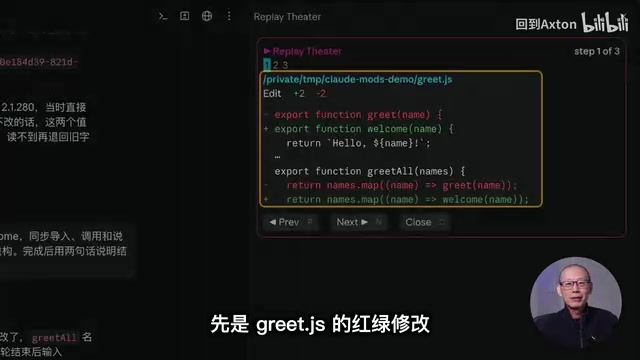
The official Replay Theater combines "see" and "draw." After having Claude batch-rename functions across three files, a Replay button appears above the input box. Clicking it lets you step through the changes made in that round like a slideshow — though it's view-only, not an undo.
A great example of "write" is the "Voiceover Timer" Axton built on the spot: asking Claude to draw each section's duration as a colored horizontal bar on the right, with the total duration displayed in large text at the top. When he asked to "cut the third section in half," the green bar visibly shrank as Claude revised the script, and the total updated from 1 minute 12 seconds to 9 minutes 42 seconds. There was even a small hiccup — it cut too much the first time and then corrected itself.
Even more interesting was the reverse interaction. In a storyboard panel, Axton selected the third card, moved it to first position, changed it to blue, and saved. After Claude read the result, it accurately described the new order and commented that "putting the conclusion first is the reverse-hook technique common in short-form video." It didn't "see" the screen — the button-clicking operations were written by the Mod into a local JSON file, which Claude then read. This means panels and buttons aren't just AI output — they can become input from you to the AI. The chat box is no longer the only channel.
More Game-Like in the Terminal: Boss Fight and Pixel Pets
The desktop version uses SVG for drawing, while the terminal renders pixel grids, enabling even more playful designs. In a practice project seeded with 5 bugs, after running the tests a pixel Boss called "Merge Conflict Org" jumps out on the right, at full health with 5 bars. Each time you fix a bug and re-run the tests, the Boss takes a hit and loses a bar — fix them all and the Boss falls, triggering a Victory screen.
Another Mod, a pixel pet called Cold Pet, starts as a Level 1 egg. Each time Claude calls a tool it eats once, eventually evolving into a Level 2 Blob after processing tests. Both Mods read events locally — no network connection, no extra token consumption.
One gotcha in the terminal: when loading a Mod with plugin dir, never enable Safe Mode, or the Mod won't load.
Before Installing Someone Else's Mod, Read the Source Code
For ready-made Mods, the official GitHub repository Claude Code Playground has quite a few, and the community has also organized plugin marketplaces with context monitors, pixel mini-games, and more.
But there's one security reminder you must keep in mind: Mods are literally running code on your computer. Before installing someone else's Mod, it's best to have Claude read through the source code first, or run claude plugin validate in the terminal. It will list which events the Mod hooks into, what it calls, whether it makes network requests, whether it reads or writes files, and whether it spawns processes — everything you need to make an informed decision.
Of course, flashier isn't always better. Axton admitted he tried a terminal game Mod that looked cool, but his six-word verdict was blunt: "Hard to play, ugly as hell."
It's worth understanding how claude plugin validate works: the command statically analyzes the Mod's manifest file and entry code, listing declared lifecycle event subscriptions (such as onToolCall and onSessionStart), requested system permissions (file read/write paths, network access domains, subprocess invocations), and other metadata. This type of "permission manifest" mechanism is similar to mobile apps listing required permissions at install time, letting users judge before running whether a Mod's actual intentions match its claimed functionality. If a Mod that supposedly "displays token usage" requests network access and arbitrary file write permissions, that's a serious red flag.
Final Thoughts
The Mod mechanism transforms Claude Code from a fixed AI editor into an open platform where you can customize the interface and interaction logic. More importantly, it dramatically lowers the barrier to customization — even non-coders can describe their needs in natural language and have AI build tools on the spot. Whether it's the safety-enhancing "Blast Radius," the content-creator-friendly "Voiceover Timer," or the purely fun pixel Boss fights, they all come down to combinations of those four core capabilities: see, draw, intercept, and write. Tonight you can open Claude Code, create an empty folder, and build your very first Mod.
Related articles

Random Pruning of the DPO Computation Graph: 1.4x Training Speedup and Lower Peak Memory
DPO training too slow and memory-hungry? This paper proposes a random pruning framework for the DPO computation graph, sampling independently across position, sequence, and branch dimensions; branch pruning achieves a 1.426x step-time speedup and cuts training time by about 30%, with in-depth attribution of memory and time gains.

Why Does JEPA Underperform MLM in Longitudinal EHR Representation Learning?
New study compares JEPA and MLM for longitudinal EHR representation learning on MIMIC-IV: three JEPA variants train stably without collapse but underperform MLM; target size, not heterogeneity, drives prediction error.

Transfer Learning + Visible Light Communication: A New Approach to Energy-Efficient Indoor Positioning
A study proposes a transfer learning-based visible light communication indoor positioning method, achieving 47% accuracy improvement on the BOSCH factory dataset, 67.5% model efficiency under high noise, and introducing the ME composite metric for energy-efficient positioning in energy-constrained industrial IoT scenarios.