Claude Code Practical Tutorial: Environment Setup and Multi-API Access Guide
Claude Code is a command-line AI coding tool embedded in your workflow; the barrier is the network and account.
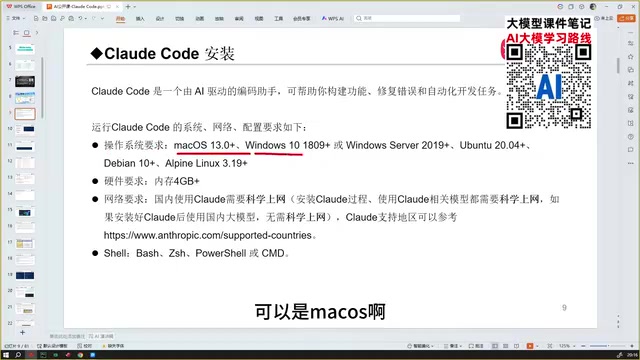
This article introduces Anthropic's command-line AI coding assistant Claude Code: it is not an IDE but a capability layer embeddable into existing editors, supporting Mac OS, Windows, and Linux with a memory requirement of 4GB or more. It emphasizes that the real barrier is not the installation command but the network and account: during installation you must enable a proxy and verify with a terminal ping to Google whether it is globally effective, since browser access does not mean the command line goes through the proxy; after installation, type claude to enter the interactive interface and judge success. Model configuration cannot avoid the official account's restrictions on access from China, so third-party APIs or relay services are needed. MCP, Skill, and SubAgent are advanced enhancements not yet detailed in the original; get installation and access working first.
Claude Code is an AI coding assistant launched by Anthropic. It is not an IDE, but a command-line tool that can be embedded into your existing development environment. Unlike standalone IDEs such as Cursor and Trae, Claude Code positions itself more as a "capability layer"—once you install it and configure it into your own editor, you can call upon AI within a conversation to complete coding tasks. Its strongest area is writing code, and it can also search for information and generate documentation.
Preparation Before Installation: System and Network
Claude Code has no strict requirements for the operating system; Mac OS, Windows, and Linux all work. On the hardware side, the official requirement is at least 4GB of memory. What really trips up beginners is the network step: the installation process must have a VPN/proxy tool enabled, otherwise the installation will hang and eventually error out.
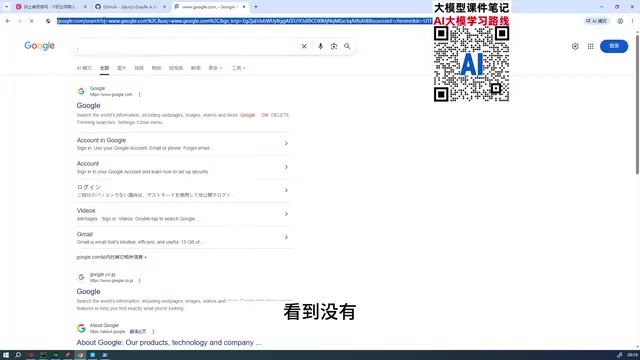
There is a common misconception here. Many tutorials only mention "being able to access Google," but the fact that a browser can open Google does not mean the command line can go through the proxy. According to the demonstration by the author of this tutorial on Bilibili, the correct way to judge is to ping Google in the terminal—if the browser can access it but the terminal ping fails with a request timeout, it means the proxy tool has not enabled global mode and is only proxying browser traffic. At this point, you need to contact your proxy service provider to confirm whether it supports global proxying or terminal proxying. In the video, the author shows his terminal successfully pinging Google and emphasizes that this is a prerequisite for a successful installation.
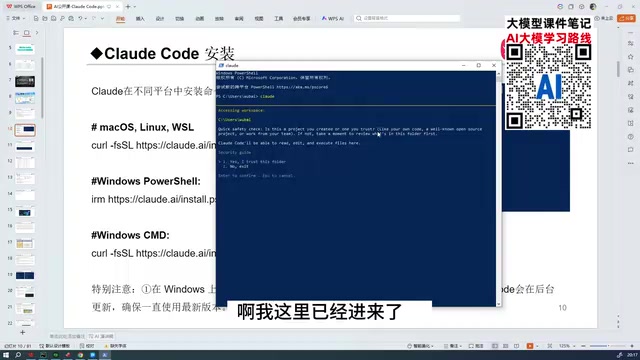
The installation command itself is provided officially: Mac OS and Linux use one set of commands, while Windows CMD uses another—just copy and paste. After installation is complete, type claude and press Enter to enter the interactive interface. If there are no large blocks of red errors in the interface, you can basically conclude the installation succeeded; if a string of red errors appears, the installation failed and you need to go back and check your network configuration.
Terminal proxying and browser proxying are two separate configurations. Most VPN/proxy tools by default only take over the system's or browser's HTTP/HTTPS traffic, while ping uses the ICMP protocol, and command-line tools such as pip, npm, and curl may go through system environment variables or connect directly. This is why you often see the situation where "the browser can open it, but the terminal times out." To determine whether the terminal is truly going through the proxy, besides ping, a more reliable method is to use curl -I https://www.google.com and observe whether a status code is returned. If you need the terminal to go through the proxy, you can set the http_proxy and https_proxy environment variables in your shell configuration file, or enable the proxy tool's "global/enhanced mode" (such as TUN mode) so that all traffic is taken over through a virtual network adapter. This is also why the author emphasizes that a successful terminal ping is the prerequisite for a successful installation—the installation script itself needs to download dependencies from overseas sources.
Model Configuration: The Unavoidable Account Issue
Installation is only the first step. After entering Claude Code, it will ask you to log in with a Claude account on the Anthropic official website, because both conversation and coding require calling the large model. The problem is that the official website is not friendly to users in China, and access is restricted even in regions including Hong Kong.
This is where the practical significance of "multi-API access" lies. The original tutorial does not elaborate on the specific operations at this point, but from its wording it can be inferred that the core idea is to replace official account login by configuring third-party APIs or relay services. For developers who cannot directly register an official account, this is a necessary step to get Claude Code actually running. The specific access method requires referring to the URL and key configuration instructions provided by the service provider; configuration items vary slightly across different channels.
The basic principle of third-party API relaying. The official Anthropic API uses an authentication system similar to OpenAI's: requests must carry a key (the x-api-key or Authorization header) and point to the official domain. The role of a relay service provider is to set up a compatible proxy layer in between, forwarding requests to the upstream model while replacing the domain and key with its own, thereby bypassing registration and regional restrictions. Claude Code supports specifying the request address and key through environment variables (such as ANTHROPIC_BASE_URL and ANTHROPIC_API_KEY), and this is exactly where "multi-API access" comes in. Three things need attention during configuration: the base URL must include the path prefix required by the service provider; the key must not be committed to the code repository; and the stability and data privacy of the relay service must be evaluated on your own, because conversation content will pass through third-party servers.
From Getting Started to Custom Development
The original tutorial's title also mentions advanced topics such as MCP, Skill, and SubAgent, which represent the path for Claude Code to go from "usable" to "good to use." MCP is used to extend tool-calling capabilities so that the AI can connect to external services; Skill and SubAgent involve customized orchestration of AI behavior. However, the video material is rather brief in these parts, staying more at the level of a preview in the title and not yet expanding into actionable details.
For developers who are just getting started, it is recommended to complete two things first: get the installation and network environment working, and get the model access configured. Only after these two steps are done does Claude Code have basic conversation and coding capabilities. The subsequent MCP and SubAgent belong to the efficiency-enhancement layer and can be introduced gradually after the basic functions are stable.
What is MCP. MCP (Model Context Protocol) is an open protocol proposed by Anthropic for standardizing the way large models connect to external tools and data sources. You can think of it as the "USB interface of the AI world": as long as an external service exposes its capabilities according to the MCP specification (such as reading and writing databases, querying documents, or calling internal APIs), Claude Code can discover and invoke these tools in a unified way without writing separate adapter code for each service. MCP services usually run as local processes or remote SSE endpoints, and once registered in Claude Code's configuration file they can be invoked in conversations. It solves the problem of the model being unable to "see" or "reach" external systems, and is a key link in Claude Code's evolution from pure code generation to real engineering automation.
Conclusion
The value of Claude Code lies in embedding AI coding capabilities into the developer's existing workflow rather than opening yet another IDE. Its barrier is not the installation command, but the network environment and the account system. Understanding this can save you a lot of detours.
One-line Summary
Claude Code is a command-line AI coding tool embedded in your workflow; the barrier is the network and account.
Paragraph Summary
This article introduces Claude Code, the command-line AI coding assistant launched by Anthropic: it is not an IDE but a capability layer that can be embedded into existing editors, supporting Mac OS, Windows, and Linux with a memory requirement of 4GB or more. The article emphasizes that the real barrier is not the installation command but the network and account: during installation you must enable a VPN/proxy and verify with a terminal ping to Google whether the proxy is globally effective, because browser access does not mean the command line goes through the proxy; after installation, type claude to enter the interactive interface and judge success or failure. In the model configuration step, the official account's restrictions on access from China are unavoidable, so you need to access models through third-party APIs or relay services. MCP, Skill, and SubAgent are advanced enhancement capabilities whose details the original text has not yet expanded; it is recommended to get installation and access working first before introducing them gradually.
Related articles

Gemini 4 Neon Released: A Balance Between Frontier Intelligence and Efficient Task Execution
Google DeepMind releases Gemini 4 Neon, focused on frontier intelligence and fast end-to-end task execution. This article breaks down its benchmark performance in coding, enterprise analysis, scientific reasoning, and cybersecurity, its four thinking levels, pricing, and safety alignment data.

Is AI the Culprit Behind Global Outages? The Trust Crisis Behind the NSA and FAA Failures
Fourth major failure in five days hits NSA classified network. Microsoft blames a software bug, FAA denies its new AI system, NSA says routine maintenance. Senator Warner suggests AI accelerates vulnerability discovery, leading to rushed fixes — while 39% of Americans already view AI negatively, exposing a deepening trust crisis.

Robot Developer Builds Custom B-rep Kernel with 3,487 Tests
A robot developer builds a custom B-rep geometry kernel with 3,487 tests, exploring why robotics needs dedicated CAD tools and the barriers to building one.