Claude Code Routines Explained: Automation in Practice with Proactive AI Coding Agents

Claude Code Routines turns AI coding agents from reactive tools into proactive teammates with built-in automation.
Claude Code's new Routines feature enables proactive AI coding agents that act autonomously via time-scheduled and event-driven triggers. Running on Anthropic's managed infrastructure, Routines eliminates the need for developers to maintain cron jobs, hosting, and authentication. Key use cases include automated documentation maintenance with agent-on-agent review, deploy verification, on-call incident investigation, and requirements prioritization.
From Tool to Teammate: The Evolution of Claude Code
At Anthropic's inaugural Code with Claude conference, Applied AI team member Maya delivered an in-depth talk on a brand-new Claude Code feature called Routines. The core idea behind this feature is simple yet powerful: a coding agent shouldn't wait for you to press Enter before it starts working.
Maya pointed out that while Claude Code is already a very powerful coding tool, Anthropic's goal is to upgrade it from a "tool" to a "teammate." A tool waits for your prompt before taking action, but a teammate notices problems and acts proactively. Routines is the key feature enabling this transformation.
Behind this shift lies a fundamental architectural distinction in the AI Agent space — the difference between proactive and reactive agents. Reactive agents follow the classic "request-response" pattern, only executing tasks after receiving explicit user instructions, similar to traditional command-line tools or API calls. Proactive agents, on the other hand, possess environmental awareness and autonomous decision-making capabilities — they can monitor external events, identify anomalous states, and take action on their own initiative. This concept originates from distributed artificial intelligence and multi-agent system (MAS) research, with academic discussions dating back to the 1990s. However, it wasn't until large language models achieved sufficient reasoning and planning capabilities that engineering-level implementation became truly feasible. Routines essentially takes the proactive agent from an academic concept to an out-of-the-box product.
Three Major Pain Points in Building Proactive Agents
Before Routines came along, developers faced significant engineering challenges when building proactive agents. During her talk, Maya asked the audience to raise their hands — how many had tried running Claude Code with cron jobs? Quite a few hands went up. But when she followed up with "how many of you enjoy maintaining that infrastructure," only one person kept their hand raised. This scene vividly illustrated the pain points.
Cron is a long-standing task scheduling tool in Unix/Linux systems that defines task execution schedules through crontab configuration files. While cron excels in traditional operations scenarios, using it to orchestrate AI agents has fundamental limitations: cron only supports time-based triggers and cannot respond to event-driven scenarios; cron tasks are stateless, with each execution running as an independent process, unable to maintain the agent's context memory and session continuity; furthermore, cron lacks built-in error recovery and retry mechanisms — when AI tasks fail due to model call failures or context loss, developers must implement complex fault-tolerance logic on their own.
The Runtime Environment Problem
You don't want your agent running on your local machine — close your laptop and the session terminates. This means you need to manage hosting, data persistence, and authentication infrastructure yourself, making a mountain of boilerplate code unavoidable.
The Trigger Mechanism Problem
When should an agent session start? You could build on cron or set up API endpoints to trigger it, but all of these require additional infrastructure development and maintenance costs.
The Observability and Controllability Problem
Sometimes you need a human-in-the-loop, and sometimes you want full automation. But with Claude Code sessions launched in headless mode, it's difficult to know what the agent is doing in real time, and even harder to intervene, guide, or resume a session mid-way.
Headless mode refers to running a program without a graphical interface or interactive terminal, commonly used in server-side deployments and CI/CD pipelines. In traditional software engineering, observability is built on three pillars: Logs, Metrics, and Traces. But AI agent behavior is non-deterministic — the same input can produce different reasoning paths and action sequences, making traditional log monitoring far from sufficient. Developers need the ability to view the agent's thought process, tool call chains, and decision rationale in real time, and intervene to correct course when necessary. This is the core requirement of the Human-in-the-Loop (HITL) design pattern.
Routines Feature Deep Dive
Routines is a built-in automation feature in Claude Code. You only need to define four things: a prompt, associated code repositories, available Connectors, and trigger conditions — Claude Code handles everything else.
Always-On Managed Infrastructure
Routines runs on Claude Code's managed infrastructure, with Anthropic handling hosting, session state, and connector authentication. Whether your laptop is powered on has absolutely no effect on the agent's operation. This solves the most painful environment management problem for developers.
Flexible Trigger Mechanisms
Routines supports two trigger methods:
- Time-scheduled triggers: For example, running a code-to-documentation drift check every Monday at 10 AM
- Event-driven triggers: Native support for GitHub events (such as PR merges, Issue creation), plus support for custom events via Webhooks

A Webhook is an HTTP callback-based event notification mechanism — when a specific event occurs, the source system sends an HTTP POST request to a pre-registered URL. Compared to traditional polling, Webhooks implement true Event-Driven Architecture (EDA) with lower latency and higher resource efficiency. In the context of Routines, Webhook support means that virtually any system capable of making HTTP requests can serve as a trigger source — CI/CD platforms (like Jenkins, GitHub Actions), monitoring systems (like PagerDuty, Datadog), project management tools (like Jira, Linear), and more. This open trigger mechanism allows Routines to seamlessly integrate into an enterprise's existing DevOps toolchain, rather than requiring developers to rebuild workflows around a new tool.
Connectors: Standardized External Service Integration
Connectors in Routines are standardized external service integration interfaces that allow Claude Code to securely access third-party tools and data sources. This design draws from the adapter concept in Enterprise Integration Patterns, as well as the design philosophy of modern iPaaS (Integration Platform as a Service) products like Zapier and Make. Connectors encapsulate complex logic such as OAuth authentication flows, API rate limit handling, and data format conversion, so developers don't need to write glue code for each external service. From a security perspective, connectors also implement the principle of least privilege — each Routine can only access services and resources explicitly authorized in its configuration, preventing the security risks that come with agents having excessive permissions.
Interactive, Controllable Sessions
This is one of Routines' most impressive features — each Routine is essentially a Claude Code session that you can open, observe, follow up on, guide, and resume at any time via the Web, CLI, or desktop client. This means you can let the agent run fully autonomously while retaining the ability to intervene and adjust course at critical moments.
Real-World Case Study: Automated Documentation Maintenance
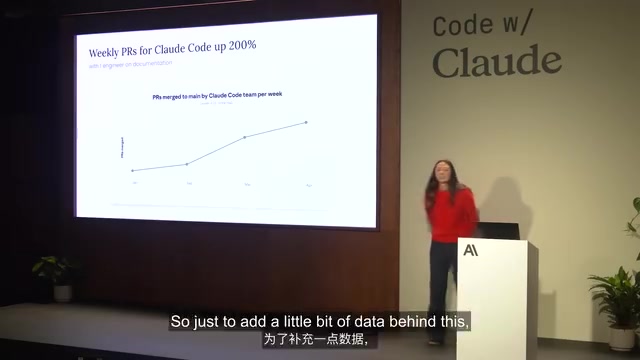
Maya shared a real use case from within Anthropic. Since the beginning of the year, Claude Code's weekly PR count has grown by 200%, engineering team productivity has skyrocketed, and users are getting new features faster as a result. But there was one person who wasn't so thrilled about this — Sarah, the engineer responsible for maintaining documentation for Claude Code and the Agent SDK.
Sarah became an early power user of Routines, setting up multiple Routines to automate the documentation creation process.
Decision 1: When to Trigger
Sarah set up a weekly scheduled task that has Claude automatically review all new changes on the main branch, compare them against the documentation repository, and create a PR whenever discrepancies are found.
Decision 2: What Context to Provide
Claude needs access to two repositories — the Claude Code source code repository (to see what's changed) and the documentation repository (to create update PRs). It's also connected to Google Drive (to access marketing materials for consistent terminology) and Slack (to notify the team after completing a PR).
Decision 3: Agent-on-Agent Review for Quality Assurance
Here's an elegant approach — Agent-on-Agent Review. Borrowing from the "Generator-Critic" pattern in multi-agent systems, one Routine creates the documentation PR, and another Routine is triggered when the PR is created, automatically performing code review and leaving comments before handing it off to a human for final confirmation.
This "Generator-Critic" pattern is a classic collaboration paradigm in multi-agent systems. Its theoretical foundation can be traced back to the adversarial training concept of Generative Adversarial Networks (GANs), as well as the quality assurance practice of code review in software engineering. In the AI field, techniques like Constitutional AI, Self-Reflection, and Debate-based alignment all embody a similar "generate then verify" philosophy. In the specific Routines implementation, the generator agent creates the documentation PR, while the critic agent reviews the PR from an independent context and perspective, checking for technical accuracy, terminology consistency, and documentation completeness. Because the two agents use different prompts and focus areas, this separation effectively reduces the blind spots and biases of a single agent, significantly improving the quality of automated output.

Live Demo Highlights
During the demo, Maya showcased the complete workflow for managing Routines in the claude.ai web interface. The left panel displays associated repositories, run schedules, and connector configurations, while the right side shows the detailed instructions Claude automatically generated from the initial prompt.
She also demonstrated event-driven triggering live: after creating a GitHub Issue about "documentation missing tool descriptions," the Routine was immediately triggered, and Claude began investigating the Issue content and determining whether a documentation gap existed. When Maya noticed there was already a related PR, she guided Claude directly through the web interface to stop the current session — a perfect demonstration of real-time controllability.
More Use Cases
Maya also shared several Routines scenarios that developers can apply immediately:

Deploy Verifier
When a CD pipeline completes a deployment, a Webhook triggers a Routine. Claude gets access to the source code and monitoring tools (Datadog, Grafana, etc.), automatically analyzes service health, and provides recommendations on whether a rollback is needed. As trust increases, you can even authorize Claude to execute rollbacks autonomously.
This scenario reflects a progressive trust escalation strategy for agents — transitioning from "Advisory" to "Autonomous" mode. In the early stages, the agent only provides analysis reports and recommendations while humans make the final decisions; as the agent accumulates a sufficient track record of correct decisions in specific scenarios, developers can gradually expand permissions, allowing the agent to act autonomously within predefined safety boundaries. This progressive authorization model is the current industry-recommended best practice for AI agent deployment.
On-Call Incident Investigator
When an alert fires, an investigation is automatically launched. Claude can access logs, monitoring dashboards, and communication tools to quickly identify root causes and notify relevant personnel. This is especially effective for reducing the burden on on-call engineers.
Requirements Prioritization
For product managers, you can set up a weekly scheduled task that has Claude scan GitHub Issues and Slack channel feedback, automatically prioritize them, and even create PRs directly for the most important issues.
Key Takeaways
The design philosophy behind Routines is worth reflecting on: proactive agents are superior to reactive agents. Anthropic doesn't want developers spending their energy maintaining infrastructure — they should be focusing on their domain knowledge and process expertise.
From a technical architecture perspective, Routines solves the "last mile" problem of agent engineering — it's not that model capabilities are insufficient, but that the scheduling, monitoring, and interaction infrastructure surrounding the model is too heavy. Industry estimates suggest that in a typical AI application project, model-related code usually accounts for only 5-10% of the total codebase, with the remaining 90%+ being infrastructure code built around the model. By productizing these infrastructure capabilities through Routines, Anthropic is essentially doing "Platform Engineering" for the AI agent space, enabling developers to focus on business logic rather than underlying plumbing. By building these capabilities directly into Claude Code, Anthropic has dramatically lowered the barrier to building production-grade agent workflows.
Want to get started? Type the /schedule command in your Claude Code terminal, and you're just one step away from creating your first Routine.
Related articles

How to Quantitatively Evaluate Agent System Engineering Quality? A Six-Dimension Framework Explained
Beyond model capabilities, how do you quantitatively evaluate Agent system engineering quality? This article breaks down a six-dimension framework covering outcome, process, reliability, cost, observability, and security — with Cost per Success as the North Star metric, a four-layer evaluator system, and a release gate flywheel for continuous improvement.

AI Agent Builder: A Beginner's Guide to the Hottest New Role in LLM Deployment
AI Agent is the core of LLM deployment. Learn about the emerging AI Agent Builder role, the SME demand gap, low-code entry paths, and how to go from beginner to delivery.

AI Manga Series for Beginners: A Six-Step Production Workflow from Script to Final Cut
A beginner's guide to AI manga production: the six core steps from script to final cut, the universal AI prompting formula, and tips for storyboard scripts compatible with AI image generation.