Claude Code + Skills: A Complete Guide to One-Click Test Case Generation

Use Claude Code's three-stage Skills pipeline to auto-generate structured test cases from requirements docs in under 10 minutes.
This article introduces an automated test case generation solution using Claude Code + Skills. A single natural language command triggers three sequential skills: splitting the requirements document by chapter (converting tables/images to text and flagging ambiguities), extracting structured test points in JSON format while skipping non-business sections, and generating final test cases with complete fields based on reviewed test points. Each stage includes an automatic review mechanism. The entire process takes under ten minutes and produces cases with titles, priorities, preconditions, test data, steps, and expected results — ready for immediate use, at several times the efficiency of manual writing.
From Requirements Document to Test Cases: One Command Does It All
Writing test cases is often the most time-consuming and tedious part of software testing. Manually breaking down functional requirements from a specification document, extracting test points, and filling in steps and expected results can take days or even weeks for a mid-sized project. This hands-on solution using Claude Code + Skills compresses that entire process to under ten minutes.
The scenario demonstrated by this Bilibili creator is typical: a requirements document with nine chapters, where chapters three through six contain the core business requirements. The starting point is remarkably simple — just one natural language command: "Please use the skill to generate test cases from the requirements document." Claude Code automatically parses this instruction, identifies the task at hand, and calls the pre-configured Skills to complete the work in stages.
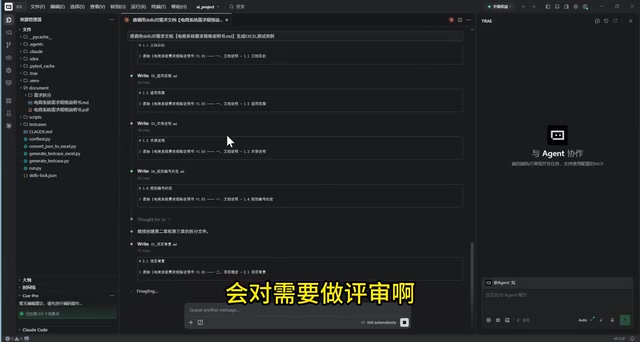
The core idea behind this approach is breaking a complex task into three distinct phases, each handled by a dedicated Skill, rather than having the LLM attempt an end-to-end completion in one shot. This divide-and-conquer design is precisely what enables it to consistently produce production-ready test cases.
Claude Code is Anthropic's AI programming assistant for developers, capable of executing coding tasks directly in the terminal or IDE. Skills are its workflow extension mechanism, allowing users to encapsulate a predefined set of instructions or tool calls into a reusable named module. You simply reference the skill name in conversation, and Claude Code executes the encapsulated logic step by step — no need to re-describe task details each time. This mechanism is similar to codifying a complex SOP (Standard Operating Procedure) into a callable function, and it's the technical foundation that makes "one sentence triggers the full workflow" possible.
Three-Stage Pipeline: Split, Extract, Generate
The entire process is organized into three sequential stages, each handled by a dedicated skill:
Stage 1: Requirements Document Splitting
The first skill splits the requirements document chapter by chapter — faithfully, without adding or omitting anything. Nine chapters become nine folders, preserving the original requirements intact. Several processing details are worth noting:
- Original location tagging: Each split requirement records its position in the source document (e.g., Chapter 3, Section 3.1) for easy traceability.
- Tables and images converted to text: Non-text formats such as tables and flowcharts are converted into written descriptions. The creator specifically emphasized this as "the hardest part" — plain text is easier for LLMs to understand and process, with clearer semantics.
- AI requirements review: Simultaneously with splitting, the AI conducts a review of the requirements, flagging ambiguous or unclear items, and organizing edge cases, boundary conditions, and acceptance criteria.
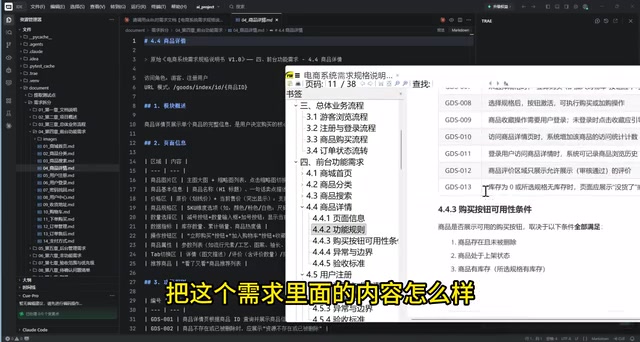
Taking Chapter 3 ("Guest Browsing Flow") and Chapter 4 ("Product Details") as examples, the AI accurately identifies the original locations, restores module descriptions, converts table-format requirements into prose, and annotates unclear sections.
Stage 2: Extracting Test Points
The second skill extracts test points from the split requirements. This is where an important judgment capability comes into play — the AI automatically skips non-requirements sections like overviews and introductions (e.g., the first two parts of the document are just documentation notes), focusing only on actual business requirements.
Each extracted test point follows a unified structured format (JSON), containing the module, chapter, title, status, steps, expected results, priority, and the test design method applied. After extraction, the AI conducts another automatic review pass on the test points.
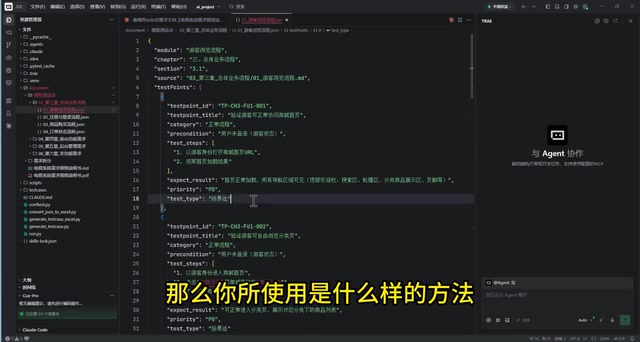
Outputting test points in JSON format is a key engineering design decision. JSON is a lightweight structured data format that machines can parse directly, meaning these test points can seamlessly integrate with mainstream test management tools like Jira, TestRail, or Zentao — or be read directly by the next stage's skill without any manual reformatting. Compared to free-form text, structured fields (module, priority, test method, etc.) also make test coverage analysis and defect tracing far more convenient. The test design method field deserves particular attention — the AI automatically annotates whether each test point uses equivalence partitioning, boundary value analysis, scenario-based testing, or another method. This is often skipped in manual writing, yet directly impacts the coverage quality of the test cases.
Stage 3: Generating Test Cases
The third skill invokes the "export test cases" capability to generate the final test cases by chapter, based on the reviewed test points.
Output: Production-Ready Test Cases
The final output includes a summary (how many cases per chapter) plus the specific test cases for each feature. The creator used the first feature in Chapter 3 as a comparison: a single sentence in the original requirements document was expanded into eight test cases — covering normal flows such as guest access to the homepage, category browsing, search functionality, and product details, as well as scenarios requiring login prompts for shopping cart, favorites, checkout, and user center.
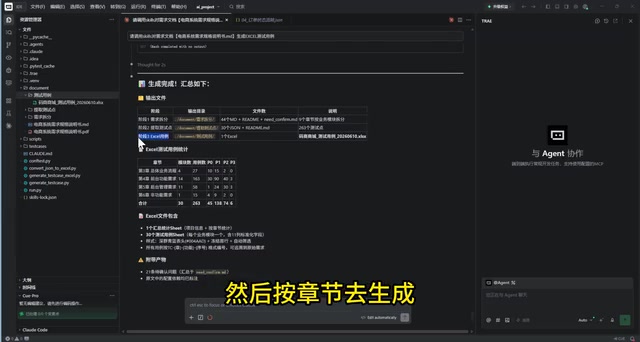
Each test case includes complete fields: title, test type, priority, preconditions, test data, operation steps, and expected results, with an additional column reserved for manual review and a reference to the corresponding test point. The creator described this output as "production-ready and usable," and noted it's even more thorough than what a person would typically write by hand.
How Much of an Efficiency Gain Is This?
Based on the demo, the entire requirements-to-test-cases workflow took under ten minutes. Compared to manual writing — the creator candidly stated that the equivalent workload "would take at least several days" — the efficiency improvement is "definitely more than double."
Beyond speed, the more significant benefit is consistency in quality. Thanks to the three-stage splitting combined with automatic review at each stage, AI-generated cases maintain fidelity to the original requirements (nothing missed, nothing fabricated) while covering both normal flows and edge/boundary cases. This "engineering-first" mindset is precisely what bridges the gap between LLM capability and practical testing work.
Methodological Value: Skills-Based AI Workflows
The true insight from this case lies in how it leverages Skills. Rather than treating test case generation as a single "black-box prompt," it breaks the process into reusable, composable skill modules: splitting the document is one skill, extracting test points is another, and exporting cases is yet another.
This modular design brings several advantages: clear task boundaries, independent validation at each step, and review checkpoints embedded directly in the pipeline. For any team looking to use AI for structured, process-driven work, this "staged skills + automatic review" pattern serves as a valuable reference — not just for testing.
It's worth noting that this article is based on a single-source demonstration. Actual results will vary depending on the quality of the requirements document, the specifics of the Skills configuration, and other factors. A small-scale pilot is still recommended before deploying this in a production environment.
This "staged skills + automatic review" architecture fundamentally draws on the Pipeline concept from software engineering: decompose large tasks into single-responsibility atomic steps, where each step's output feeds the next, and each step can be independently tested and replaced. Compared to a "single ultra-long prompt" approach, this design has two key advantages: first, maintainability — if one stage's output quality is unsatisfactory, only the configuration for that skill needs to be adjusted without affecting other stages; second, observability — each stage produces intermediate artifacts (split requirement files, test point JSON), making it easy to trace the root cause of any issues. For engineers looking to roll out AI workflows across a team, this also provides a path for gradual adoption — you can start by introducing AI into just one stage, validate the results, and then expand to the full pipeline.
Related articles

Random Pruning of the DPO Computation Graph: 1.4x Training Speedup and Lower Peak Memory
DPO training too slow and memory-hungry? This paper proposes a random pruning framework for the DPO computation graph, sampling independently across position, sequence, and branch dimensions; branch pruning achieves a 1.426x step-time speedup and cuts training time by about 30%, with in-depth attribution of memory and time gains.

Why Does JEPA Underperform MLM in Longitudinal EHR Representation Learning?
New study compares JEPA and MLM for longitudinal EHR representation learning on MIMIC-IV: three JEPA variants train stably without collapse but underperform MLM; target size, not heterogeneity, drives prediction error.

Transfer Learning + Visible Light Communication: A New Approach to Energy-Efficient Indoor Positioning
A study proposes a transfer learning-based visible light communication indoor positioning method, achieving 47% accuracy improvement on the BOSCH factory dataset, 67.5% model efficiency under high noise, and introducing the ME composite metric for energy-efficient positioning in energy-constrained industrial IoT scenarios.