Claude Code Step-by-Step Practical Tutorial: From Installation to Permission Modes, Avoiding Account Bans
Practical guide to installing and configuring Claude Code in China: npm installation, CC Switch ban prevention, and permission modes explained.
Based on a public course demonstration by a frontline instructor, this article outlines the key steps for domestic developers using Claude Code. For installation, npm is recommended over the official PowerShell/CMD scripts, requiring Node.js 22+ and Git pre-installed, with a VPN maintained throughout. For login, it points out the high risk of bans with official accounts and suggests using the open-source tool CC Switch to configure third-party API Keys such as DeepSeek, skipping login to avoid bans—but note that configurations for different tools are independent. The article also warns that pure natural language prompts have limited effectiveness, and real efficiency comes from MCP, Skills, Subagent, and CLAUDE.md; permission modes are switched via Shift+Tab, reflecting the human-in-the-loop design philosophy.
Why Claude Code?
According to the public course analysis by instructor Lian from Mashi Bing Education on Bilibili, most companies in China are currently pushing Web Coding, with some requiring 50% of code to be completed by AI, and the more aggressive ones even reaching 90% to 100%. Among the mainstream tools Claude Code, Codex, Cursor, and Trae, the instructor's personal experience is: if there is no company-level mandatory constraint, Claude Code or Codex is preferred.
These tools are essentially programming Agents; there is no absolute good or bad—just pick the one that suits you. But Claude Code currently has broader adoption, which is why it becomes the primary teaching target.
Installation: Why npm Is Recommended Over the Official Script
The official website provides two installation commands, PowerShell and CMD, but the instructor explicitly points out that due to network environment restrictions, the success rate of these two methods is not high. He does not recommend beginners to copy those unofficial workarounds for configuring API Keys and changing environment variables from the internet—"too troublesome."
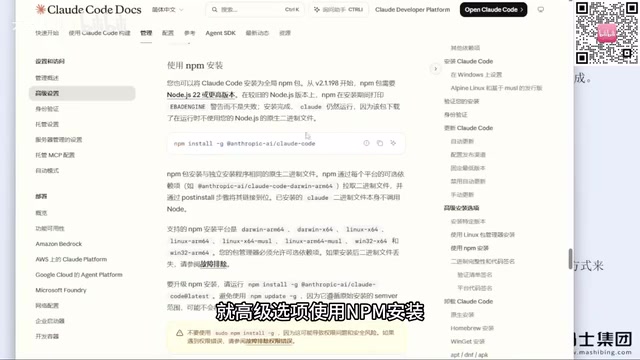
A more reliable path is npm installation—the official website's advanced settings actually list this command. Two prerequisites are needed before use:
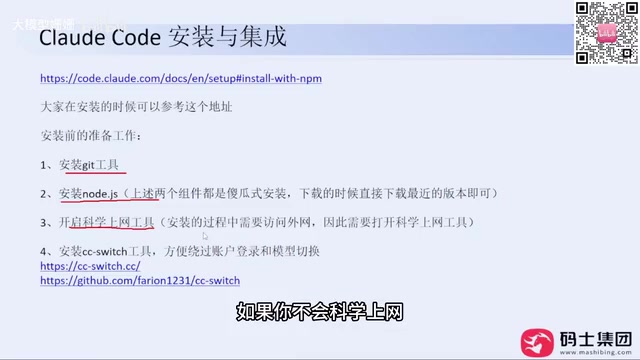
- Node.js version 22 or above (currently the latest is 24), download the installer from the official website and click Next all the way
- Git, also a foolproof installation
During installation, a VPN tool must be enabled—this is an unavoidable prerequisite. The instructor mentioned that he has installed it for company colleagues many times, and going the npm route has basically never gone wrong.
npm (Node Package Manager) is the package manager bundled with Node.js and the world's largest open-source software registry. Claude Code is distributed via npm, meaning installation only requires running a command like npm install -g @anthropic-ai/claude-code; npm will then pull the package and its dependencies from the registry and automatically handle version management and global command registration. Compared with the official PowerShell/CMD scripts that directly download binaries or call system components, the npm path does not depend on a specific system's script execution policy and is easier to retry or roll back after failure. The -g parameter means global installation, and the installed claude command can be invoked in any directory.
Note that npm installation itself still accesses overseas registries, so a VPN is a prerequisite; if the network is unstable, you can temporarily switch to a domestic mirror (e.g., npm config set registry https://registry.npmmirror.com), but mirror synchronization may be delayed and the latest version may not be available.
Login and Ban Prevention: CC Switch Is Key
When running the claude command for the first time, it will sequentially ask you to trust the folder, choose a theme style, and select a login method. The problem lies in the login step—logging in directly with an official account carries a high risk of being banned. The instructor admitted that he "has been banned many times before."
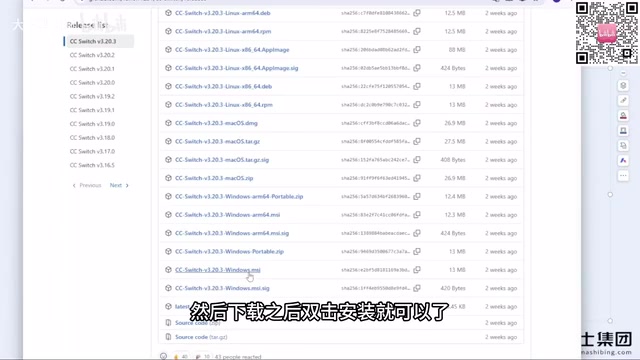
The solution is the open-source tool CC Switch. It was originally a project on GitHub and is now made into a website, offering a Windows MSI installer. After installation, open it and you can configure API Keys separately for different tools such as Claude Code and Codex.
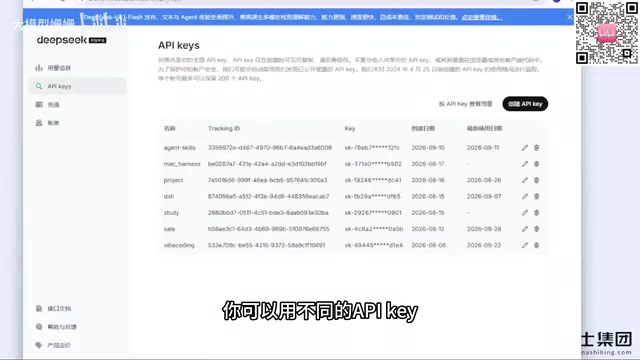
The specific operation is: click the plus sign, select a model provider (e.g., DeepSeekAd), fill in your API Key, and save. Common model providers on the market are basically covered; if you can't find one, you can use "custom configuration" and fill in the API Key and request address of a third-party relay station—it works the same. After configuration is complete, start Claude Code again; the login step will be skipped, and without an account there is naturally no ban issue. The instructor stated that using this method, he "has not been banned for at least several months."
A pitfall that is easy to hit: in CC Switch, different tools are configured separately. Configuring DeepSeek in Codex does not mean Claude Code can use it; remember to switch the corresponding configuration when switching tools.
Regarding VPN tools, the instructor gave a pragmatic suggestion: do not buy an annual membership; risk control changes quickly, so buying monthly is safer, even if the unit price is a bit higher.
API Key is the credential for calling large model services. It is essentially a string of keys issued by the service provider, placed in the HTTP header (e.g., Authorization: Bearer <key>) during requests; the server uses it to identify the caller and bill accordingly. Claude Code by default uses OAuth login with an official Anthropic account, but when accessing via API Key, the client sends requests directly to the provider corresponding to the Key (such as DeepSeek or a third-party relay station), and Anthropic does not participate in authentication, so there is no "official ban" issue. This is the fundamental principle behind why CC Switch can bypass login.
A "relay station" is a proxy service built by a third party; they hold upstream official or multiple Keys and resell them to users by token, usually compatible with OpenAI/Anthropic interface formats. The advantage of using a relay station is that you don't need to handle overseas payments and registration yourself; the cost is that stability, privacy, and compliance are borne by the third party. Sensitive code is not recommended to go through relays of unknown origin.
Natural Language Is Not a Panacea
After installation, most people's first reaction is to directly say "help me develop a Snake game." The new version of Claude Code will ask some technical selection questions, while older versions start writing directly. The instructor's assessment is direct: this pure natural language prompt "will definitely have very poor results," with high token consumption and time cost.
He demonstrated with Snake, and it did run—this reflects the so-called "technological equality," where a person with zero foundation can make a small tool with one sentence. But he also poured cold water: playing by yourself is fine, but if you want to make a commercial product and make money, things made without technical reserves are full of bugs, the code quality is worrying, and the demonstration did not include any code review.
Permission Modes: Controlling AI's Hands and Feet
The confirmation windows that keep popping up during generation correspond to Claude Code's permission modes. You can switch with Shift+Tab; common ones include: default mode requires manual confirmation for every step, accept mode automatically accepts edits, plan mode only plans without acting, and auto mode opens up more permissions.
Behind this is the human-in-the-loop design philosophy—let a human check before AI acts. Only by understanding the boundaries of each mode can you find a balance between efficiency and safety according to your own scenario. The instructor will later expand on MCP, Skills, Subagent, and the usage of the CLAUDE.md file; these are the key components for making Claude Code efficient—natural language conversation alone is far from enough.
For domestic developers, getting the installation and ban prevention steps solid will make the subsequent learning curve much smoother. The tool itself is just an Agent; what really makes the difference is how you organize prompts, configure context, and design permission boundaries.
human-in-the-loop is an interaction paradigm in AI system design: the model does not directly execute operations with side effects; instead, it first outputs a plan or tool call request, which is confirmed by a human before taking effect. In Claude Code, reading/writing files and executing shell commands are all actions with side effects, and permission modes adjust how tightly this loop is closed—in default mode almost every action requires human confirmation, accept mode automatically allows file edits, plan mode only generates plans without executing, and auto mode delegates more decisions to the model.
This design stems from weighing Agent risks: the more open the permissions, the higher the efficiency, but a single misjudgment can delete files or run the wrong command; the tighter, the safer, but it frequently interrupts flow. A common practice is to use accept for low-risk steps such as read-only exploration and writing tests, and fall back to default mode when involving databases, deployment, or deletion operations, reserving human attention for truly irreversible steps.
One-line Summary
Practical guide to installing and configuring Claude Code in China: npm installation, CC Switch ban prevention, and permission modes explained.
Paragraph Summary
Based on a public course demonstration by a frontline instructor, this article outlines the key steps for domestic developers using Claude Code. For installation, npm is recommended over the official PowerShell/CMD scripts, requiring Node.js 22+ and Git pre-installed, with a VPN maintained throughout. For login, it points out the high risk of bans with official accounts and suggests using the open-source tool CC Switch to configure third-party API Keys such as DeepSeek, skipping login to avoid bans—but note that configurations for different tools are independent. The article also warns that pure natural language prompts have limited effectiveness, and real efficiency comes from MCP, Skills, Subagent, and CLAUDE.md; permission modes are switched via Shift+Tab, reflecting the human-in-the-loop design philosophy.
Related articles
AWS Launches Official Agent Toolkit: Letting AI Agents Directly Build and Manage AWS Applications
AWS launches the official Agent Toolkit, letting AI coding agents directly build and manage AWS apps across CDK, CloudFormation, Serverless, Bedrock Agents, and DevSecOps.
Does Agentic AI Need Its Own "Second Foundation"? A Three-Loop Architecture Explored
Inspired by Asimov's Foundation series, a multi-agent AI architecture hypothesis proposes execute, verify, and adapt control loops to reduce correlated errors and improve trust in AI results.
Rewriting a Commercial Engine in Jai: The Trade-off Between Performance and Productivity
Exploring the engineering practice of rewriting a commercial game engine in Jai: compile-time metaprogramming and data-oriented design advantages, plus ecosystem maturity and learning curve challenges.