Claude Code Subagents in Practice: Isolated Contexts and Parallel Agents

Claude Code subagents isolate context and run in parallel, but carry significant token cold-start costs.
Claude Code's Subagent mechanism solves context pollution in long conversations by giving each subtask its own isolated context, toolset, and system prompt. Subagents run independently and return only their final results to the main conversation, without leaving behind intermediate noise. Multiple subagents can run in parallel, and the fork/branch mechanism allows selective context inheritance. Built-in and custom agents support model matching by task complexity, but every subagent starts cold with no prompt cache, making token costs significantly higher — use the `usage` command regularly and choose models carefully.
What Are Subagents?
In Claude Code, all operations happen within the same loop and the same conversation by default. Every tool call result and every user message gets appended to that underlying messages array. The problem quickly becomes apparent: the more random content piles up in the context — files, tool return values, information unrelated to the original task — the more likely the model is to drift off course. You might start with "add a button," but end up with a conversation full of irrelevant noise.
Subagents exist precisely to solve this context pollution problem. As explained by Lydia in her Claude Code introductory tutorial, a subagent is essentially an independent loop: it has its own context, its own toolset, and its own system prompt. The main agent can spin up a subagent and let it run independently in a forked environment in the background, returning only the final result to the main agent.
This means all the tool call results, intermediate file reads, and other artifacts generated during subagent execution never pollute the main conversation. More importantly, subagents can be spawned in parallel — you can run multiple processes simultaneously, they can even touch the same file at the same time, and each one comes back with its own result. The main loop then decides which outcome it actually wants.
From a technical standpoint, "context pollution" is fundamentally a consequence of how LLM attention mechanisms treat all input tokens equally — as the messages array grows, the effective weight of early critical instructions gets diluted, and the model becomes more susceptible to being pulled off course by recently injected noise. This is especially pronounced in long conversations: when the context window fills up with intermediate file contents and debug logs from tool calls, the model's "memory" of the original task objective gradually fades. Subagents sidestep this issue through physical context isolation, rather than relying on prompt engineering to fight attention dilution — it's an architectural solution, not a prompting patch.
Built-in Agents vs. Custom Agents
Run the agents command in Claude Code and you'll see the currently available subagents. The tool ships with several built-in agents:
- Claude Code Guide: Has access to the official documentation, and is invoked when you ask Claude Code questions about itself
- Explore: Used to find things in your codebase — one of the most frequently used agents in everyday sessions
- General Purpose / Plan / Status Line Setup: General-purpose, planning, and status bar configuration agents
One detail worth noting is the model selection. The Explore agent uses Haiku — because tasks like "find something in the codebase" don't require reasoning ability, and Haiku is both fast and economical. This actually illustrates the core philosophy behind subagent design: match the right model to the right task.
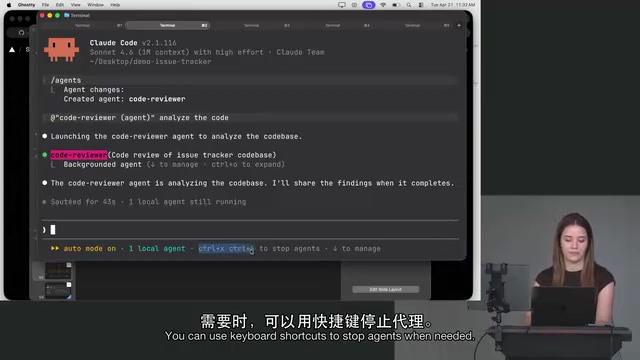
Creating a custom agent is straightforward. After running the creation command, Claude Code first asks whether you want to build it at the project level or personal level — personal level means the agent can be reused across multiple projects and repositories. You can then let Claude Code generate it for you, for example: "write an agent that performs code review." During generation it will ask: what tools should this agent have access to? Which model (Sonnet is sufficient for code review)? Do you want a color identifier?
Subagents vs. Skills
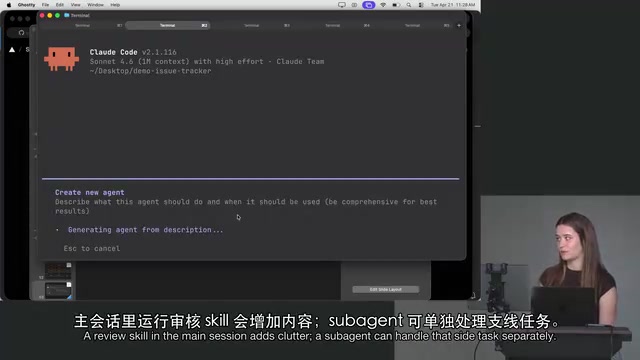
A common question is: why not just use a Skill? Lydia offers a practical rule of thumb. If you're in the middle of an "add a button" session and you invoke a code review Skill, the review process dumps a lot of messy content into the current context. For this kind of one-off task, a subagent is the better fit — it runs in its own isolated environment with its own compact system prompt ("You are an expert code reviewer..."), and when it's done, it returns only the result, without polluting the main conversation with the process.
Skills in Claude Code typically refer to reusable instruction templates or tool call sequences embedded in the main conversation flow — similar to "macros" or "functions" — where the execution and its artifacts remain within the current messages array. The core distinction between Subagents and Skills isn't about capability, but about execution environment isolation: Skills run inside the main conversation, while subagents run outside it and return a result. The decision rule simplifies to: if the intermediate steps of a task are valuable to the main conversation, use a Skill; if you only care about the final output and don't want the process polluting the context, use a subagent.
How Agents Are Invoked and Run
After generating your custom code reviewer agent, Claude Code automatically writes a fairly accurate description for it — something like "Use this agent when code has been written or modified and needs to be reviewed for quality and correctness." This description isn't just a comment — it determines when the model automatically triggers the agent.
Agents can be invoked manually or automatically by the model. Mechanically, running an agent is essentially the model making an agent tool call to the harness (the runtime framework), which then decides to spin up the subagent. While it runs, you can see it reading files and executing tool calls, even with the color you assigned (pink, in the tutorial).
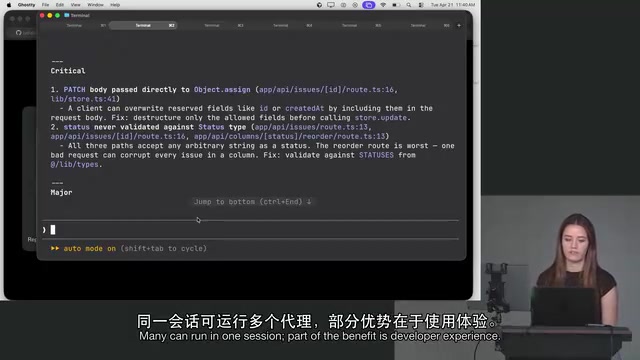
Even though it appears to happen within the main thread, these operations are not appended to the main conversation's messages array. You can also send agents to the background and continue writing code in the main thread, while watching how many tokens they consume and which tool calls they make. To stop an agent, use Control-X followed by Control-K.
Fork / Branch: Subagents with Inherited Context
By default, subagents don't share the main conversation's context — they only receive a summarized system prompt generated by the main agent that covers the project overview and task objectives. However, Claude Code also provides a fork mechanism (now apparently renamed branch): if a prior conversation exists, using branch/fork causes the subagent to inherit the existing conversation while still running in a parallel sub-environment. This is the middle ground between "full isolation" and "full context inheritance."
The Git concepts of fork and branch are borrowed here to describe context inheritance, but with a different meaning: the branch (or earlier fork) mechanism gives the subagent a "snapshot copy" of the main conversation to work from, while the main conversation itself remains unaffected. This is similar to the concept of immutable data structures in functional programming — the subagent reads the context as it existed at the moment of inheritance, and subsequent changes on either side don't interfere with each other. In practice, when you want a subagent to have full background on the current task (rather than inferring from a summary alone), but don't want its exploratory operations to pollute the main thread, branch is the more precise tool.
Token Consumption: The Hidden Cost of Subagents
Subagents are powerful, but there's an easily overlooked cost — they're token-hungry. The reason is that each subagent essentially builds its base context from scratch, with no cached prompts to reuse. Multiple subagents running in parallel, especially when you're unaware of it, can cause token usage to accumulate rapidly.
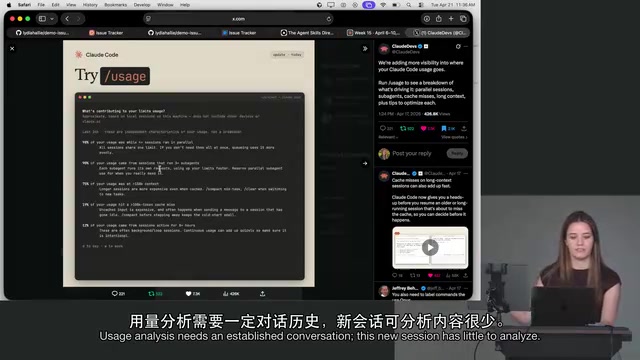
Lydia mentions an upcoming usage analytics feature: in sufficiently long sessions, running usage will surface attributions like "98% of your usage came from sessions with four or more parallel agents" or "your usage came from sessions that ran three or more subagents." Many users have no idea they have subagents running in the background — and that's often where the bulk of their usage goes.
Two practical recommendations: run usage regularly to check for unwanted background agents; and choose the right model when creating agents — don't use Opus (especially with effort max) for code review. Sonnet or even Haiku is sufficient. Opus is more capable, but you pay for it. Additionally, writing an overly broad agent description carries its own risk — if the code reviewer's trigger condition is written as "review whenever code is modified," it may auto-run after every single file edit without you noticing.
The cost of "no cache reuse" is worth understanding more deeply. Claude's API supports prompt caching — for long prefixes that appear repeatedly (like system prompts or project documentation), cache hits are dramatically cheaper than first-time processing. The main conversation builds up this caching advantage over time; each newly spawned subagent is a fresh session starting from zero, with the highest per-token costs in the first few exchanges. In high-concurrency scenarios (spawning four or more subagents simultaneously), these "cold start" costs pile up in parallel, causing pulse-like spikes in token consumption within a short time window — which is exactly what the usage analytics feature is trying to make visible.
Subagent, Session, or Work Tree?
On the question of "should I use a subagent, a new session, or a Git work tree," Lydia candidly admits the answer is "it depends."
- Subagents excel when results need to come back to the main conversation, making them suitable for tasks related to the current work that the main agent needs to act on afterward; they also support massive parallelism within the same session.
- Git work trees create small clones of the directory under different branches, including
node_modules, which means dependencies must be reinstalled each time — quite heavyweight. Lydia personally doesn't love the work tree experience, though she acknowledges many people use it, and the official desktop app uses it by default. - For repeatable tasks, subagents have less friction than starting a new session each time you'd manually run a Skill — letting the model itself decide "this should be run" and then returning to the main thread is something a main session simply can't do.
One of the more valuable takeaways from the tutorial is this: using Claude Code is largely about building your own intuition. Lydia likens different models to team roles — Opus is like a senior engineer who knows everything and loves to dig deep, while Haiku is like an intern who excels at repetitive tasks. This mental model shift changes how you use the tools more profoundly than any list of "best practices."
She also notes: whenever a new model launches (like Opus 4.7), it's worth reassessing your CLAUDE.md and Skill configurations. For example, Opus 4.7 is notably better at following instructions, which means the emphatic writing style many people relied on in CLAUDE.md — piling on exclamation marks, "don't do this" warnings — may no longer be necessary. A configuration that worked two months ago might still function today, just less efficiently. The tools and models keep evolving, and users need to evolve alongside them.
Related articles

Random Pruning of the DPO Computation Graph: 1.4x Training Speedup and Lower Peak Memory
DPO training too slow and memory-hungry? This paper proposes a random pruning framework for the DPO computation graph, sampling independently across position, sequence, and branch dimensions; branch pruning achieves a 1.426x step-time speedup and cuts training time by about 30%, with in-depth attribution of memory and time gains.

Why Does JEPA Underperform MLM in Longitudinal EHR Representation Learning?
New study compares JEPA and MLM for longitudinal EHR representation learning on MIMIC-IV: three JEPA variants train stably without collapse but underperform MLM; target size, not heterogeneity, drives prediction error.

Transfer Learning + Visible Light Communication: A New Approach to Energy-Efficient Indoor Positioning
A study proposes a transfer learning-based visible light communication indoor positioning method, achieving 47% accuracy improvement on the BOSCH factory dataset, 67.5% model efficiency under high noise, and introducing the ME composite metric for energy-efficient positioning in energy-constrained industrial IoT scenarios.